Perception, cognition
and human performance
How people see, attend, remember, understand and act—and how those mechanisms help us explain and improve an interface.
Read alongside the lecture slides or independently. Figures open at full size. Worked review answers are included at the end.
1. Explaining an interaction
An interface asks people to perceive information, select what matters, remember a goal, interpret the system and act. The consequences of an action become new perceptual information. A small button, a forgotten fare and a misunderstood refrigerator control can all produce an unsuccessful interaction, but they require different explanations and different repairs.
This chapter develops the human side of that loop. Vision receives substantial attention because many interfaces depend on reading, color and spatial organization. We then consider attention, hearing and touch, memory, mental models, representation and movement. The aim is to connect each mechanism to a design prediction that can be examined, rather than to collect rules without understanding their conditions.
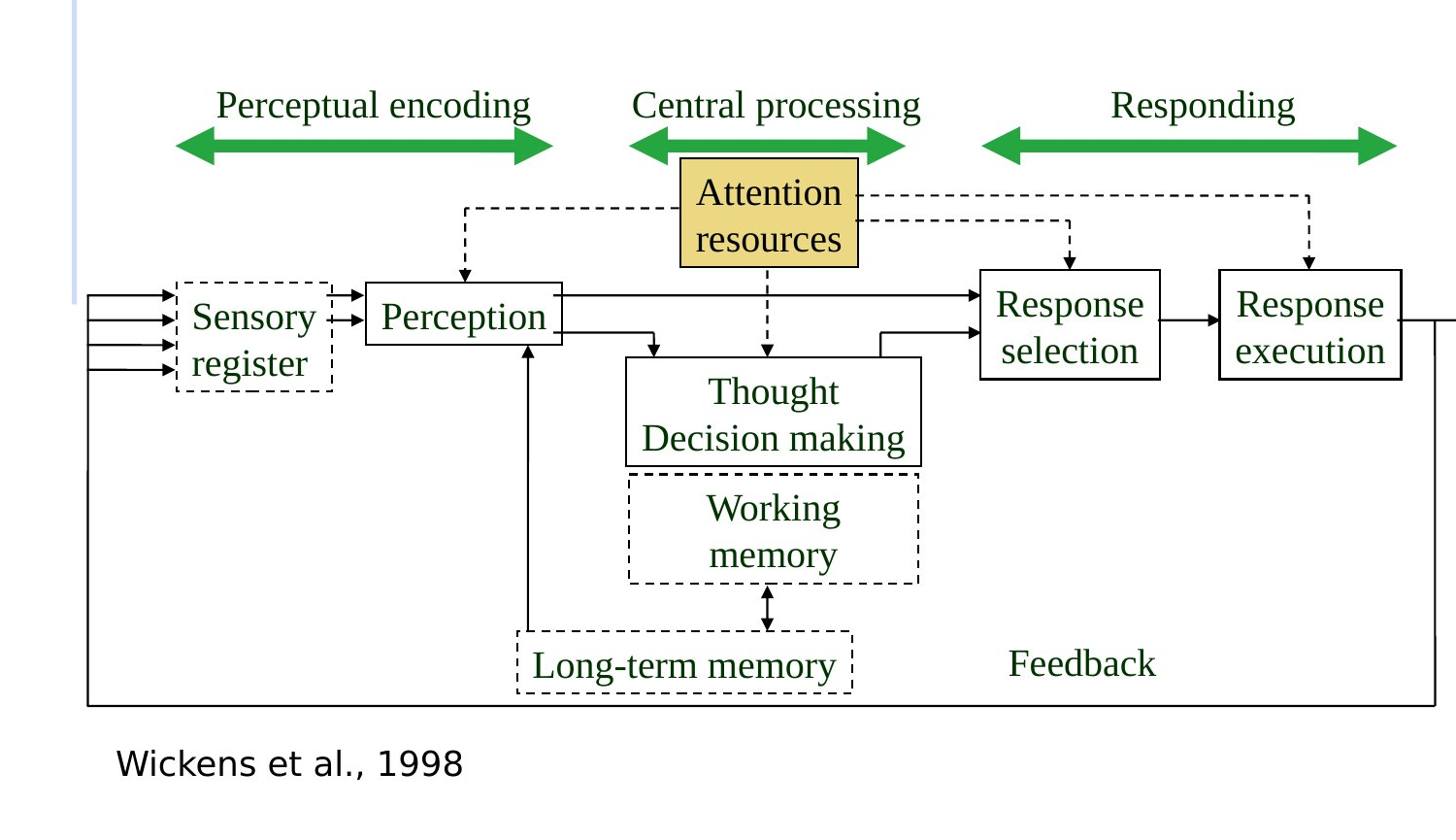
Consider an interrupted booking. The traveller must read the fare, notice whether payment succeeded, remember unfinished work and select the next control. Enlarging the payment button may help targeting. It cannot repair a misleading confirmation message. Throughout the chapter, ask three questions: which demand is causing difficulty, what change should reduce it, and what other demand might that change increase?
2. Light, surfaces and the eye
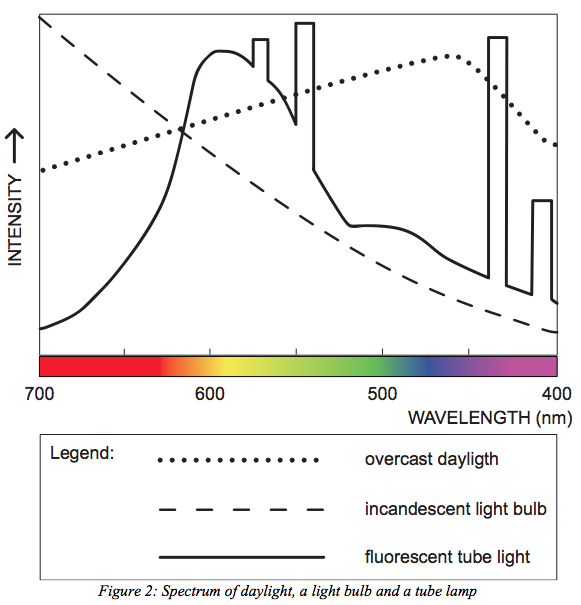
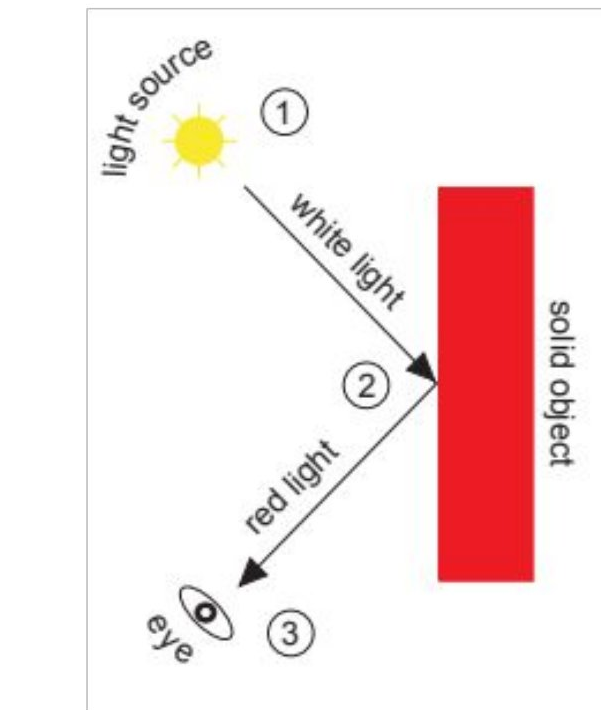
Visible light occupies only a small part of the electromagnetic spectrum, approximately 380–780 nm; the boundaries are gradual rather than sharp cutoffs. Wavelength composition influences color appearance, but a surface does not carry an invariant color directly to the eye. What reaches us depends on the illuminant, the surface’s spectral reflectance, viewing geometry and the visual system.
For a simplified reflecting surface, the spectrum reaching the eye is proportional to the illuminant spectrum multiplied by the surface reflectance at each wavelength. A red surface strongly reflects some wavelengths and absorbs others. Change the illuminant and the reflected spectrum changes. A color that separates two categories under one light may be harder to distinguish under another.
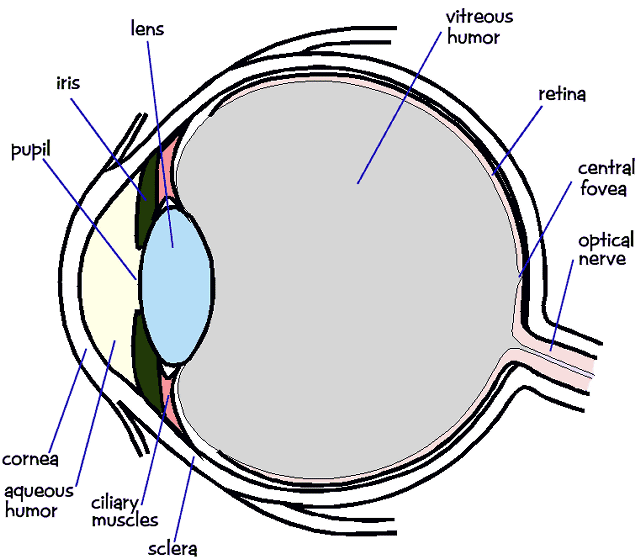
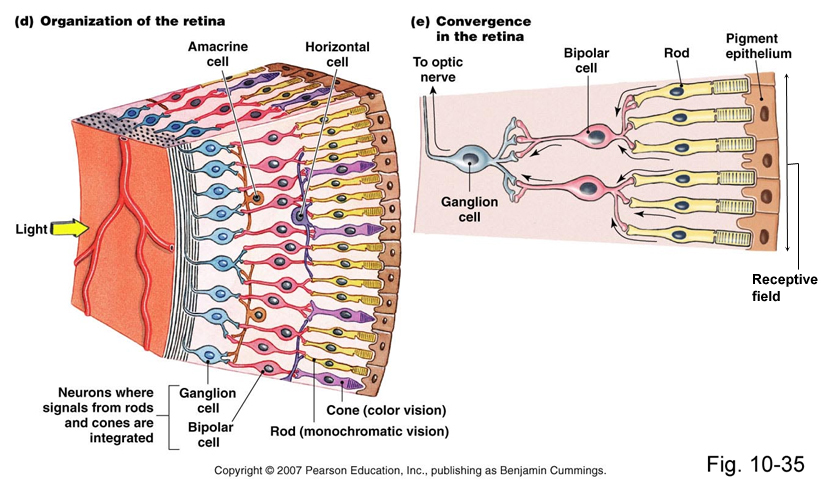
The cornea and lens help form a retinal image, and the pupil regulates the opening through which light enters. The retina contains photoreceptors: rods are especially important at low light levels, while cones support daylight color vision and fine detail. Photoreceptor signals pass through retinal circuits involving bipolar, horizontal and amacrine cells before ganglion-cell axons carry output toward the brain. The retina is active processing tissue, not a passive camera sensor.
3. Retinal sampling and visual angle
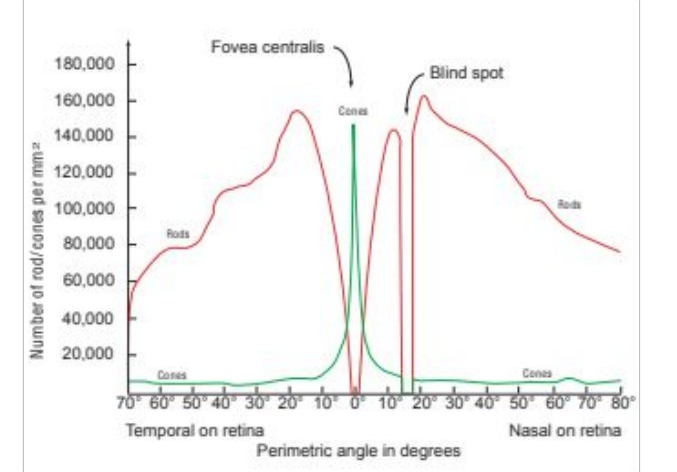
Visual sensitivity is not uniform across the retina. The central foveal region supports especially fine spatial discrimination, while rods are absent from the foveal center and more numerous outside it. Looking directly at a small label therefore matters. Peripheral vision can help detect an event or a broad arrangement without making peripheral text equally readable.
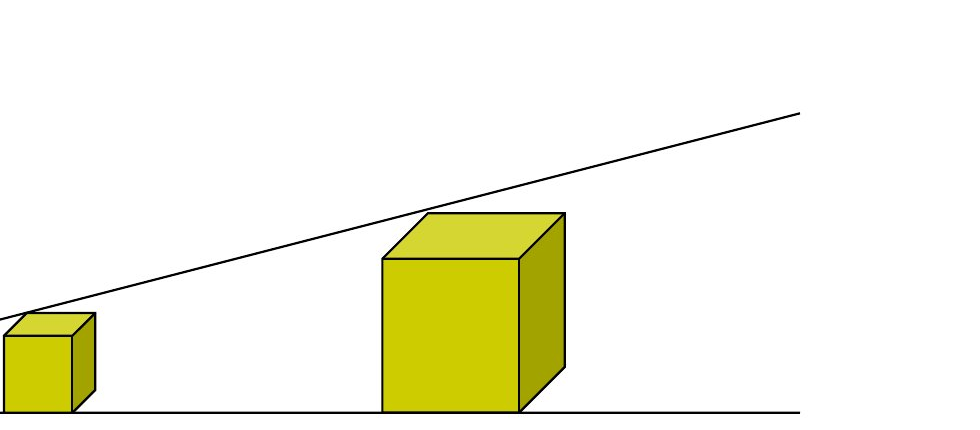
Physical size alone cannot describe a visual target. A 10 mm symbol at arm’s length produces a larger retinal image than the same symbol across a room. For a target of height h centered perpendicular to the line of sight at distance d, its visual angle is:
θ = 2 arctan(h / (2d)).
Use the same units for h and d. The inverse tangent gives radians unless the calculator is set to degrees. At h = 10 mm and d = 600 mm, θ ≈ 0.955°. At 1,200 mm, the same symbol subtends approximately 0.477°. Conversely, a 2° target at 600 mm has height h = 2d tan(θ/2) ≈ 20.9 mm. These calculations connect display geometry to viewing conditions; they do not establish a universal minimum readable size.
Typographic point size is another indirect measure. A nominal 12-point em is 12 × 25.4/72 ≈ 4.23 mm. At 600 mm this em subtends about 0.404°. The visible height of a particular letter is smaller than or otherwise differs from its em; x-height, weight and typeface matter. Screen scaling and viewing distance further complicate any rule expressed only in points or pixels.
| Retinal feature | Approximate teaching value | Interpretation |
|---|---|---|
| Unfolded retina; thickness | About 5 × 5 cm; about 0.4 mm | Orders of magnitude, not dimensions of a flat sensor |
| Retinal scale | 1° corresponds to roughly 0.3 mm | Useful local geometric approximation |
| Fovea | About 1.5 mm / 5.2° | Central region supporting fine vision |
| Rod-free center; foveola | About 0.5 mm / 1.7°; 0.3 mm / 1° | Related regions with different anatomical definitions |
| Optic disc | About 1.5 × 2.1 mm / 5 × 7°; around 15° nasal to the fovea | Location where nerve fibers leave; corresponds to a temporal-field blind spot |
| Sampling feature | Approximate teaching value |
|---|---|
| Photoreceptor populations | 5–6 million cones; 100–120 million rods |
| Peak cone density | About 160,000 per mm² |
| Foveal cone dimensions | Diameter 1–4 µm; length 50–80 µm |
| Extrafoveal cone dimensions | Diameter 4–10 µm; length around 40 µm |
| Rod dimensions | Diameter around 1 µm; length around 60 µm |
| Central L/M cone spacing; S cone spacing | Around 0.5 arcmin; around 10 arcmin |
| L/M to S cone abundance | An illustrative ratio of about 14:1; varies with region |
| Optic-nerve fibers | Around 1–1.5 million |
| Photoreceptor to ganglion-cell ratios | Illustrative foveal ratio 1:3; whole-retina ratio around 125:1 |
These anatomical values are approximate reference values retained for understanding scale. Estimates depend on location, definitions and measurement. The contrasting cell ratios indicate differences in convergence and parallel pathways, not a literal one-wire-per-receptor wiring diagram. They should not be converted into exact pixel requirements for every observer.
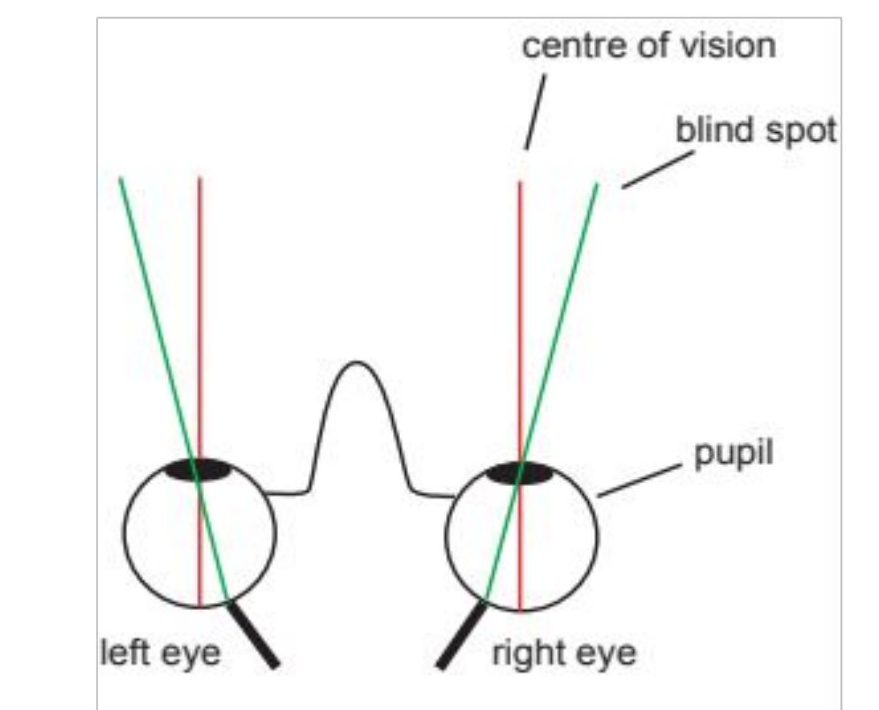
The blind spot is usually not experienced as a persistent black hole. The other eye and surrounding visual context contribute to ordinary perception. In a classroom demonstration, failure to find the disappearance can simply reflect distance, fixation or scaling. The design lesson is broader: our experience of a continuous scene does not mean every location was sampled equally.
4. Color signals, displays and gamut
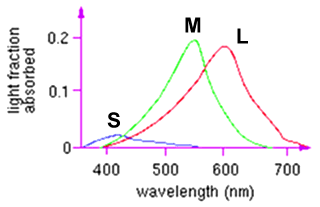
Cones have overlapping spectral sensitivities, conventionally described as short-, medium- and long-wavelength sensitive (S, M and L). They are not tiny blue, green and red cameras. A single cone response does not uniquely identify a wavelength; color information depends on comparisons across responses. Distinct physical spectra can produce similar cone responses and appear alike under specified conditions. Such matches are called metamers.
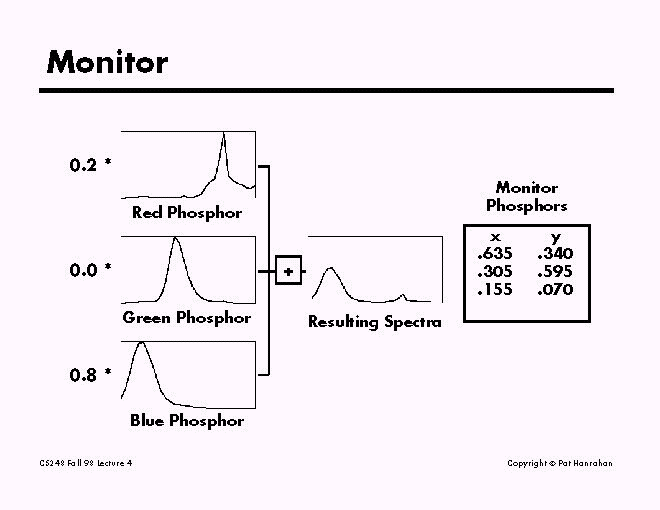
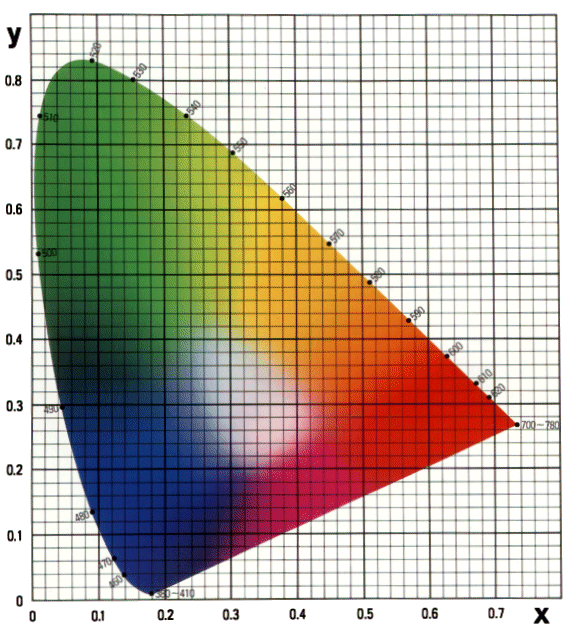
A display exploits this by combining three primaries. The historical CRT example uses phosphors with different emission spectra. Its ability to reproduce many colors does not imply that it can reproduce every visible color. The set of reproducible colors is its gamut. A printer and display can have different gamuts, so a color selected on screen may change when printed.
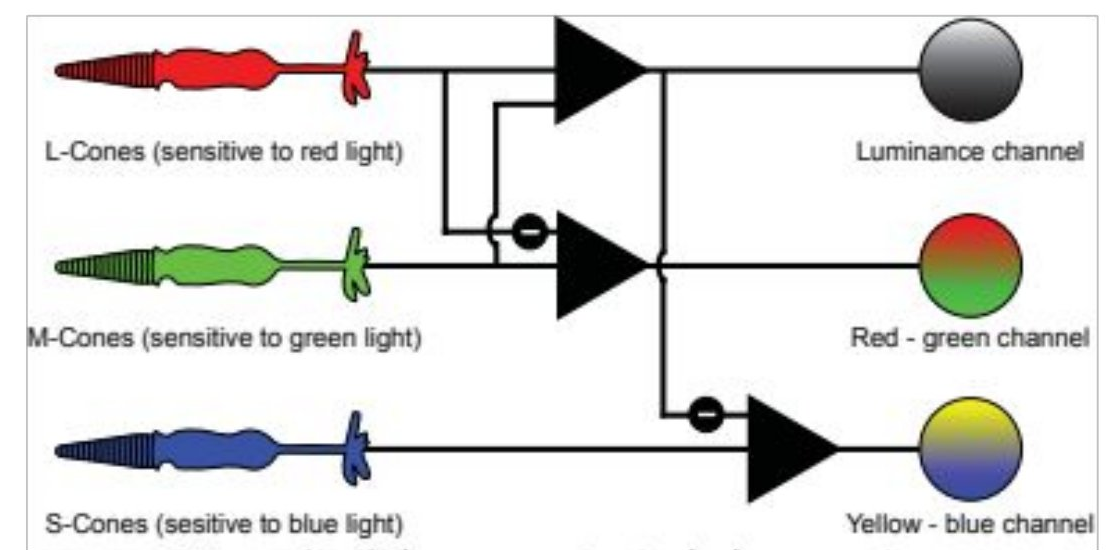
Retinal and later processing compare cone signals through opponent relationships. Conceptual channels include an L+M-like luminance signal, an L−M comparison, and an S−(L+M) comparison. Actual channels involve weighting and adaptation; these expressions describe useful relationships rather than an exact universal color conversion.
| Representation | What it helps describe | Important distinction |
|---|---|---|
| RGB | Additive mixtures in a display | Values require a defined color space and transfer characteristics to specify a color precisely |
| CMY/CMYK | Subtractive reproduction with inks | Ink absorbs light; black ink has a practical role in printing |
| CIE chromaticity | Colorimetric relationships and gamut | Chromaticity alone omits luminance |
| HSV/HSL-like coordinates | Convenient controls for selecting hue, saturation and brightness/lightness | Equal coordinate steps are not necessarily equal perceived differences |
| YUV and related YCbCr systems | Separation of a luma-like component and color-difference components | YUV and digital YCbCr are related but not identical; luma is not simply physical luminance |
Discriminating two adjacent samples and naming a color are different tasks. A viewer may reliably see a difference without having distinct everyday names for it. Conversely, two people may apply the same name to visibly different samples. Color labels therefore need a clear task meaning and should not be the only way to identify a critical item.
5. Adaptation, brightness and boundaries
The visual system adapts to illumination. Entering a dim room after bright light temporarily changes what can be seen; adaptation involves multiple mechanisms and time scales. The same display may be comfortable indoors and difficult to read in sunlight. Screen brightness settings cannot be evaluated independently of reflections, ambient light and the user’s adaptation state.
A useful elementary model of discrimination is the Weber fraction, ΔI/I: the change in intensity relative to the background level. Raising a normalized intensity from 0.10 to 0.11 gives 0.01/0.10 = 0.10. Raising 0.50 to 0.55 gives 0.05/0.50 = 0.10. Equal absolute changes and equal relative changes are different. Weber-like behavior is an approximation over some conditions, not a universal law of display readability. It should not be confused with gamma encoding, which concerns the numerical representation and transfer of display values.
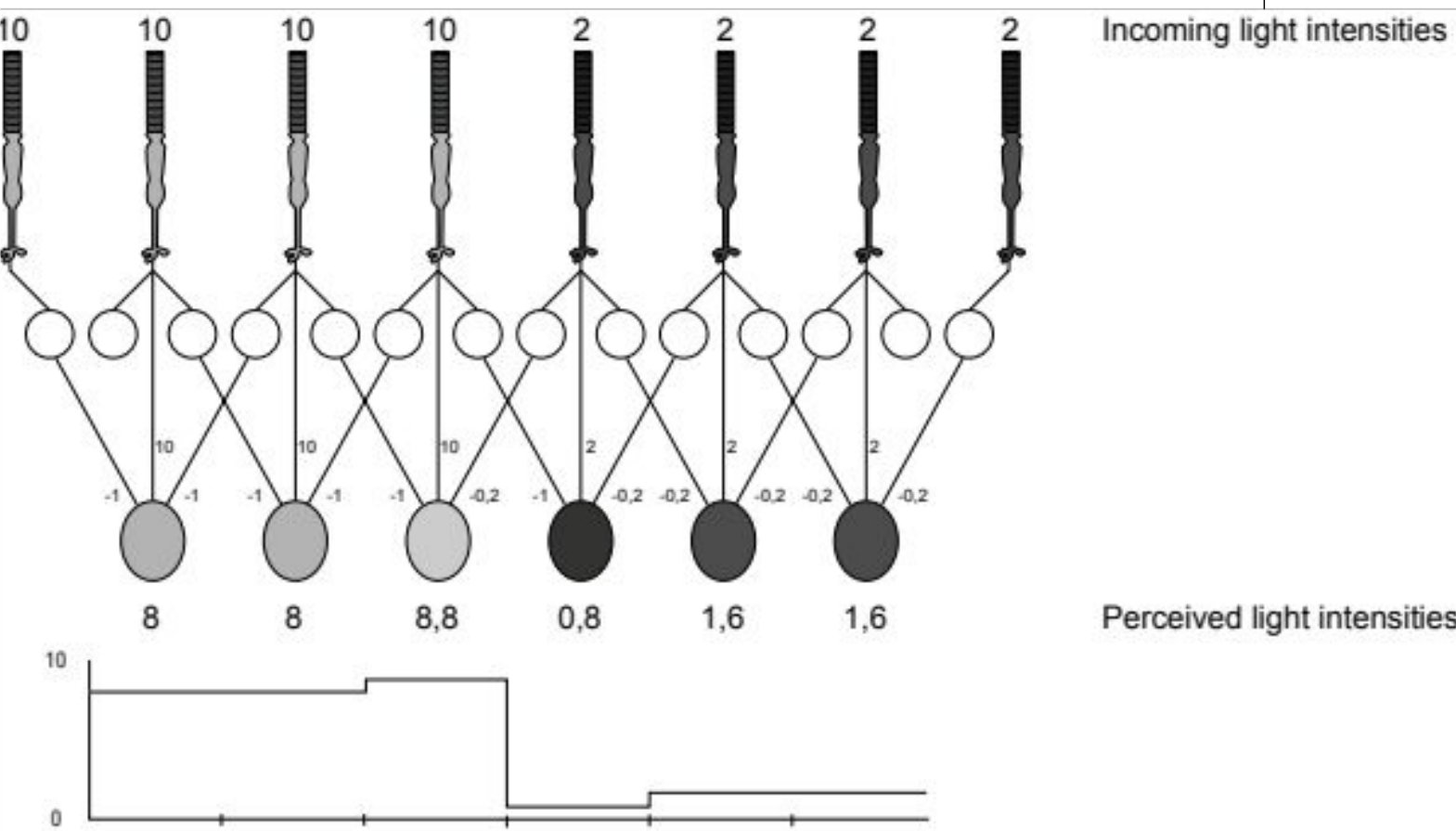
Spatial context also changes appearance. In a simple lateral-inhibition exercise, each receptor’s output is its own input minus 10% of each immediate neighbor. Deep inside a bright region with inputs of 10, output is 10 − 1 − 1 = 8. At its boundary with a dark region of input 2, the bright-side output is 10 − 1 − 0.2 = 8.8. The neighboring dark-side output is 2 − 1 − 0.2 = 0.8, while the dark interior gives 2 − 0.2 − 0.2 = 1.6. The boundary becomes more pronounced in the output.

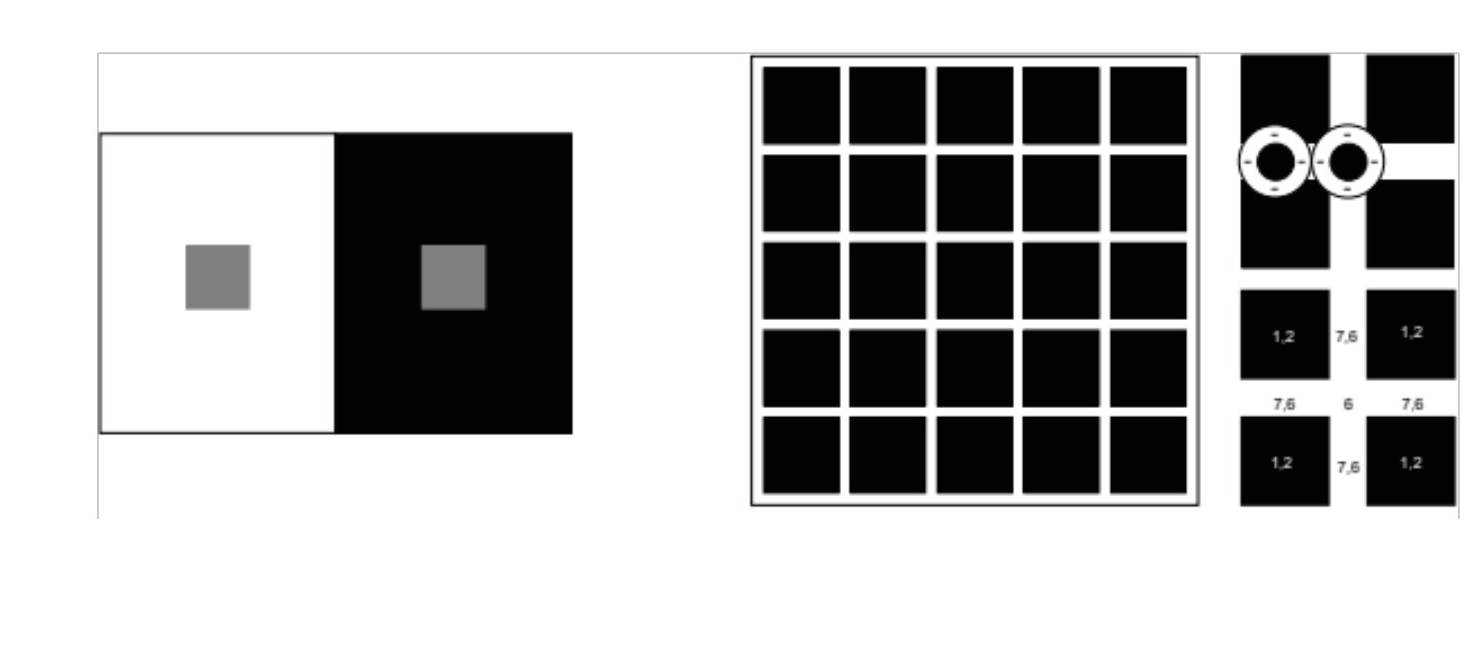
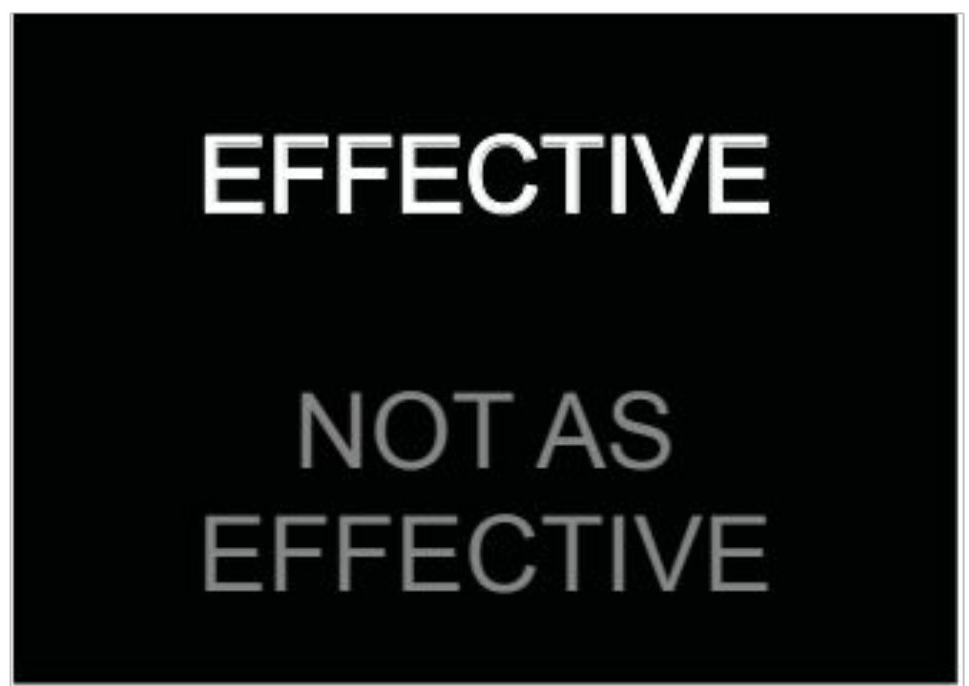
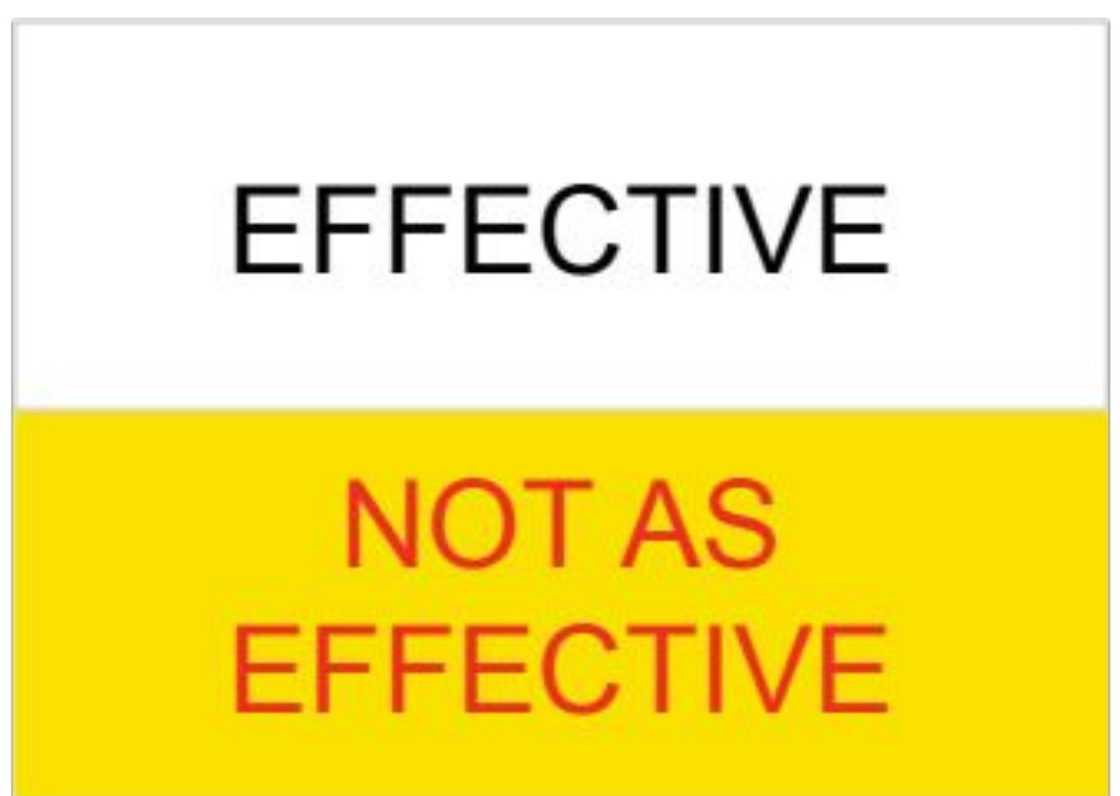
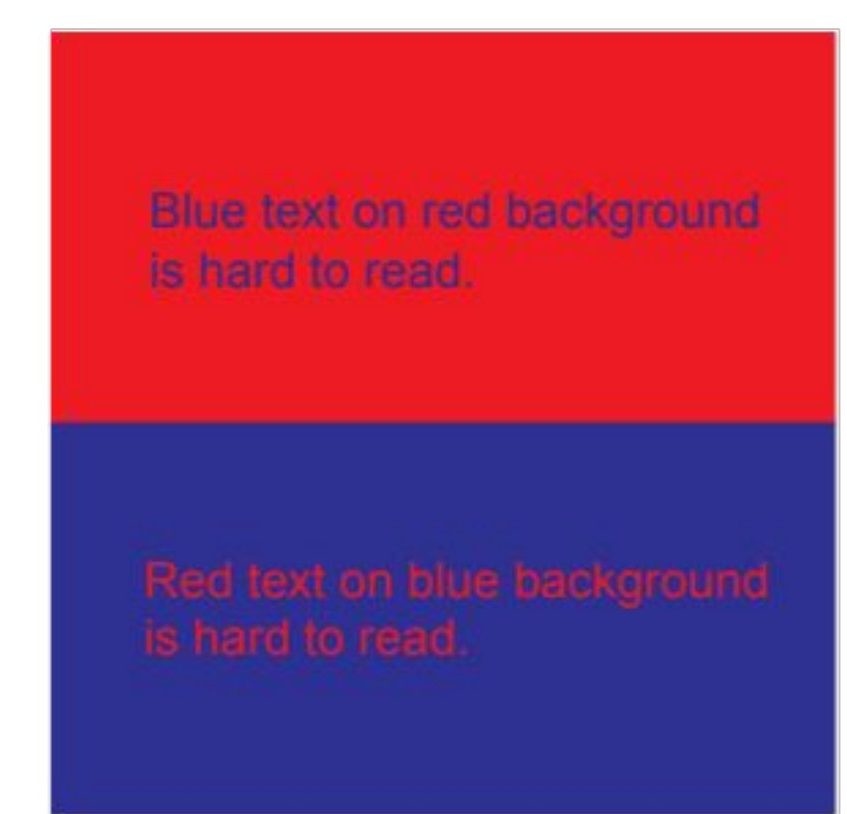
For fine text, a substantial luminance difference usually matters more than hue difference alone. Compare light text on dark and dark text on light, paying attention to weight, glare and environment rather than declaring one polarity universally superior. Green letters on a brown background can be distinguishable by hue yet remain difficult to read. A red and blue pair can be vivid but uncomfortable for small text.
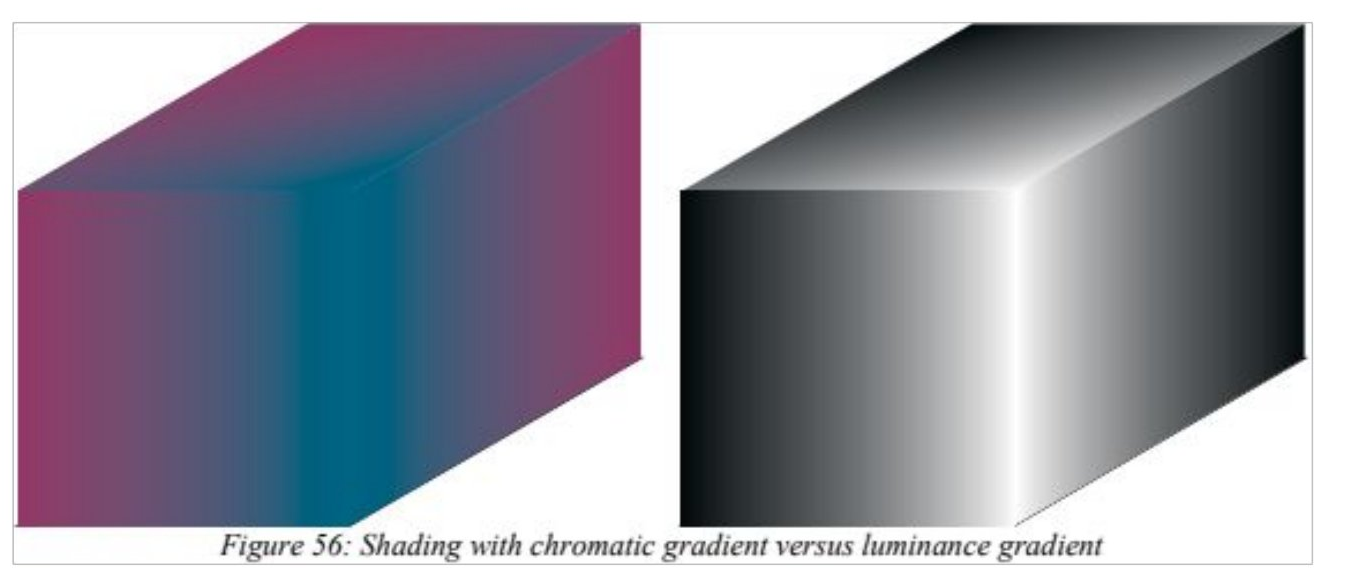
6. Using color to communicate
Color is useful when it supports a task: distinguishing categories, indicating state, connecting related objects, emphasizing an exception or guiding a search. A palette with many unrelated hues can increase the work of learning and remembering a legend. Consistency between the cue and its meaning matters as much as the vividness of the cue.

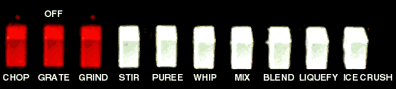
Red often suggests stopping, danger or an urgent condition, but color meanings depend on application and convention. Historical industrial examples associate red with stop/fire, fluorescent orange with biological hazards, yellow with caution, orange with dangerous machinery parts, green with safety equipment, blue with information, black/white/yellow with boundaries, and magenta/yellow with radiation warnings. These are historical teaching examples, not a current compliance specification. A real installation requires its applicable current standards and clearly identified symbols and labels.
Use redundant cues for important distinctions: text, shape, position or pattern can accompany color. A red stop sign also has a distinctive outline and the word STOP. Redundancy helps when colors are hard to discriminate, lighting changes, a display is monochrome, or the user does not share the expected color association.

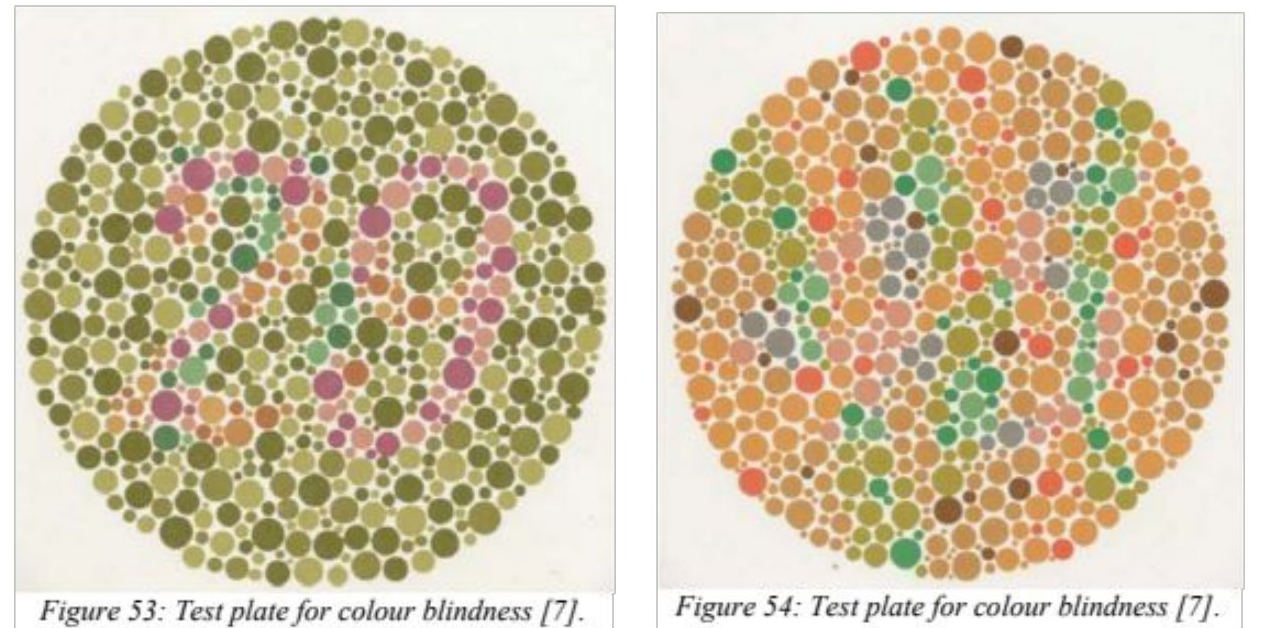
Color vision differs between people. The often-quoted figures of about 8% of men and 1% of women apply to some populations and some classes of deficiency, not to all people everywhere. An Ishihara-style classroom image demonstrates that color-dependent information may be available to some viewers and unavailable to others; a reproduced screen image is not a diagnostic test.
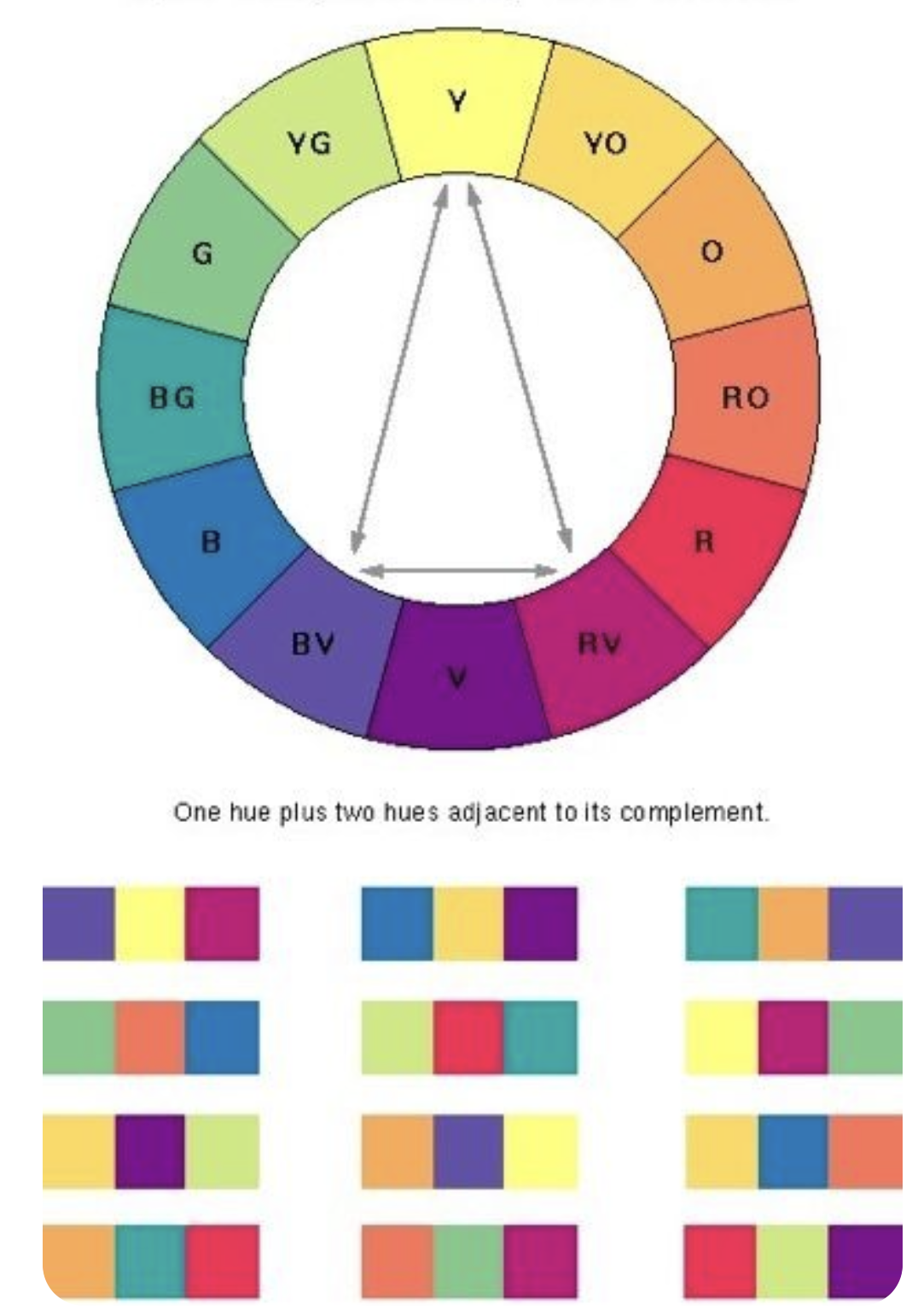
Color models describe coordinates; color contrasts describe relationships in a composition. Hue contrasts distinguish color families. Lightness contrasts distinguish light and dark. Saturation contrasts place vivid colors against muted ones. Warm–cool relationships and complementary or split-complementary schemes can help organize a palette, but none guarantees readability or accessibility.



Area affects visual balance. In the historical Goethe-based classroom exercise, illustrative brightness weights are yellow 9, orange 8, red 6, violet 3, blue 4 and green 6. If one defines balance as weight × area, balancing red and violet gives 6Aᵣ = 3Aᵥ, hence Aᵥ = 2Aᵣ. This is an artistic teaching heuristic, not a perceptual measurement or a UI accessibility rule. Its useful question is whether a small vivid accent can dominate a large muted area.

Several contrasts act together. Changing a background can alter apparent saturation or lightness; a complementary pair also has a spatial arrangement and relative area. Color naming varies with language and experience. A category labeled “blue” is less dependable than a visible example combined with a stable identifier when exact matching matters.
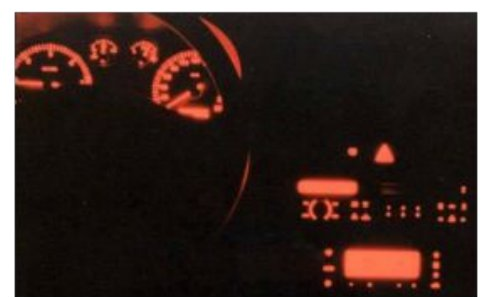
Red–blue fine text illustrates another difficulty: optical chromatic aberration means different wavelengths need not focus identically. Hue contrast alone is therefore a poor argument for small, tightly packed lettering. Red illumination is sometimes used in dark-adapted environments, but preservation of useful dark vision depends on spectrum, intensity, duration and the task; “red” is not an unconditional guarantee.
7. Reading is an active visual task
Reading involves sequences of fixations and eye movements, recognition of letter forms and words, and interpretation using language knowledge. The eye does not scan a line with uniform high-resolution processing at every position. A comfortable reading display therefore depends on letter size and contrast, line length, spacing, typeface and the complexity and familiarity of the text.

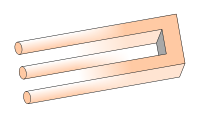
An impossible trident is a useful companion example: local lines may be individually easy to see while their combination cannot form a coherent object. Legible parts do not ensure an intelligible whole. In a document, the comparable problem can be a clear sentence whose reference, grouping or place in the argument is unclear.
Historical reading advice in the lecture includes line widths of roughly 60–130 mm, a reported 14% slowdown for all-capital text attributed to Tinker’s work, and older reports of screen reading being 15–30% slower than paper. These figures belong to particular materials, displays and experimental conditions. They are not fixed penalties for every modern screen. Uppercase may work for a short isolated label while being unsuitable for long prose.
For a current design, examine the actual font, device, distance, user and reading task. A narrow mobile column and a wide projected slide present different constraints. Test comprehension and finding relevant information as well as raw reading speed. Increasing font size can improve visibility while making the page longer and requiring more navigation.
8. Gestalt principles: organizing the visible world
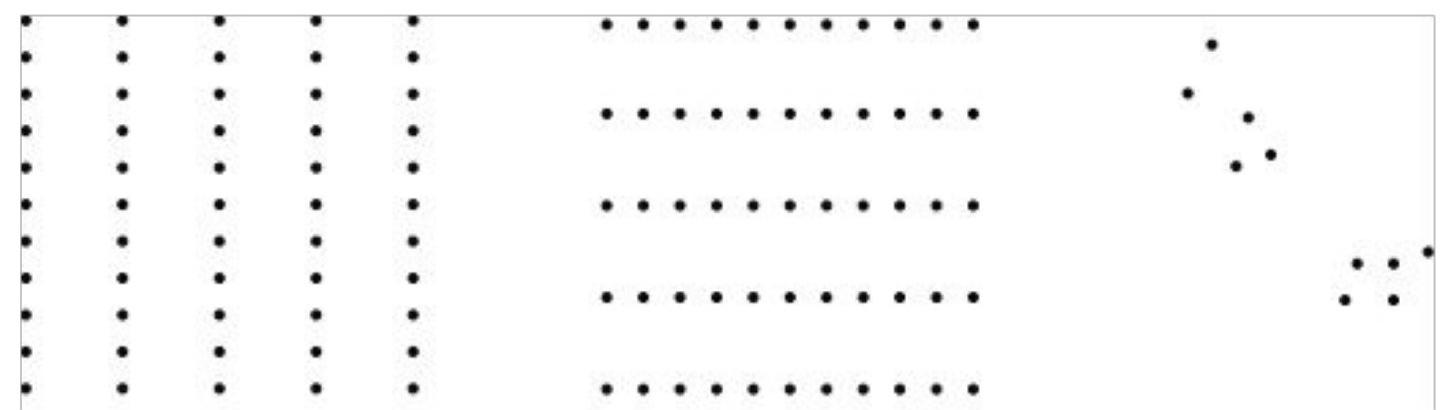
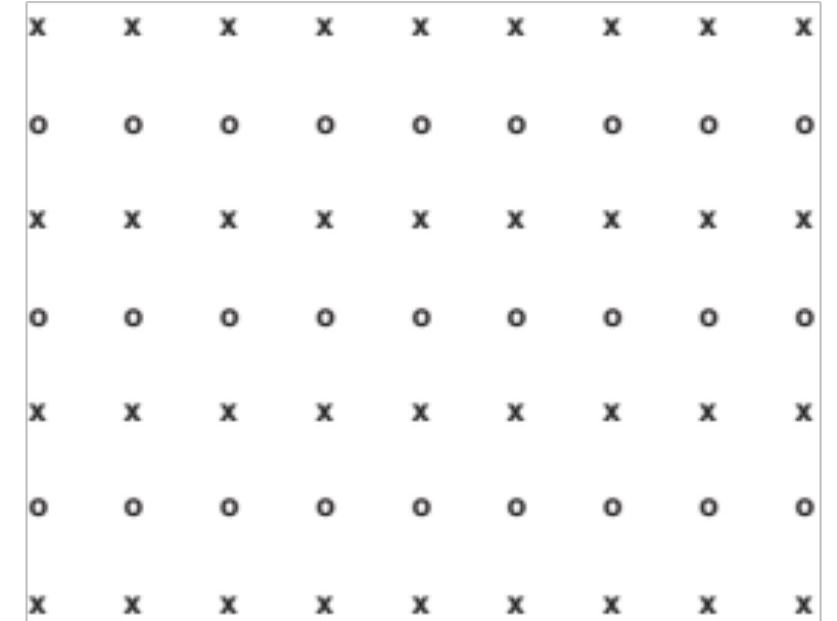
Gestalt means form or configuration. We tend to perceive organized wholes and relationships rather than independent marks. These principles matter in HCI because visual organization communicates structure before a user reads every label: which items belong to one record, which label describes which control, and which shape is the object against its background.
| Principle | Perceptual tendency | Interface consequence |
|---|---|---|
| Proximity | Nearby items appear related | Place a label nearer its own input than the next input |
| Similarity | Similar shapes or appearances suggest membership | Use repeated styling for controls with a shared role |
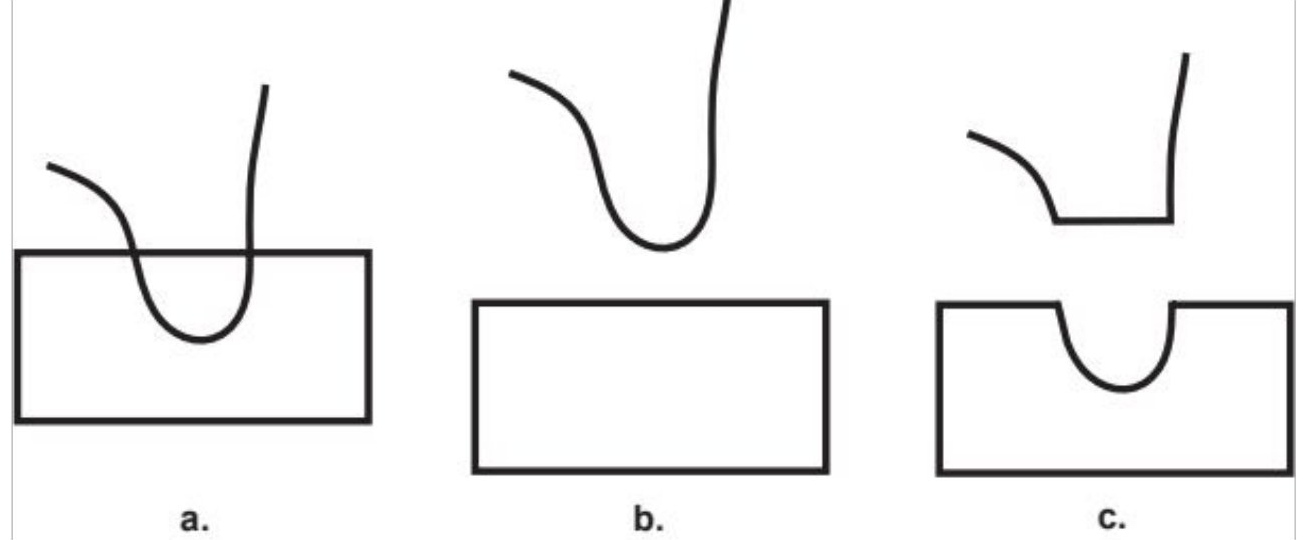
| Continuity | Smooth continuations are followed through crossings | Make diagram routes traceable and semantically correct |
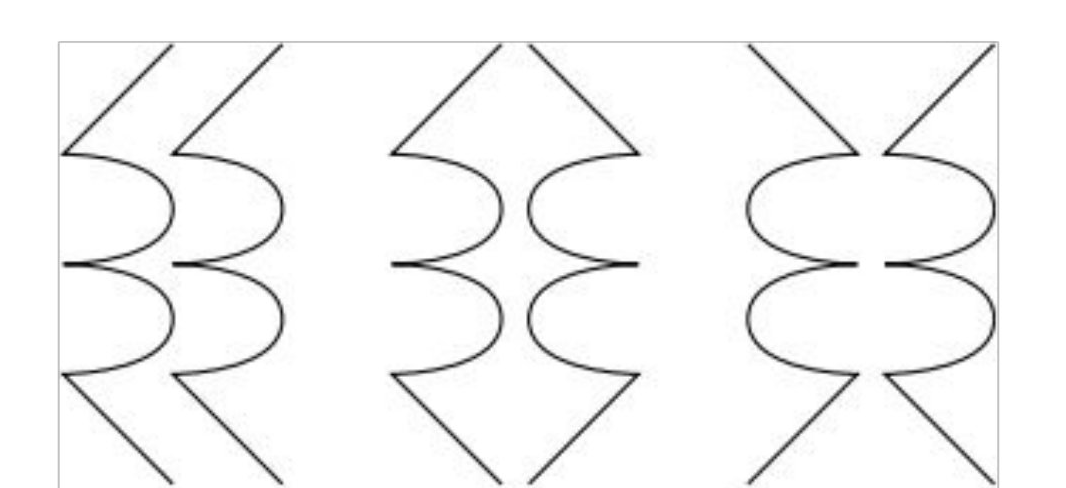
| Symmetry | Symmetrical parts can form a coherent object | Use symmetry deliberately; it can also conceal orientation |
| Closure | Incomplete contours can be perceived as complete figures | An outline need not be fully drawn to imply an object |
| Relative size | Smaller enclosed regions often appear as figures | Area can influence the foreground/background interpretation |
| Figure–ground | A scene separates into an object and a background | Negative space and shared boundaries can change the perceived object |
Common region is another useful grouping cue: an enclosure suggests that its contents belong together. Principles can compete. Proximity may suggest one grouping while alternating backgrounds suggest another. They are tendencies to investigate, not guarantees that every viewer will parse every layout the same way.


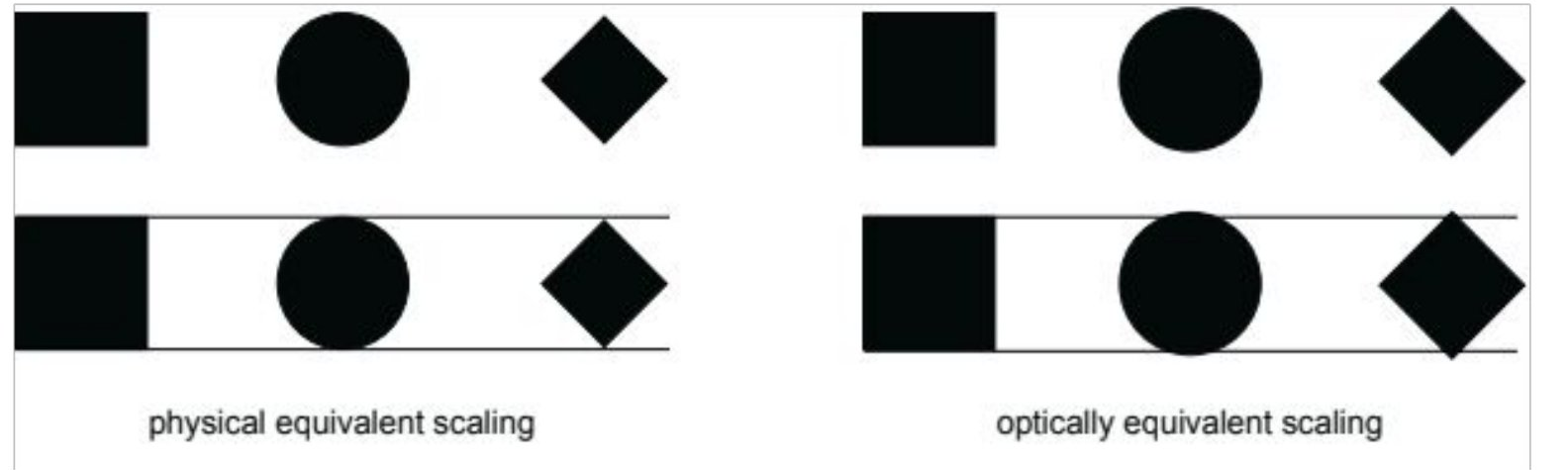
Geometric alignment and perceived alignment are not identical. The apparent centers of a circle, a triangle and a letter differ because their shapes and visual weight differ. Optical adjustments can make a layout appear more even even when its coordinates become less mechanically uniform.
A form illustrates the practical stakes. Suppose the sequence is Traveller: Aylin, Amount: €60, Traveller: Bora, Amount: €90, but a shaded band connects €60 with Bora. Every word may be readable while the grouping teaches the wrong association. A repair makes each person and amount one stable row:
| Traveller | Amount due |
|---|---|
| Aylin | €60 |
| Bora | €90 |
Consistent spacing and aligned columns communicate the relationship without another color legend. More borders or more colors would help only if they reinforce that relationship. Once information is resolvable and properly grouped, a separate question remains: will the user attend to it?
9. Attention, search and interruption
Attention gives some information priority while other available information receives less processing. Goals, expectations and competing signals influence selection. Visibility is consequently necessary for many visual tasks but insufficient for successful communication. A prominent item can be missed when attention is occupied; a modest cue can work when placed directly in the task’s path.
Try finding the only Q below, then finding every A. The display is unchanged, but the instruction changes the search. This is an exercise in task dependence, not a timed experiment or a measurement of individual ability.
A O R P A O R P
P R O A P R O A
O A P R O Q P R
R P A O R P A O
In a payment screen, making the cardholder’s name the largest element may conflict with the immediate task of checking the amount. A better hierarchy gives the amount and payment action appropriate priority while keeping other necessary information available. Hierarchy should reflect what must be verified, not simply what is easiest to decorate.
A change can also be missed. Compare booking GT 402, seat 14A, gate 16 with booking GT 402, seat 14A, gate 18. If both remain visible, the comparison uses an external reference. If the first disappears during an interruption, the user must retain enough of it to identify the change. Persistent change indicators can reduce that memory-dependent comparison.

The Stroop task makes interference tangible: fluent reading can be difficult to suppress when the task is to name a conflicting ink color. Interfaces likewise impose extra effort when familiar cues must be overridden. Arbitrarily reversing a familiar control meaning can create errors even among users who have read the instructions.
Interruption creates a resumption problem. Remembering the broad goal “finish the booking” differs from knowing whether the address was entered, a delivery option selected and payment confirmed. Preserve entries and progress. On return, show the last completed step and the unresolved action. A notification that vanishes while the user is away cannot supply that later reference.
10. Hearing and auditory feedback
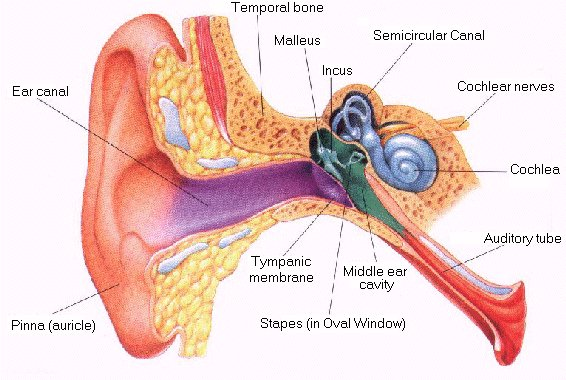
The outer ear and ear canal guide sound toward the eardrum. Middle-ear bones transmit vibration toward the cochlea, where movement stimulates sensory hair cells. Signals then travel through the auditory nerve. Pitch, timing, duration and intensity offer different dimensions for an interface signal. NIDCD’s explanation of hearing provides an accessible anatomical account.
The commonly stated range of roughly 20 Hz–20 kHz describes a broad young-listener range, not a promise about every user. Sensitivity varies by frequency, age, exposure and environment. Equal sound-pressure levels do not imply equal perceived loudness. Selective listening can help a person follow one stream in a busy scene—the “cocktail party” example—but masking and divided attention remain constraints.
Lₚ = 20 log₁₀(p / p₀) dB, with reference pressure p₀ = 20 µPa in air.
For the same measurement conditions, doubling root-mean-square sound pressure changes the level by 20 log₁₀(2) ≈ 6.02 dB. This is not a statement that the sound is perceived as twice as loud. Frequency content, duration and the listener affect perceived loudness. The logarithmic measure should not be read as a linear loudness scale.
A brief tone can announce an event while the eyes are occupied. Distinct rhythms can help separate events without making every signal louder. Repeated beeps can nevertheless distract nearby people, mask one another or become meaningless. A critical state should remain obtainable through another channel, and essential information should not depend on an unusually high pitch being audible.
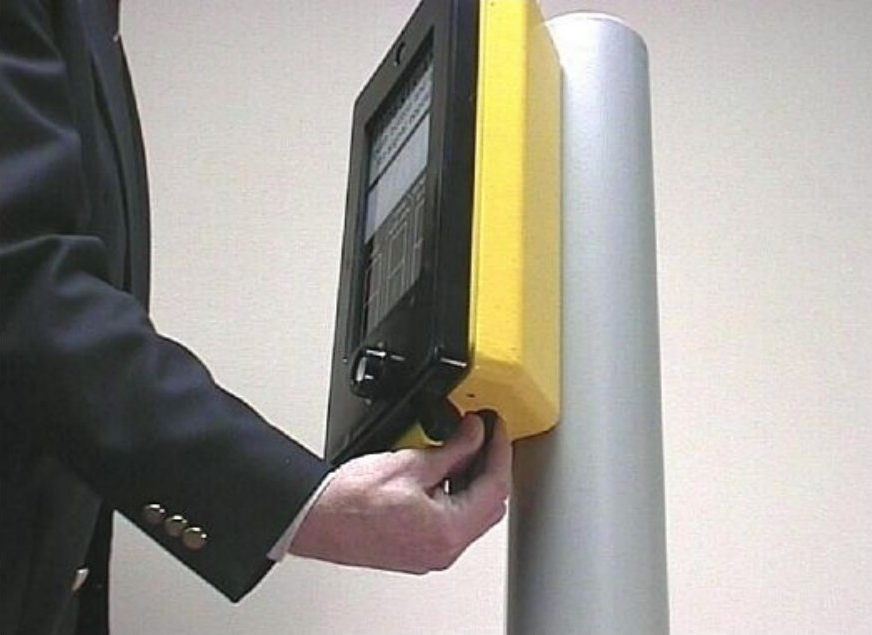
For an interrupted payment, use a sound to draw attention when appropriate and a persistent “Payment not confirmed” status for later recovery. These support different moments in the task. Adding a channel is useful when it addresses a particular demand; sound does not eliminate the attention required to interpret and act on it.
11. Somatosensation, tactile switches and haptics
Somatosensation encompasses touch, pressure, vibration, body position, temperature and pain. Haptic interaction involves skin sensations together with forces and movement; tactile feedback is the skin-sensation component. Kinesthetic or proprioceptive information concerns movement, force and position. Distinguishing these helps describe what a device actually communicates.
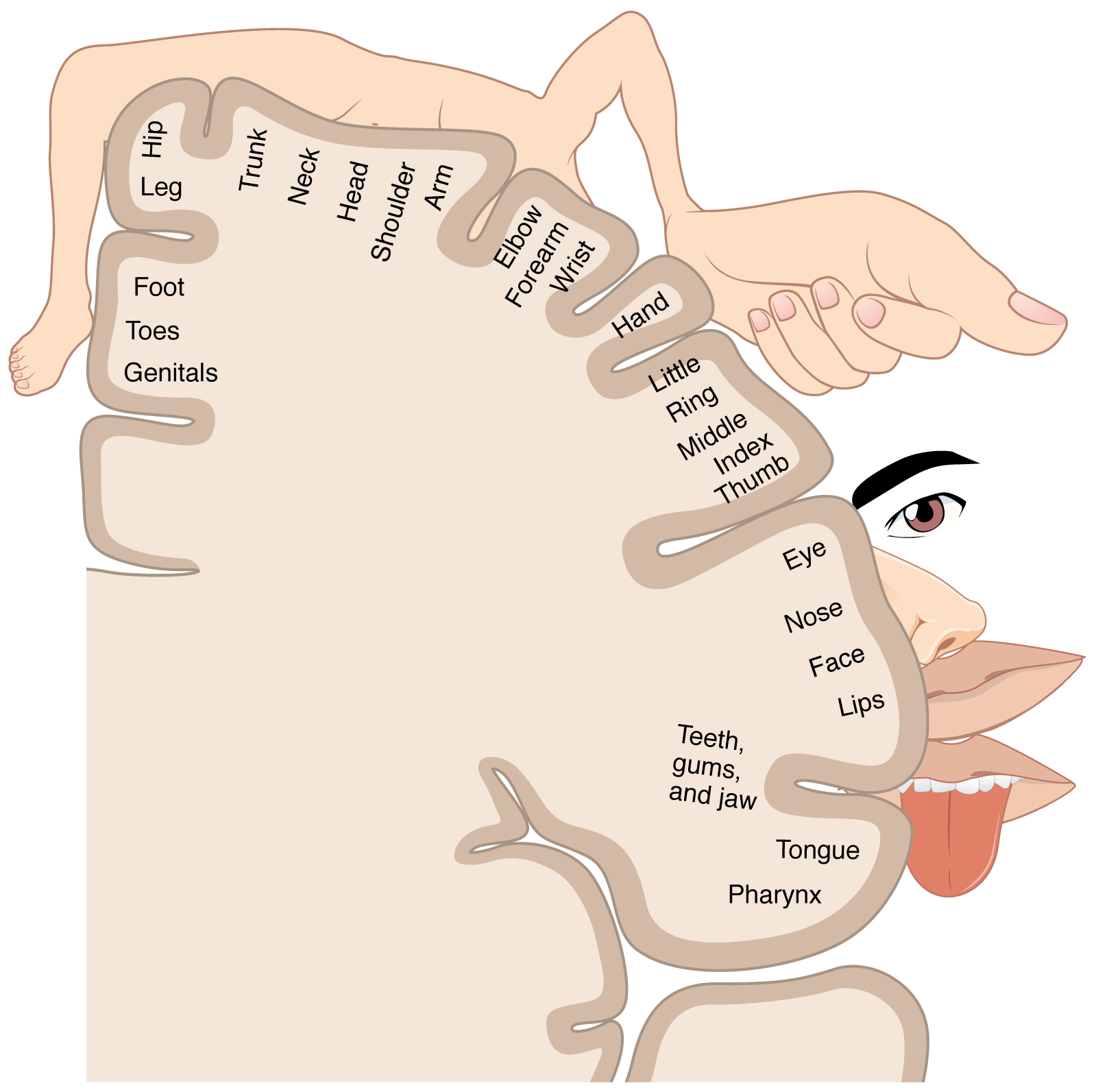

The disproportionately large hands and lips in this representation indicate the importance of those regions in somatosensory processing. It does not follow that every body location discriminates the same vibration pattern equally well. Placement, contact and individual differences matter when designing wearable feedback.
A tactile switch produces a noticeable resistance change, bump or snap during a press. Dome and membrane keypads can supply this mechanical event. The sensation can help a user detect actuation without looking at the finger, and physical differences can distinguish nearby controls. A tactile event need not be accompanied by an audible click.
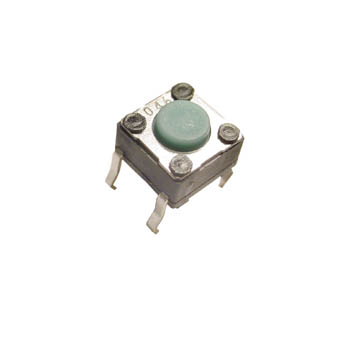
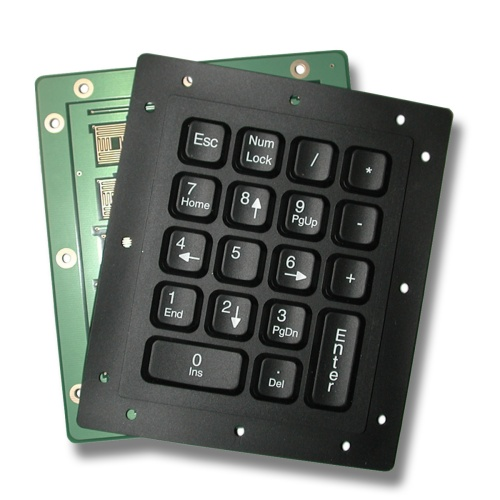
The felt click confirms a local mechanical event, not necessarily that the intended system outcome occurred. A remote-control button can click while the television receives no command. Outcome feedback must communicate the actual state change. The same distinction holds when a phone vibrates on touch: a pulse may acknowledge input before a transaction finishes.
The motor homunculus concerns the cortical organization of movement; the sensory homunculus concerns incoming bodily sensation. Their exaggerated proportions can look similar, but the images should not be interchanged. Movement also involves interacting cortical and subcortical systems: planning, execution and correction belong to a feedback loop. This prepares us to distinguish targeting constraints from perception and understanding.
12. Memory in an ongoing task
Sensory persistence briefly retains aspects of incoming stimulation. Short-term storage maintains information temporarily, while working memory emphasizes maintaining and manipulating information for a task. Long-term knowledge supports recognition, interpretation, skills and expectations. These are useful functional distinctions, connected by attention, rehearsal, encoding and retrieval; memory is not a set of independent boxes into which a design simply deposits facts.
Hold the code 4729, then compare it with 4792. Repeating the first code requires maintenance. Comparing the two requires maintenance and manipulation. Displaying both together changes the demand: the user can repeatedly inspect the values rather than carry the entire comparison internally.
A familiar capacity slogan, “7 ± 2,” is not a rule that every menu should contain seven choices. Task structure, rehearsal, chunking and the definition of an item affect estimates. Cowan’s 2001 reconsideration of short-term storage capacity discusses a smaller limit under specified conditions. Replacing seven with four as a universal interface rule repeats the original mistake. Identify what the particular user must maintain and what can remain visible.
Chunking uses existing knowledge. The sequence 1 9 2 3 2 0 2 6 may be eight digits or the two meaningful dates 1923 and 2026. The grouping helps only if it is meaningful to the user. An expert’s familiar abbreviation can still be a novice’s collection of unrelated characters.
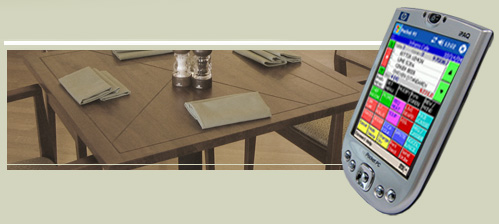
A server taking an order must retain items and modifications while attending to a customer. A paper note or handheld device preserves information, but entering it also consumes attention. Externalization changes the task; it does not remove all cognitive work. The record must remain legible, findable and correctly associated with the person or table.
Long-term knowledge changes what a symbol means. A familiar character, command or icon activates associations that an unfamiliar user does not possess. Recognition offers candidates; recall requires producing information without those candidates. A menu can help a novice recognize an action, while an expert’s remembered shortcut may be faster than searching a crowded menu.

Practice makes sequences fluent. Fluency can also produce a slip when a familiar location or action acquires a new meaning. Consistency aids transfer, while clear feedback helps reveal a changed state. Remembering a fact and remembering to do something later are different problems: prospective memory concerns the intention to act at the appropriate time. A stored order code does not by itself remind a person that the order still needs submission.
13. A worked memory-demand analysis
A booking form hides the fare while passenger details are entered, asks the user to calculate a total, displays an unfamiliar baggage abbreviation and requires a final confirmation after an interruption. Calling this simply “too much information” conceals four different demands. Diagnose each before choosing a repair.
| Demand | Example | Worked redesign |
|---|---|---|
| Maintenance | Remember the fare from the previous screen | Keep the fare in a persistent summary |
| Manipulation | Multiply fare by number of passengers | Show the calculation and resulting total |
| Knowledge retrieval | Interpret an unfamiliar baggage abbreviation | Provide a plain label and a short explanation |
| Prospective memory | Remember to confirm after interruption | Keep an explicit unsubmitted state and clear next action |
The redesigned summary might say “2 passengers × €60 = €120; baggage not included; payment not confirmed.” It supplies both the inputs and the result so that the user can check the calculation. Preserving completed fields prevents unnecessary reconstruction. The cost is space and possible search effort, so the summary should be grouped and prioritized rather than expanded into another wall of competing information.
Evaluate whether the user can resume at the correct step and understand the remaining obligation. A reduction in typing time alone would not establish that confirmation errors decreased. Memory support is successful when it preserves the right information at the moment it is needed.
14. Mental models and the system image
A mental model is an explanation a user employs to predict what a system will do. It can be partial, inconsistent or wrong and still guide purposeful action. Mental models draw on experience and long-term knowledge; they are not an extra memory store added after working memory.
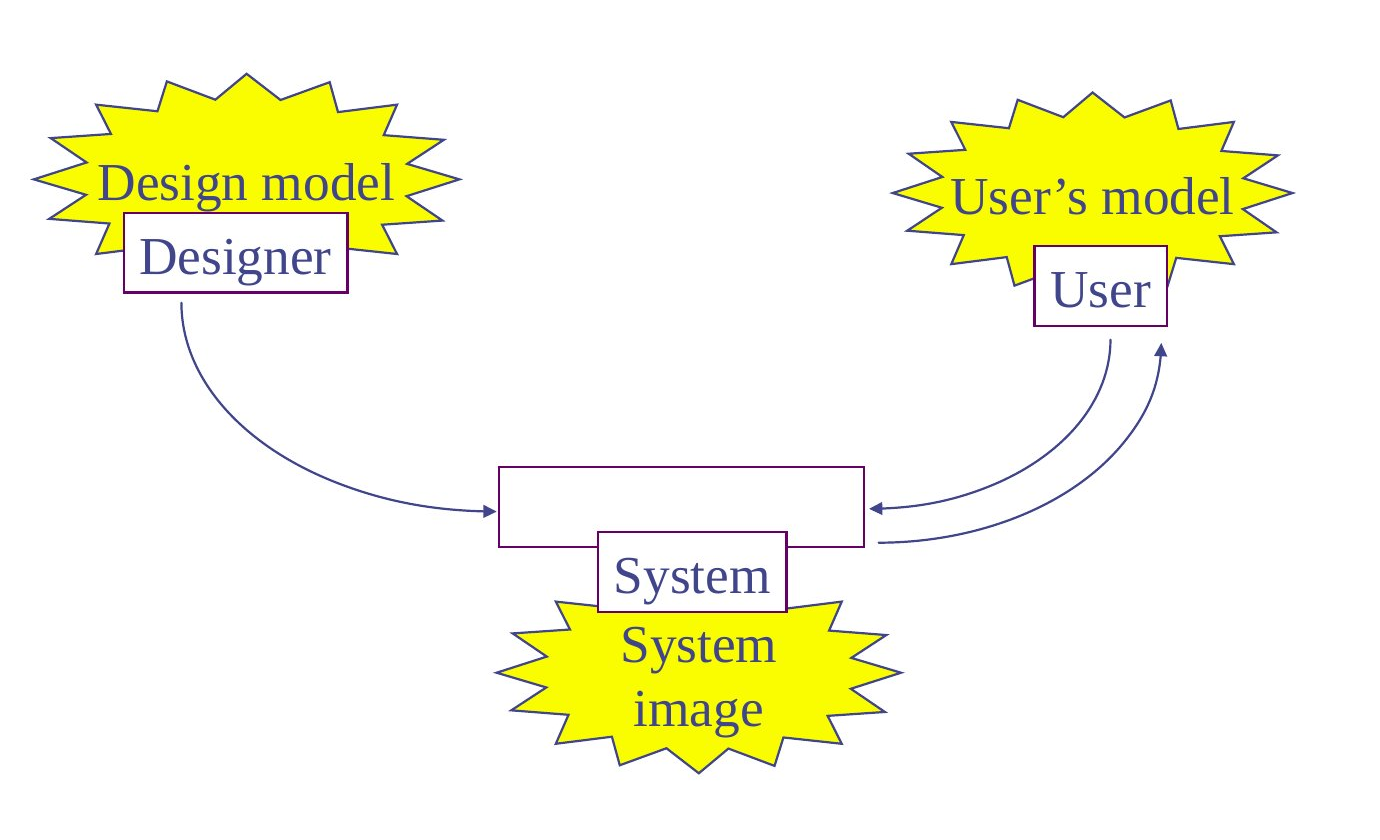
The designer has an intended conceptual model. The user encounters the system image: controls, labels, arrangement, behavior, feedback and documentation. The designer’s intentions are not directly visible. Two separate controls may communicate independence even if the mechanism couples their effects. A visually persuasive system image can therefore teach a mistaken prediction.
This distinction helps separate a slip from a mistaken understanding. Intending to press the freezer control but accidentally pressing its neighbor is a slip. Deliberately adjusting a dial because one believes it affects only the freezer is a model-based mistake if the cooling system is coupled. Spacing and undo can help the first; clearer mapping, explanation and outcome feedback are needed for the second.
A useful evaluation question is “What do you expect to happen next?” Asked before the action, it reveals the causal expectation. A correct final outcome alone may hide trial and error. Conversely, a reasonable prediction that fails can expose a misleading relationship in the interface.
15. The complete refrigerator case
The freezer is too cold while the fresh-food compartment is satisfactory. Which control should change, and what should happen to the other compartment? Begin with a prediction. The goal is clear, but the correct action depends on the relationship between the controls and cooling mechanism.
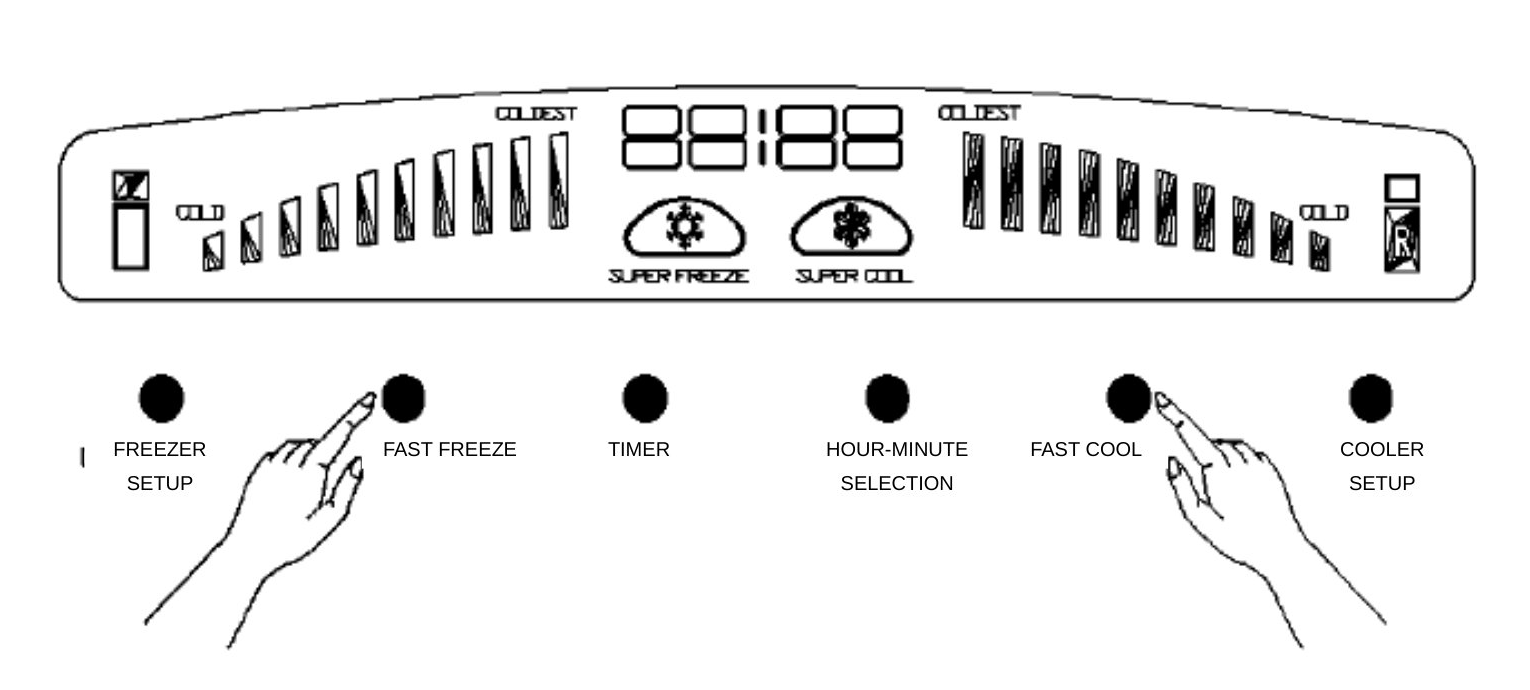
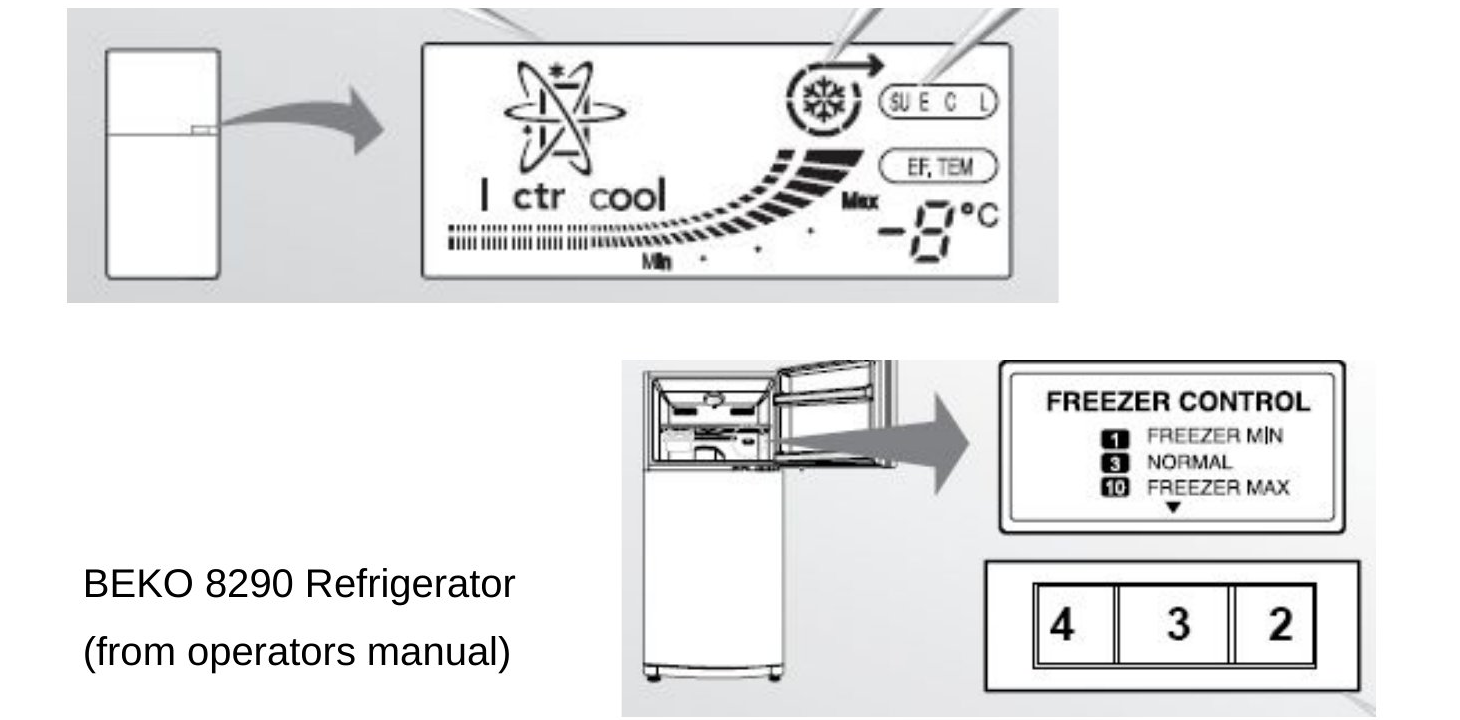
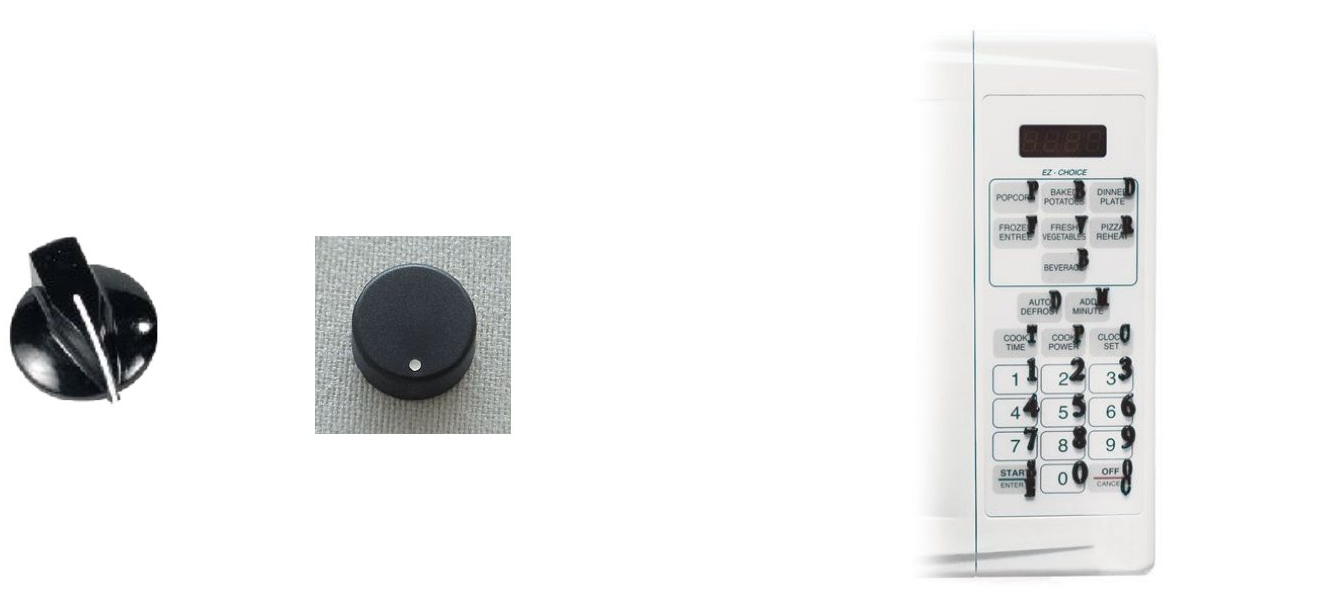
These product panels expose different system images. They do not, by appearance alone, establish the products’ hardware. A user may reasonably infer that one control belongs to each compartment. A temperature in degrees and a numbered dial can also suggest different directions of change, making “turn it up” ambiguous.
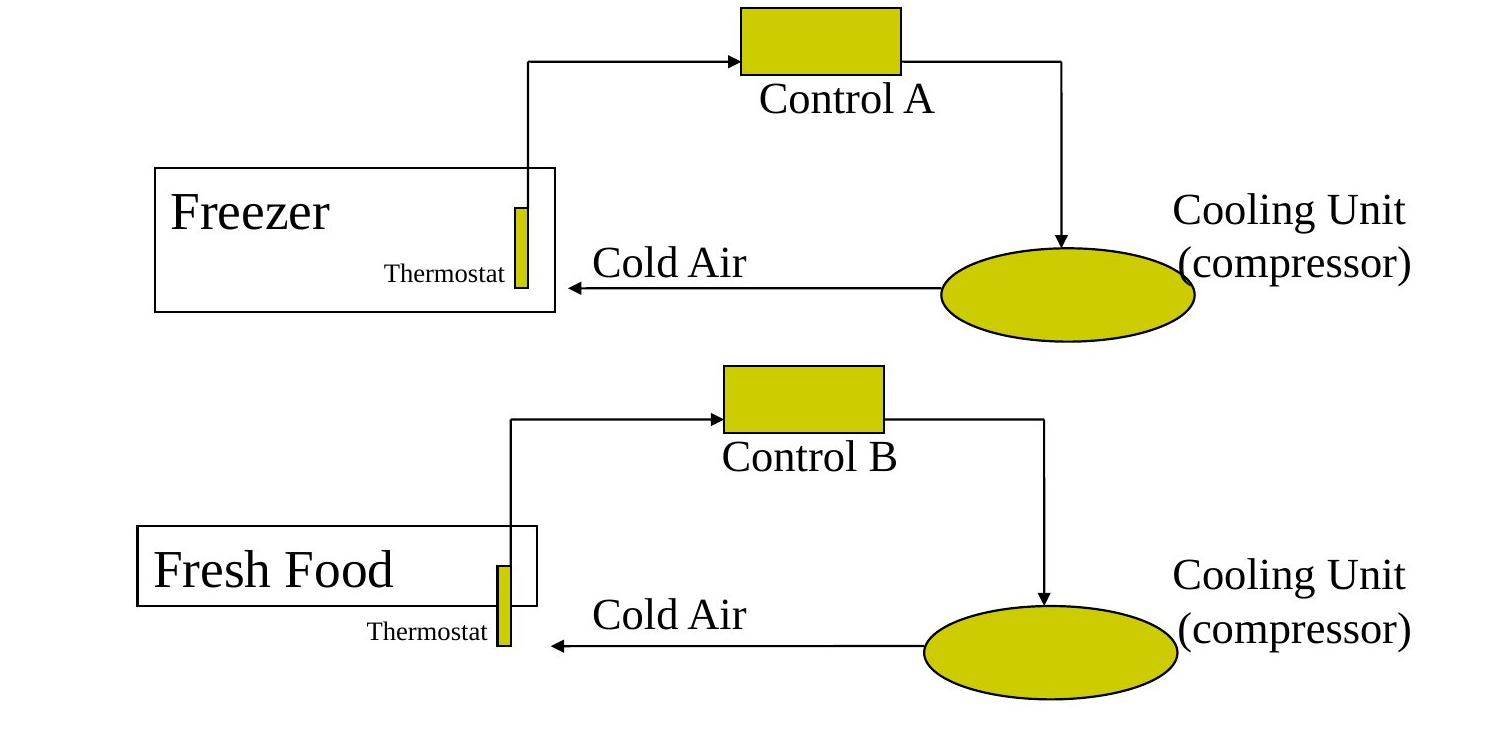
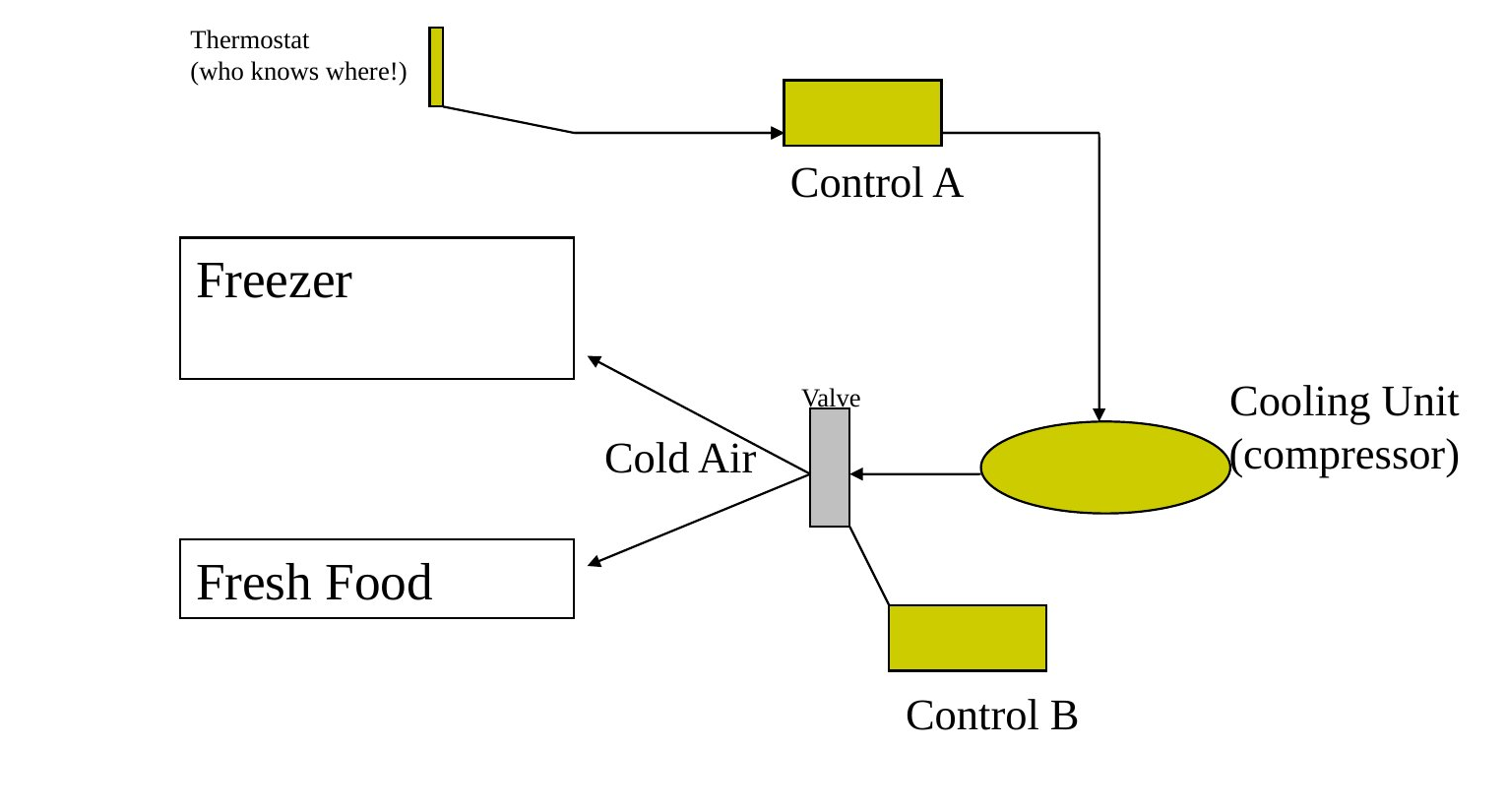
Under Model A, leaving the fresh-food control unchanged while changing the freezer control may achieve the goal. Under Model B, one control changes overall cooling and another changes its distribution; a change aimed at one space can affect both. These are explanatory candidate models, not verified engineering specifications for the pictured appliances.
Scott Klemmer’s separate teaching example explicitly uses the shared-cooling arrangement. Two dials invite a one-dial-per-compartment interpretation, while one actually changes overall cooling and the other divides the cold air. To make the freezer less cold while maintaining the fresh-food condition, both controls must be coordinated. The interface requires a causal understanding that its apparent separation does not clearly communicate.
A deliberately simplified allocation model makes the coupling explicit. Let C be total cooling supplied in arbitrary units and f the fraction sent to the fresh-food space. Fresh-food allocation is fC and freezer allocation is (1−f)C. Start with C = 100 and f = 0.4: allocations are 40 and 60. If the intended allocations become 40 and 40, total C must become 80 and f must become 0.5. Changing only the fraction while holding total cooling fixed cannot preserve one allocation and reduce the other. This is an explanatory arithmetic analogy, not a thermodynamic model or operating instructions.
| Question | Independent-loop prediction | Shared-system issue |
|---|---|---|
| Reduce freezer cooling only? | Adjust the freezer loop | May require coordinated total and distribution changes |
| Switch off fresh-food cooling while retaining freezer cooling? | Plausible if supported by the actual controls | Depends on shared operation and allowed distribution |
| Use the freezer as fresh-food storage? | Still requires a supported temperature range | Coupling and range may prevent the desired state |
The last two questions cannot be settled from knob labels alone. Product documentation and observed operation would establish what is supported. For interface design, several remedies are possible: give the user genuinely independent goal-level controls, use computation to coordinate the mechanism behind apparently independent controls, or explain the coupled relationship directly when it must remain exposed.
An illustrative exposed-mechanism interface could label the controls “Overall cooling: changes cooling supplied to both spaces” and “Air distribution: balances cold air between compartments,” with a preview that both temperatures may change. A goal-level interface could instead accept desired temperatures and handle coupling internally. The design should support the user’s goal without demanding an avoidable guess about hardware.
16. Representation changes the work
In the make-fifteen game, two players alternately choose an unused number from 1 to 9. The first player holding any three numbers that sum to 15 wins. A player using a simple list must track owned numbers, remaining numbers and possible triples. The arithmetic is elementary, yet coordinating all these relationships can be difficult.
Now arrange the numbers as the following magic square. Mark ownership directly on the board instead of keeping a separate mental list.
| 8 | 1 | 6 |
| 3 | 5 | 7 |
| 4 | 9 | 2 |
Every row, column and diagonal sums to 15. For example, 8 + 1 + 6 = 15 and 8 + 5 + 2 = 15. The eight distinct triples from 1–9 that sum to 15 are exactly the eight winning lines of this board. If an opponent owns 8 and 1, the threatened 6 becomes a visible line completion. The game is structurally the same as tic-tac-toe.
The representation changes which operations are easy. It exposes relationships spatially and reduces repeated bookkeeping without changing the legal moves or winning condition. This is the central lesson of Klemmer’s “Representation Matters”: a useful external representation participates in reasoning.
A calendar grid makes date relationships visible; a grouped form makes record membership visible; a control diagram makes coupling visible. External structure can reduce memory and calculation demands, but it must be interpretable. An unfamiliar diagram can initially add work. Evaluate the representation with the knowledge and goals of its intended users.
17. Target acquisition and Fitts’s law
Before predicting a click, separate finding the control, deciding to use it, moving to it, selecting it and waiting for the system. A movement model concerns only part of that chain. Making a target wider can improve acquisition while leaving confusing labels and slow network responses unchanged.
Let D be movement amplitude, usually measured from the starting position to the target center, and W the target width along the approach direction. Both must use the same units. The interactive hit area determines success; it need not equal the visible icon. The lecture uses the Shannon formulation of Fitts’s law:
ID = log₂(1 + D/W) and MT = a + b × ID.
ID is the index of difficulty in bits; D/W is dimensionless. MT is movement time, a has units of time and b has units of time per bit. Coefficients are fitted for specified tasks, devices and participants. They are not universal human constants. MacKenzie’s 1992 survey discusses formulations and measurement issues.
For an illustrative calculation, use a = 50 ms and b = 100 ms/bit. A target at D = 400 px with W = 20 px gives ID = log₂(21) ≈ 4.392 bits. Predicted MT = 50 + 100 × 4.392 ≈ 489 ms. These are teaching coefficients and predictions, not observations from participants.
| Layout | D (px) | W (px) | ID (bits) | Predicted MT (ms) |
|---|---|---|---|---|
| Baseline | 400 | 20 | 4.392 | 489 |
| Wider | 400 | 40 | 3.459 | 396 |
| Nearer | 200 | 20 | 3.459 | 396 |
| Alternative | 300 | 30 | 3.459 | 396 |
Doubling width or halving distance changes D/W from 20 to 10. The time difference is 100[log₂(21) − log₂(11)] ≈ 93 ms. The alternative 300/30 layout has the same ratio and therefore the same prediction. That equality says nothing by itself about visual search, decision time or total task duration.
The logarithm also means that doubling width does not halve predicted movement time. Here the reduction is about 19% of the baseline prediction. A change must be interpreted through the complete equation, including its intercept, rather than through an informal claim that size and speed are directly proportional.
A pointer constrained at a real screen boundary can be easier to acquire in the constrained direction because it cannot overshoot beyond that boundary. The benefit depends on geometry and implementation. A physical touchscreen target does not inherit every property of a desktop pointer boundary, and an arbitrary on-screen border is not an infinite target.
18. From a prediction to an observation
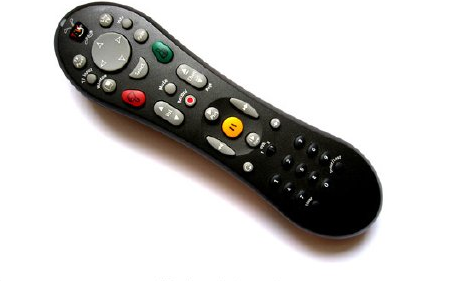
The TiVo remote shows why target size alone does not explain a complete design. Large differentiated buttons can help movement and identification. Grouped controls can support interpretation. A nearly symmetric body can make orientation by touch harder. A single device can improve one demand while leaving a different difficulty.
To examine a target-layout prediction, define a concrete selection task and the success boundary. Compare layouts under the same input device and display conditions. Record movement times and errors, repeat trials, and balance order so that practice is not systematically assigned to one layout. Make clear whether the timer starts before search or only when a known movement begins.
A faster layout with many more misses is not unambiguously better. Report accuracy and what happens after an error. Repeated trials from one participant are also not a substitute for independent participants when drawing population conclusions. A small classroom exercise can demonstrate a method without establishing a broadly generalizable effect.
Evidence can challenge the prediction. A wider target might not reduce total completion time if identifying it takes longer. A layout may produce different results on touch and mouse input. Such outcomes call for examination of the task and assumptions, rather than automatically declaring the participants wrong. Preserve the distinction between the numerical model, the design hypothesis and the observed outcome.
As a practice exercise, calculate two layout predictions using stated coefficients, then specify a measurement that could contradict your expectation. This is a study exercise, not a replacement for the separately announced assignment brief.
19. Diagnose the mechanism before proposing the repair
Return to the interrupted booking form. The label can be too small, the payment status can go unnoticed, the fare can be forgotten, the control can imply the wrong effect and the final button can be difficult to acquire. Each difficulty has a plausible mechanism. The most useful redesign explains which mechanism it addresses.
| Observed difficulty | Candidate explanation | Targeted response |
|---|---|---|
| Unreadable label | Perceptual resolution or contrast | Increase appropriate size/contrast and check viewing conditions |
| Wrong amount associated with a person | Grouping | Keep each record visually coherent |
| Missed payment status | Attention and interruption | Use a persistent task-relevant cue |
| Forgotten fare | Temporary memory demand | Keep the fare and total visible |
| Wrong prediction about a dial | Mental model | Clarify mapping and coupled consequences |
| Missed small button | Motor demand | Enlarge the actual hit area and examine spacing |
These are hypotheses to investigate, not diagnoses inferred with certainty from any single error. A persistent summary can help memory while increasing search effort; a sound can capture attention while distracting others; a larger control can reduce movement difficulty while consuming space. The user’s task determines whether the tradeoff is useful.
The next lecture turns toward understanding users, tasks and context. The mechanisms in this chapter help formulate better questions: whose prior knowledge is assumed, what must be maintained during the task, which feedback is available, and what evidence would show that a proposed change helped?
20. Review questions with worked answers
1. Why is “12-point text” not a complete readability specification?
Point size describes an em, not a particular glyph’s visible height. Typeface, scaling, distance, contrast, lighting and the reader matter. A 12-point em is about 4.23 mm; at 600 mm it subtends about 0.404°, while the actual letter may subtend less.
2. How can equal gray values appear different?
The surrounding luminance and spatial organization influence appearance. Local comparison is part of vision. Inspect both the numerical values and the actual contexts; equal stored values do not guarantee equal perceived brightness.
3. What does the lateral-inhibition example predict at a bright/dark boundary?
With inputs 10 and 2 and 10% inhibition from each immediate neighbor, the bright interior yields 8, the bright edge 8.8, the dark edge 0.8 and the dark interior 1.6. The difference between adjacent edge outputs is enhanced. This simplified calculation is not a complete account of vision.
4. Why is color alone an unreliable status code?
Color discrimination, lighting and learned meanings vary. A label, shape or stable position can preserve meaning. Red and green may be useful additional cues, but “Payment pending” and “Payment complete” must remain distinguishable without requiring that hue difference.
5. Which Gestalt principle fixes a label placed nearer the wrong field?
Proximity is the immediate issue. Move the label nearer its own field and make each record a coherent unit. Check similarity and enclosure too: a conflicting shaded band can recreate ambiguity.
6. What changed in the booking comparison?
The gate changed from 16 to 18; the flight and seat remained GT 402 and 14A. A side-by-side or highlighted comparison reduces dependence on remembering the previous display.
7. What does a 6 dB increase mean in the pressure example?
Approximately double the root-mean-square pressure under the same conditions, because 20 log₁₀(2) ≈ 6.02. It does not universally mean twice the perceived loudness.
8. Does a tactile click prove that a command succeeded?
No. It can signal that a physical switch actuated. The receiver may not have received or completed the command. Outcome feedback must communicate the actual system state.
9. Why not restrict every menu to seven items?
A short-term-memory estimate does not directly determine the best size of a visible menu. Recognition, grouping, familiarity and search all matter. Ask what the user must retain rather than applying a universal count.
10. How do prospective memory and storage differ in a booking?
Keeping the booking code visible supports access to a value. Showing “Not submitted” at the right point supports the intention to finish. A user can know every field value and still forget to submit.
11. Why can two refrigerator dials require coordinated adjustment?
If one determines total cooling and the other divides it, both compartment allocations depend on both controls. In the illustrative model, preserving 40 units for fresh food while reducing freezer allocation from 60 to 40 requires changing total cooling from 100 to 80 and the fresh-food fraction from 0.4 to 0.5.
12. What is gained by the magic-square representation?
Winning triples become visible rows, columns and diagonals. The game’s rules are unchanged, but users can perceive line completion rather than repeatedly search arithmetic combinations. The representation carries some of the reasoning work.
13. Compute movement time for D = 300 px and W = 30 px.
Using a = 50 ms and b = 100 ms/bit, ID = log₂(11) ≈ 3.459 bits and MT ≈ 396 ms. State that these are illustrative coefficients. Equal predictions do not establish equal overall usability.
14. What would make a pointing comparison misleading?
Unequal practice, different devices, inconsistent start positions, counting search in only one condition, ignoring misses or treating repeated trials as independent people can distort interpretation. Define the task and measure both time and accuracy.
15. A larger payment button did not reduce errors. What next?
Inspect the errors. If users selected the intended button but misunderstood whether payment was complete, motor targeting may not be the main problem. Test their predictions and the status feedback. A failed intervention is evidence about the original hypothesis, not a reason to keep enlarging the button.
21. Further reading and source notes
The figures and teaching examples accompany the lecture’s discussion; a historical interface is used to reveal a mechanism, not to endorse its design as current best practice. Approximate anatomical tables and historical reading figures are reference context rather than universal design thresholds.
- Donald A. Norman, The Design of Everyday Things, revised edition, 2013. Conceptual models, the system image, mapping, feedback, slips and mistakes.
- Scott Klemmer, Human–Computer Interaction: “Mental Models” and “Representation Matters.” The refrigerator and make-fifteen discussions develop the relationship between explanation, representation and action.
- Stuart K. Card, Thomas P. Moran and Allen Newell, The Psychology of Human–Computer Interaction, 1983. Functional models of human performance.
- Nelson Cowan (2001), The magical number 4 in short-term memory: a reconsideration of mental storage capacity. Capacity estimates and their conditions.
- I. Scott MacKenzie (1992), Fitts’ law as a research and design tool in human–computer interaction, Human–Computer Interaction, 7, 91–139.
- NIDCD, How Do We Hear? Anatomical explanation of hearing.
- OpenStax College (2013), Sensory Homunculus, CC BY 3.0. The sensory-map figure retains its attribution.
- MIT 6.831, User Interface Design and Implementation, 2004. Historical TiVo remote example.