Foundations, people and design
From everyday controls to interactive systems: understanding use, comparing designs and learning from evidence.
Read alongside the Week 1 slides. Figures open at full size. Worked questions and the printing example support independent study.
1 Technology serves human activity
A technically impressive system can still be difficult to use. It may offer the right functions but make them hard to discover, require information that people do not have, or give so little feedback that an ordinary delay looks like a failure. Human–computer interaction studies and designs the relationship between people and interactive technology. Its unit of concern is the activity that the technology helps people accomplish.
Consider a television, a washing machine and a hospital information system. Their purposes differ, but each asks people to interpret information, choose actions and judge what happened. The washing machine is useful because clothes become clean, not because its menu has many options. A hospital system succeeds when the right information reaches the right person at the right time and supports appropriate work. Processing speed and feature counts matter through these outcomes.
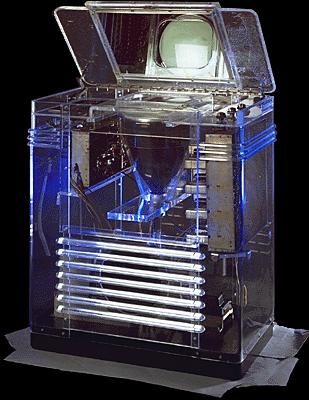
HCI includes graphical interfaces, physical controls, voice interaction, mobile devices, collaborative services and systems that perform work on a person’s behalf. It draws on computing, psychology, design, ergonomics and social inquiry. These perspectives meet around a practical question: how should a system fit the people, tasks and circumstances in which it will be used?
This is also an engineering question. A system must work, but its users must be able to make it work for their purposes. A correct function hidden behind an incomprehensible workflow is an incomplete solution. We therefore need both knowledge of what the technology does and evidence of what people can accomplish with it.
2 Safety includes the whole task
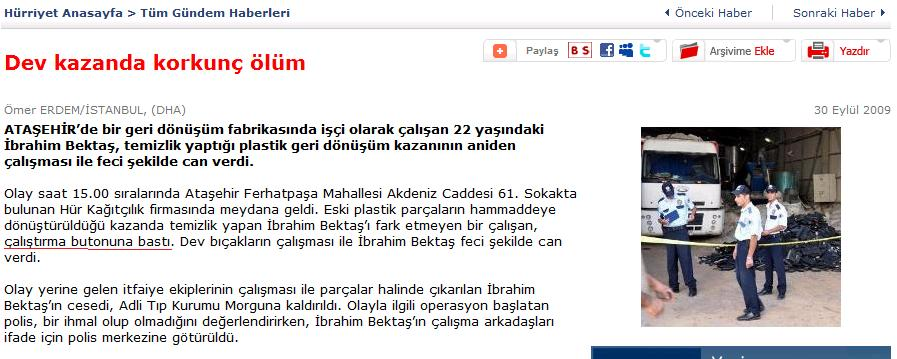
The newspaper case discussed in class concerns a worker cleaning inside an industrial machine when it started. It directs attention to an easily overlooked part of design: equipment is not only operated under normal conditions. It is cleaned, adjusted, unblocked and maintained. Those activities change where people are, what they can see and which actions are safe.
A warning is one possible intervention, but the design space also includes guards, interlocks, control placement and maintenance procedures. The useful question is how the system prevents or interrupts hazardous operation during the actual task. A paper cutter, for example, can use separated two-hand controls to keep the operator’s hands away from the cutting area during activation. The protection depends on the complete arrangement and its use, including other people near the machine.
Human factors therefore extends beyond making buttons attractive. Physical reach, visibility, workflow, coordination and recovery all matter. When a difficult interface is encountered repeatedly, people may develop workarounds. Understanding why a workaround makes local sense can reveal a conflict between the formal procedure and the work that must be completed.
For an HCI analysis, begin by describing the activity and the hazardous transition. Who is exposed? Who can start the machine? What information identifies the current state? What must happen before operation is possible? This produces a more useful design discussion than simply deciding that the operator should have paid greater attention.
3 Air Inter: a small display difference, a large consequence
The Airbus A320 panel used the same controls and display location for two modes. Flight path angle expressed a descent angle; vertical speed expressed a descent rate. In the original display, −3.3 represented an angle of −3.3°, while −33 represented a vertical speed of −3,300 feet per minute. Investigators considered inadvertent selection of vertical-speed mode highly probable in the Air Inter accident.
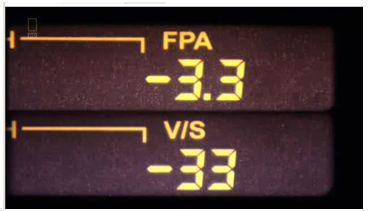
After the accident, the vertical-speed display was changed to show the full value: −3300 instead of −33. The extra zeros made the two modes more visually distinct. This is a concrete design response: represent the command so that its meaning is easier to distinguish.
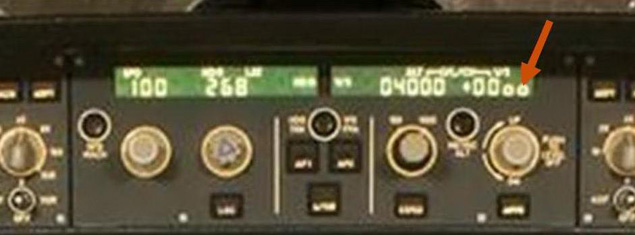
A mode changes the meaning of an action or representation. In everyday software, the same gesture may move an object in one tool and draw a new object in another. A number without a clear unit may express a quantity, a percentage or a limit. The design problem is to make the active meaning visible at the moment of action and support checking the result.
For your own designs, examine values together with their units, labels and surrounding state. Ask whether similar-looking states imply very different consequences. A change in representation can reduce the effort required to distinguish them, especially when a person is also handling other demands.
4 People, technology and organization
Interaction takes place within a larger system. A service employee may use a customer database while listening to a visitor, checking a paper document and coordinating with a colleague. Counting clicks on the database alone misses much of the work. The screen might be efficient in isolation while the complete service remains slow because information must be entered twice.
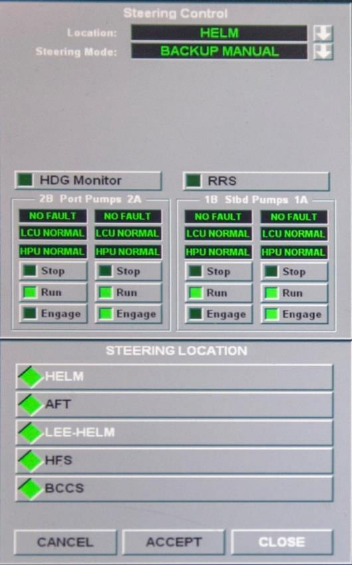
The USS John S. McCain collision provides a more demanding example of this broader view. The NTSB report discusses control transfer, steering and throttle arrangements together with training, procedures and oversight. For interface analysis, the important questions include who currently has control, how a transfer is understood by the team, and how operators recognize the state of the system.
These cases introduce four connected elements: people, tasks, technology and context. People bring abilities, experience and responsibilities. Tasks concern the outcomes and activities being pursued. Technology supplies representations and actions. Context includes the physical, social and organizational conditions of use. Changing one element can change the suitability of the whole design.
A useful design statement names all four. “An occasional student user submits a print job at a shared kiosk between classes” is more informative than “a user clicks Print.” It tells us something about frequency, privacy, time pressure and the shared environment before we draw a screen.
5 Usefulness, usability and experience
Usefulness concerns whether a system supports a worthwhile purpose. Usability concerns how well specified people can achieve specified goals in a specified context. The distinction matters: a beautifully organized application can solve the wrong problem, while a valuable service can remain unnecessarily difficult to operate.
Three complementary dimensions make usability concrete. Effectiveness concerns successful and accurate accomplishment. Efficiency concerns the resources used in relation to that accomplishment. Satisfaction concerns people’s experience and judgments of use. Each needs a task and context before it becomes a meaningful measure.
| Dimension | Printing example | Evidence |
|---|---|---|
| Effectiveness | The intended document is printed with the correct pages, copies and settings. | Inspect the output and record independent completion. |
| Efficiency | The correct job is completed with reasonable effort and time. | Measure time, unnecessary actions and assistance. |
| Satisfaction | The person feels able to understand and control the task. | Ask about confidence, ease and frustration after use. |
A faster result is not automatically better. If one interface produces an incorrect document quickly, its time score does not compensate for failure. Equally, a design that forces people through many confirmations may be effective but burdensome. Interpret the measures together and report which outcomes they refer to.
User experience extends across anticipation, interaction and what follows. A booking service can have a clear form but still create anxiety if confirmation never arrives. A pleasing visual style may improve initial impressions without fixing an ambiguous cancellation policy. Experience includes meaning, expectations, confidence and emotional responses as well as the mechanics of task completion.
Learnability and retained skill also matter. A tool used daily by experts can justify learning a compact notation. A kiosk used once each semester should help people recognize their options without recalling a procedure from months earlier. “Easy to use” is therefore the beginning of an investigation, not its final conclusion.
6 Turn qualities into observable criteria
Design goals such as “simple,” “intuitive” and “efficient” need operational definitions. Suppose a room-booking service aims to be easy for occasional users. One useful task is to reserve an available room for a specified time and verify the reservation. Success requires the right room, date and time, plus a correct understanding of whether the reservation is confirmed.
Before testing, decide where timing begins and ends, what counts as a critical error, whether help is allowed, and how partial completion is recorded. Otherwise two evaluators can observe the same session and assign different outcomes. Define a completion criterion that corresponds to the user’s goal rather than merely the last button press.
| Vague claim | More useful formulation |
|---|---|
| The form is clear. | Users can identify required information and explain the next step. |
| The service is fast. | Users complete a correct booking with less time or effort under comparable conditions. |
| The confirmation works. | Users correctly distinguish a submitted request from an approved reservation. |
| Users like it. | Post-task responses describe confidence and ease; these are compared with observed performance. |
Acceptance targets can be set for a project, but they should have a reason. A target suitable for an optional entertainment feature may be inappropriate for a critical work process. At this stage, the central habit is to specify the outcome, the people and the conditions before choosing a number.
Software testing and usability evaluation answer related but different questions. A test can confirm that valid form data reaches the database. Observation can reveal that users select the wrong date or interpret “Request submitted” as an approved booking. Both findings concern quality, and neither replaces the other.
7 Goals, tasks and operations
A goal is an intended outcome, such as obtaining two printed copies of a report. A task organizes the activity needed to achieve it, such as selecting the file, choosing settings, submitting the job and collecting the output. Operations are the particular actions through which the task is performed: clicking a button, turning a dial or speaking a command.
Keeping these levels separate prevents a common design mistake: treating the existing sequence of operations as the requirement. If users currently copy information between two screens, the requirement may be to keep records consistent. A redesign might remove the copying activity entirely instead of making its buttons larger.
People also differ along more than one dimension. A domain expert can be unfamiliar with a particular application. A frequent application user may know little about an unusual business case. A person who rarely uses a service may still have excellent general computing skills. “Novice” and “expert” become useful only when we say what knowledge or experience they describe.
Record the roles that matter to the activity. The direct operator, the recipient of a service and the person responsible for administration may have different priorities. A self-service kiosk that saves staff time but makes customers abandon their tasks has shifted work rather than simply improved it.
8 Context becomes a design requirement
A quiet desk and a busy public counter can make the same interface feel very different. Noise affects speech input. Interruptions make it harder to resume a partly completed task. Lighting changes readability. A shared screen affects privacy, and a queue changes how comfortable people feel about exploring options.
Context is useful when it leads to a traceable requirement. If users are frequently interrupted, the interface may need a visible summary and a safe way to resume. If information is sensitive, the design may need to conceal it from bystanders and remove it at the end of a session. Each requirement should connect to evidence about the activity.
A scenario provides a concrete way to reason about these connections. An occasional user arrives with a report on a USB drive, needs two duplex copies and has a short interval before class. The scenario does not prove that every user behaves this way. It gives the team a shared situation against which to examine decisions, and it identifies assumptions that user research should investigate.
Separate what was observed from your explanation. “The participant pressed Print twice” is an observation. “They did not understand the queue state” is an explanation. “Show a persistent job-status panel” is a proposal. Keeping those statements distinct makes it easier to collect evidence that could support or challenge the explanation.
9 Choosing an interaction style
Interaction styles distribute work differently between the person and the system. A command interface asks people to express an action in a notation. Menus and forms expose alternatives and structured fields. Direct manipulation supports acting on visible objects with immediate feedback. Speech permits expression without necessarily using hands or a keyboard. Delegation asks a system to carry out a broader intention.
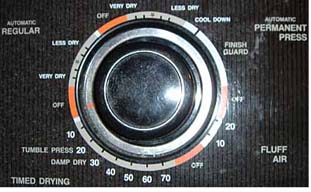
Commands can be concise, repeatable and composable, especially for frequent work. They also require knowledge of syntax and available operations. A menu can make alternatives discoverable, but a very large menu creates a search problem. A form can expose required information while imposing an order that does not match how users obtain it.
Direct manipulation is valuable when the relationship between an object and an action is easy to perceive. Seat-shaped adjustment controls, for example, connect the control’s structure with the part of the seat being moved. The correspondence reduces translation between “what I want to change” and “which control should I use.” Feedback still matters: the person must see or feel the result.
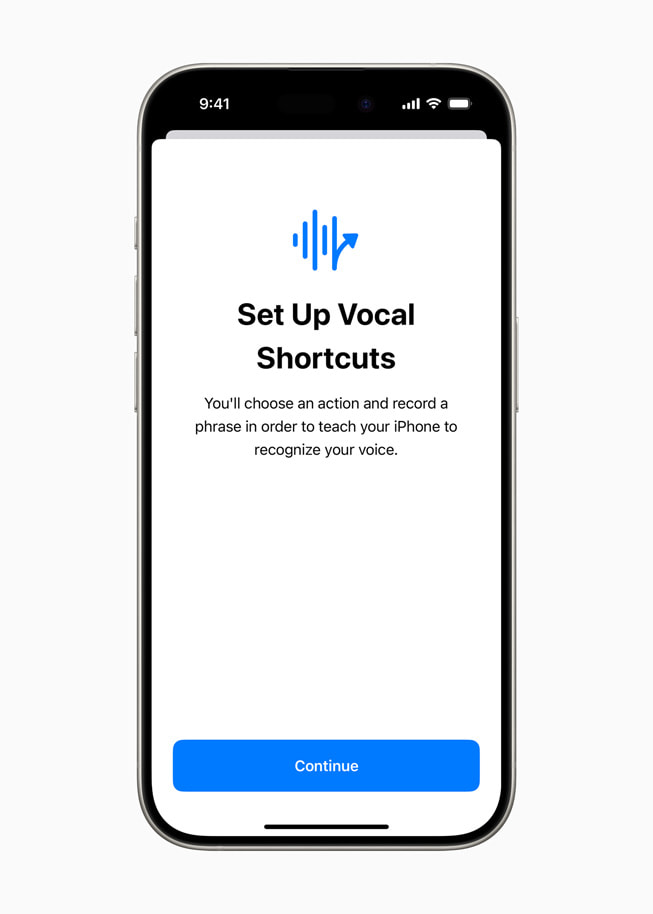
Speech can support hands-free operation and access for people who find other inputs difficult. Apple’s 2024 Vocal Shortcuts announcement illustrates assigning an utterance to an action. The design questions include discoverability, recognition feedback and correction, as well as whether speaking is suitable in the current setting.
There is no universally best style. Compare alternatives by asking how the person specifies the goal, checks progress and recovers from an unwanted outcome. The right choice depends on frequency, expertise, complexity, available attention and the consequences of an error.
10 A representation is designed for a task
A geographic map preserves spatial relationships useful for judging location and distance. A schematic transit map emphasizes connections, line identity and transfer stations. Distorting geographic shape can improve route planning because the representation gives priority to the relationship needed for that task.
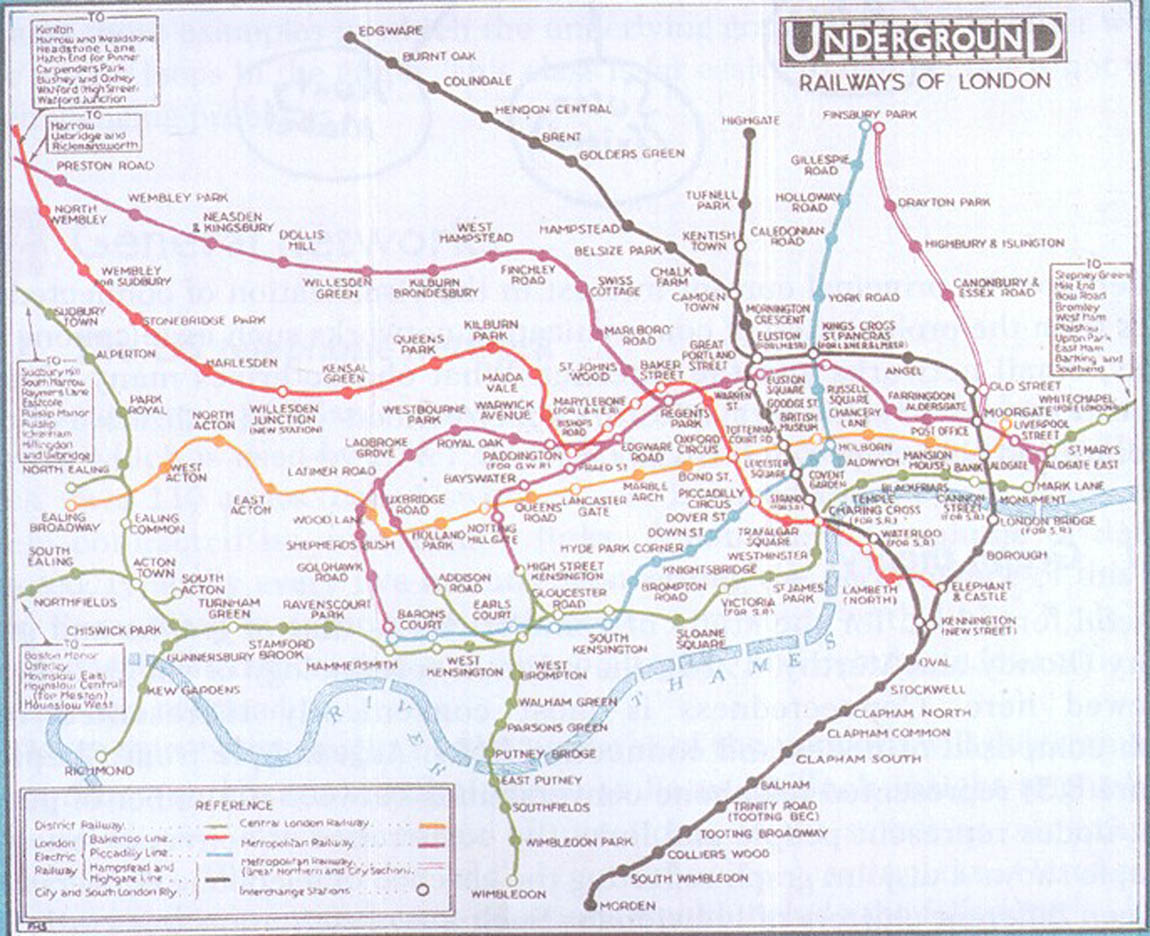
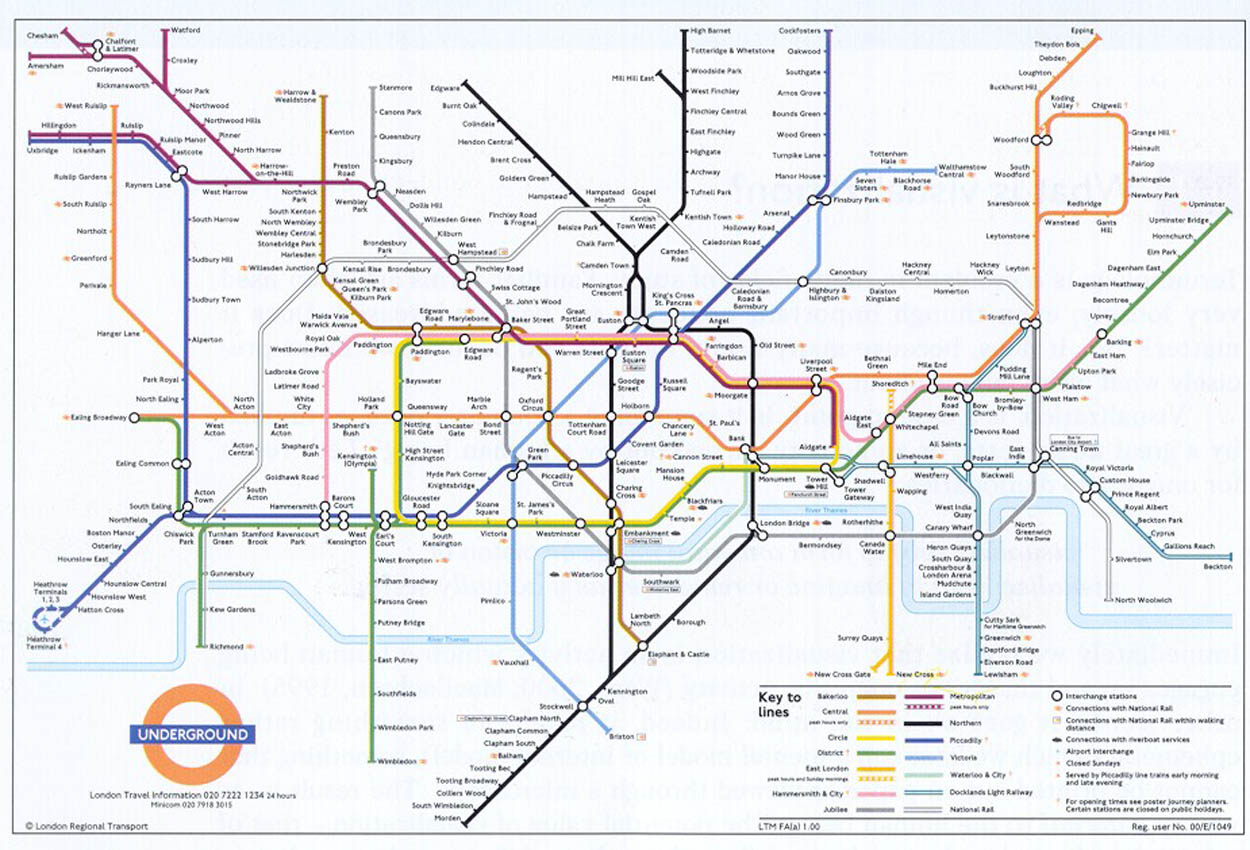
Ask a traveler to choose a sequence of lines and transfers, and the schematic may be more helpful. Ask whether walking between two places is practical, and geographic distance becomes important. The same data can support different questions through different representations.
This principle applies to dashboards, menus and workflows. A design cannot emphasize every property equally. Decide what users need to notice, compare or act upon, then choose a representation that supports those operations. Evaluate it with the intended task rather than judging it only as a picture.
The map comparison also explains why visual simplification requires care. Removing detail can reduce clutter, but removing a relationship essential to the task can make the display misleading. The design argument should identify what is preserved, what is deemphasized and why that choice fits the activity.
11 Delegation changes the interface problem
When a system acts on a broad request, the user may specify an outcome without selecting every intermediate operation. This can reduce routine work, but it creates new questions about interpretation, progress and intervention. Has the system understood the request? What will it do next? Which actions need review? Can the person stop or correct the work?
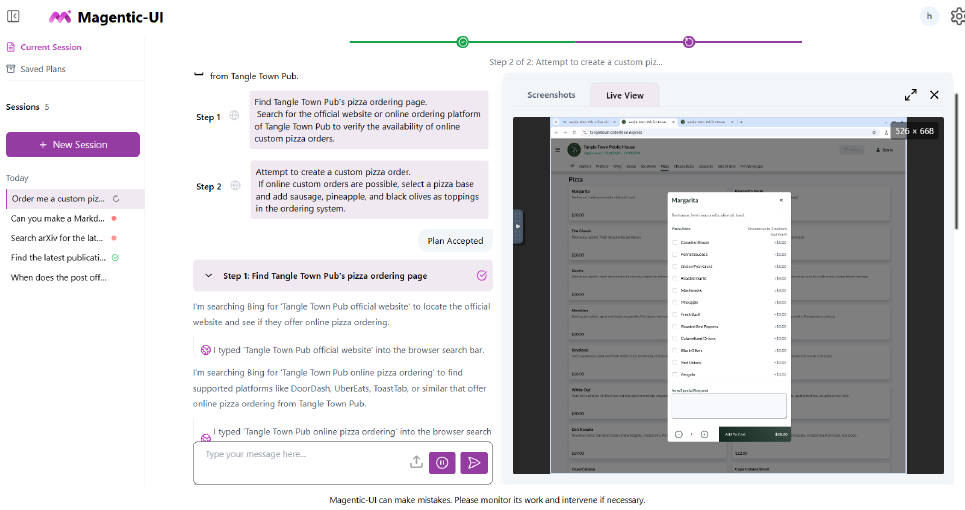
A visible plan makes a proposed course of action inspectable. A shared workspace can let a person relate an action to the page or object being changed. These mechanisms do not by themselves establish that an agent is reliable. They create opportunities to understand and direct its behavior.
For evaluation, consider both task accomplishment and the work of supervision. An automated system might finish quickly while demanding frequent checking. Another might make its uncertainty and progress clear enough that intervention is effective. The user’s ability to recognize a problem and recover is part of the interaction, even when the system carries out most operations.
Week 11 develops human–AI interaction in detail. Here the connection is foundational: command interfaces, forms and delegated systems all require a way to express intentions, interpret state and manage consequences.
12 Human-centred design is an iterative process
Human-centred design connects understanding use with creating and evaluating alternatives. A practical cycle has four activities: understand the context of use, specify user requirements, produce design solutions, and evaluate those solutions. Findings feed into another iteration; they can change a screen, a requirement or the original understanding of the problem.
| Activity | Question | Possible output |
|---|---|---|
| Understand use | Who is doing what, where and under which constraints? | Observations, interviews and task descriptions. |
| Specify requirements | Which needs and outcomes should the design support? | Traceable requirements and success criteria. |
| Produce alternatives | What arrangements could support those outcomes? | Sketches, scenarios, prototypes and flows. |
| Evaluate | What happens when the alternatives meet the task? | Findings, explanations and priorities for revision. |
User involvement is useful before a layout exists. A person may reveal that a proposed feature addresses a rare exception while ignoring the daily bottleneck. Observing work may show that an apparently unnecessary paper note supports coordination between people who do not share a screen.
Produce alternatives before committing. For printing, one design might use a compact settings form, another a step-by-step sequence, and another a document preview with editable settings. Each distributes attention and effort differently. Comparing alternatives makes the trade-offs explicit.
Prototype fidelity should match the question. A paper sketch can expose confusing labels and ordering. A clickable prototype can investigate navigation and state transitions. A functional prototype may be needed to examine response time or a real device interaction. More polished is not always more informative, especially if polish makes an untested decision seem fixed.
Evaluation methods also answer different questions. Inspection uses design principles and expertise to identify likely issues. Observed use reveals what participants do with a task. Field study examines activity in its working context. Later lectures develop these methods; Week 1 establishes why evaluation belongs throughout design.
13 Worked case: two duplex copies
Imagine a shared university printing kiosk. A student has a six-page report and needs two copies, printed on both sides of the paper. This is a fictional classroom case used to connect requirements, interface decisions and evaluation.

The goal is the correct physical output. Selecting a file and pressing Print are intermediate steps. Assuming the report has six pages and no separator sheets, one duplex copy requires three sheets. Two copies therefore require six sheets in total. There are twelve printed page impressions across those sheets.
| Setting or result | Required value |
|---|---|
| Document | The intended six-page report. |
| Copies | 2 complete copies. |
| Sides | Duplex: print on both sides. |
| Paper use | 3 sheets per copy × 2 copies = 6 sheets. |
| Completion | Correct output collected; no unintended extra job. |
This calculation can become useful feedback. A summary stating “2 copies · double-sided · 6 sheets” lets the person check the combined consequences of several settings. A preview can show order and orientation. The interface should also explain what happens after submission: whether the job is queued, processing, completed or needs attention.
Begin with effectiveness: did the person obtain the intended output without assistance? Then examine efficiency: how much time and effort did correct completion require? Finally ask about confidence and clarity. A participant who gets the right pages but cannot tell whether another job is pending has a remaining interaction problem.
Now suppose an observation shows a person pressing Print again, followed by two jobs in the queue. Several explanations are possible. The initial feedback may have been missed; the person may have interpreted a delay as failure; or they may have thought each press requested one copy. A redesign should respond to a supported explanation rather than assuming that repetition proves impatience.
14 From observation to a testable redesign
A candidate redesign combines three elements: an explicit output summary before submission, persistent job status after submission, and a way to inspect or cancel an unintended pending job. Each element has a purpose. The summary supports checking settings, status supports understanding progress, and recovery limits the consequences of an error.
Simply disabling Print after the first press is incomplete. It may prevent an immediate duplicate while leaving the person unsure whether anything happened. A state such as “Job received — waiting for printer,” with a visible job identifier and settings, gives the disabled control a comprehensible meaning. Recovery should reflect what the printer can actually stop; the interface must distinguish a queued job from pages already printed.
| Observation | Possible explanation | Design response | Evaluation focus |
|---|---|---|---|
| Print pressed twice | First submission had no noticeable feedback | Persistent received/queued state | Can users explain what is happening? |
| Wrong number of copies | Copies confused with individual pages | Output summary and preview | Is the final output correct? |
| User leaves before completion | Completion state is unclear | Visible progress and collection instruction | Does the user collect the intended output? |
| Unwanted job remains | Recovery is difficult to locate | Job list with available cancellation | Can users identify and recover from the extra job? |
To compare the original and revised designs, use equivalent tasks and consistent instructions. Decide how assistance is handled and record completion, errors, extra submissions, time and user explanations. If the same person uses both designs, practice can affect the second attempt. A comparison should account for order rather than attributing every improvement to the redesign.
Do not collapse results into a single attractive number. Fewer duplicate jobs may coexist with longer completion time because people inspect the summary. That extra time may be worthwhile if it prevents wasted printing. Report the trade-off in terms of the task and its consequences.
Iteration can also change the problem definition. Field observation might show that the longest delay comes from incompatible files rather than copy settings. The next design effort may then need to address file preparation and error recovery. Human-centred design remains responsive to what is learned.
15 Review and practice
Use these questions for self-study. Try answering before opening the worked explanation.
Why is a technically correct interface not necessarily usable?
It may implement the intended function while making it hard for people to find, specify or verify the action. Functional tests and evidence from use address different parts of quality.
What changed in the Air Inter display, and why is it instructive?
Vertical speed was displayed as the full value, such as −3300 rather than −33. The difference between an angle and a descent rate became easier to see. The example shows how representation can support recognizing the meaning of a command.
Can a person be both expert and novice?
Yes. Expertise is relative to a domain or system. An experienced clinician can be unfamiliar with a new records application, so domain knowledge does not remove the need for understandable interaction.
Why is “the user clicked Print” a weak success criterion?
It records an operation rather than the goal. The required document, settings, number of copies and physical output may still be wrong.
How many sheets are needed for two duplex copies of six pages?
Three sheets per copy, therefore six sheets total, assuming no separator sheets. The job contains twelve printed page impressions.
Does pressing Print twice prove that the person misunderstood copies?
No. It is an observation compatible with several explanations, including weak feedback or uncertainty during a delay. Ask what the person understood and inspect the sequence before choosing a redesign.
Which map is better: geographic or schematic?
The answer depends on the task. Route connections favor a schematic representation; walking-distance judgments need geographic relationships. Evaluate the representation against the intended question.
Why not always use the highest-fidelity prototype?
Fidelity should support the question. Early sketches can test concepts and labels quickly; realistic behavior is needed for other questions such as timing. Extra polish can cost time without improving the relevant evidence.
Does an agent remove the need for interaction design?
No. Delegation adds questions about expressing intent, inspecting plans, following progress and intervening. Task completion and the effort of supervision both matter.
What makes a redesign claim defensible?
It connects a specific goal and observed problem to a proposed mechanism and an evaluation criterion. It states the relevant users and context and interprets trade-offs rather than assuming every change is an improvement.
Practice: inspect a confirmation
Choose an everyday interface that submits a request: booking, ordering, uploading or printing. Describe the user’s goal and the states between submission and completion. Identify one place where the screen could be interpreted in more than one way. Propose a change and state what observation would show that it helps.
A strong response names the ambiguity precisely. For example, “Request submitted” may leave approval unclear. A proposal might distinguish “Awaiting approval” from “Confirmed” and state the next action. Evaluate whether people correctly explain the state and act accordingly; changing the wording alone is not proof of success.
16 Further reading and the next lecture
The course chapter is the main Week 1 reading. For a second perspective, consult Donald Norman’s The Design of Everyday Things (revised edition, 2013), especially its opening discussion of everyday interaction. Detailed perception, attention, working memory, long-term knowledge and mental models follow in Week 2.
Scott Klemmer’s interaction-design teaching provides a useful route into observation, prototyping and evaluation. Explore the Stanford HCI course collection and UC San Diego Design Lab as further study resources.
Case sources
- FAA Lessons Learned: Air Inter F-GGED — original displays, accident discussion and the subsequent display change.
- NTSB, Collision between USS John S McCain and Tanker Alnic MC, MAR-19/01 (2019) — control, coordination and organizational context.
- Apple accessibility announcement, 15 May 2024 — Vocal Shortcuts.
- Mozannar et al., Magentic-UI: Towards Human-in-the-loop Agentic Systems (2025) — an interface for human involvement in agentic work.
Teaching examples draw on Mehmet Göktürk’s HCI lectures, John Stasko and colleagues’ Georgia Tech CS/PSY 6750 introductory material, James Tam’s CPSC 481 material, and Brad Hemminger’s INLS 507 map comparison. The explanations and worked printing case are prepared for this course.
Closing video: confusing doors
Vox / 99% Invisible: It’s not you. Bad doors are everywhere. As you watch, identify the cue suggesting an action, explain why a written instruction may compete with the physical form, and propose a design change. This is a companion viewing suggestion.
In Week 2 we examine the human capabilities behind noticing, interpreting and remembering information. Those foundations will give us a more detailed explanation of why some representations and interactions are easier to understand than others.