CSE 101 · WEEK 03 · READING
Algorithms, decisions and loops
Describe a solution, follow its paths, and connect a flowchart to instructions that change a display.
Begin with everyday algorithms and flowcharts, then follow a straight-line display program before studying branches and loops. Figures link to the corresponding pages of the 62-slide lecture PDF. Everyday counts and C examples use decimal. VizMachine addresses, words and register values use hexadecimal. Try each Check question before revealing the answer.
1. A solution that someone can follow
Week 2 explained how a processor executes instructions. This week asks how we choose and organize those instructions to solve a problem. We will first reason about tea orders and paper folding, where the steps are easy to imagine, and then use the same control-flow ideas in a small machine program.
An algorithm describes how to solve a problem through precise, executable steps. Before choosing the steps, establish what information is available and what result is required. A program expresses an algorithm in a particular language, with the exact syntax that its implementation accepts.
Folding a paper bird makes this distinction concrete. The sheet is the starting material, the folded bird is the intended result, and the illustrations describe intermediate actions. Order matters: a fold may depend on a crease made earlier. Instructions also depend on shared meanings. “Make a valley fold” is useful only if the person following it knows that operation.
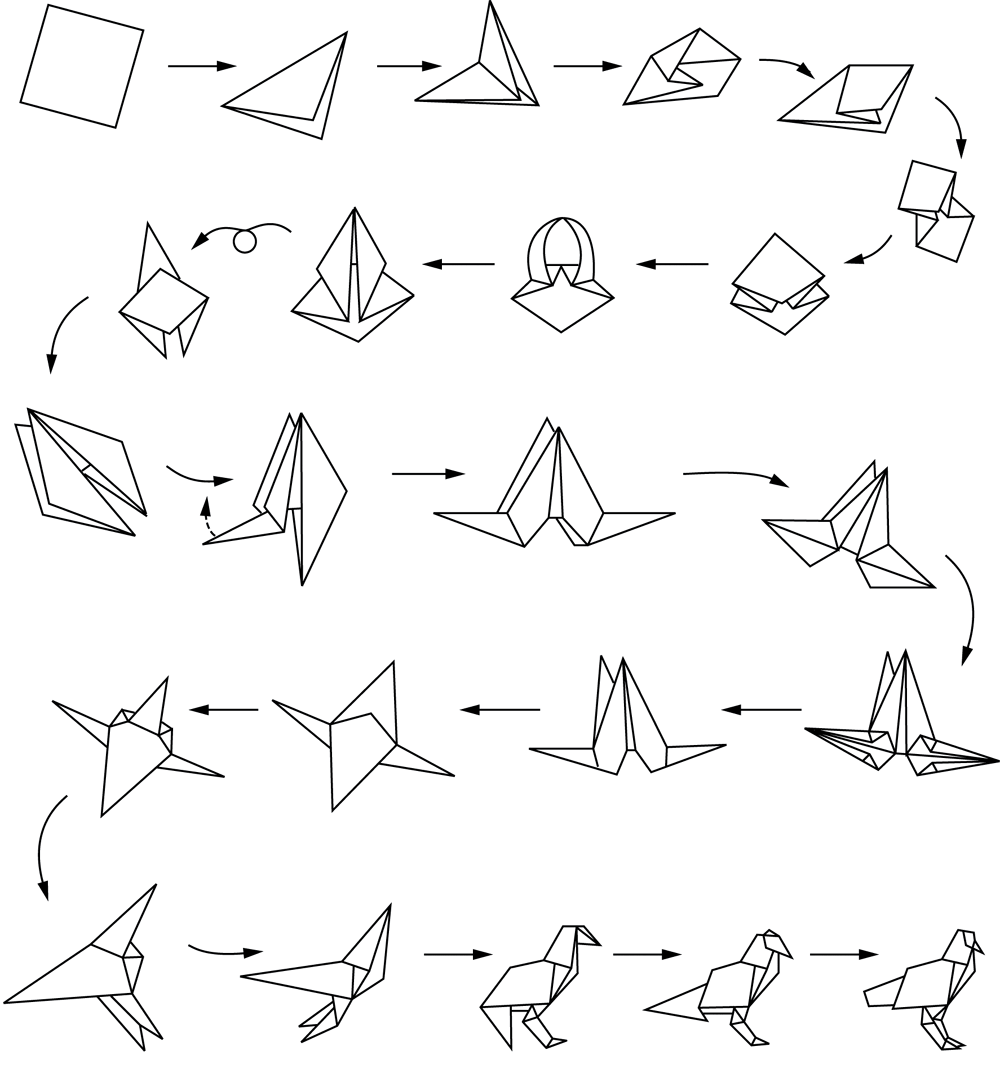
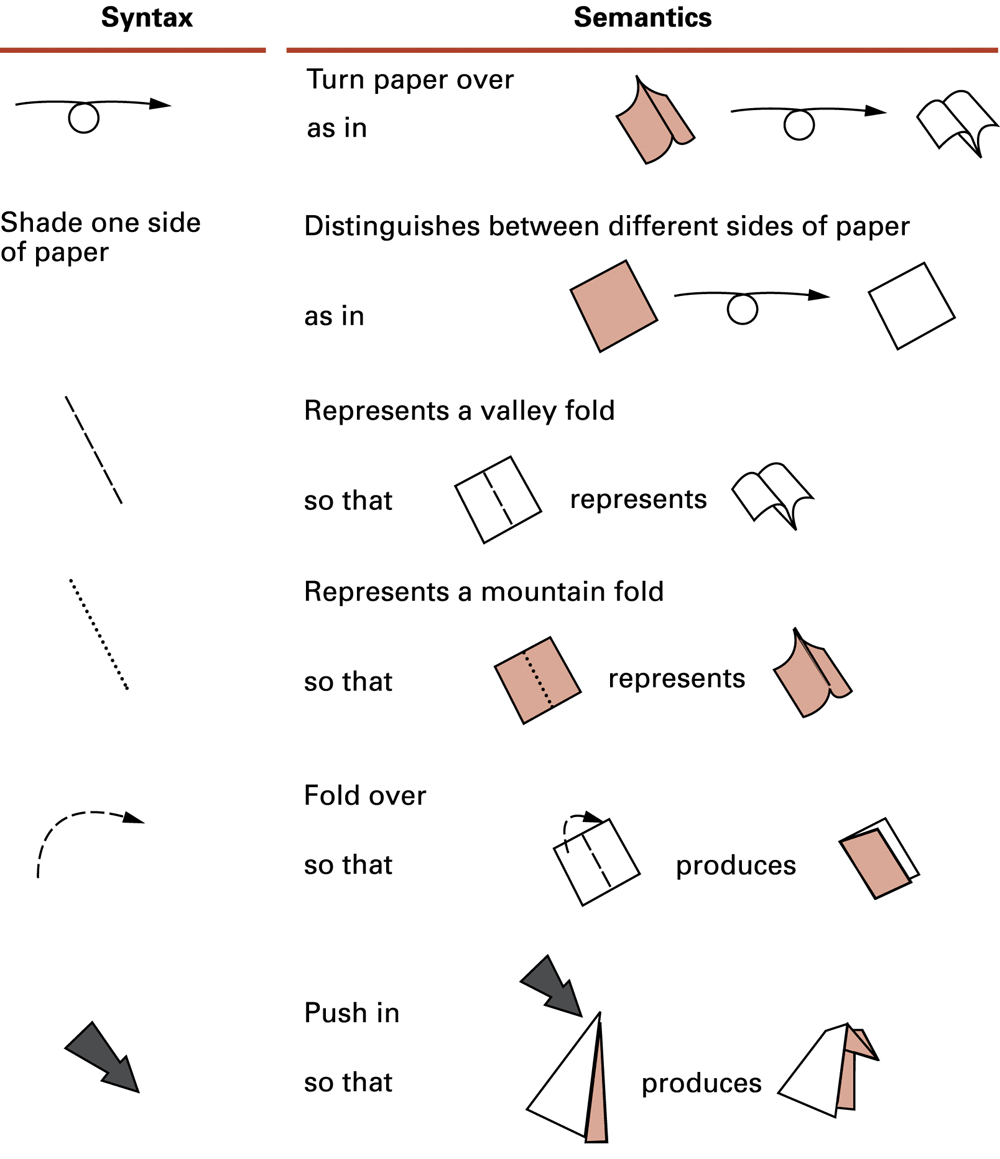
Origami figures retained from the instructor’s original Set 7, slides 5–6.
These basic operations are sometimes called primitives. What counts as a primitive depends on the person or machine carrying out the procedure. “Prepare tea” can be one step in an order-management algorithm, but it needs more detail when explaining preparation itself. A useful description chooses a consistent level of detail and expands any action whose meaning is uncertain.
Check: Does a numbered list automatically make a good algorithm?
No. Its steps may still be ambiguous, impossible to carry out, in the wrong order, or unable to finish. Numbering records an order; it does not establish that the procedure solves the stated problem.
2. Define the problem and assumptions
Consider a request to prepare n cups. The input is a nonnegative whole number and the relevant preferences. The required result is exactly n cups served correctly. Assume the cups, ingredients and equipment are available. These assumptions give the procedure a clear starting point; a shortage-handling procedure would require additional decisions.
“Make enough tea” leaves the quantity uncertain. “Prepare exactly n cups” identifies it. “Add some sugar” is also incomplete for a repeatable procedure; “add one spoon if sugar is requested” defines both the condition and action. Precision means making the decisions that affect the result explicit.
The kettle example introduces a repeated check: heat the water, check whether it has boiled, and if it has not, wait briefly and check again. Here the environment changes the water while the procedure waits. Termination depends on the assumptions that the heater works and the water can reach boiling. In the counter examples later, our own update changes the state that controls repetition.
Check: If n is zero, how many cups should the procedure prepare?
Zero. A correct procedure must handle this boundary case without making an unnecessary first cup. Testing the condition before entering the repeated work provides that possibility.
3. Three patterns and their flowchart symbols
Sequence performs actions in order. Selection chooses a path according to a condition. Repetition returns to an earlier test while work remains. These patterns can be combined: a repeated task can include a decision, and either side of a decision can contain a sequence of actions.
A flowchart makes these paths visible. A rounded terminal marks a beginning or ending, a rectangle describes an action, a diamond asks a question, and a parallelogram represents input or output. Arrowheads show the direction of execution. At a decision, read the condition and choose the appropriately labelled outgoing path.
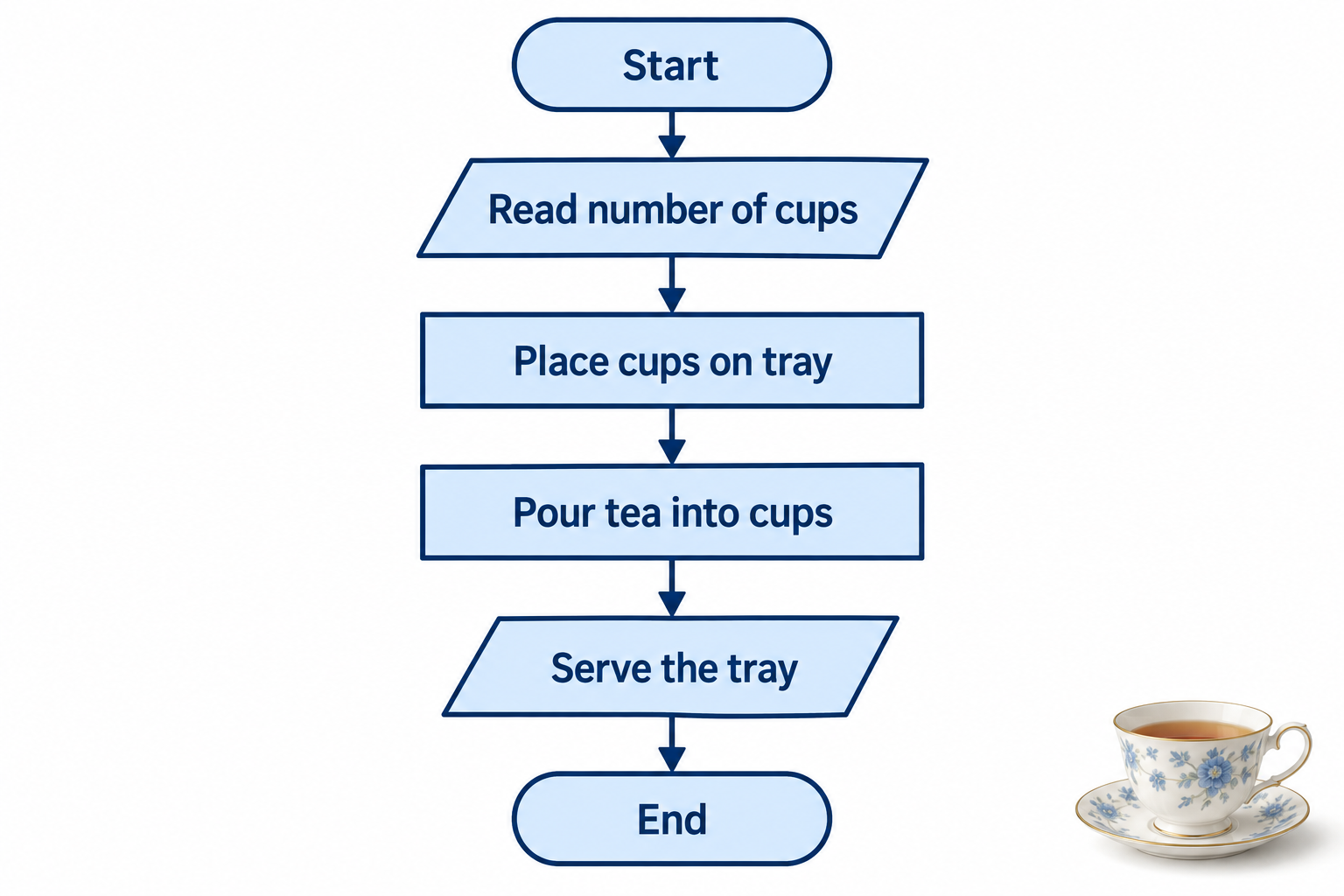
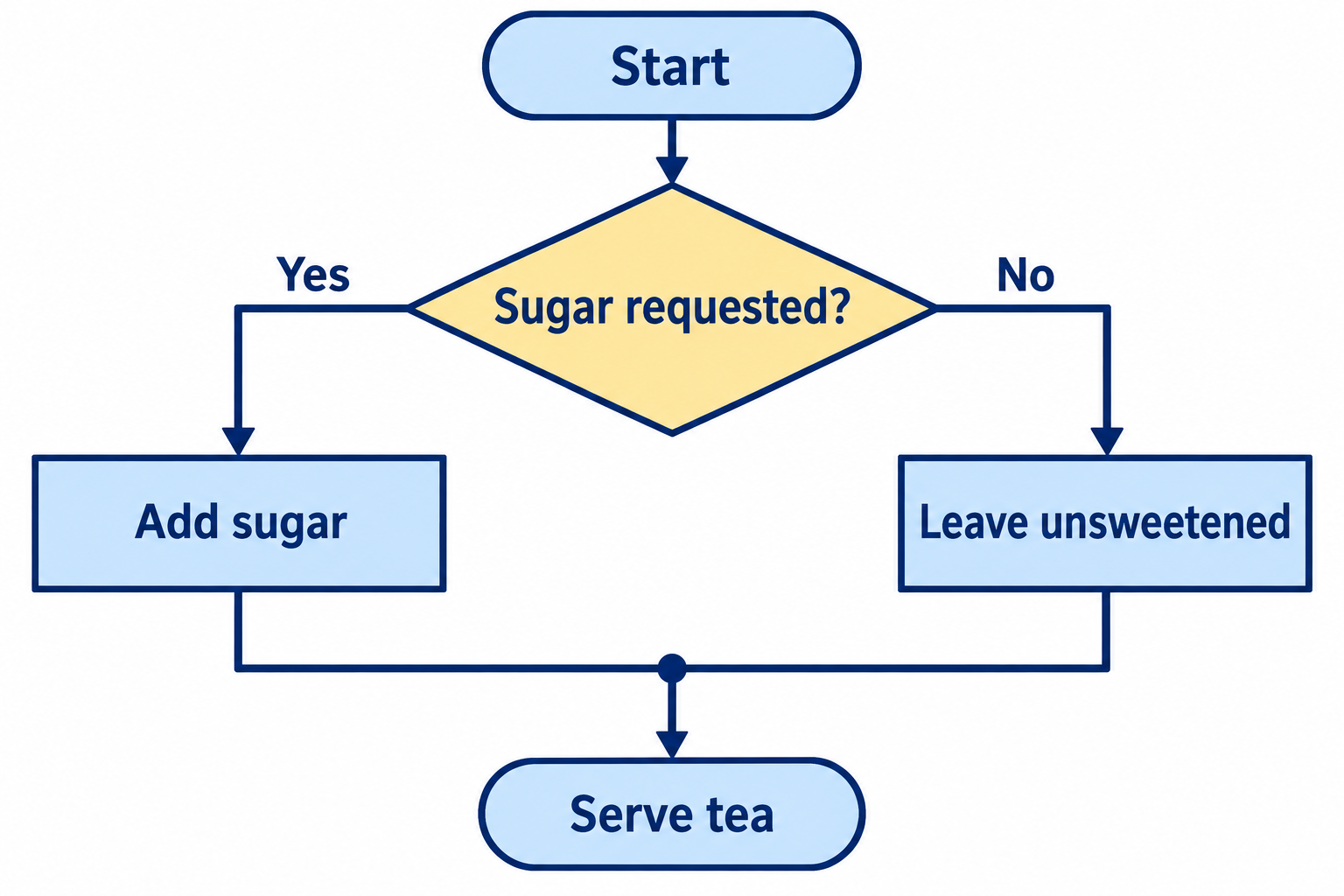
Two outgoing paths do not mean both execute. For one cup with one known sugar preference, follow one path. The point where the paths rejoin identifies the work that follows either choice.
Check: When sugar is not requested, do we skip serving as well?
No. The no-sugar path skips the sugar action, then rejoins the other path before serving. Reading where the paths merge is just as important as reading the decision.
4. A loop needs progress and an exit
To serve several cups, initialize served = 0. Before preparing another cup, test served < n. If the test is true, prepare and serve one cup, increase served by one, and return to the test. If it is false, finish.
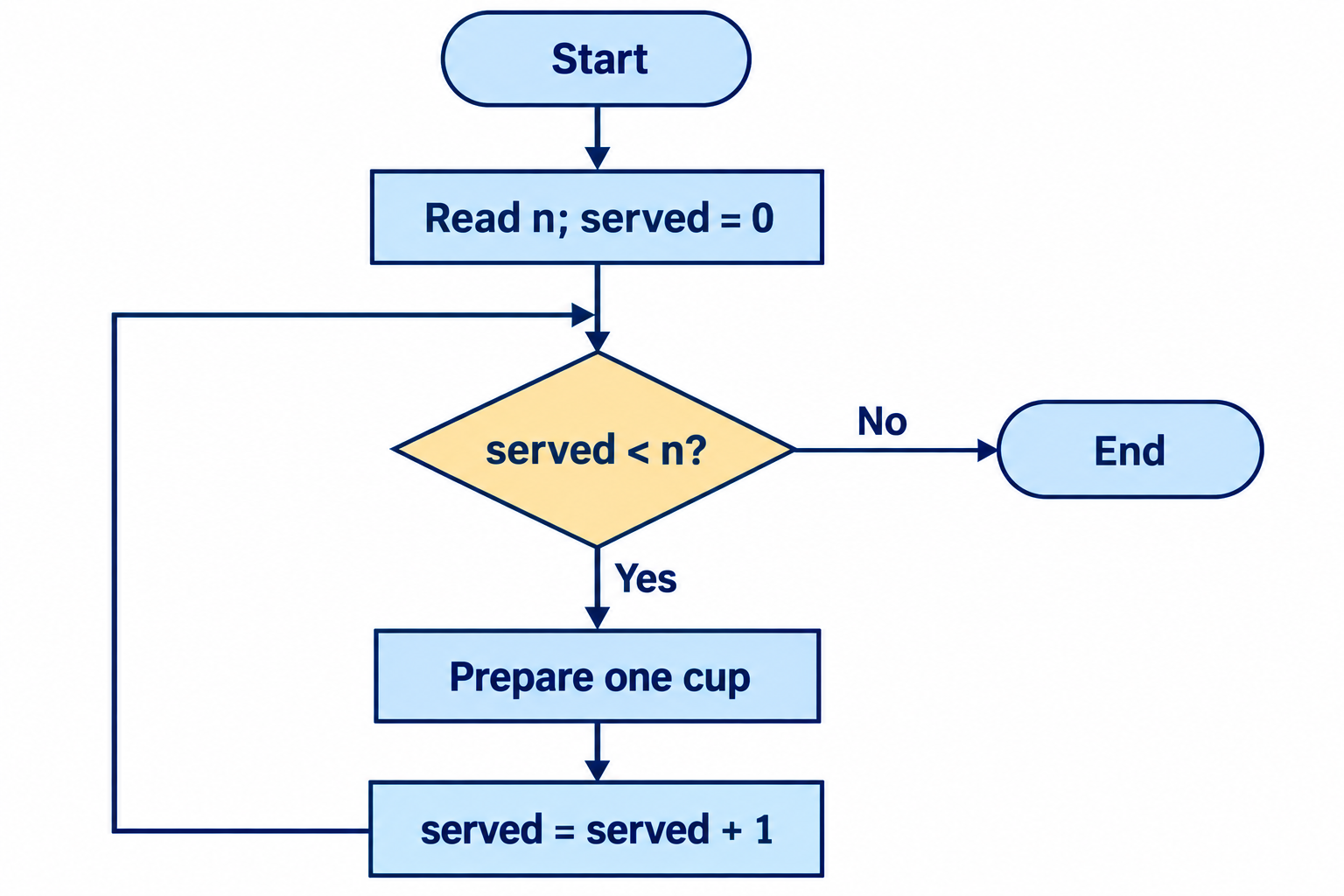
Tracing means following execution with concrete values, recording state changes rather than guessing from the intended result. For n = 3, the trace is:
| served before test | served < 3? | Action | served afterward |
|---|---|---|---|
| 0 | Yes | Prepare and serve cup 1 | 1 |
| 1 | Yes | Prepare and serve cup 2 | 2 |
| 2 | Yes | Prepare and serve cup 3 | 3 |
| 3 | No | Finish | 3 |
The body runs three times, but the condition is tested four times. The final false test is necessary to discover that the work is complete. For valid positive n, each completed cup decreases the remaining work n − served by one. That gives a reason to expect termination, provided each body action itself finishes.
Check: What changes if the update is omitted?
For n greater than zero, served remains zero. The test stays true, so the procedure keeps preparing cups. For n = 0, it still exits immediately. A bug can therefore be hidden by one test case and exposed by another.
5. A decision inside repeated work
Suppose three customers request sugar in the order yes, no, yes. The outer loop controls how many cups are served. Inside each repetition, the selection controls what happens to that particular cup. After either sugar choice, serve the cup and increase the count.
The resulting execution serves three cups and adds sugar twice. The sugar decision does not repeat by itself; the surrounding loop returns execution to the next cup. This distinction helps when reading nested structures: identify which condition controls the whole repetition and which condition selects an action within it.
A flowchart, pseudocode and a program can describe the same algorithm at different levels. The flowchart emphasizes paths; pseudocode names the actions without committing to all language rules; code provides a form the chosen system can execute. Translating between them requires preserving the decisions, updates and continuation points.
Check: For preferences no, no, no, how many times does the outer loop test its condition?
Four times when n = 3: three true tests and one false test. Sugar is never added, but three cups are still served. The inner choices do not change the outer stopping condition.
6. Readable assembly and machine words
The tea-service examples let us describe an algorithm using familiar actions. To implement one on a machine, we must express its actions using operations that machine can execute. Keep the algorithm in view: decide what the program should accomplish before choosing registers or writing hexadecimal words.
VizMachine stores instructions as two bytes. We write each instruction word using four hexadecimal digits: the first identifies the operation and the remaining digits encode operands. The readable assembly below separates the operation, registers and addressing modes so that their roles are easier to see.
In our teaching notation, # marks an immediate value supplied inside the instruction, and $ marks a memory address. These symbols are a convention for this reading, not a universal assembly-language standard. The operands in this section remain hexadecimal.
| Machine word | Readable assembly | Meaning |
|---|---|---|
| 2130 | LOAD R1, #30 | Put the value 30 in R1. |
| 1130 | LOAD R1, $30 | Read the contents of memory address 30 into R1. |
| 31E0 | STORE R1, $E0 | Copy R1 into memory address E0. |
| 5112 | ADD R1, R1, R2 | Add R1 and R2, placing the byte result in R1. |
The actual assembler menu uses compact names and a three-digit operand. To enter LOAD R1, #30, select LOAD2 and enter 130. For LOAD R1, $30, select LOAD1 with the same operand 130. For the addition above, select ADD1 with operand 112. The readable notation explains the encoding; it is not text to paste into the menu.
Instruction addresses identify where instructions begin. With two-byte instructions starting at A0, the next starts at A2, then A4. The address printed beside a word is not part of that word.
Check: Memory cell 30 contains 7B. What do the two load instructions put in R1?
LOAD R1, #30 puts 30 in R1. LOAD R1, $30 puts 7B in R1. One uses the immediate operand as data; the other uses it as the location of data.
7. How VizMachine turns bytes into characters
Our simulator exposes one small teaching machine. We will use it to connect execution state to visible output; Week 4 will examine how an operating system shares resources among processes. In the course VizMachine, the Screen tab displays characters from a designated memory region.
The first row reads addresses E0–EF; the second reads F0–FF. Each row has sixteen positions, so the two rows use thirty-two cells. The simulator’s inherited help sentence says “last 16 addresses,” but its actual two-row display reads all thirty-two cells. Follow the address mapping here.
Storing a byte in a display cell changes what the display interprets there. The byte itself does not contain a drawing of the letter. For the characters in this exercise, the display uses the familiar ASCII character-code values:
| Character | Decimal code | Hexadecimal byte |
|---|---|---|
| H | 72 | 48 |
| I | 73 | 49 |
| O | 79 | 4F |
| K | 75 | 4B |
| Space | 32 | 20 |
Loading 48 into a register does not display H. A STORE must write that value to a displayed memory location. This is a simplified memory-to-display relationship; real display hardware has additional organization and software support.
Check: does decimal 48 represent H?
No. H has decimal code 72, which is hexadecimal 48. Decimal 48 is hexadecimal 30, the code for the digit 0. Keeping the number base explicit prevents this error.
8. Write and run the HI program
Our first machine problem needs only sequence: display H in the first position and I in the next, then stop. The output requirement determines the two destinations, E0 and E1. The character-code table supplies the values, 48 and 49. At the algorithm level, the steps are:
write the code for H to the first display position
write the code for I to the next display position
stop
Each write becomes a LOAD followed by a STORE because this machine copies the immediate value into a register before storing it in memory. Both writes use R1, but their destinations differ. There is no decision or return path, so each instruction executes once.
Reset the simulator’s memory and registers before entering the program. Put its bytes at A0–A9, then set PC = A0. Resetting after entry would erase the program, so initialize first. Keep code separate from the display region.
| Address | Instruction | Assembly | Meaning |
|---|---|---|---|
| A0 | 2148 | LOAD R1, #48 | Load literal 48 into R1. |
| A2 | 31E0 | STORE R1, $E0 | Store R1 in M[E0]. |
| A4 | 2149 | LOAD R1, #49 | Load literal 49 into R1. |
| A6 | 31E1 | STORE R1, $E1 | Store R1 in M[E1]. |
| A8 | C000 | HALT | Halt. |
Each instruction occupies two cells, one byte per cell. Enter the following ten bytes in consecutive locations:
Address: A0 A1 A2 A3 A4 A5 A6 A7 A8 A9
Byte:    21 48 31 E0 21 49 31 E1 C0 00
Opcode 2 loads a literal; opcode 3 stores a register. In 31E0, the digit 1 names R1 and E0 is the destination address. Predict each change, single-step the instruction, then inspect the register and memory. Switch to Screen to inspect the characters.
Check: why does the second instruction start at A2 rather than A1?
The first instruction occupies A0 and A1. The next two-byte instruction begins at A2. Starting at A1 would treat an operand byte as the beginning of another instruction.
9. Trace the result before looking at the screen
With registers and display memory initially zero, the program produces the following states. All entries are hexadecimal.
| Executed | Next PC | R1 | M[E0] | M[E1] |
|---|---|---|---|---|
2148 | A2 | 48 | 00 | 00 |
31E0 | A4 | 48 | 48 | 00 |
2149 | A6 | 49 | 48 | 00 |
31E1 | A8 | 49 | 48 | 49 |
C000 | AA | 49 | 48 | 49 |
H appears after the first STORE. The next LOAD changes R1 to 49 but leaves M[E0] at 48. Memory retains the copied value; it does not remain linked to the register. The second STORE produces I in the adjacent position.
This simulator advances PC while fetching an instruction, including HALT. Consequently, the stopped PC is AA, although no instruction at AA is executed. HALT also leaves the register and memory values available for inspection; it is not a reset.
Check: why does changing R1 to 49 not change the first displayed character from H to I?
STORE copied the earlier value 48 into M[E0]. Later changes to R1 do not alter that memory cell. Another STORE to E0 would be required to replace the first character.
10. Modify the output and diagnose mistakes
First change the message to OK while leaving it on the first row. The destination addresses are already correct; only the literal character values need to change. Next move HI to the second row. Its characters stay the same, but the destinations become F0 and F1.
Worked answer: display OK on the first row
Load at A0 and set PC to A0: 214F 31E0 214B 31E1 C000. The first literal is 4F for O; the second is 4B for K. The STORE instructions retain E0 and E1.
Worked answer: display HI on the second row
Use 2148 31F0 2149 31F1 C000 at A0. If you have not cleared the display memory, characters from an earlier first-row run may still be visible. Reset before loading, or deliberately clear old output, when comparing runs.
Now consider the mistake 1148 in place of 2148. Opcode 1 reads memory at address 48; opcode 2 uses the literal value 48. If M[48] is zero after initialization, the mistaken program stores zero at E0 and the simulator shows no character there. The instruction is valid, but it obtains the wrong input.
Check: what if the program uses 31E0 for both STORE instructions?
The second STORE overwrites the first character. At the end M[E0] is 49, so the first position shows I, while M[E1] remains at its previous value. With reset memory it remains blank.
An optional arithmetic extension calculates the code of the next character. Load R1 with 48 and R2 with 01, add them into R3, and store R3 at E0. The result is 49, so the display shows I.
Worked answer: calculate and display the next character
Use 2148 2201 5312 33E0 C000 at A0. Instruction 5312 means R3 gets R1 + R2. The following STORE writes R3 to E0. This demonstrates numerical operations on a character code, not an understanding of alphabetic meaning by the CPU.
11. A branch selects the next instruction
The HI program always followed the next instruction in order. Selection and repetition need more control: sometimes we must skip an alternative, and sometimes we must return to a test. A branch implements that change of path by choosing the next instruction address.
Normally, execution continues with the next two-byte instruction. A branch can replace that next address. VizMachine’s word BRXY compares register R with register R0. If they are equal, execution continues at address XY; otherwise it continues sequentially.
We write B1AE as JUMP R1, $AE. The comparison with R0 is implicit: this instruction means “if R1 equals R0, go to AE.” It does not compare R1 with AE. A word B0A6, written JUMP R0, $A6, always takes the branch because R0 equals itself.
| R1 | Equal to R0? | Next instruction address |
|---|---|---|
| 39 | No | A8 |
| 3A | Yes | AE |
A branch changes the program counter. It does not automatically change the register being tested. If a loop must make progress, another instruction needs to update the relevant state.
Check: Does JUMP R0, $A6 mean “jump only when R0 is zero”?
No. VizMachine compares the selected register with R0. Selecting R0 compares it with itself, so the branch is unconditional regardless of the value stored in R0.
12. Connecting a decision to its paths
Consider the pseudocode: if two stored values are equal, display Y; otherwise display N; then continue. The flowchart exposes an important requirement: the two alternatives must meet again after the choice. One output belongs to the true case and the other to the false case.
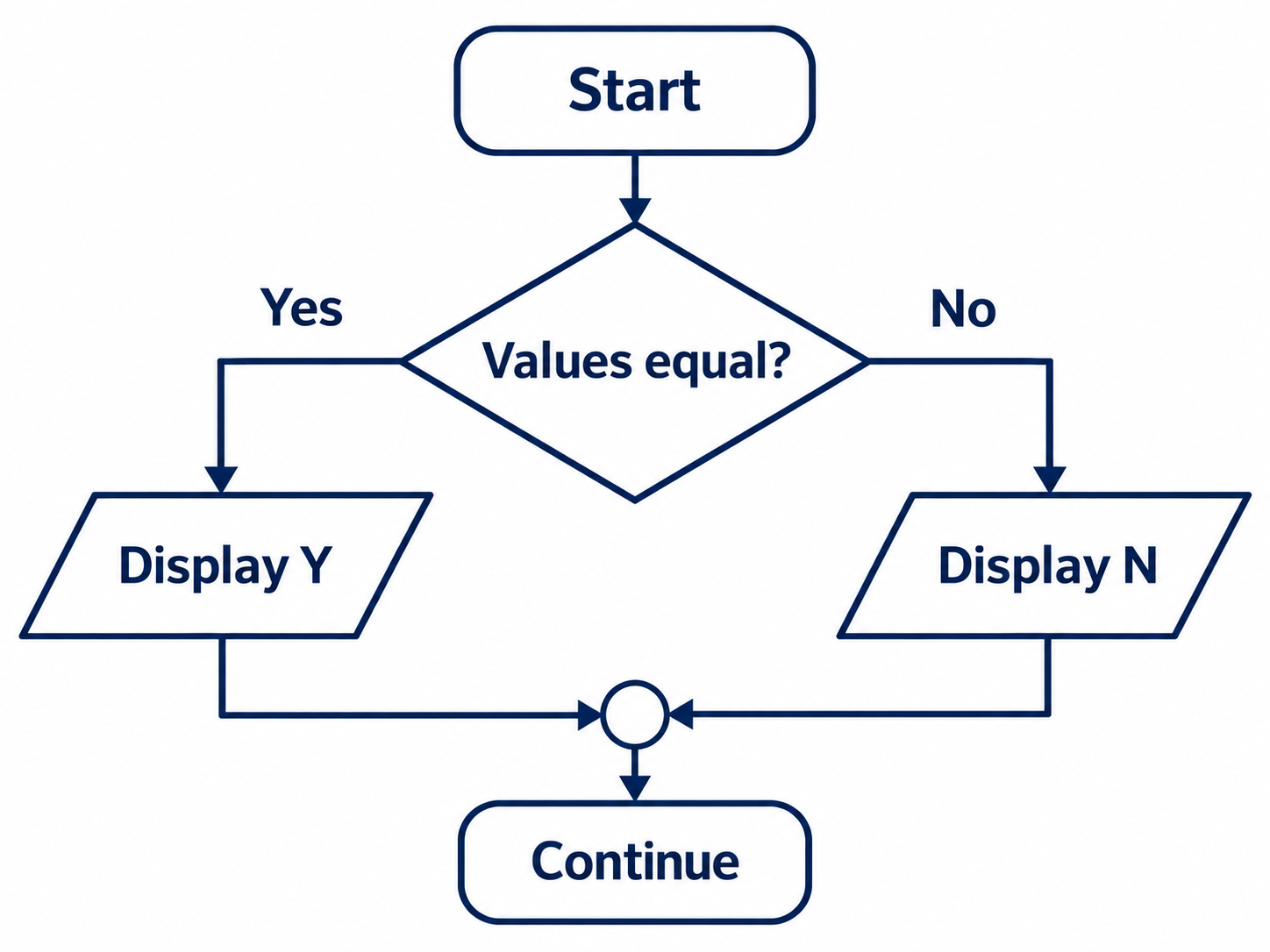
When implementing this structure with branches, the placement of instructions matters. If the true action simply falls through into the false action, both outputs could execute. A program must arrange its branches and continuation so that it follows the same paths as the algorithm.
Check: A test with equal inputs displays Y and then N. What should you inspect?
Inspect the continuation after the Y action. Execution may be falling into the N action instead of skipping to the shared continuation. Compare the actual next instruction addresses with the flowchart paths.
13. The four parts of a programmed loop
Initialization establishes the starting state. The test decides whether to enter another repetition. The body performs the work. The update changes the state before returning to the test. Identifying these parts helps translate a loop into machine instructions.
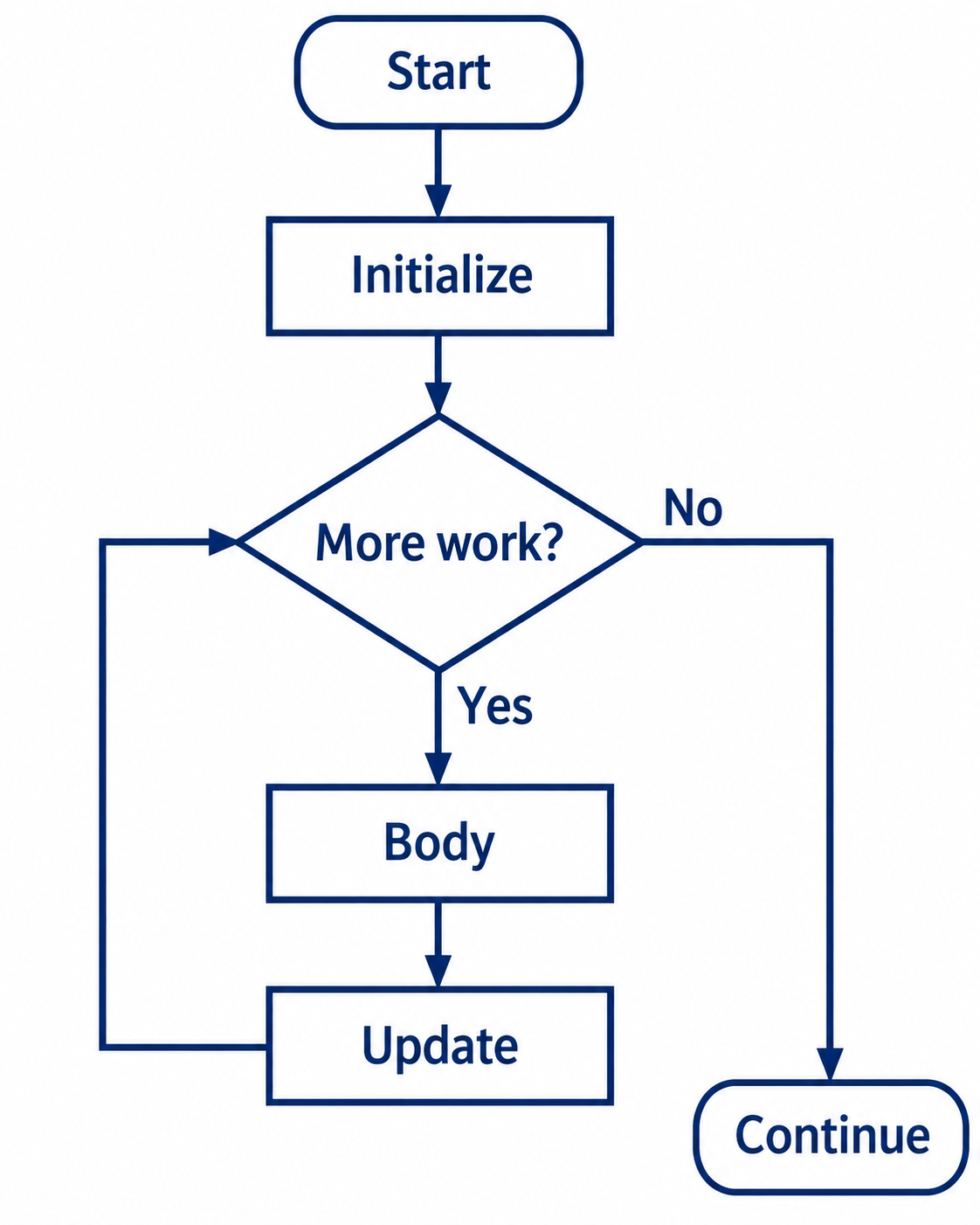
set the starting character
set the stopping value
while the character has not reached the stopping value:
    display the character
    advance to the next character
Testing first permits zero repetitions. Returning to initialization would instead reset the progress already made. The next program makes these relationships concrete with registers and addresses.
Check: Why is “repeat from the beginning” an unsafe description of a loop?
It does not identify which beginning. The loop must return to its test after the update. Returning to initialization can reset the counter and prevent termination. Name the continuation point explicitly.
14. A counter that updates one display cell
We can now extend the display idea into repetition. The HI program used two different cells; this algorithm reuses the first cell, E0, and changes its character each time. Its goal is to show the digits 0 through 9 in order and then stop. The character codes run from hexadecimal 30 for “0” through 39 for “9”.
The next code, 3A, is the colon character. We will use it as a stopping value and stop before storing it. The program repeatedly writes to E0, so each new character replaces the previous one in that cell. It does not write the string 0123456789 across a row.
| Register | Initial value | Role |
|---|---|---|
| R0 | 3A | Stop value for the equality test. |
| R1 | 30 | Current digit character code. |
| R2 | 01 | Increment used after each display write. |
Check: Why does loading R1 with 00 not display the digit zero?
00 is a different byte value from the character code 30. A number used for counting and a code interpreted as the printed character “0” are different representations. This program starts from character code 30.
15. The complete display counter
The initialization occupies A0–A4. The loop test is at A6, the body at A8, the update at AA, and the return branch at AC. The halt at AE is outside the loop body. All entries in the following table use hexadecimal machine values.
| Address | Word | Readable assembly | Effect |
|---|---|---|---|
| A0 | 203A | LOAD R0, #3A | Set the stopping value. |
| A2 | 2130 | LOAD R1, #30 | Set the first character. |
| A4 | 2201 | LOAD R2, #01 | Set the increment. |
| A6 | B1AE | JUMP R1, $AE | If R1 = R0, go to the halt. |
| A8 | 31E0 | STORE R1, $E0 | Display the current character. |
| AA | 5112 | ADD R1, R1, R2 | Advance the character code. |
| AC | B0A6 | JUMP R0, $A6 | Always return to the test. |
| AE | C000 | HALT | Stop execution. |
Open VizMachine and reset the machine and display memory before the experiment. Enter the program at A0, set the program counter to A0, and single-step. Starting at A6 would skip the initialization unless you had already set all three registers correctly.
In assembler mode, choose starting address A0 and enter the following operation/operand pairs in order:
| Opcode | Operand |
|---|---|
| LOAD2 | 03A |
| LOAD2 | 130 |
| LOAD2 | 201 |
| JUMP | 1AE |
| STORE | 1E0 |
| ADD1 | 112 |
| JUMP | 0A6 |
| HALT | 000 |
For byte-by-byte memory entry, the same program is:
A0: 20 3A 21 30 22 01 B1 AE
A8: 31 E0 51 12 B0 A6 C0 00
The labels A0 and A8 identify row starting addresses. Enter only the eight bytes following each label. Check the bytes before running; an instruction split across the wrong addresses describes a different program.
Check: Which instruction is responsible for repeating, and which makes progress?
B0A6 at AC returns execution to the test at A6. The addition 5112 at AA changes R1. The branch provides repetition; the addition makes the repeated state approach the stop value.
16. Trace the first and final repetitions
After initialization, R0 is 3A, R1 is 30 and R2 is 01. At A6 the comparison is false. The store writes 30 to E0, showing “0”. The addition produces 31, and the unconditional branch returns to A6.
| Instruction | R1 after execution | Next PC | Effect |
|---|---|---|---|
| A6: JUMP R1, $AE | 30 | A8 | Comparison false. |
| A8: STORE R1, $E0 | 30 | AA | E0 becomes 30: “0”. |
| AA: ADD R1, R1, R2 | 31 | AC | Advance to “1”. |
| AC: JUMP R0, $A6 | 31 | A6 | Repeat the test. |
On the last productive repetition, R1 is 39. It is still unequal to 3A, so the program stores “9”, increments R1 to 3A, and returns to the test. This time the comparison succeeds and execution branches directly to the halt. There is no store of 3A.
Ten stores execute, and the test executes eleven times. The screen’s first cell finishes with “9”; R1 finishes with 3A. If execution is fast, intermediate characters may be difficult to see, which is why single-stepping is valuable.
Check: At the halt, must E0 equal R1?
No. E0 contains 39 from the last store, while R1 contains 3A from the following addition. The successful test then skips the store. Memory and a register change only when an instruction changes them.
17. Change one instruction and predict
Restore the original program before each experiment. Predict the number of stores, the displayed characters and the cell used, then step through the modified program. Reset the display too: old screen contents can remain when a new run performs no store.
Check: Replace 203A with 2033. Which characters are written?
The stop value becomes 33. The program writes codes 30, 31 and 32: characters 0, 1 and 2. It stops before storing 33, so there are three stores.
Check: Replace 203A with 2030. What appears?
The initial R1 equals R0, so the first test branches to the halt. No store executes. A cleared screen remains unchanged; an uncleared screen can still show an earlier result.
Check: Replace 2130 with 2137. What changes?
The start code becomes 37. The program writes 7, 8 and 9, then reaches 3A and stops. It makes three stores.
Check: Replace 31E0 with 31F0. Does the character sequence change?
No. The destination moves to F0, the first cell of the second row. The same sequence of ten characters replaces that one cell, ending with 9.
18. Diagnose a loop using its state
If the program does not finish, inspect the state controlling its test and the address reached by its return branch. Repeating output is evidence of repeated execution, but it does not by itself explain the cause.
Changing 2201 to 2200 makes the increment zero. R1 stays at 30, so it never equals the original stop value 3A. Changing B0A6 to B0A0 causes a different failure: each repetition restarts initialization, resetting R1 to 30. In both cases the program can keep writing “0”, but the traces differ.
The stopping value must also be reachable under the actual update. For example, with start 30, increment 02 and stop 3A, the even-valued sequence reaches 3A. With that same start and increment but stop 39, equality is never reached: an eight-bit update wraps around and continues through even values. A test using “equals” is not automatically safe simply because the programmer intended the counter to move toward the stop.
Useful cases include zero repetitions, one repetition, several repetitions and the final transition to the stopping state. Trace the expected result and the intermediate state. A successful ordinary case does not establish that every boundary works.
Check: With the original stop 3A, which start value gives exactly one store?
Start R1 at 39 by replacing 2130 with 2139. It stores “9”, advances to 3A, then halts at the next test.
Check: Why does resetting R1 at A0 prevent the original loop from finishing?
R1 reaches 31 after the update, but returning to A0 eventually executes the load at A2 and changes it back to 30. The next test never sees 3A. Progress is undone between repetitions.
19. The same structure expressed in C
Week 5 will introduce C source files, compilation, variables and expressions. For now, use the following program to recognize the loop structure you already understand; learning every piece of C syntax is not needed for this comparison.
C provides a while statement for this control-flow structure. The test appears directly in the language rather than as a branch to a particular instruction address. This short preview uses decimal integers and prints their representations:
#include <stdio.h>

int main(void) {
    int digit = 0;
    while (digit < 10) {
        printf("%d", digit);
        digit = digit + 1;
    }
    printf("\n");
    return 0;
}
Here digit = 0 initializes the state, digit < 10 is the test, printf produces output, and the assignment advances the count. The braces group the two statements repeated by the loop. The program prints 0123456789 followed by a newline.
This is a conceptual comparison, not compiler output for VizMachine. The C program uses a less-than test and appends formatted digits to a text output stream. Our machine example uses equality with a stop code and repeatedly replaces one display cell. They share a loop structure without having identical output devices or instruction sequences.
cc counter.c -o counter
./counter
Check: After the C loop finishes, what is digit, and did it print that value?
digit is 10. The final test is false, so the body does not print it. The last number printed is 9. As in the machine example, the final counter state differs from the last output.
20. Use the flowchart to develop the algorithm
A flowchart helps turn an informal intention into a description that another person can follow. Start with the problem’s inputs, result and assumptions. Break the work into actions. Then identify every choice and repetition, including where the paths meet again. This makes unresolved questions visible before they are hidden inside language syntax.
For mental tracing, imagine one execution token moving along the arrows. At each decision choose one edge, and at each action update the state you are tracking. Writing that state beside a trace reduces the amount you need to remember. It also exposes missing updates, unreachable exits and actions that can accidentally be skipped.
The following order-processing example combines validation with the cup loop. A valid quantity is a nonnegative whole number. Assume each drink choice is either tea or coffee, the sugar choice is yes or no, and preparation can be completed with the available supplies.
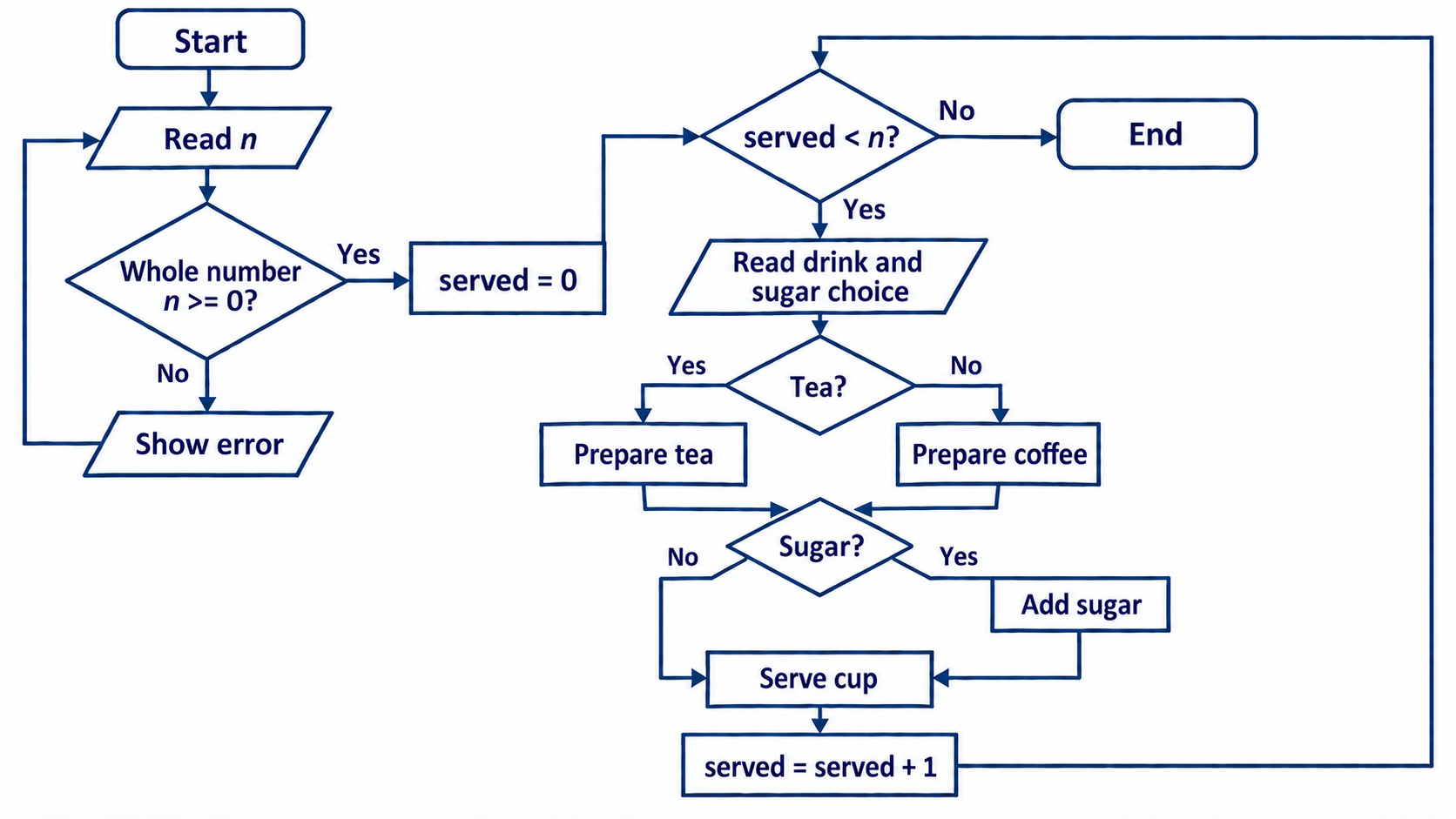
Trace n = 0: validation succeeds, served becomes zero, and the first loop test is false. No drink choice is requested. Trace n = 2 with tea/no sugar followed by coffee/yes sugar: prepare tea and serve it, increase served to one, then prepare coffee, add sugar and serve it, increase served to two, and exit at the next test.
An invalid quantity such as −1 follows the error path and returns to input. That input loop may continue if invalid entries continue arriving. Distinguish the assumption that a user eventually supplies valid input from the reason the cup loop terminates after a valid finite quantity.
A clear diagram supports correctness reasoning but is not itself a proof. Check normal and boundary paths, compare the program’s actual execution with those paths, and state assumptions. If a chart becomes too crowded to read, split a well-defined action into a separate, more detailed procedure.
Check: In the complete order example, where must the return arrow from the count update lead?
It must lead to served < n?. Returning to served = 0 would erase progress. Returning directly to drink input would skip the stopping test and keep serving cups.
Check: For two cups, tea/no sugar then coffee/yes sugar, how many sugar actions and loop tests occur?
One sugar action and three served < n? tests. The first two tests enter the body; the third exits. The quantity-validation decision is separate from those loop tests.
21. Correct answers can require different amounts of work
After asking whether an algorithm gives the right result, we can ask how much work it requires as the input grows. To add the whole numbers from 1 through a positive integer n, one method starts with 1 and adds each remaining number. Another evaluates n × (n + 1) ÷ 2.
For n = 10, both produce 55. To understand the formula, write the sequence forward and backward. Each corresponding pair sums to n + 1, and there are n pairs. The two copies therefore total n(n + 1); one copy is half that amount.
| n | Repeated addition | Formula |
|---|---|---|
| 10 | 9 additions | 3 operations: add, multiply, divide |
| 1,000 | 999 additions | 3 operations: add, multiply, divide |
This comparison counts arithmetic operations and leaves out loop bookkeeping. It assumes intermediate values fit the chosen numeric type. It does not claim that every operation takes the same time or that these counts are stopwatch measurements. The useful observation is how the amount of work changes: one method performs more additions as n grows, while the formula uses the same number of these arithmetic operations.
Later, searching examples will provide another way to compare work as input size grows. For now, concentrate on a precise algorithm, a trace showing that it behaves as intended, and a clear explanation of what you are counting.
Check: For n = 1,000, what answer should both summation methods produce?
1,000 × 1,001 ÷ 2 = 500,500. The comparison concerns the work used to obtain that same answer, not a change in the required result.
Check: What should you be able to explain before leaving this reading?
Trace a taken and untaken branch; identify initialization, test, body and update; predict a modified counter’s output; explain its zero-iteration and final-iteration cases; and follow the complete order flowchart. These are study checks, not a new submission requirement.
Week 4 asks what happens when several programs need the same machine. Keep the program counter, registers and memory from these traces in mind: they are the state an execution must retain if it pauses and later resumes. Continue with Operating systems and processes.
Sources and further study
The resources below develop algorithms as a way of solving problems, independently of a particular processor or programming language. Start with the first two readings, then choose a broader explanation or an interactive example. These are optional study resources.
Start here: describing and reasoning about algorithms
- Kansas State University — Flowcharts and Pseudocode. A concise comparison of natural-language descriptions, flowchart symbols and pseudocode. Use it to review how the same solution can be represented in different forms. After reading, describe a familiar task in words, draw its decisions and loops, and check whether both descriptions have the same paths.
- Harvard CS50 — Algorithms and Pseudocode in Lecture 0. The phone-book example compares different ways to solve one problem, then expresses the steps precisely. Focus on the decisions, repetition and the case where the requested person is absent. Ask both whether the procedure gives the right result and how much work it requires.
- The Open University — Introduction to computational thinking. A free course on algorithms and abstraction, with applications beyond programming exercises. Useful for understanding how a real-world problem becomes a computational problem and why choosing what to represent matters. This is a broader course rather than a short reference page.
Explore further: examples and efficiency
- University of Canterbury — Computer Science Field Guide: Algorithms. An accessible chapter with examples and interactive material. Follow What’s the big picture? to explore why different algorithms for the same problem can require different amounts of work. Use the examples to practise explaining a method before implementing it.
- Khan Academy — Algorithms. Begin with the introduction and the number-guessing example. For a later extension, read Binary search and compare checking candidates one by one with repeatedly halving a sorted search space. The wider course also covers more advanced topics; formal asymptotic notation is beyond this week’s scope.
Suggested study activity: choose one example from these resources. State its inputs, output and assumptions; write pseudocode or draw a flowchart; then trace an ordinary case and a boundary case. Explain what changes on each loop iteration and why the procedure stops. This connects the reading to algorithm development rather than merely copying code.
Sources of this course reading
The main text accompanies the CSE101 Week 3 algorithms deck, slides 1–62. The display introduction and HI trace provide the straight-line foundation for the later counter exercise. Original algorithm and origami material comes from the instructor’s Set 7; the C preview follows the course’s Set 4 material. Flowchart illustrations are the reviewed diagrams used in the accepted deck. The external resources above are supplementary reading, not claimed sources of those illustrations.
The machine-code exercise follows the instruction and display behavior of the course VizMachine. For its hardware background, revisit Week 2: architecture and instructions and the display-memory introduction in this reading. The instructor determines classroom pacing and carryover.