CSE 101 · WEEK 02 · READING
Computer architecture
How a processor executes stored instructions, and how the parts of a computer exchange data.
This reading follows the Week 2 architecture slide set. Slide references use PDF page numbers. Addresses, register contents and machine instructions are hexadecimal unless stated otherwise. Try the questions before opening the worked answers. The instructor determines classroom pace and carryover.
1. CPU, registers and main memory
Week 1 explained how bits represent information. Architecture explains how a machine stores those bits, chooses operations and moves results between components. A program becomes useful when hardware can repeatedly interpret its instructions and act on them.
The central processing unit (CPU) contains an arithmetic/logic unit, a control unit and registers. The arithmetic/logic unit (ALU) performs operations such as addition and bitwise AND. The control unit coordinates the steps needed to carry out an instruction. Registers hold the small amounts of information that the processor is currently using, including operands and intermediate results.
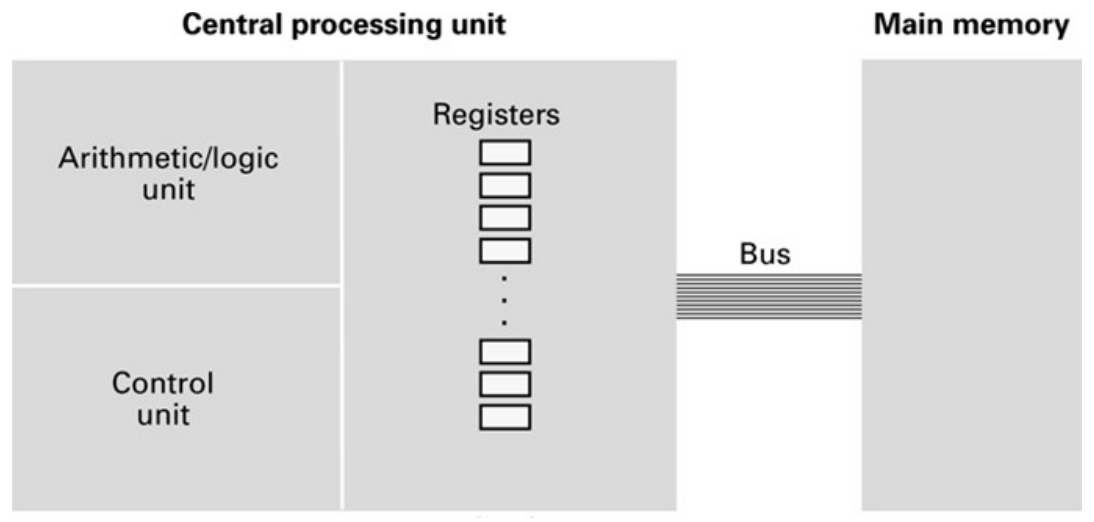
Main memory supplies a larger set of addressed storage locations. To add two values stored there, our example processor first brings them into registers, computes the result and then stores it back. The bus is the communication path connecting components. The motherboard is the physical board carrying and connecting many system components; it is not another name for the CPU.
General-purpose registers hold values for many different calculations. Special-purpose registers have defined roles in execution. Two of these, the program counter and instruction register, will let us explain why a machine executes one instruction rather than another.
Check: after an ADD, is the result automatically saved in main memory?
Not in the instruction set used here. ADD places its result in a register. A separate STORE copies that result into a chosen memory cell. Register state and memory state must be traced separately.
2. The Brookshear machine and VizMachine
The Brookshear machine is a small hypothetical computer used to make execution understandable. VizMachine lets us inspect and run this model. Its limited size makes it possible to follow a complete program without hiding the changing machine state.
The model has sixteen general-purpose registers, named 0 through F, and 256 memory cells, addressed 00 through FF. Each register and each memory cell holds one byte. A memory address selects a cell; the cell's contents are the byte stored there. We write M[6C] for the contents of cell 6C and R5 for register 5.
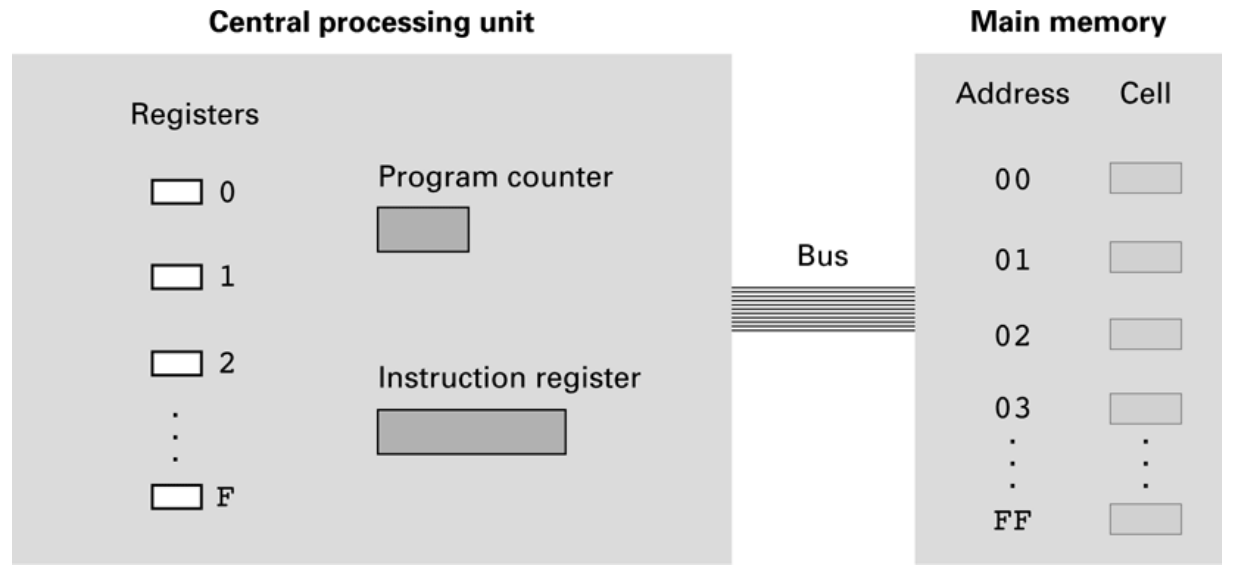
An instruction occupies two consecutive bytes. It therefore takes four hexadecimal digits to write one complete instruction. For example, 156C occupies a cell containing 15 followed by a cell containing 6C. A one-byte memory cell cannot hold the whole instruction.
To follow an example, locate memory, registers, the program counter and the instruction register in the simulator. Enter the instruction bytes and initial data, set the starting address, and predict one step before executing it. For repeatable results, initialize the relevant registers and memory cells each time. A previous run may have left values behind.
Check: what is the difference between address 6C and M[6C] = 05?
The address 6C identifies a memory location, decimal 108. The byte currently stored in that location is 05, decimal five. Loading from address 6C gives 05; loading the literal value 6C gives 6C.
3. Stored programs and instruction sets
A stored-program computer keeps its program as bit patterns in memory. The processor fetches those patterns and interprets them as instructions. Loading a different program changes the machine's behavior without replacing its physical circuits.
A machine instruction is one encoded operation recognized by the processor. The processor's machine language is its set of recognized instructions. Data-transfer instructions move values between locations, arithmetic/logic instructions compute values, and control instructions choose how execution proceeds. These categories cooperate even in a short calculation.
The addition algorithm in the slides illustrates this cooperation: load two operands, add them, store the result, then stop. An algorithm describes a method, whereas an instruction set determines the operations available for implementing it. The division slide is a conceptual algorithm: the basic Brookshear instruction set has no DIVIDE instruction. Implementing division on such a machine would require a sequence of supported operations.
RISC and CISC describe broad instruction-set design traditions. RISC designs tend to emphasize regular instructions and register operations; CISC designs include more varied instruction forms. For example, Arm uses a load/store architecture in which memory access and register computation are distinct operations. These labels alone do not rank processor performance. Program behavior, memory access and the hardware implementation also matter. The Arm instruction-set reference gives a real architecture's load/store rules.
Check: do instructions and numerical data require different kinds of memory cells in this model?
No. Both are bit patterns in the same memory. The program counter and the executing instruction determine how bytes are used. Starting execution at a data byte can make the processor attempt to interpret that byte, and the next one, as an instruction.
4. Reading an encoded instruction
An instruction contains an opcode, which selects the operation, and operand fields, which specify its details. The opcode determines how the remaining bits should be interpreted. A field may name a register, supply a value or identify a memory address.
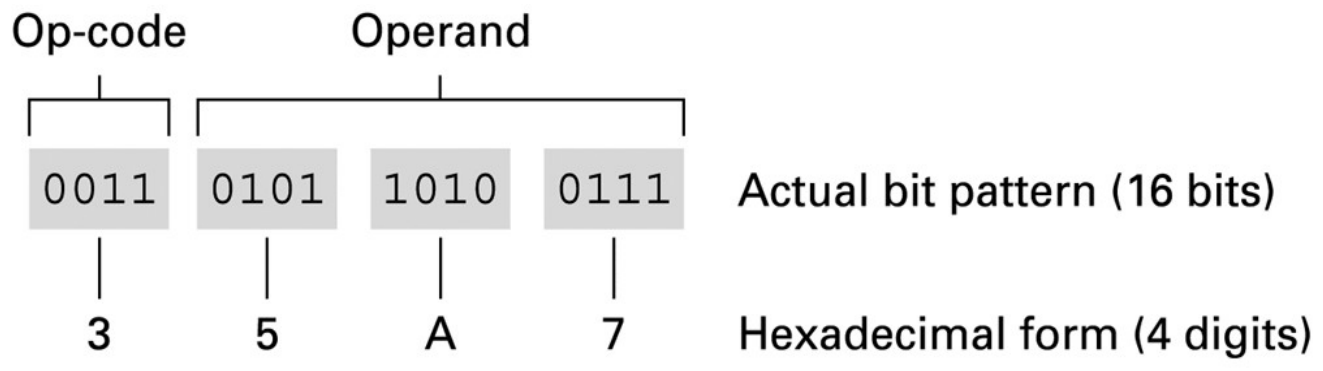
Decode 35A7 from left to right. Opcode 3 means STORE. The next digit, 5, selects R5. The final two digits, A7, select the destination memory cell. The effect is M[A7] = R5. Neither the address A7 nor the value already at A7 is added to R5.
| Encoding | Effect |
|---|---|
1RXY | Load register R with the byte at memory address XY. |
2RXY | Load register R with the literal byte XY. |
3RXY | Store the contents of register R at memory address XY. |
5RST | Add the integer values in registers S and T; put the result in R. |
7RST / 8RST / 9RST | Compute bitwise OR / AND / XOR of registers S and T; put the result in R. |
BRXY | Set the program counter to XY if register R equals R0. |
C000 | Halt execution. |
In this table, R, S and T stand for register identifiers, each one hexadecimal digit. XY stands for a byte written with two hexadecimal digits. In 5056, all three operand digits are register identifiers: put the sum of R5 and R6 into R0. The final digits 56 do not form a memory address for this opcode.
Check: decode 156C, 256C and 306E.
156C loads R5 from M[6C]. 256C loads the literal byte 6C into R5. 306E stores R0 into M[6E]. The first digit changes the meaning of the remaining fields.
5. Fetch, decode and execute
The program counter (PC) holds the address from which the next instruction is fetched. The instruction register (IR) holds the current fetched instruction. They answer different questions: where should the processor look, and what instruction is it interpreting?
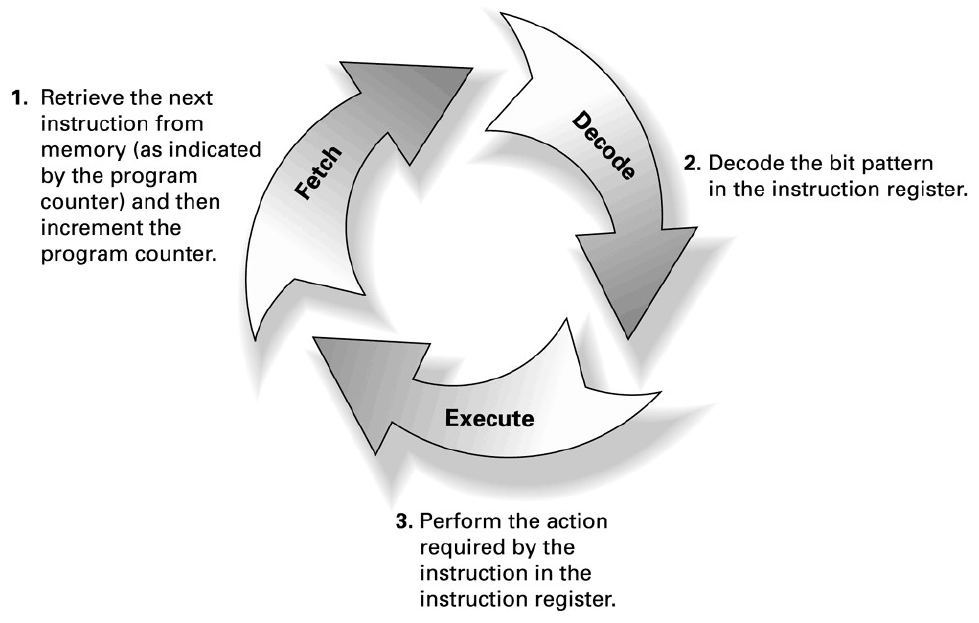
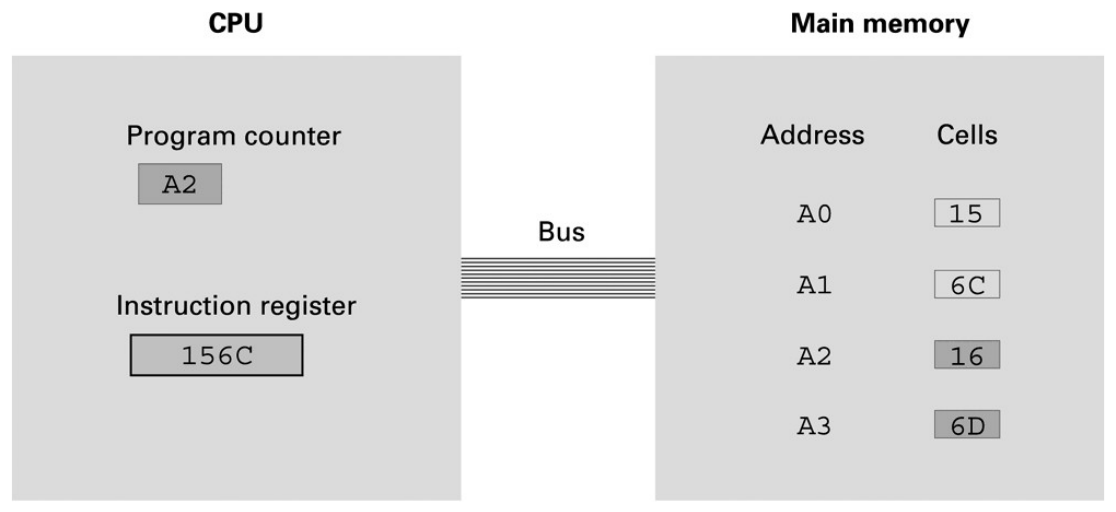
During fetch, the machine reads the instruction bytes at the PC. In our examples it reads two bytes, combines them into one instruction and advances PC by two. During decode, the control unit interprets the opcode and operands. During execute, it performs the selected operation. A branch can replace the already advanced PC with a different address.
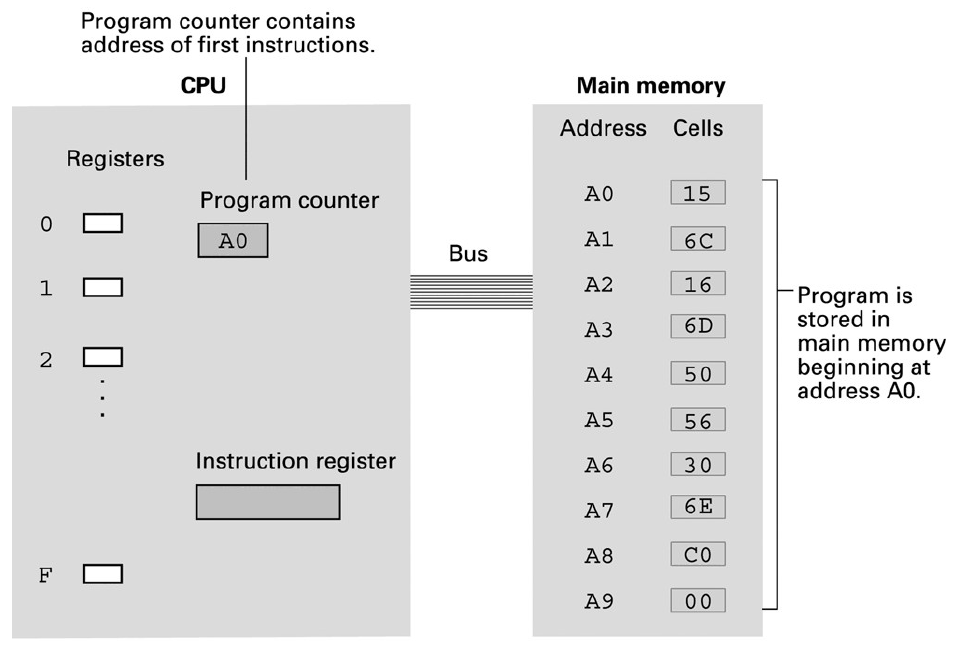
Starting at A0, the bytes 15 and 6C form 156C. Fetching them advances PC to A2. Executing this instruction then reads a different address, 6C, to obtain the operand for R5. Fetching an instruction and loading its data operand are separate memory accesses.
The fetch/decode/execute model describes logical steps. It does not imply that every real instruction completes in one clock tick. Actual processors may split or overlap the work. We first use the simple model to understand each instruction's effect.
Check: after fetching 156C from A0, should PC contain 6C?
No. PC contains A2, the next sequential instruction address. The operand 6C tells the LOAD where to read data. Only a control instruction such as a taken branch changes the execution address to its target.
6. A complete addition trace
Place 156C 166D 5056 306E C000 at addresses A0 through A9. Set M[6C] to 05, M[6D] to 03 and M[6E] to 00. Begin with the general registers at 00 and PC at A0. All values below are hexadecimal.
Address: A0 A1 A2 A3 A4 A5 A6 A7 A8 A9
Byte:    15 6C 16 6D 50 56 30 6E C0 00
On a narrow screen, scroll the trace table sideways to see all registers and the memory result.
| Executed | PC | R5 | R6 | R0 | M[6E] |
|---|---|---|---|---|---|
156C | A2 | 05 | 00 | 00 | 00 |
166D | A4 | 05 | 03 | 00 | 00 |
5056 | A6 | 05 | 03 | 08 | 00 |
306E | A8 | 05 | 03 | 08 | 08 |
C000 | AA | 05 | 03 | 08 | 08 |
The result first appears in R0. M[6E] changes only after STORE. The original inputs in M[6C] and M[6D] remain unchanged. The course simulator advances PC during fetch, including the fetch of HALT, so its stopped PC is AA. It does not execute an instruction at AA after halting.
Now change only the inputs to 09 and 04 and start again at A0. The same program produces 0D, decimal thirteen. This is the value of a stored program: one instruction sequence can process different data. To store the result at 70 instead, replace 306E with 3070. The LOAD and ADD instructions retain their original roles.
Check: with inputs 09 and 04, what happens if 156C is replaced by 256C?
R5 receives the literal 6C rather than the input 09. R6 still receives 04. Their sum is 70 in hexadecimal, decimal 112, so the unchanged STORE writes 70 into M[6E]. An incorrect opcode can produce a valid-looking result while implementing the wrong calculation.
Check: after changing the STORE to 3070, what should you inspect?
Inspect M[70], which should become 0D for inputs 09 and 04. M[6E] is no longer the destination and retains whatever value it had before this run. Reset or record initial state before comparing results.
7. A branch chooses the next instruction
A conditional branch makes execution depend on machine state. The instruction B258 compares R2 with R0. If their bit patterns are equal, PC becomes 58. Otherwise, PC retains the next sequential address established during fetch.
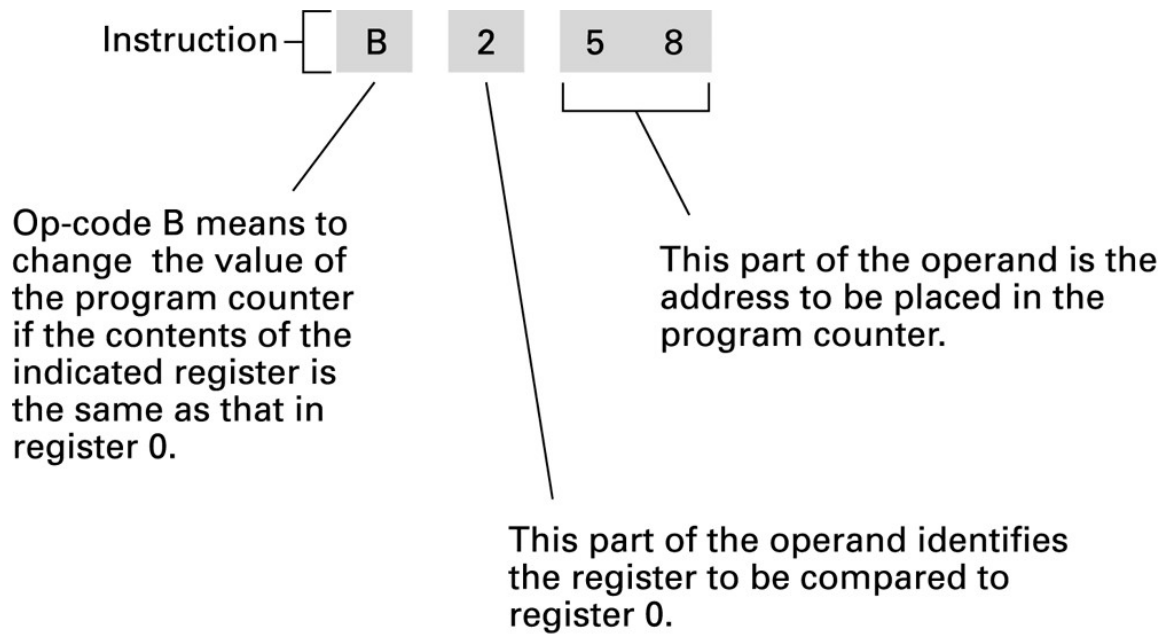
Suppose B258 begins at address 20. Fetch advances PC to 22. If R0 and R2 both contain 03, the comparison succeeds and execution continues at 58. If R0 contains 03 and R2 contains 04, the branch is not taken and execution continues at 22.
The target 58 is an address. This instruction neither compares R2 with the literal 58 nor loads M[58] into R2. The target must contain the first byte of a valid instruction. Because instructions take two bytes, branching into the second byte of an existing instruction changes how the following bytes are grouped and decoded.
Check: why can B058 act as an unconditional jump to 58?
It compares R0 with itself. That equality is always true, so the branch sets PC to 58 regardless of R0's contents. The selected address still needs to be a valid instruction location.
8. Copying bytes through the CPU
Copying data is useful work, but it also consumes processing and communication capacity. Start with M[50] = 2A and M[51] = 7C. The following program copies those bytes to 60 and 61. Initialize PC to A0.
| Address | Instruction | Effect |
|---|---|---|
| A0 | 1150 | R1 receives M[50], which is 2A. |
| A2 | 3160 | M[60] receives R1, which is 2A. |
| A4 | 1151 | R1 receives M[51], which is 7C. |
| A6 | 3161 | M[61] receives R1, which is 7C. |
| A8 | C000 | Stop. |
R1 is temporary working storage. The second LOAD replaces its earlier value, but that is safe because the earlier value has already been stored at 60. The source cells retain 2A and 7C. In these instructions, a LOAD reads a value and a STORE copies a value; neither erases the source.
Each copied byte requires a LOAD and a STORE, and those instructions themselves must be fetched. Larger transfers therefore involve more than the useful payload bytes alone. A real processor may have wider accesses or specialized instructions, but our small example makes the CPU's participation visible. Later, DMA will provide another way to arrange a transfer.
Check: what goes wrong if both LOADs come before both STOREs?
If the program executes 1150 1151 3160 3161 C000, the second LOAD overwrites R1 before 2A is stored. Both destination cells receive 7C. Use the original alternating order, or preserve both values in separate registers before storing them.
9. Bit masks, shifts and rotations
The ALU also works on individual bit positions. AND produces 1 only when both input bits are 1. OR produces 1 when at least one input bit is 1. XOR produces 1 when the input bits differ. A mask is a bit pattern chosen to select or alter particular positions.
    1001 1010   (9A)
AND 0000 1111   (0F)
    ---------
    0000 1010   (0A)
AND with 0F retains the low four bits and clears the high four bits. Load 219A 220F 8312 3360 C000 at A0 and start there. The first two instructions put 9A into R1 and 0F into R2. 8312 puts R1 AND R2 into R3. 3360 stores the result, 0A, at address 60.
Different logical operations serve different purposes. OR with a mask can set selected bits to 1. XOR with a mask toggles selected bits. For example, 9A XOR 0F = 95: the low four bits change, while the high four remain unchanged. The mask's meaning comes from the operation used with it.
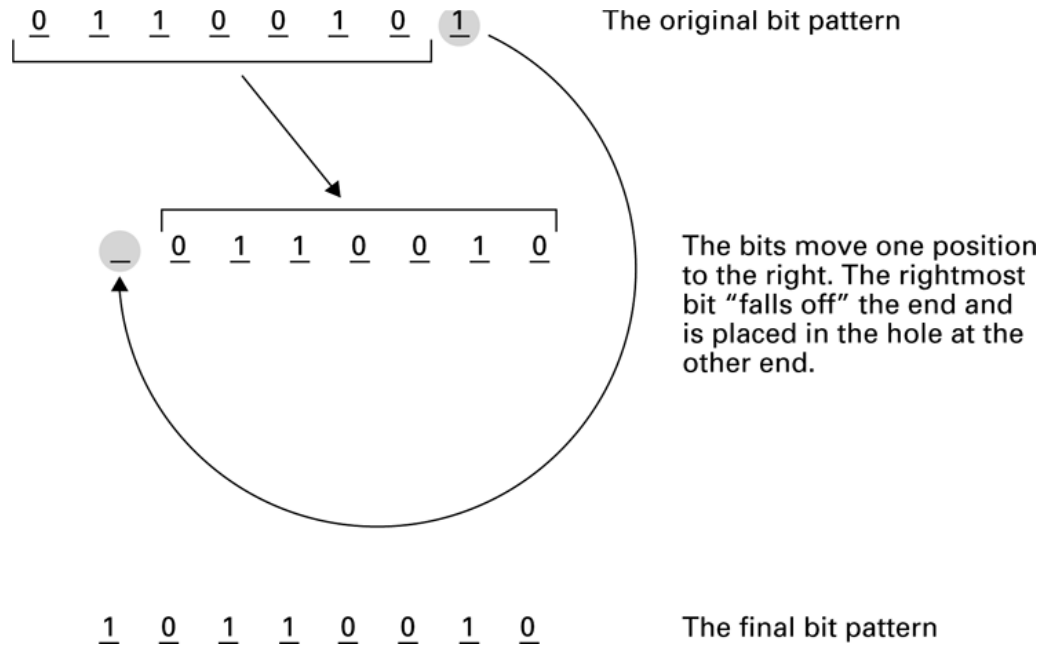
A shift moves bits and discards those that leave the available width; the incoming bit depends on the kind of shift. A rotation wraps the outgoing bit to the opposite end. Rotating the eight-bit pattern 65, 0110 0101, right by one gives 1011 0010, or B2. A logical right shift instead inserts zero and gives 32. The rotation figure explains the bit operation conceptually; the executable example in this section uses AND.
Check: which mask keeps only the high four bits of 9A?
Use F0 with AND: 9A AND F0 = 90. This leaves the selected bits in their original positions. It does not move them into the low four positions.
10. Controllers and input/output
A computer needs ways to receive information and affect its surroundings. Input/output (I/O) connects computation to devices such as keyboards, storage drives and displays. These devices have different electrical behavior, timing and control requirements. A controller handles the communication needed for a device or class of devices.
Software may read a controller's status, provide a command or exchange data through its registers. A physical port is a connection point for a device. The word “port” also appears in port-mapped I/O, where it describes an I/O address. A connector on the case and an address used by a processor are different things.
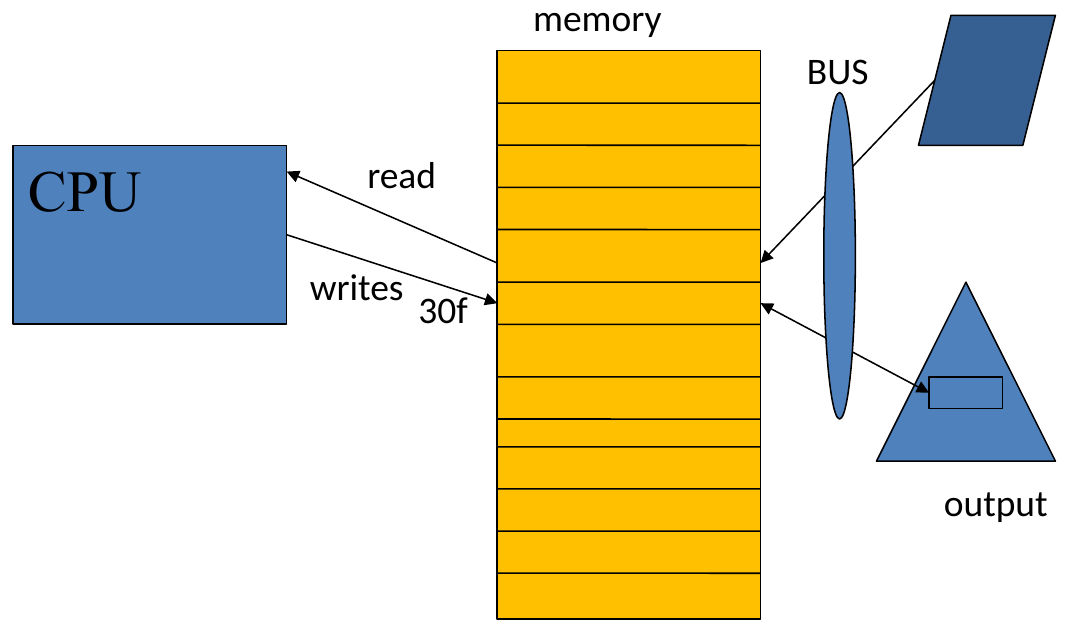
With memory-mapped I/O, part of the processor's address space refers to device registers. A read or write to one of those addresses interacts with hardware. The address does not have to correspond to ordinary RAM. Reading a device register may report status or consume incoming data; writing one may start an operation.
With port-mapped I/O, the processor uses a separate I/O address space and instructions such as IN and OUT. Both arrangements give software a way to communicate with controllers. They differ in how the processor names and accesses the device registers. The diagrams are real-system concepts; the basic LOAD/STORE programs above are ordinary memory examples.
Check: if a device uses memory-mapped I/O, is it storing all its data in the CPU's RAM?
No. Some addresses select registers belonging to the device or controller. A read or write reaches those registers through the system's connections. Calling the arrangement “memory-mapped” describes addressing, not the physical location of all device data.
11. Shared buses, contention and caches
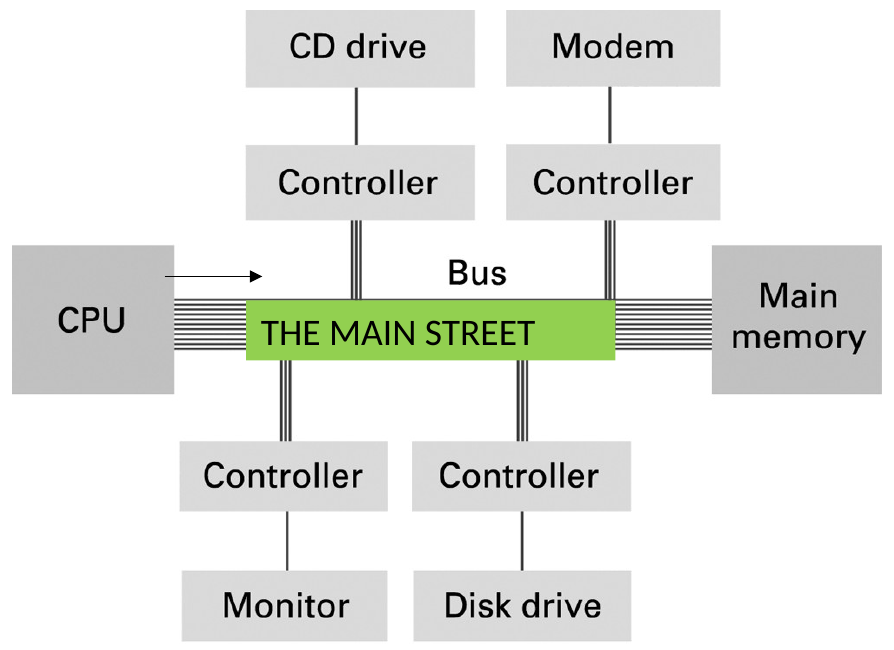
The lecture's street analogy captures an important constraint: many participants can share a path, but the path has limited capacity. A bus connects components so they can exchange information. A transfer identifies a destination and coordinates the movement of data.
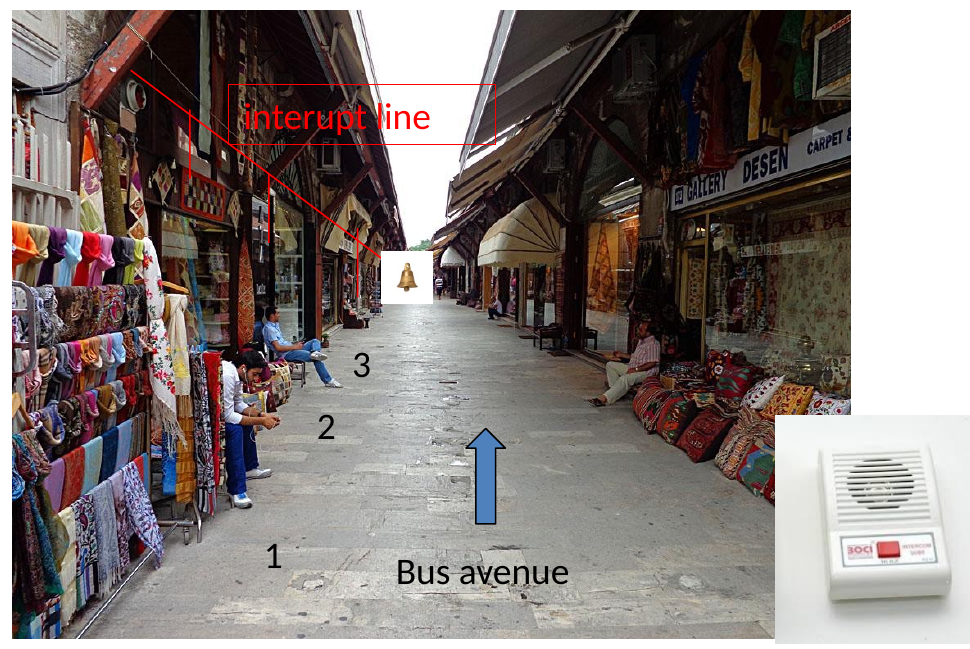
Look at the rope along the upper left of the street photograph, highlighted by the red annotation. In the instructor's example, a shopkeeper who wants tea steps outside and pulls this shared rope. The pull rings a mechanical bell in front of the tea shop. The bell tells the tea-service worker that somebody needs attention, but it does not identify the shop or specify the order.
The worker comes outside and looks left and right to find the person who rang. This corresponds to identifying the source of a shared interrupt. The shopkeeper then uses hand signals to indicate the quantity and whether the order is tea or coffee. The worker confirms visually, for example by acknowledging “two teas.” These gestures exchange the request details and provide an acknowledgement, linking this example to the handshaking discussion.
The analogy separates three jobs. The rope and bell request attention, the visual exchange identifies and confirms the service required, and the street provides the path for delivery. Likewise, a shared interrupt line can signal that service is needed without carrying the full data or identifying the requester by itself. The system must determine which device needs service and then handle its request. If several shops call, their orders still compete for the worker's time and the shared delivery route.
A related example is the instructor's recollection of older Leyland city buses in England. A passenger pulled a cord running along the bus, mechanically operating a switch at the front that activated the stop-request indicator. The cord extended access to one signalling point: passengers could request attention without walking to the front. Here the cord operated a switch, whereas the tea-shop rope rang a mechanical bell directly. For more on bus bell cords, see The New York Times: “The Return of the Bus Bell Cord”.
Several devices may need service at once. Contention occurs when they compete for the same resource. Arbitration decides which requester can use it next. An interrupt can notify the CPU that attention is needed; it does not create more bus capacity or carry an entire data transfer by itself.
Adding separate paths can let some transfers proceed simultaneously, but extra connections require hardware and coordination. The slides compare a single shared path with a more connected arrangement. They also show historical PC bus layouts. Those pictures illustrate separate roles and speeds; their exact northbridge, southbridge and bus arrangement is not a universal description of current computers.
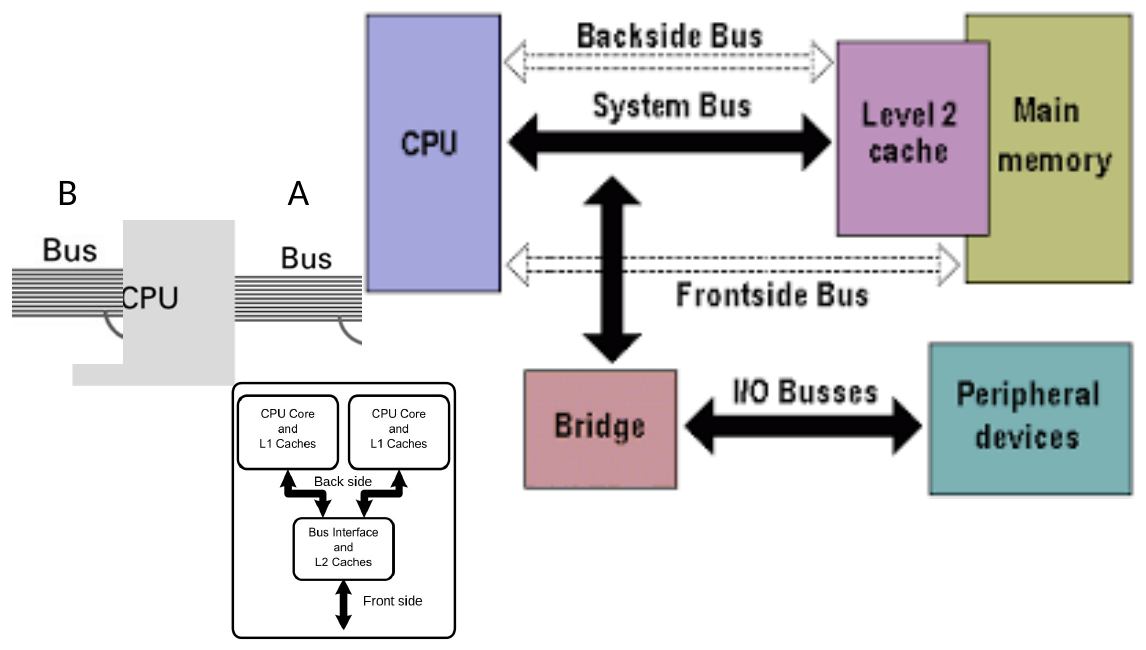
A cache keeps copies of information that may be needed again, closer to the processor. When a requested value is available there, the processor may avoid a slower main-memory access. Programs often reuse recently accessed information or nearby addresses. A cache takes advantage of this behavior, but a missing value still has to be obtained from the next storage level.
Check: will doubling CPU arithmetic speed always double program speed?
No. A program may spend much of its time waiting for memory, a device or a shared communication path. Faster arithmetic helps only the work it accelerates. Contention and data-transfer delays can remain.
12. Direct memory access
Our byte-copy program made the CPU execute every LOAD and STORE. For a large device transfer, repeatedly moving data through a CPU register can consume substantial CPU time. Direct memory access (DMA) lets a controller transfer data to or from main memory after software arranges the operation.
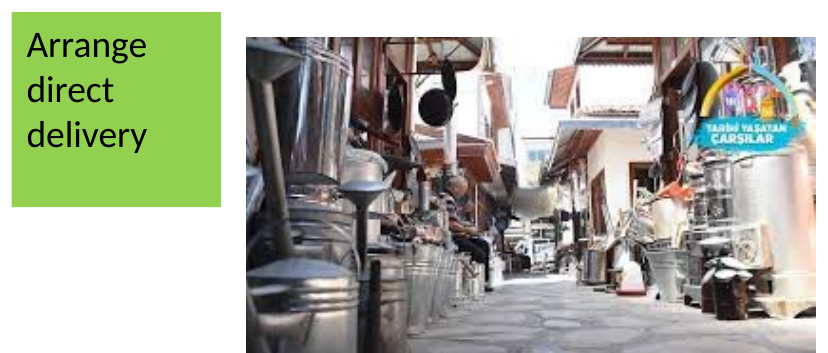
Software supplies transfer details such as a memory buffer, a length and a direction. The controller performs the transfer, while the CPU may do other work. Software then checks or receives notification of completion and coordinates access to the buffer. The CPU still has setup and completion responsibilities.
DMA reduces the need for CPU instructions that copy every data item. The transfer still uses memory and communication capacity, so DMA can compete with other activity. This distinction matters when discussing the von Neumann bottleneck: computation can be limited by the movement of instructions and data between processing and memory, even when the ALU is fast.
Real systems must also ensure that CPU and device accesses observe the intended data. The Linux kernel DMA guide describes buffer mapping and synchronization. Driver implementation details are beyond this introductory example, but the obligation to coordinate access is part of understanding DMA.
Check: why should a program wait for a device-to-memory DMA transfer to finish before processing the whole buffer?
Some bytes may still contain old data while others have already arrived. The program needs a completion indication and the synchronization required by its system before treating the buffer as a complete result.
13. Handshaking and buffering
Communication requires agreement about when information is ready and when it has been accepted. Handshaking uses signals or messages between participants to coordinate a transfer. In the lecture's delivery analogy, requesting an item, handing it over and acknowledging receipt establish what each participant knows.

Consider a simple request/acknowledgement protocol. The sender puts valid data on the connection, then signals that it is ready. The receiver accepts the data and acknowledges it. The sender can then proceed according to the protocol. The exact sequence varies between interfaces, but both sides must agree on what each signal means and how long data remains valid.
A strobe marks a time when data should be accepted. Without a return acknowledgement, the sender relies on timing assumptions about the receiver. A handshake can let a slower receiver delay acceptance. Neither approach works merely because a wire exists: the participants must follow the same timing rules.
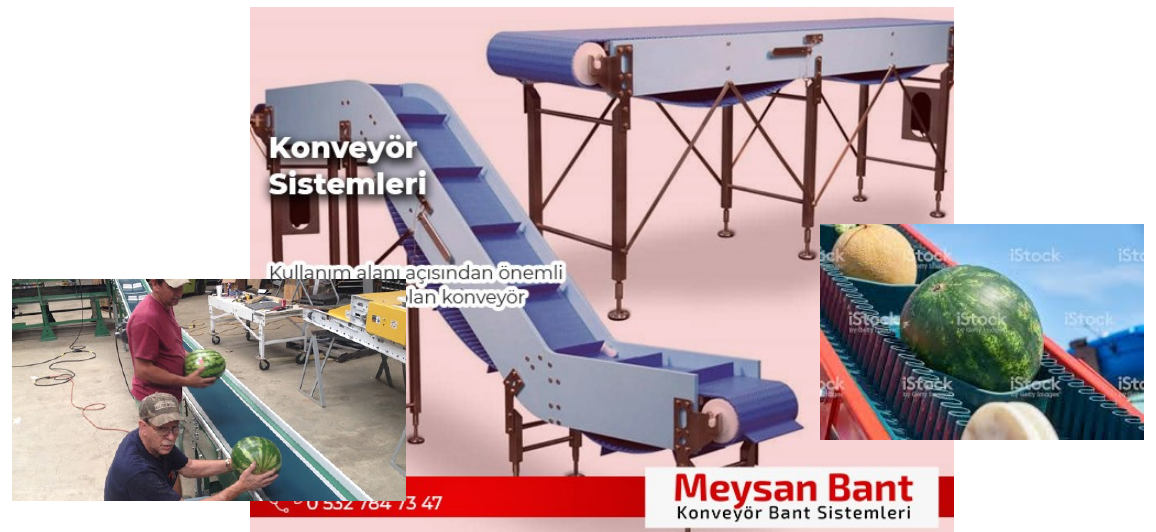
A buffer allows data to wait when sender and receiver work at different rates. It can absorb a short burst or a temporary pause. Its capacity is finite. If data arrives faster than it is consumed for long enough, the buffer fills and the system must pause the sender, discard data or handle the condition in another defined way.
Check: a 100-byte empty buffer receives 30 bytes/s and drains at 20 bytes/s. When does it fill?
Assuming steady rates, simultaneous arrival and consumption, and no overhead, its occupancy grows by 10 bytes/s. It fills after 100 ÷ 10 = 10 seconds. Buffering delays this overload; it does not remove the persistent rate mismatch.
14. Serial, parallel and transfer timing
In serial communication, bits follow one another along a communication path. In parallel communication, several paths carry bits at the same time. Parallel transfer can move several bits per transfer event, but this alone does not establish which interface has the higher overall data rate. Timing, signaling speed and overhead also matter.
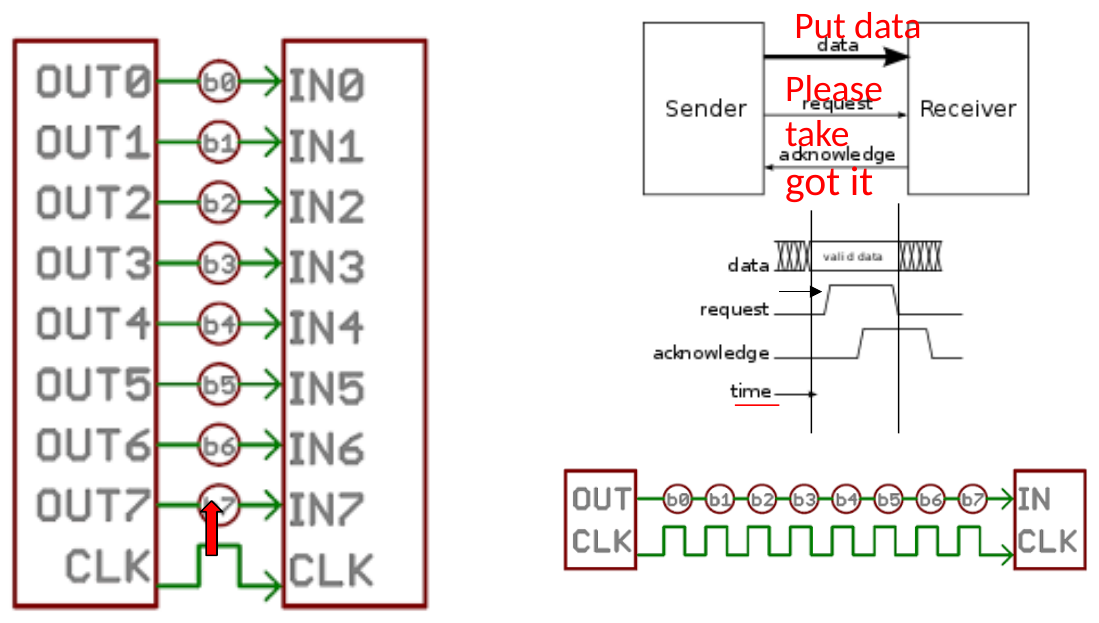
A clocked interface supplies a timing reference. The sender places data on the connection and keeps it stable around the sampling instant specified by the interface. The receiver uses that agreed instant to sample it. A signal that changes too close to the sampling instant may not be read reliably.
An asynchronous interface does not use a shared clock for every transfer in the same way. It still needs timing rules. These may involve a handshake or conventions that let the receiver identify the start and timing of a message. “Asynchronous” does not mean that timing is irrelevant.
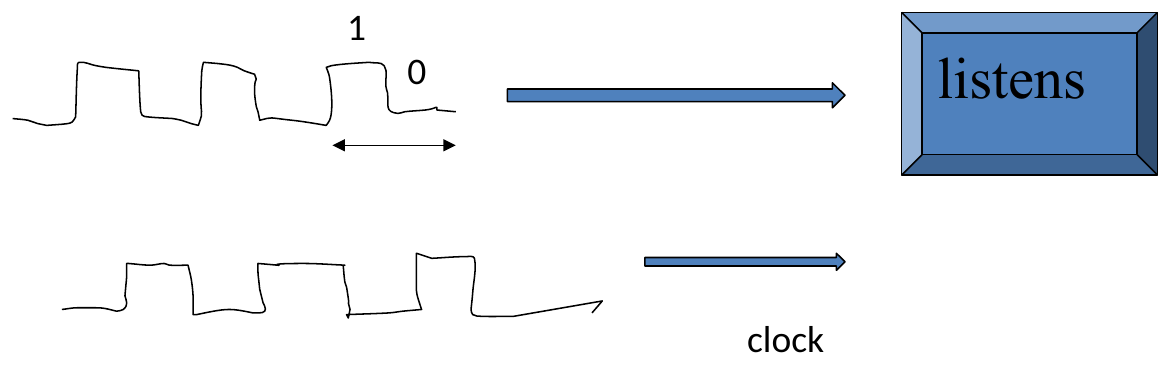
The receiver also needs to recognize when new information arrives. A constant high signal by itself does not say how many consecutive 1 bits were sent. Bit duration, framing and synchronization establish how the waveform is divided into information.
Check: does an eight-wire parallel data connection necessarily outperform a serial connection?
No. Eight data paths can carry eight bits per transfer event, but the rate of those events may be lower. Compare bits transferred per event, events per second and useful-data overhead under the same assumptions.
15. Manchester coding and clock recovery
A receiver can obtain timing from a separate clock, or from suitable transitions in an encoded signal. Manchester coding includes a transition at the middle of each bit interval. The direction of that transition represents the bit value under an agreed convention.
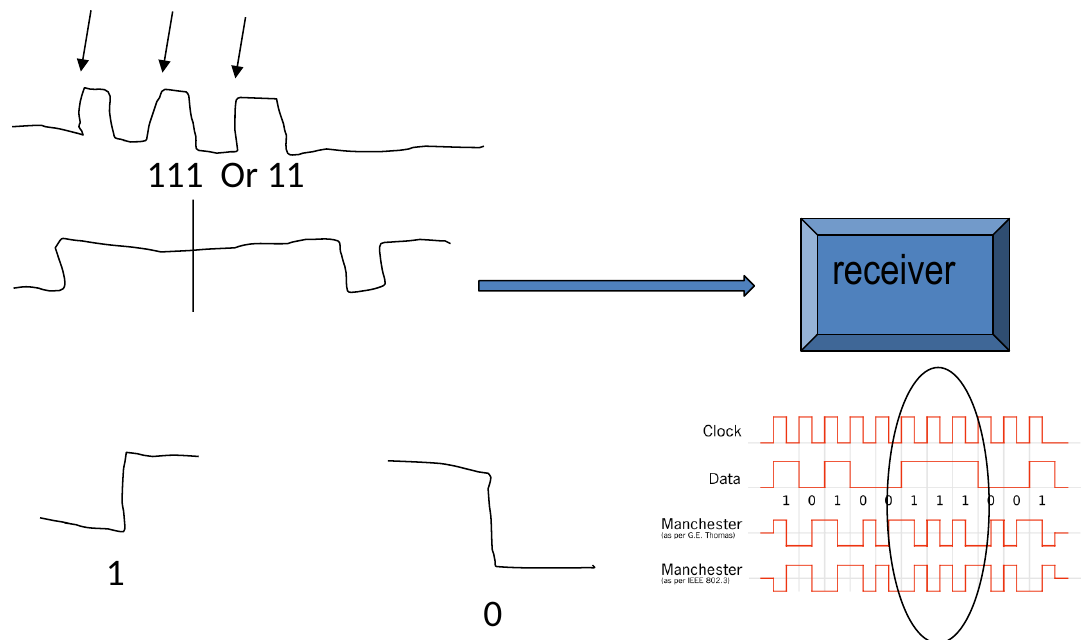
For example, under the IEEE 802.3 convention described in Microchip's Manchester encoder application note, a low-to-high mid-bit transition represents 1 and a high-to-low transition represents 0. Another convention reverses that assignment. Always state the convention before decoding a waveform.
Using that example convention, bits 1, 0, 1 are represented by the level pairs LH | HL | LH, where each pair spans one bit interval. Some bit boundaries also contain transitions. The receiver must identify bit timing rather than count every edge as a new bit.
The guaranteed mid-bit transition helps the receiver recover timing even through a long run of equal data bits. The encoding uses two level intervals per data bit, so the data-bit rate and the rate of encoded half-bit intervals are different quantities.
Check: can a long run of 1 bits remain continuously high in Manchester coding?
No. Each encoded bit contains a mid-bit transition. Repeated 1 bits produce repeated transition patterns, which provide timing information rather than one uninterrupted high level.
16. Bits per second and useful throughput
Data rates require careful units. Lowercase b means bits, while uppercase B means bytes. One byte has eight bits. In the decimal communication-rate prefixes used here, 1 kb/s is 1,000 bits/s and 1 Mb/s is 1,000,000 bits/s.
An ideal 8 Mb/s connection carries 1 MB/s because 8,000,000 ÷ 8 = 1,000,000 bytes each second. Sending 10 MB would therefore require at least 10 seconds if the full rate were available for those data bytes throughout the transfer.
Bandwidth, in this data-rate context, describes capacity. Throughput is the achieved rate. Headers, acknowledgements, shared use and other protocol work can reduce the rate available for useful application data. A stated link rate should not be treated as a guarantee of file-transfer speed.
Check: how long does 10 MB take at 8 Mb/s if 80% of the link rate carries the file's data?
The useful rate is 0.80 × 8 = 6.4 Mb/s, or 0.8 MB/s. The transfer takes 10 ÷ 0.8 = 12.5 seconds under these assumptions. The calculation uses decimal MB and a steady rate.
17. Pipelining and parallel processing
Pipelining overlaps stages of work. While one instruction executes, a processor may decode another and fetch a third. Each instruction still passes through the required stages. Overlap aims to increase the rate at which instructions finish.
For a simplified example, suppose fetch, decode and execute each take one equal time unit, and there are no dependencies or stalls. Four instructions executed without overlap need twelve units. An ideal three-stage pipeline finishes the first instruction after three units, then one more per unit, finishing four after six units. This is a teaching model, not a timing claim about VizMachine or a particular processor.
A pipeline can improve throughput, the amount of work completed per unit time, without reducing the latency of one instruction. Dependencies, resource conflicts and branches may prevent the ideal overlap. A branch is especially relevant because it can change which instruction should be fetched next.
| Category | Meaning | Example idea |
|---|---|---|
| SISD | Single instruction stream, single data stream. | A conventional sequential instruction stream. Its implementation may still use a pipeline. |
| SIMD | Single instruction stream, multiple data streams. | Apply the same addition to several pairs of values at once. |
| MIMD | Multiple instruction streams, multiple data streams. | Processors or cores execute independent instruction streams on their data. |
These categories describe instruction and data streams. Pipelining describes overlap inside processing. They answer different questions, so SISD should not be read as a claim that every internal circuit waits idle until an instruction finishes.
Check: in the ideal three-stage example, how long do ten instructions take?
The first finishes after three time units; the remaining nine finish one per unit. The total is 3 + 9 = 12 units, compared with 30 units without overlap. Dependencies and stalls would increase the pipelined time.
18. Connecting execution and communication
The same questions connect the entire lecture: where is the information, which component acts on it, and what determines the next step? Registers and memory identify stored state. Instructions define changes to that state. PC and branches determine execution order. Controllers and communication protocols extend those changes to devices.
Performance also depends on where work is happening. A cache can reduce some main-memory accesses. DMA can reduce CPU work spent copying data. A buffer absorbs temporary differences in rates. Pipelining overlaps execution stages. Each technique addresses a particular source of waiting or repeated work, and none removes every limitation.
Final check: trace 2107 2205 5312 3370 C000 starting at A0.
The first two instructions put 07 in R1 and 05 in R2. 5312 puts their sum, 0C, in R3. 3370 writes 0C to M[70]. HALT stops execution with PC at AA in the course simulator. The source registers retain 07 and 05.
Final check: does DMA remove the need for a buffer, a bus or completion notification?
No. A DMA transfer still needs a memory region and a communication path. Software must establish when the transferred data is ready for use. DMA changes who performs the data movement; it does not remove storage, capacity or synchronization requirements.
For revision, explain the addition trace without running it, distinguish a literal from an address, and connect the CPU-copy example to DMA. Then use VizMachine to check your predicted states. Return to the Week 1 hexadecimal explanation or signed-number section when representation is the source of a mistake.
Sources and further reading
The main source is Prof. Dr. Mehmet Göktürk's CSE101 Week 2: Computer Architecture, 63 slides. Numbered figures extract the illustrations from the current course slides, including retained diagrams from J. Glenn Brookshear's Computer Science: An Overview and the instructor's communication analogies. Slide headers and footers are omitted; diagram labels and annotations are retained. The tea-service rope explanation and Leyland bus comparison were supplied by the instructor. The explanations and worked checks expand the slide examples for independent reading.
- Course VizMachine and its English manual. Use the instruction subset and initialization given in this reading for its executable examples.
- Arm Instruction Set Reference Guide: a real load/store architecture.
- Linux kernel: Dynamic DMA Mapping Guide: optional detail on DMA buffers and synchronization.
- Microchip AN2371: Manchester Encoder Using USART and CCL on ATtiny817: encoding conventions and clock transitions.