CSE 101 · WEEK 01 · READING
Computer foundations and data representation
How physical circuits retain bits, and how those bits become numbers, text and signals.
This reading follows the Week 1 slide set. Some topics may continue into the next meeting. Slide references use PDF page numbers, because the original slide footers retain their earlier numbering. Try the questions before opening the answers.
1. What computer engineering studies
A computer system connects a physical machine with a precise description of what it should do. A program can calculate a sum, display a letter or control a light, but each result ultimately depends on physical devices that store and transform information. This course follows those connections: from gates and bits to machine instructions, C programs and Arduino projects.
Science develops and tests explanations of the world. Engineering uses scientific knowledge, mathematical reasoning and experimentation to design systems under constraints. A design must do something useful while meeting limits such as cost, power, size and reliability. Computer science studies computation, including how problems can be represented and solved. Computer engineering studies systems in which hardware and software work together. Programming expresses a method in a language that a machine can execute, then tests whether the implementation behaves as intended.
These activities overlap. An engineer choosing a sensor must understand the physical measurement, the representation of its readings and the program that reacts to them. A data scientist studies patterns in data, but the meaning and quality of those measurements still matter. Systems engineering considers interactions across components and requirements. A job title alone rarely describes all the reasoning a project needs.
The word computer once referred to people who performed calculations. Automating a calculation changes the mechanism, but a procedure still needs clearly represented inputs and rules. Modern computers can perform many different tasks because their instructions can change. The same machine may run a text editor, a game or a numerical calculation.
CSE101 develops the principles and programming foundations. Recitation provides guided practice, while CSE107 has its own lab preparation and reports. Use the syllabus and CSE107 lab page for those arrangements. The reading explains concepts; it does not introduce extra assessed tasks or new submission rules.
2. Input, processing, memory and output
The meat-grinder analogy in class provides a first model: material enters, a mechanism transforms it and a result comes out. A computer similarly accepts input, transforms represented information and produces output. The analogy has limits. A general-purpose computer can change its behavior by executing different programs, and it can retain intermediate results to use in later steps.
Input devices supply information from outside the machine. Memory holds instructions and data. The processor carries out operations, while output devices make results available. An arithmetic logic unit (ALU) performs operations such as addition and logical combination. Control signals select an operation and coordinate where its operands come from and where its result goes. A clock coordinates many state changes, but a clock tick is not necessarily one complete instruction. Different processors organize execution differently.
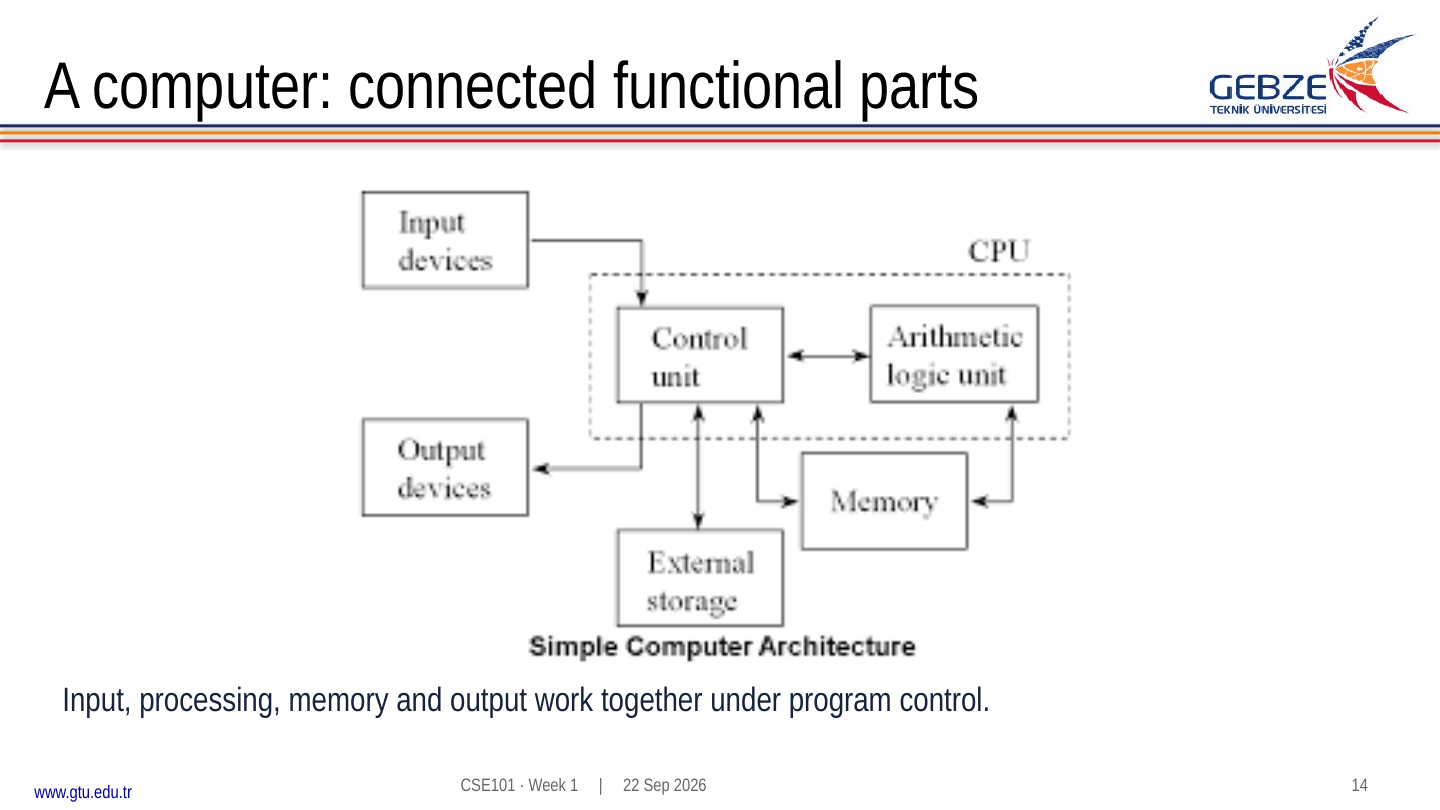
Consider adding two numbers entered through a keyboard. Their characters first need interpretation as numbers. The operands must become available to the processor, the ALU performs the addition, and the resulting bit pattern must be interpreted and formatted before it appears on screen. Even this small task crosses several layers of representation.
The instructor's historical film offers another view of these components: Computer — an early IBM film (linked in PDF page 17). While watching, identify input, storage, processing and output. Compare the physical equipment with the functions that remain recognizable today.
3. From transistors to digital circuits
A transistor controls electrical conduction. At this introductory level, a useful model treats it as a controlled switch: one signal changes whether another path conducts. Real devices have analog electrical behavior, and the switch model deliberately leaves much of that detail out. Digital circuits interpret ranges of voltage as logical 0 and logical 1, making it possible to reason about states without tracking every electrical variation.
In an inverter, the output represents the opposite of the input. Input 0 gives output 1; input 1 gives output 0. Connecting transistors in different arrangements produces other functions. A NAND circuit gives output 0 only when both inputs are 1. Following NAND with an inverter gives AND. NOR gives output 1 only when both inputs are 0.
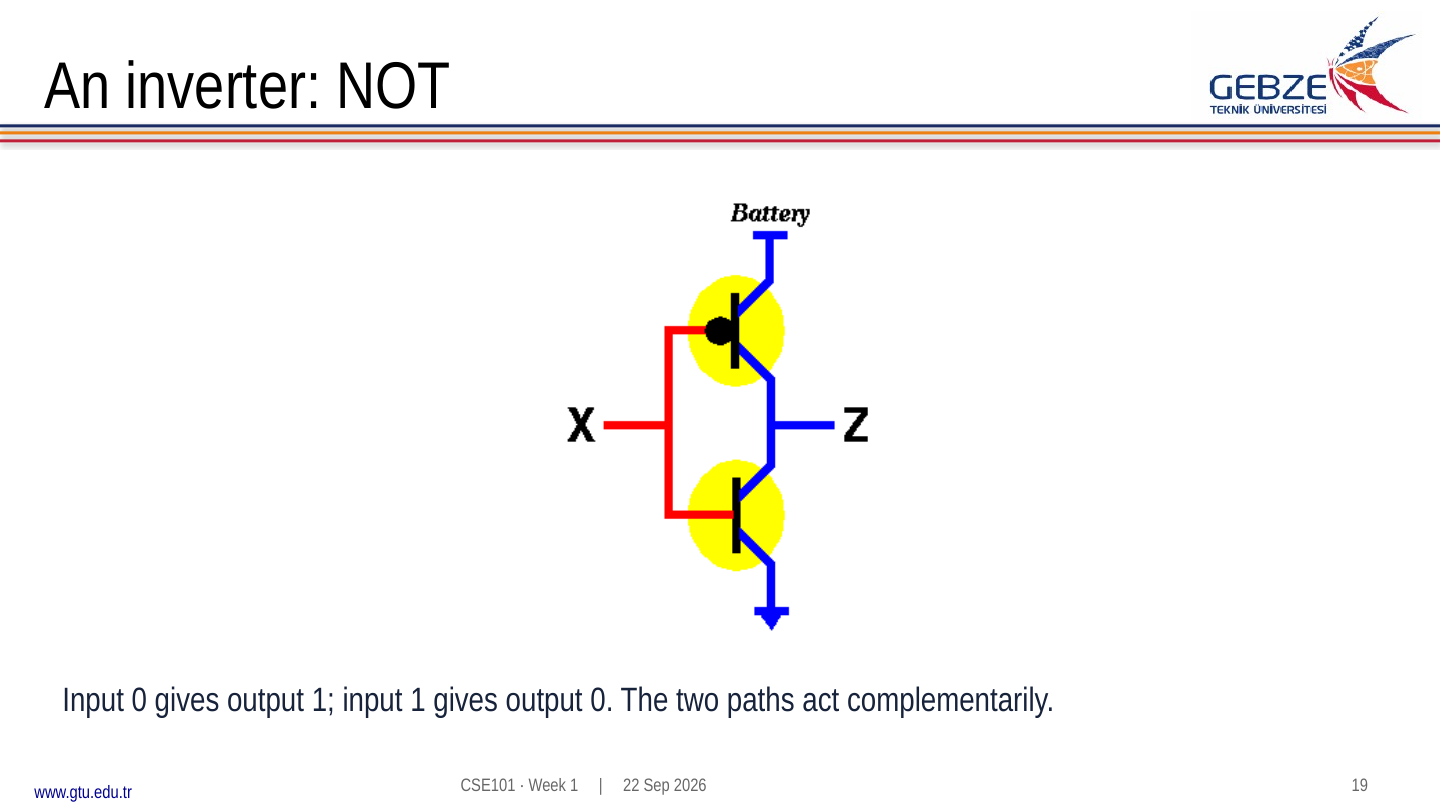
Read a circuit at the appropriate level. At the transistor level, ask which paths conduct for a given input. At the gate level, use the gate's truth table. At the processor level, identify larger functional blocks rather than attempting to trace every transistor. These levels describe the same physical system with different amounts of detail.
An integrated circuit fabricates many devices and connections together. A chip package connects that circuitry to a board. The processor images and transistor-count material in the slides show how much circuitry can fit into a device. Counts depend on the particular chip and what is included in the count. A larger count alone does not establish that one processor will run every program faster: organization, memory behavior, clocking and workload also matter.
4. Truth tables and gate combinations
A Boolean value has two possibilities, represented here as 0 and 1. AND returns 1 when both inputs are 1. OR returns 1 when at least one input is 1. For two inputs, XOR returns 1 when exactly one is 1. NOT reverses one input. The important distinction between OR and XOR occurs when the inputs are both 1.
| A | B | AND | OR | XOR | NAND | NOR |
|---|---|---|---|---|---|---|
| 0 | 0 | 0 | 0 | 0 | 1 | 1 |
| 0 | 1 | 0 | 1 | 1 | 1 | 0 |
| 1 | 0 | 0 | 1 | 1 | 1 | 0 |
| 1 | 1 | 1 | 1 | 0 | 0 | 0 |
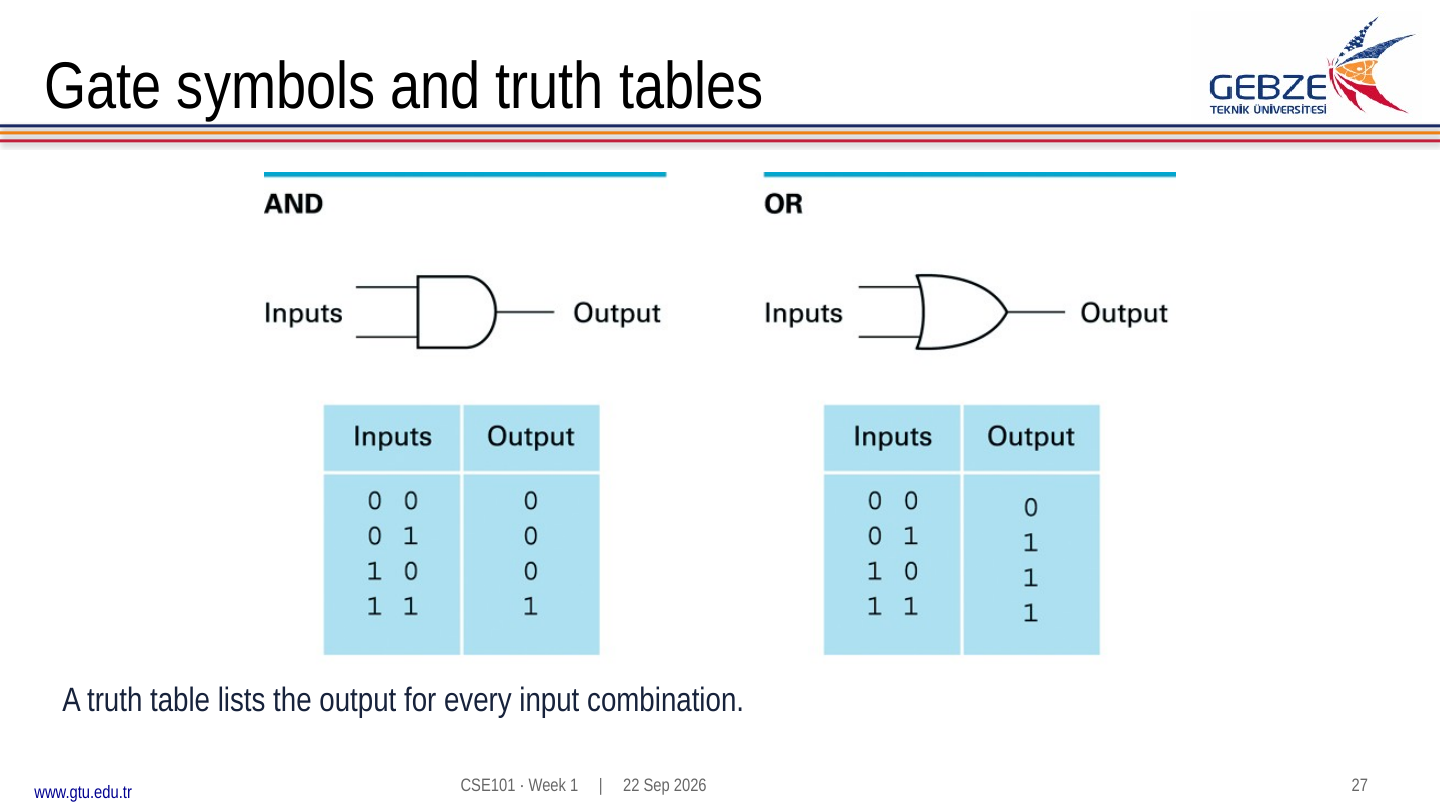
To evaluate a combination of gates, calculate intermediate signals in dependency order. For X = A AND B and Y = X OR C, find X first. With A=1, B=0 and C=1, X=0 and Y=1. The final output is 1 because C is 1, even though the AND result is 0. With A=1, B=1 and C=0, X=1 and Y=1 for a different reason.
Check: when is Y = (A AND B) OR C equal to 0?
C must be 0, and A AND B must also be 0. Thus A and B cannot both be 1. The input triples (A,B,C) are (0,0,0), (0,1,0) and (1,0,0). This is a useful way to reason without listing all eight rows.
5. Feedback, bits and addresses
A circuit with no stored state produces an output determined by its present inputs, once propagation has settled. Feedback adds a different possibility: a signal returns to influence the circuit that produced it. A suitable feedback circuit can retain one of two stable states, allowing it to store a bit. The state then depends on its history as well as its current inputs.
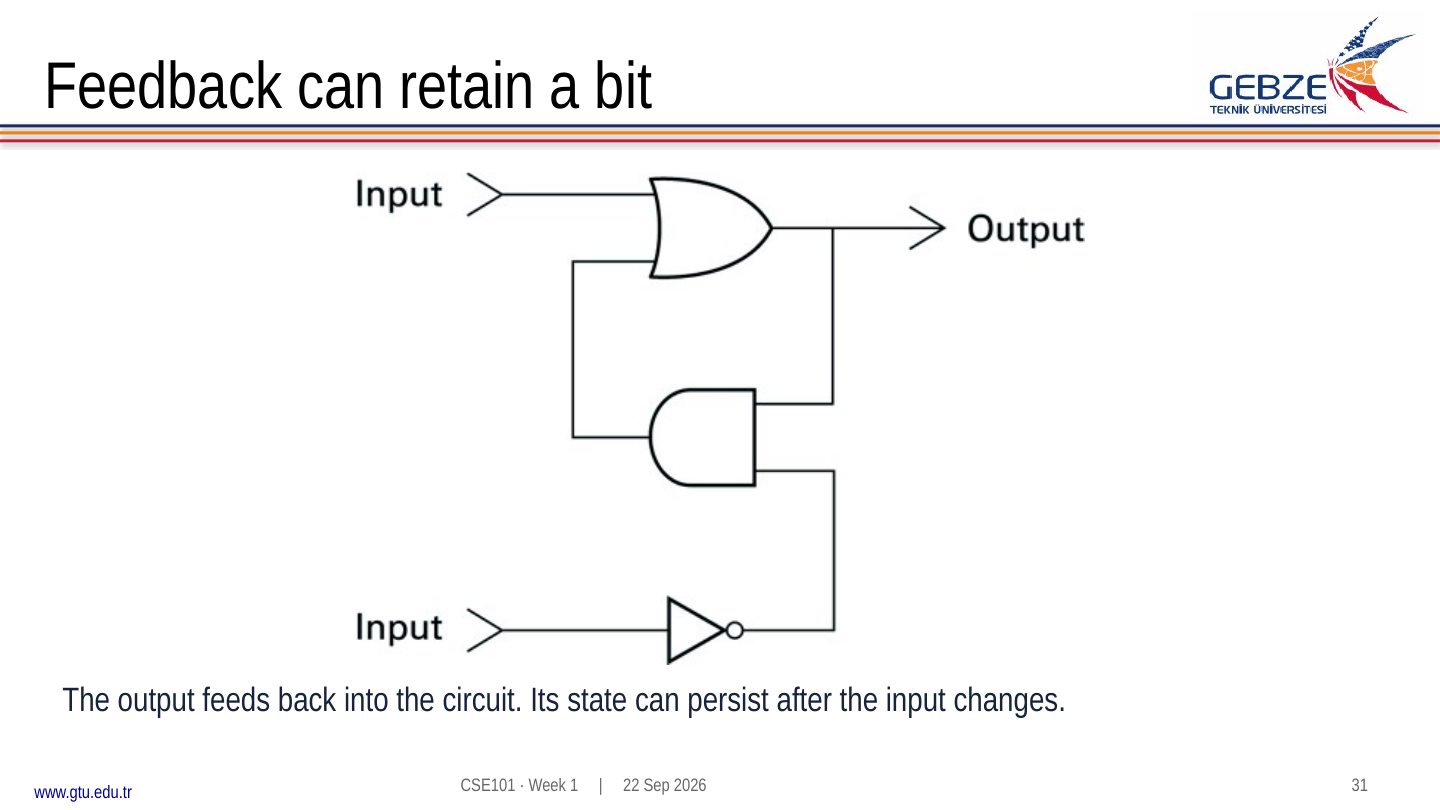
The lecture's OR/AND example shows a value being set, propagating through the circuit and remaining after the setting input returns to 0. Follow each intermediate signal through the sequence rather than assuming feedback automatically means memory. A practical storage circuit must define how to set, hold and clear its state. Feedback circuits can also have unstable or unwanted behavior if their design and timing are unsuitable.
One bit has two possible states. A byte contains eight bits and therefore has 28 = 256 possible patterns. This counts the patterns, not their meaning. A byte might represent a small integer, part of a character encoding or one component of a larger value.
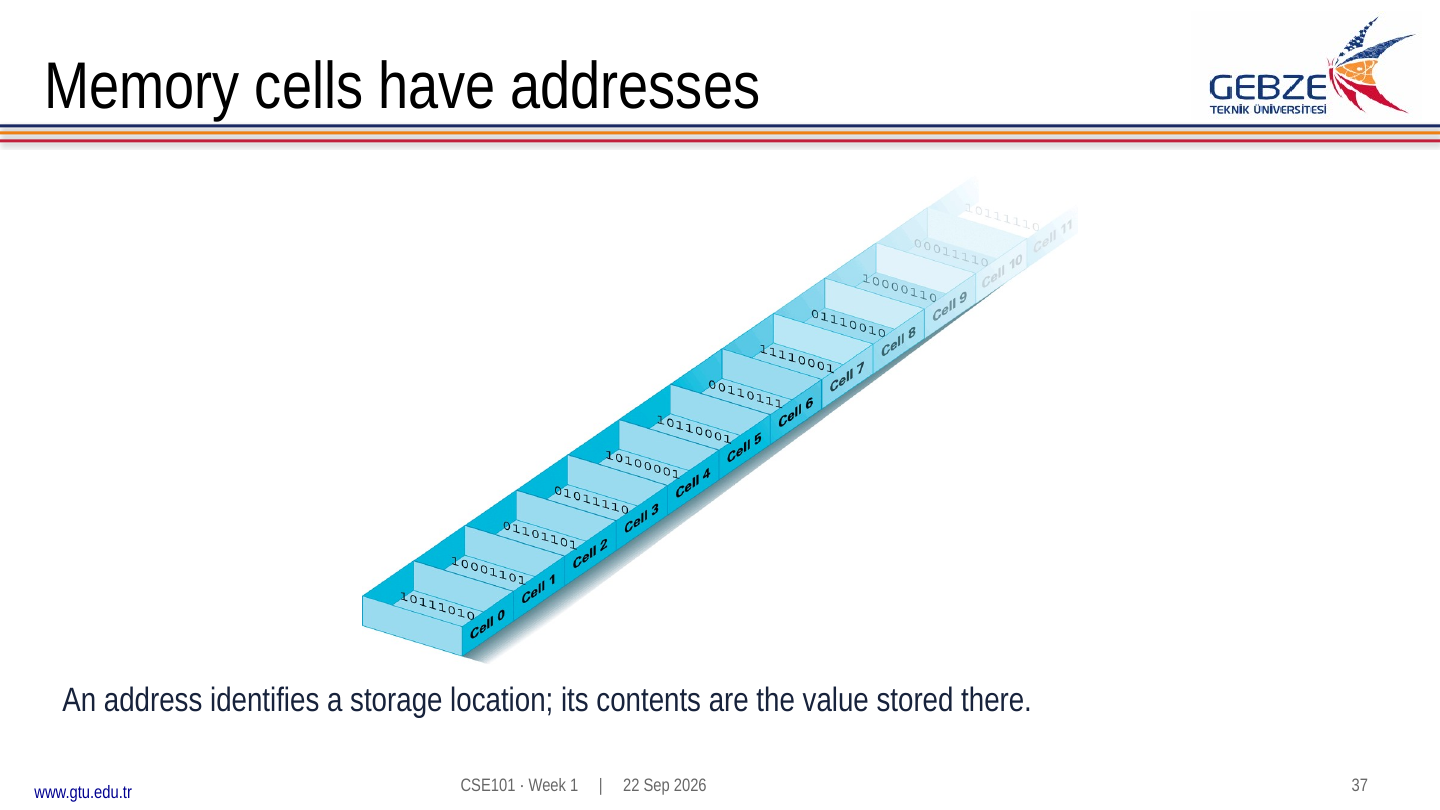
An address identifies a storage location. The contents are the value currently stored there. If location 12 contains 37, changing its contents to 19 does not change the address. An instruction can refer to the location and obtain its current contents. The size of an addressable unit depends on the machine; the introductory diagram uses byte-sized cells.
Check: how many locations can a 10-bit address distinguish?
There are 210 = 1,024 distinct addresses. If each address selects one byte, those locations hold 1,024 bytes. If each selects a larger unit, the byte capacity changes. Address count and bytes per location are separate quantities.
6. Binary place value and conversion
In decimal, moving one position to the left multiplies the weight by ten. In binary, it multiplies the weight by two. From right to left, the integer weights are 1, 2, 4, 8, 16, 32 and so on. A digit 1 includes its position's weight; a digit 0 contributes nothing. Always state the base when a string of digits could be ambiguous.
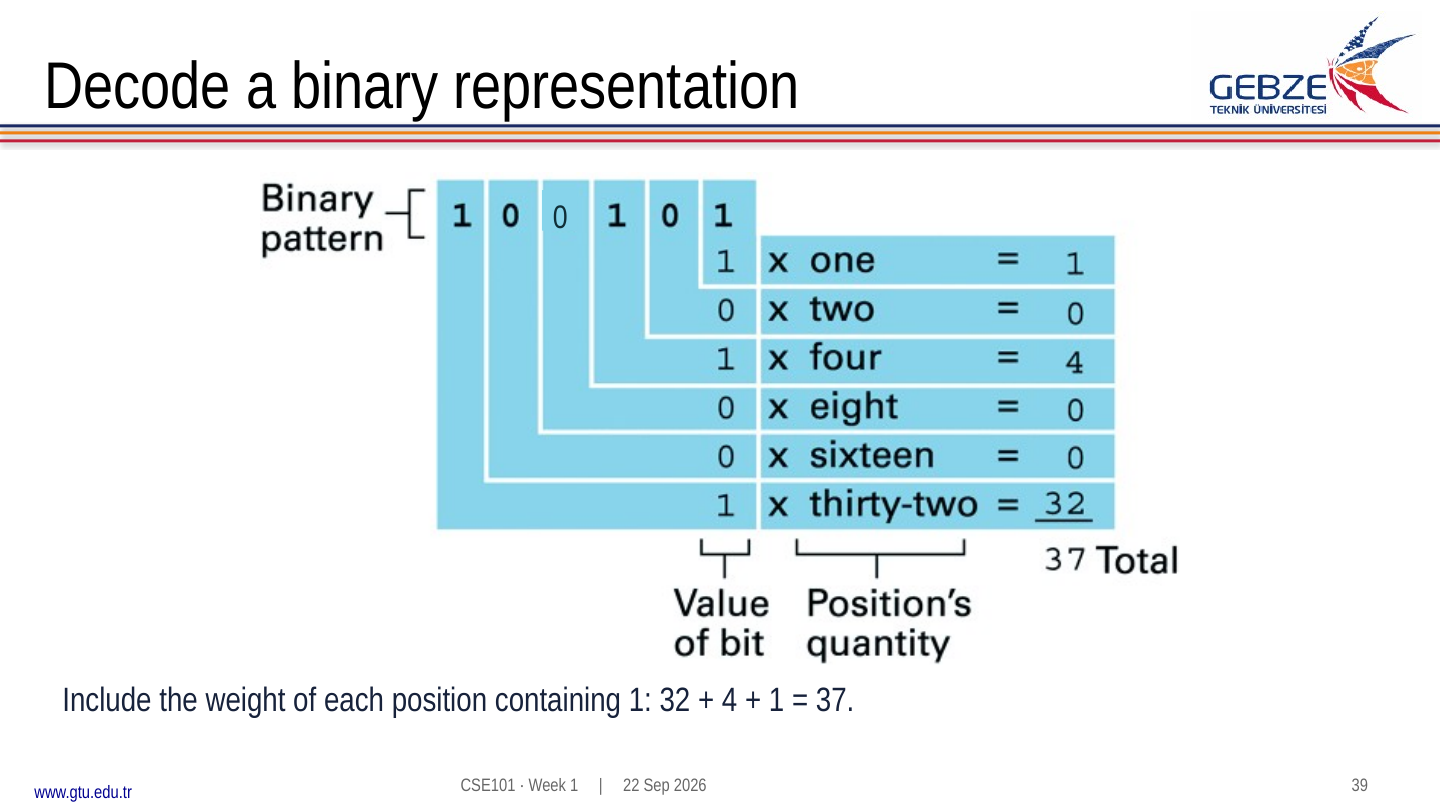
For example, 110102 = 1×16 + 1×8 + 0×4 + 1×2 + 0×1 = 2610. Leading zeros do not change an unsigned value: 001012 and 1012 both represent five. A fixed-width representation nevertheless keeps those positions available, so the width still matters when considering range or interpretation.
To convert a nonnegative decimal integer to binary, repeatedly divide by two and record the remainder. For thirteen, the successive quotient/remainder pairs are 6/1, 3/0, 1/1 and 0/1. Reading the remainders from last to first gives 1101. The first remainder describes the least significant bit, which is why simply writing the remainders in the order obtained reverses the result.
A second method chooses weights. Nineteen contains sixteen, leaving three; three contains two and one. Therefore 1910 = 100112. Verify a conversion in the opposite direction: 16 + 2 + 1 = 19. An unsigned n-bit value ranges from zero through 2n−1. Eight unsigned bits can represent 0 through 255, inclusive.
Check: convert 45 to binary and verify it.
45 = 32 + 8 + 4 + 1, so the weights 32,16,8,4,2,1 receive digits 1,0,1,1,0,1. The result is 1011012. Repeated division produces remainders 1,0,1,1,0,1, which read upward give the same answer.
7. Hexadecimal as compact binary notation
Hexadecimal uses base sixteen. Its digits are 0–9 and A–F, where A means ten and F means fifteen. Because 16 = 24, each hexadecimal digit corresponds exactly to four binary digits. Hexadecimal is convenient when inspecting long bit patterns, memory contents and machine-level data.
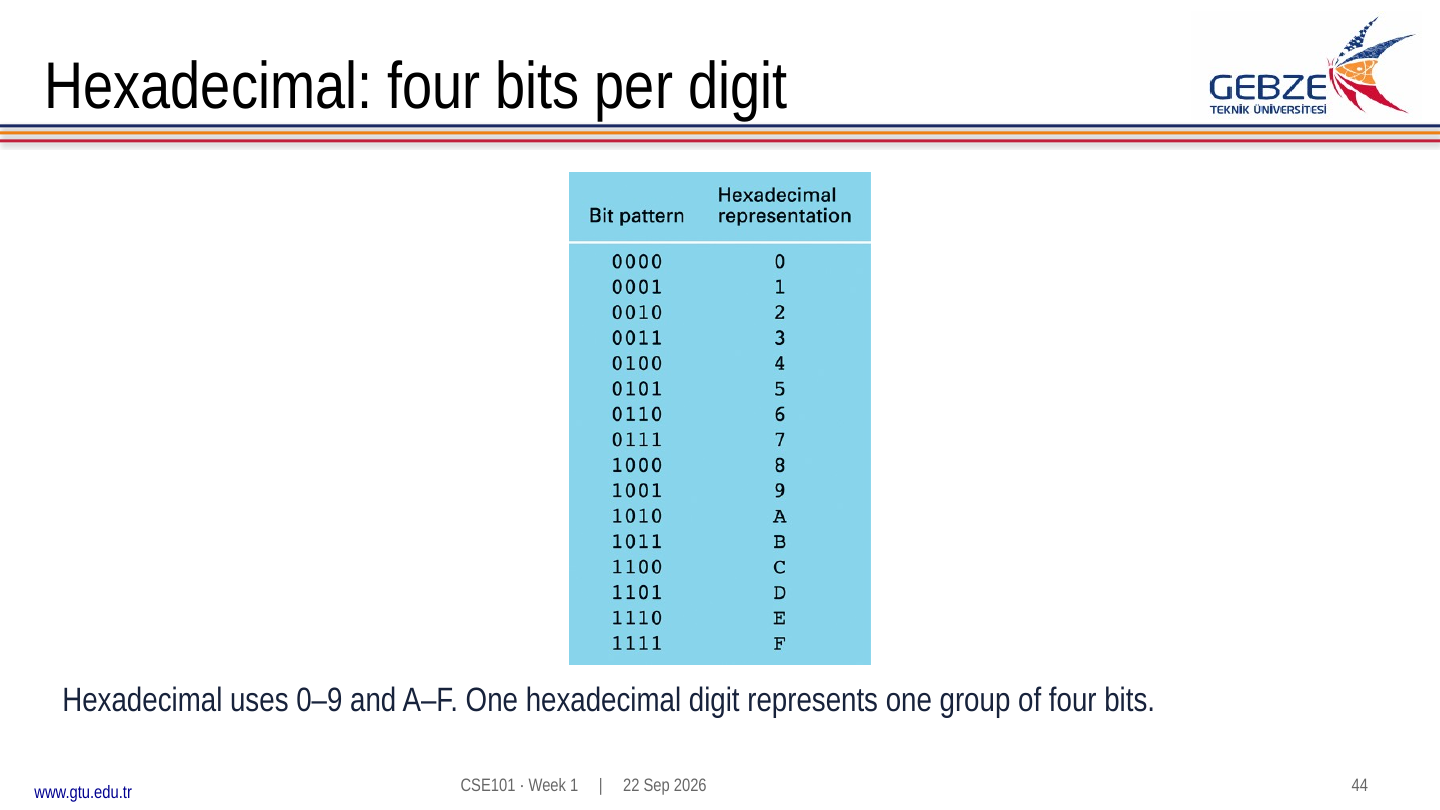
Group a binary integer from the right into sets of four, adding leading zeros if needed. For 0011 1010, the first group is three and the second is ten, so the hexadecimal result is 3A. Checking in decimal gives 3×16 + 10 = 58. The conversion changes how we write the value, not the value itself.
For a reverse example, 2F16 becomes 0010 11112. Keep all four positions for each digit while grouping; dropping the leading zeros from an interior group would change the bit positions. Two hexadecimal digits represent one byte.
Check: write 10101101 in hexadecimal.
Split it as 1010 1101. These groups correspond to A and D, so the result is AD16. Its unsigned decimal value is 10×16 + 13 = 173.
8. Characters need an agreed encoding
A bit pattern does not announce whether it means a number or a letter. An encoding supplies that interpretation. In ASCII, the code for uppercase A is decimal 65, hexadecimal 41, or binary 01000001 when stored in an eight-bit byte. Interpreted as an unsigned integer, the same byte is simply sixty-five.
Text containing the character “5” and a binary integer with value five have different representations. ASCII “5” has code 53, written 00110101 in binary. The unsigned integer five is 00000101 in eight bits. Reading numeric text therefore requires a conversion from character codes into a numerical value.
ASCII provides a small character repertoire. Unicode assigns character identities across many writing systems, and encodings such as UTF-8 represent those identities as bytes. Do not assume every visible character occupies one byte. See the Unicode Consortium's introduction for why a common character standard matters.
Check: can you identify the meaning of the byte 01000001 from its bits alone?
No. It can be 65 as an unsigned integer, A under ASCII, or part of some other representation. You need the format or the operation that interprets it.
9. Turning a signal into stored numbers
A sound wave varies over time. A digital representation records a finite sequence of values. Sampling chooses measurement times. Quantization maps each measured value to one of the representable levels. Encoding writes the chosen level using a bit pattern. These are different decisions, even though a device may perform them together.
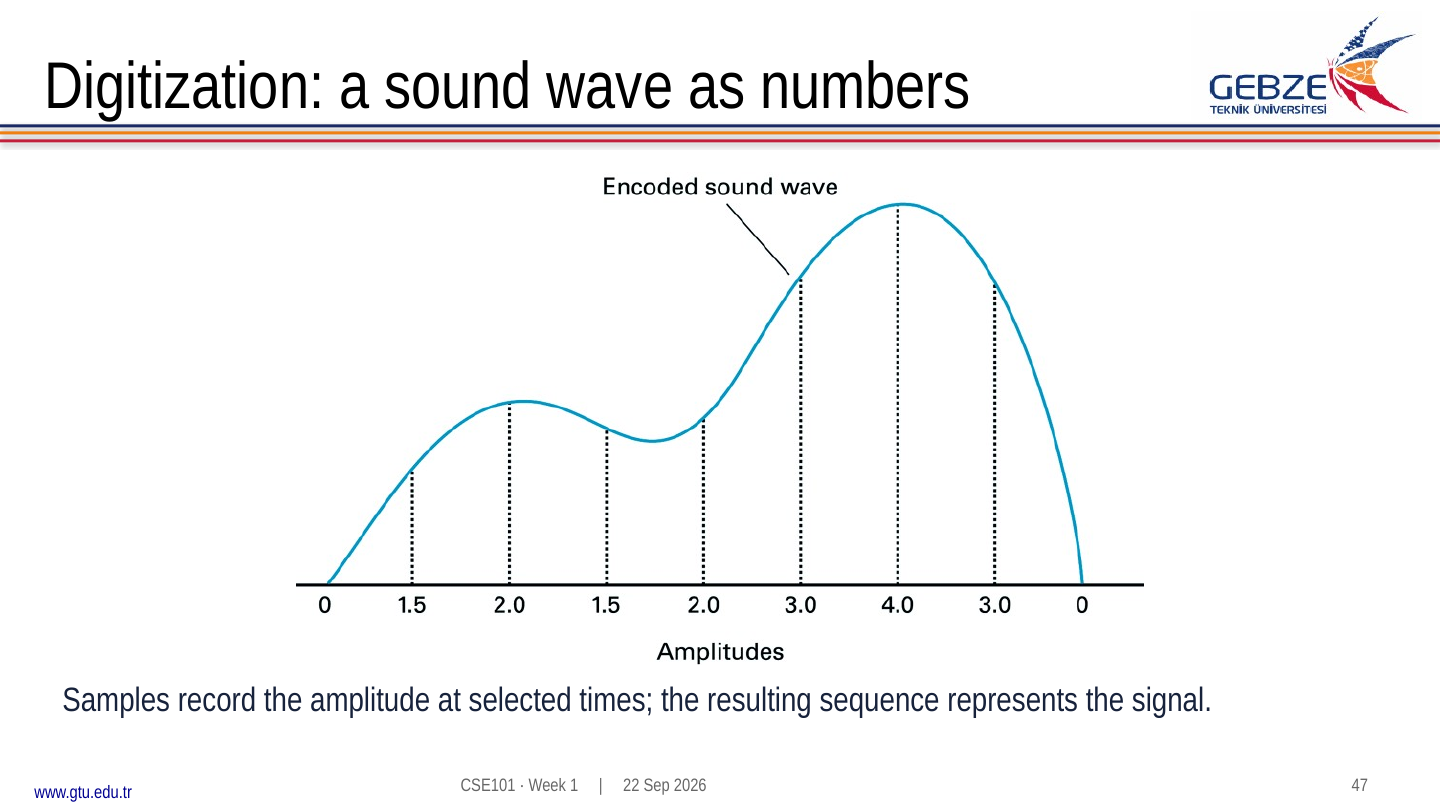
Suppose the measured amplitudes are 1.2, 1.8 and 2.4, and the available stored levels are whole numbers. Rounding to the nearest level gives 1, 2 and 2. The errors, defined as stored minus measured, are −0.2, +0.2 and −0.4. The last two measurements become indistinguishable in the stored representation.
Increasing the sampling rate gives more measurements in the same time interval. Increasing the number of quantization levels permits finer amplitude distinctions over a fixed range. Neither change automatically repairs information already lost in a poor recording. A representation has to suit the signal and the intended use.
For uncompressed sample data, storage size can be estimated as samples per second × seconds × bits per sample × channels. A hypothetical mono signal sampled 8,000 times per second at eight bits per sample takes 64,000 bits for one second, or 8,000 bytes before headers and other overhead. Two channels double that sample-data amount.
Check: what changes when four-bit quantization becomes eight-bit quantization?
The number of available codes increases from 16 to 256. Over the same amplitude range, they can describe more finely spaced levels. This does not change the number of measurement times unless the sampling rate also changes.
10. Binary addition and carry
Binary addition follows the same positional idea as decimal addition. The elementary sums are 0+0=0, 0+1=1, 1+0=1 and 1+1=102. For the last case, write 0 in the current position and carry 1 to the next. If both operands and the incoming carry are 1, the sum is 112: write 1 and carry 1.
  0101    (5)
+ 0011    (3)
------
  1000    (8, unsigned)
Starting at the right: 1+1 writes 0 and carries 1. The next column has 0+1+1, again writing 0 and carrying 1. The four's column has 1+0+1, also producing a carry. Finally 0+0+1 gives the leading 1. The bit operation can be traced without deciding a signed interpretation yet.
Width is part of the problem. In four unsigned bits, 1111+0001 needs the five-bit result 10000. Keeping only four bits leaves 0000 and loses the carry beyond that width. A program or circuit must decide how to handle an out-of-range result; an apparently plausible pattern is not proof that the mathematical sum fits.
11. Two's complement and overflow
Two's complement represents positive and negative integers in a fixed number of bits. The leading position has negative weight, while the other positions retain their positive powers of two. In four bits, the weights are −8, 4, 2 and 1. Thus 1101 represents −8+4+1 = −3. The same pattern is thirteen when interpreted as unsigned.
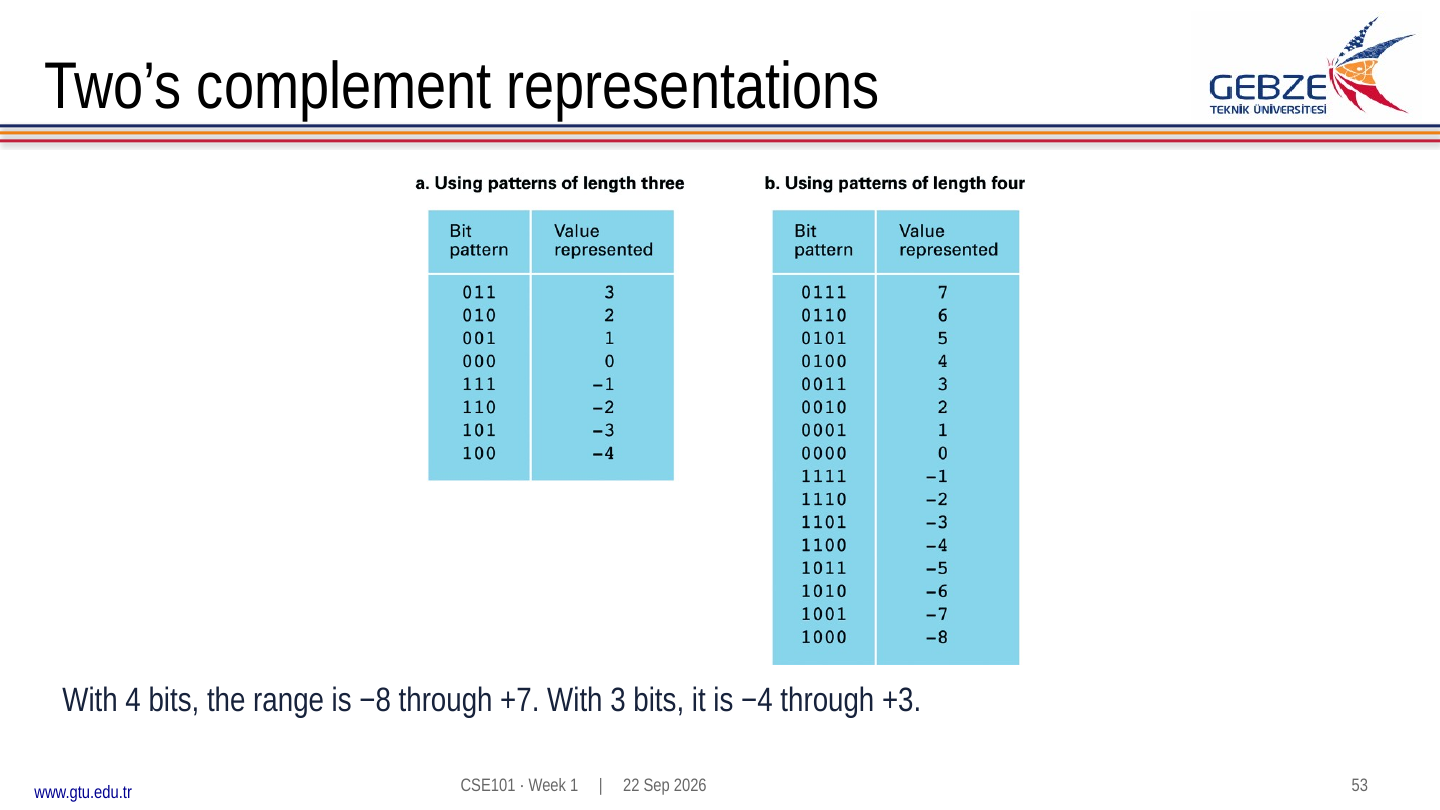
With n bits, the range is −2n−1 through 2n−1−1. The negative side has one extra value. There is only one zero. In four bits, 0000 is zero, 0111 is seven, 1000 is minus eight and 1111 is minus one.
To form minus six in four bits, start with plus six, 0110. Invert all four bits to get 1001, then add one to obtain 1010. The negative-weight check gives −8+2 = −6. The procedure depends on the chosen width: in eight bits, minus six is 11111010. When extending a two's complement value, repeat the sign bit on the left. This preserves its signed value.
Ordinary binary addition also works for two's complement patterns when the true result fits. For −3+2, add 1101+0010 = 1111, which represents −1. For −3+(−2), 1101+1110 produces a carry beyond four bits and the retained pattern 1011, representing −5. This is a valid signed result. A carry out alone is therefore not a signed-overflow test.
Signed overflow occurs when the true answer lies outside the signed range. In four bits, 0111+0001 gives 1000. The intended sum is +8, but 1000 means −8 in two's complement. Adding two values of the same sign and obtaining a result of the opposite sign indicates signed overflow. Adding opposite signs cannot exceed the signed range in this way.
Check: does four-bit signed 5+4 fit? What about −5+3?
5+4 = 9 exceeds +7. Its retained pattern 1001 means −7, so signed overflow occurred. For −5+3, 1011+0011 = 1110. The negative weight gives −8+4+2 = −2, which is the correct result and fits.
12. Binary fractions and limited precision
To the right of the binary point, weights decrease by factors of two: 1/2, 1/4, 1/8 and so on. The pattern 101.1012 therefore represents 4+1+1/2+1/8 = 5.625. The zero in the quarter's position contributes nothing.
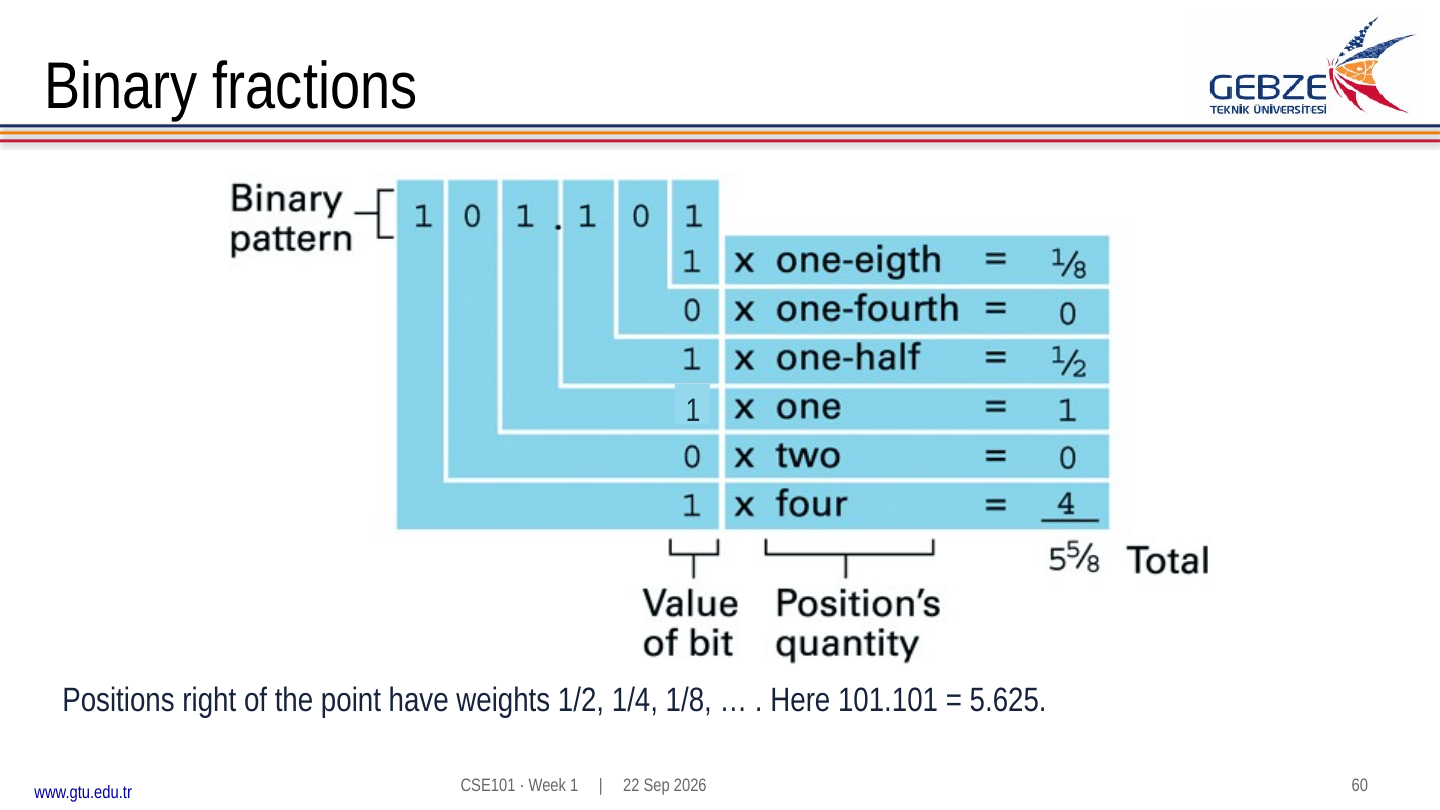
Some fractions terminate in binary, while others require repeating digits. One half is 0.12; one tenth has a repeating binary expansion. A finite binary representation of one tenth is consequently an approximation. Increasing the available precision can reduce the error, but it cannot give a terminating exact representation of that fraction.
Floating point separates a value into fields describing a sign, a scale and significant digits. It resembles scientific notation, which represents a quantity as a significand multiplied by a power of a base. For example, 10.1012 can be written as 1.01012 × 21, or 0.101012 × 22 under a different convention. A format must specify the convention as well as the field sizes.
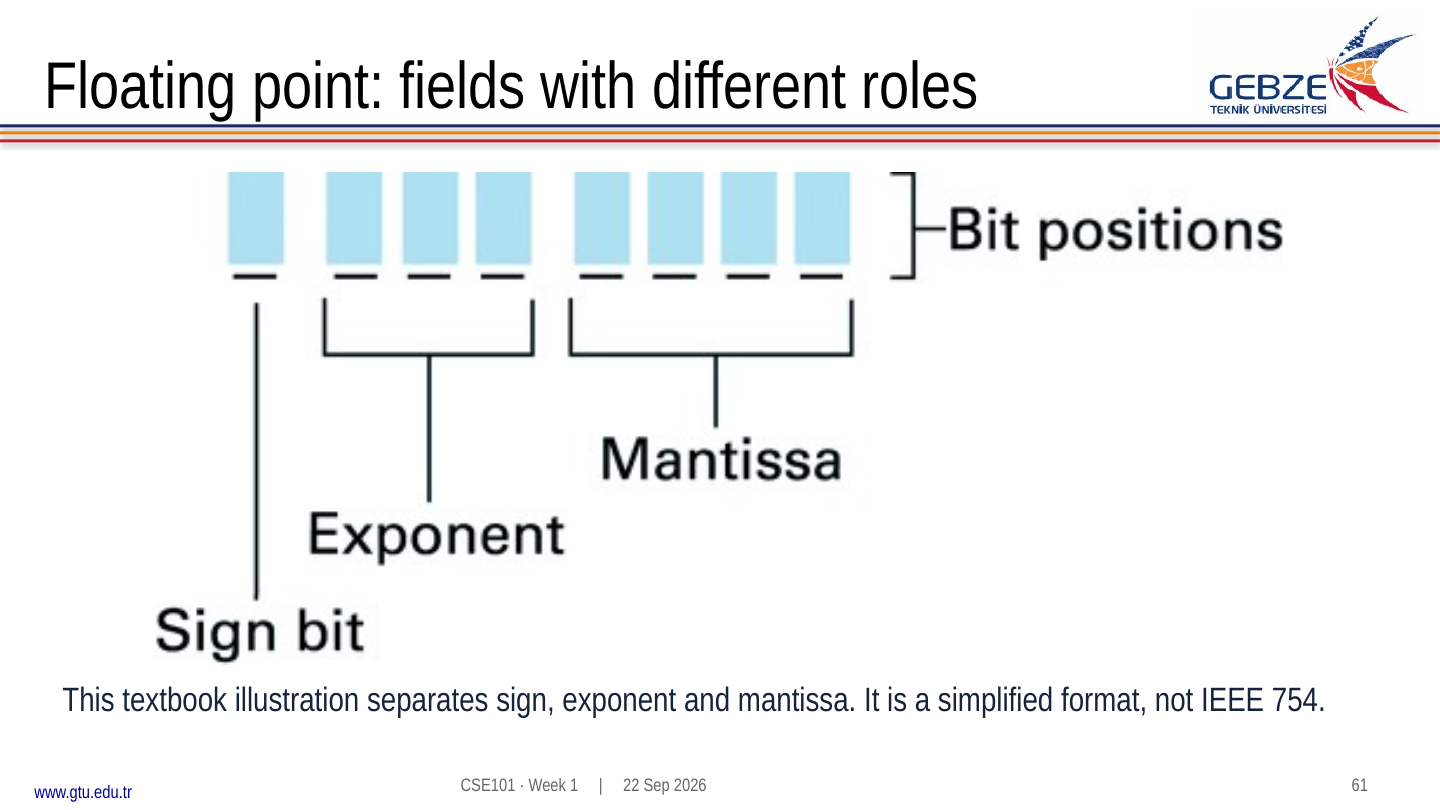
The small format shown in the lecture is a teaching example, not IEEE 754. Use its own exponent and significand rules when tracing that diagram. The lecture's 2⅝ example is 10.1012. If a toy format retains only four fractional significand bits in the form 0.1010×22, the result is 2.5, losing the final low-order bit. This illustrates why representation can alter a value before any later calculation begins.
Range and precision are different. Exponent bits help determine the span of magnitudes; significand bits help determine the detail retained at a given magnitude. Do not assume all nearby integers or all decimal fractions remain distinguishable at every scale. Later programming exercises will make these limits observable.
Check: convert 0.1011 binary to decimal.
The value is 1/2 + 0/4 + 1/8 + 1/16 = 0.6875. Because its denominator is a power of two, it terminates in binary.
13. Physical storage and logical records
Bits need a physical representation wherever they are kept. The slides compare magnetic disks, optical discs and magnetic tape. These examples connect a logical sequence of data with mechanisms for recording and retrieving it. They do not imply that every computer uses every medium.
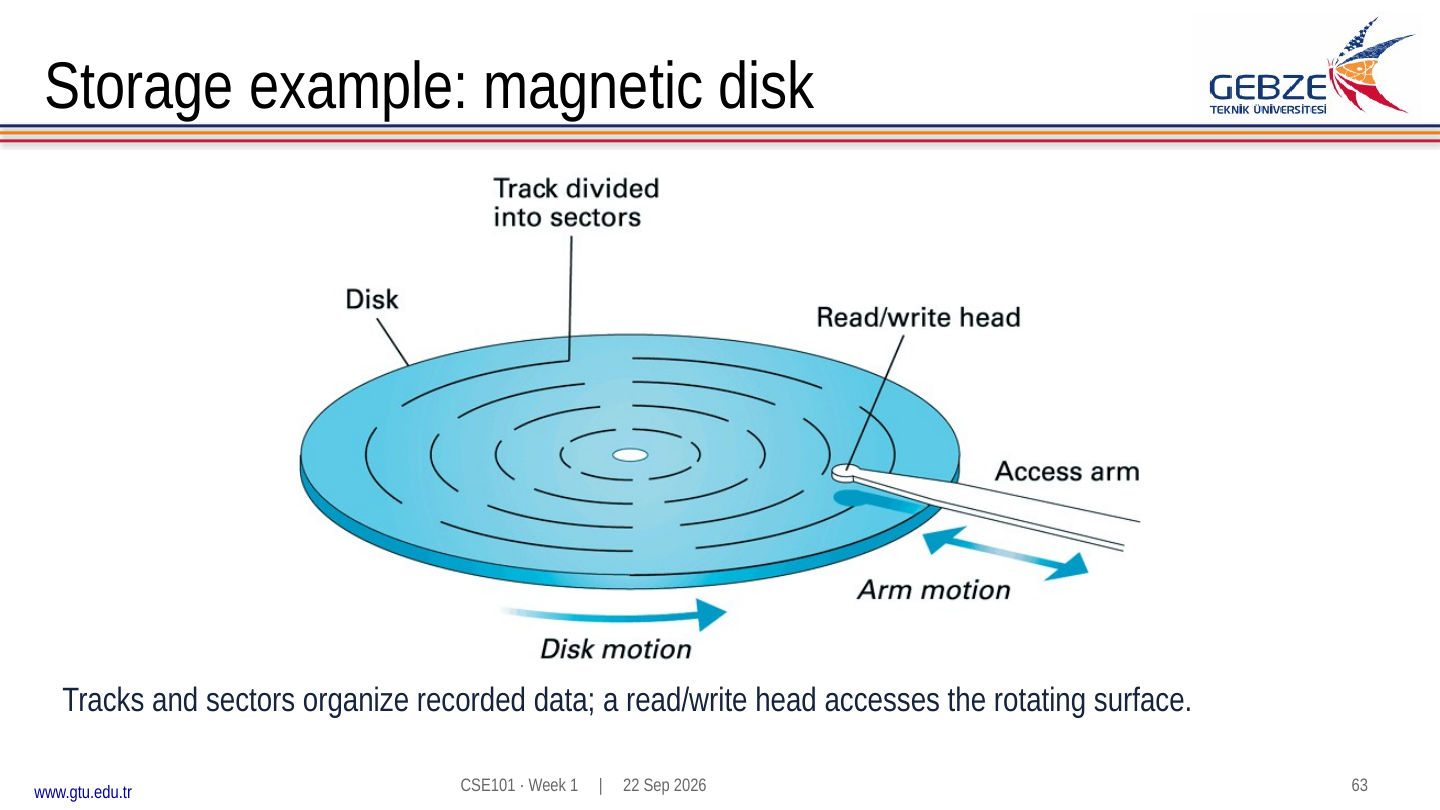
A magnetic disk records information on surfaces organized into tracks and sectors. Reaching data involves physical movement and rotation. An optical disc uses a spiral track and optical reading. Tape records along a length of medium, so reaching a later portion requires moving the tape. Solid-state storage provides another physical implementation using electronic storage cells, without those rotating parts.
Access pattern matters. Reading a long sequence in order is different from repeatedly jumping among distant locations. The best choice for a task depends on more than capacity: access time, transfer rate, durability and the workload all matter. Keep those concepts separate from the number of bytes a device can hold.
A logical record groups information meaningful to a program, such as an item identifier and a quantity. A physical block groups data for storage and transfer. A record may fit within a block, share a block with other records or cross a block boundary. The application-level meaning and the physical unit need not align.
The complete connection is now visible: devices support gates and state; state holds bits; a format interprets those bits; instructions manipulate the represented information. The same byte may play different roles at different points in a computation, so always ask what interpretation is being applied.
14. Connecting programs to the physical world
Arduino brings input, processing and output into a system you can observe directly. A microcontroller runs a stored program, reads inputs and controls outputs. A computer can develop and upload the program, then communicate with the running board. With suitable power, the board can execute its uploaded program independently of the development computer.
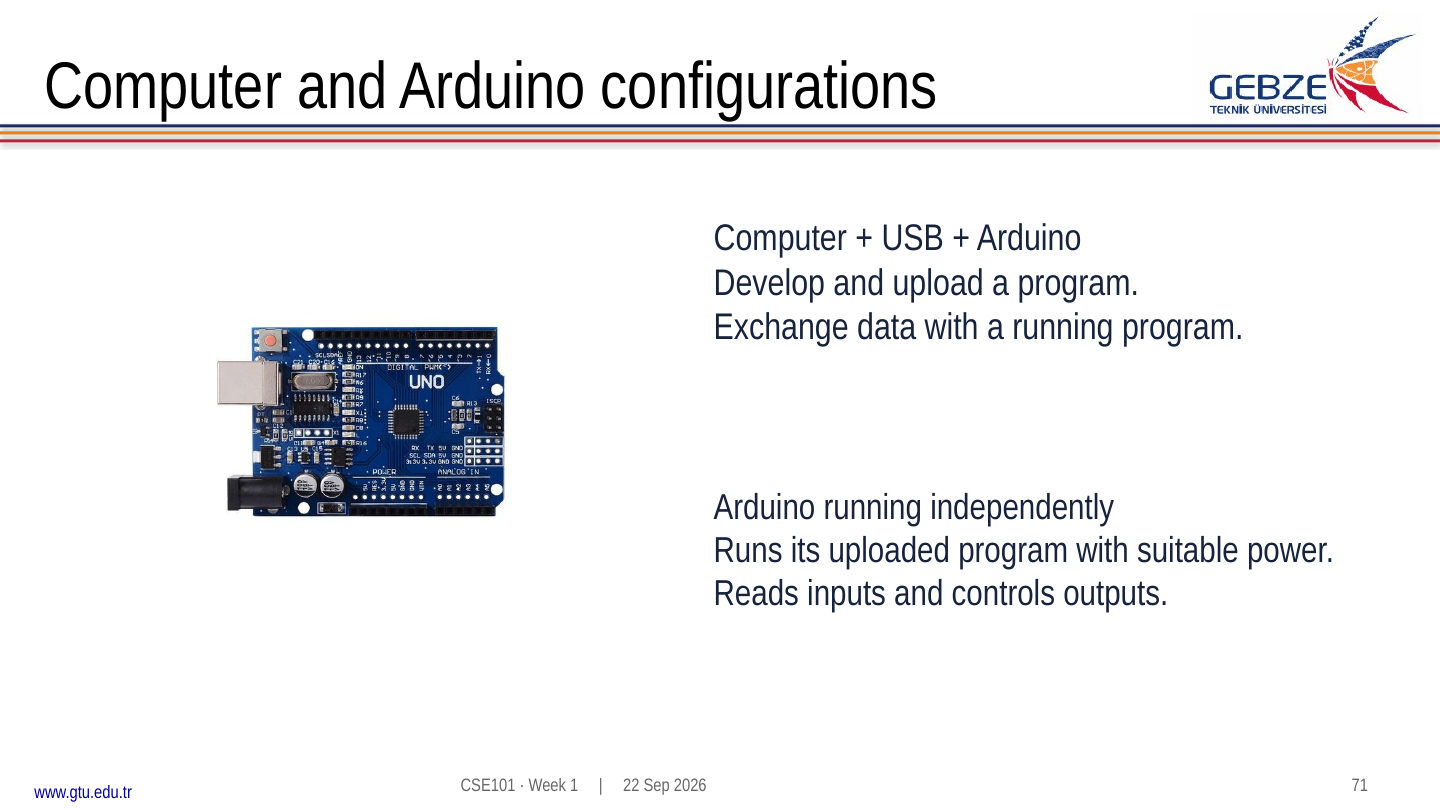
Every student must obtain a personal Arduino kit, as stated in the lecture. The slides specify an Arduino Uno or compatible clone and show modest starter-kit examples. The purchase timing and final component list will be announced. The store screenshots in the slide PDF are historical examples with obsolete prices and offers. Ask the instructor or TAs if a board or kit is uncertain.
A USB data cable, board, breadboard, wires and basic components connect the programming environment with simple experiments. The official Uno R3 reference describes the board and provides its pinout and documentation. Check the actual model being used; board families do not all have the same electrical and programming details.
15. Review: explain, calculate and check
Use these questions to test the connections across the chapter. Show intermediate reasoning and state width, base and interpretation whenever they affect an answer.
1. Why can the same hardware run different applications?
A programmable machine changes its behavior by executing different instruction sequences. The hardware supplies available operations, while the program selects and organizes those operations using particular data.
2. What distinguishes stored state from a gate's ordinary output?
A combinational gate output follows current inputs after propagation. Stored state can persist and depend on earlier inputs. A suitable feedback circuit provides one way to retain that state.
3. Interpret 1110 as unsigned and as four-bit two's complement.
Unsigned: 8+4+2 = 14. Two's complement: −8+4+2 = −2. Width and interpretation are essential parts of the answer.
4. Convert 29 decimal into binary and hexadecimal.
29 = 16+8+4+1, giving 111012. Group as 0001 1101 to get 1D16. Check: 1×16+13 = 29.
5. Is 0111+0011 valid in four bits?
The retained pattern is 1010. As unsigned arithmetic, 7+3 = 10 fits the range 0–15. As signed two's complement, +10 exceeds +7 and the pattern means −6, so signed overflow occurred. The question needs an interpretation before it has a single answer.
6. How much raw data represents two seconds at 1,000 samples/s, 12 bits/sample, one channel?
2×1,000×12 = 24,000 bits, or 3,000 bytes when packed without padding. A file can require additional headers or use a wider storage unit per sample.
7. Why does a copied text file sometimes display the wrong characters?
The reader may interpret the bytes with a different encoding from the writer. Identical stored bytes do not ensure identical displayed text unless both sides agree on their interpretation.
8. Does a wider numerical range guarantee more precise fractions?
No. A representation may allocate more bits to scale while retaining the same number of significant bits. Range concerns the magnitudes available; precision concerns how finely values can be distinguished.
16. Sources and further reading
This companion expands the concepts and examples in the current CSE101 Week 1 lecture. The full slide PDF includes the instructor's added slides and original figures. Figure captions identify PDF page numbers; captions retain the course figure provenance.
- Mehmet Göktürk, CSE101 Week 1: Computer foundations and data representation, 76-page slide set, published 22 September 2026. Primary source for the sequence, examples and figures.
- J. Glenn Brookshear, Computer Science: An Overview, data-storage material represented in the instructor's lecture figures. See the figure credits in the slides; the diagrams are retained from the course source collection.
- Unicode Consortium, What is Unicode? Background for character identity and encoding.
- Arduino, Uno R3 documentation. Board reference, pinout and supporting documentation.
- Historical IBM computer film, the video selected in the instructor's current deck.
For restudy, trace the gate example, convert numbers in both directions, and explain why a fixed-width result may have different unsigned and signed meanings. Revisit any step you cannot justify before moving on to machine instructions.