CSE 101 · WEEK 04 · READING
Operating systems and processes
How many programs share a few processors, wait for events, and resume with the right state.
This chapter builds on the single-program traces from Week 3 and explains how an operating system shares the machine. Figures link to the 32-slide lecture PDF. Try each Check question before opening its answer.
1. Why share a computer?
Week 2 followed a processor as it fetched instructions, used registers and exchanged data with memory and devices. Week 3 then described algorithms and traced a complete program in VizMachine. Together, these explain how one program executes. A working computer has a further problem: several programs need those same resources. A browser, editor and music player may all be active while background services handle networking, storage and other work.
Large early computers made resource sharing particularly visible. A computing installation served many jobs and users, so deciding what should run next mattered. The historical photographs below show a computer room and, later, a classroom of terminals. A terminal provides an interface to a computing service; it need not contain the processor doing the main computation.
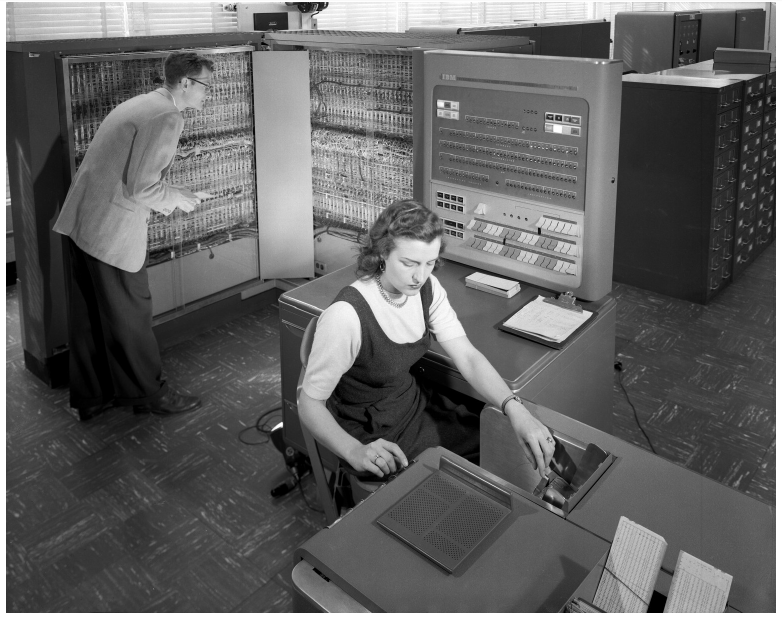
Photograph: NASA, public domain, via Wikimedia Commons. This is historical context, not a photograph of the CTSS system.

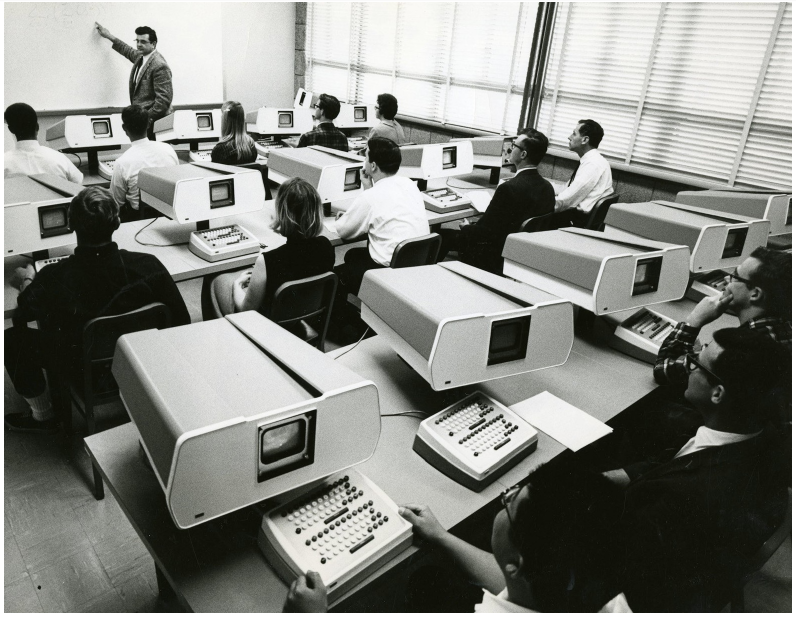
Photograph and historical identification: IBM, Time-sharing.
An operating system (OS) manages resources and provides services through which programs use them. The hardware still executes instructions. The OS supplies rules and mechanisms for allocating CPU time, managing memory and coordinating access to files and devices.
Check: why is the instruction cycle alone insufficient to explain a busy desktop?
It explains how the CPU carries out the current instruction, but not which program should receive the CPU next, which memory it may access, or what happens when it must wait for a device. Those questions require resource management and coordination.
2. A few cores, hundreds of processes
A typical personal computer has one CPU package containing several cores. A core is an execution resource inside the processor. For a concrete desktop example, Intel lists ten cores for the Core Ultra 5 225. This is an example, not the core count of every PC.
Multiple processor packages are another arrangement. The historical board below has two separate processors installed in two sockets. Two packages and two cores are different descriptions: a package may itself contain several cores. Some processors also expose more logical processors than physical cores through simultaneous multithreading; these logical processors are not additional complete physical cores.
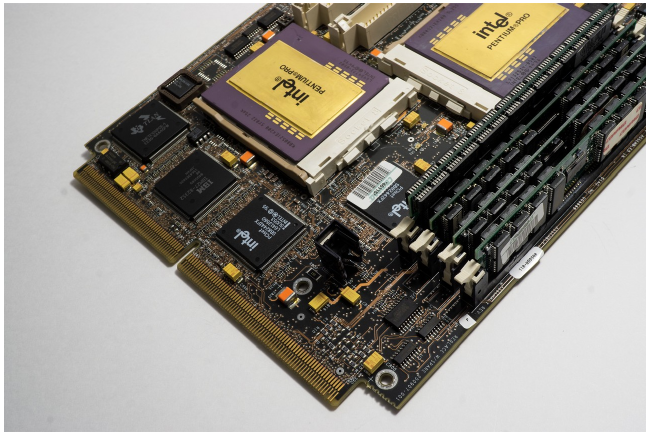
Photograph: Capitalistcakes, Two Intel Pentium Pro 256k, CC0.

A computer may have hundreds of processes even though it has only a small number of cores. The count changes with the operating system, installed services and open applications. There is no universal “correct” range of 300–1,500. Nor does the count mean that all those processes execute instructions simultaneously: many are waiting. In Windows, Task Manager distinguishes apps and background processes and shows live performance information.
Processes and threads also have different counts. A process can contain several threads of execution; real operating systems generally schedule threads. For this introductory model, we follow one execution stream per process so that the sharing mechanism remains easy to trace.
Check: does a list of 300 processes imply that the computer needs 300 cores?
No. Some processes are waiting for input or another event. Ready work can take turns on the available execution resources. The number of existing processes is not the number executing at one instant.
3. The mechanic-shop analogy
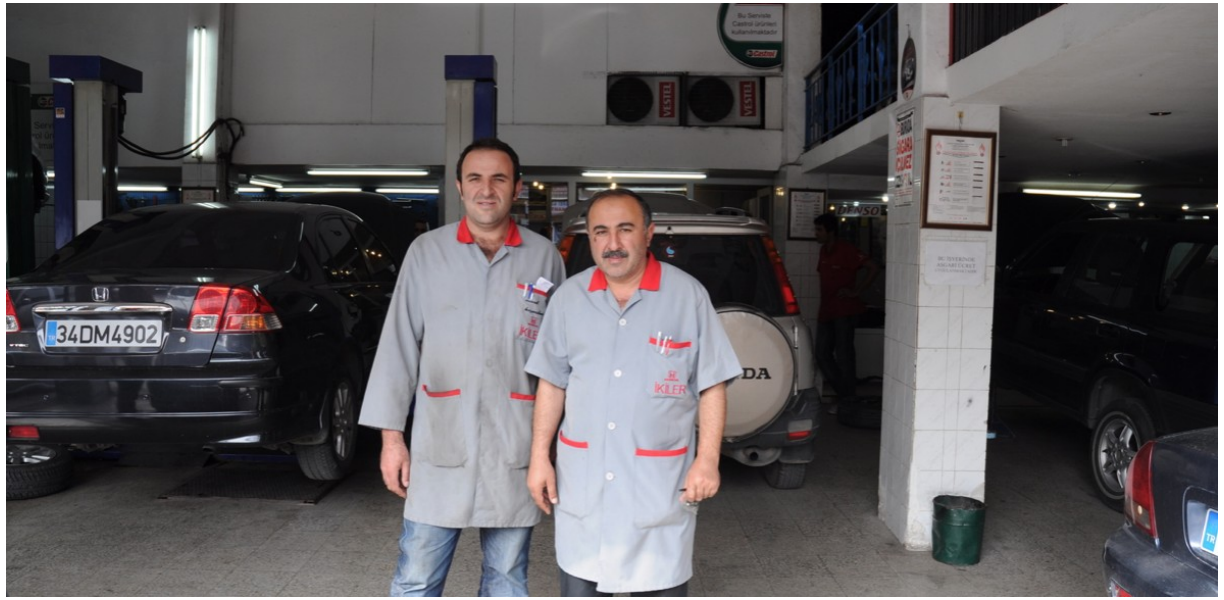
In the instructor’s analogy, the mechanic is the CPU or core, while each car’s repair job represents a process. Several cars can have repairs in progress even when there is only one mechanic. The mechanic may work on one car, pause its repair and continue with another.
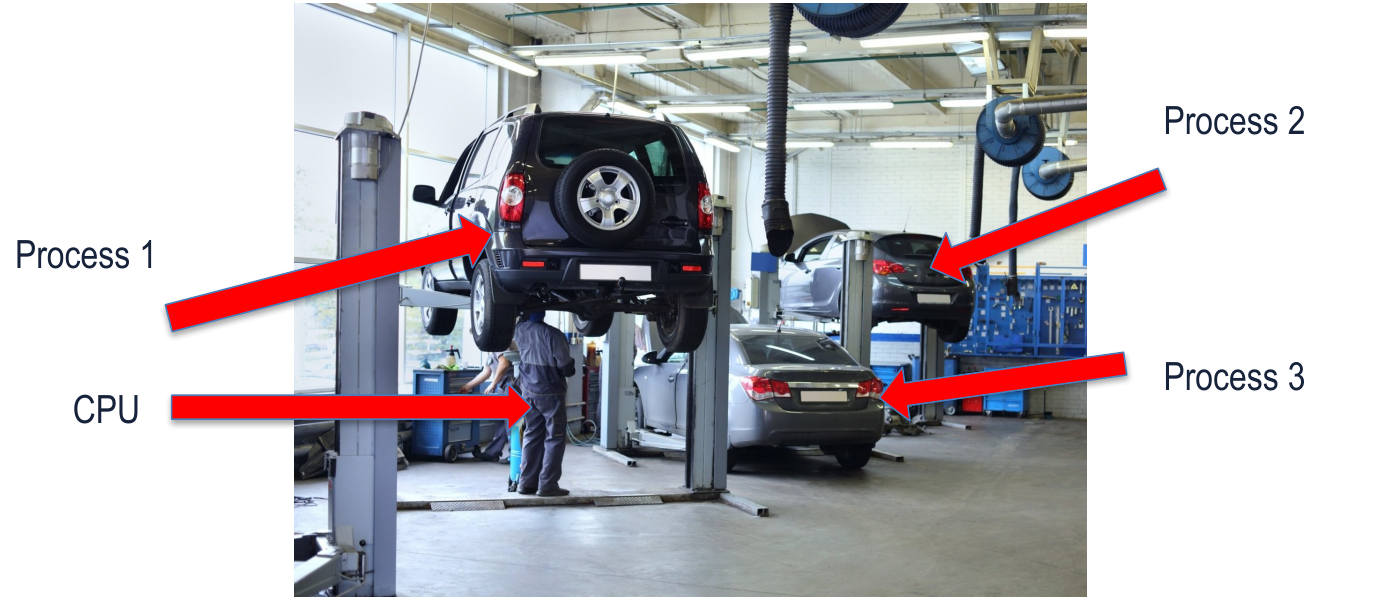
This connects to Week 3’s distinction between an algorithm and its execution. A written repair procedure is a description; repairing this particular car is one execution with its own progress and working state.
The distinction between the car and its repair is useful. The repair procedure describes what should be done; the particular repair has an input, a current stage and unfinished work. Similarly, a program describes instructions, while a process is an instance of a program in execution.
Some repairs are short, such as changing a tyre; others involve prolonged engine work. A coordinator can organize which job receives attention next. Crucially, a repair may stop because a spare part is unavailable. Leaving the mechanic idle during that wait wastes a resource that another ready job could use.

The photograph is retained from the instructor’s original slides. We use it to illustrate a queue, without inferring a particular scheduling policy from the photograph.
Check: a part for car A will arrive in twenty minutes, and car B is ready for repair. Must the mechanic wait?
No. The mechanic can work on B while A waits. A’s repair remains unfinished, but unfinished work is not necessarily ready work. This resembles letting another process use the CPU while an I/O operation completes.
4. Concurrency and parallelism
Concurrency means that tasks make progress during overlapping periods. One mechanic can support concurrent repairs by alternating attention between them. This does not mean the mechanic physically works on two cars at the same instant.
Parallelism means work actually executes at the same time on separate resources. Two mechanics working simultaneously illustrate parallelism. A multicore processor or multiple processor packages can provide this possibility. The shop analogy shows the execution resources; it does not by itself specify whether the cores are in one package or several.
Adding a resource does not guarantee that every job finishes twice as fast. Both mechanics might need the same lift, or the next repair step might depend on completion of the previous one. Likewise, dependencies and shared resources can limit useful parallel execution.
Check: classify one mechanic alternating between cars and two mechanics repairing separate cars at once.
The first case demonstrates concurrency without simultaneous execution of the repairs. The second demonstrates parallelism and also concurrency. The terms describe different aspects of progress rather than mutually exclusive categories.
5. Programs, processes and their states
A program is a stored instruction sequence. A process is an executing instance with its own working state. Running the same program twice can create two instances with different inputs, register values and progress. “Executing instance” includes periods when the process is temporarily waiting; a process does not cease to exist every time it loses the CPU.
We use three states to describe its eligibility for CPU time:
| State | Meaning | Shop equivalent |
|---|---|---|
| Running | Its instructions are executing on a processor. | The mechanic is working on this car. |
| Ready | It can execute but is awaiting CPU time. | The car is ready for a mechanic. |
| Blocked | It must wait for an event before continuing. | A necessary spare part has not arrived. |
When a required I/O operation completes, a blocked process can become ready. It does not automatically become running: another process may still be using the CPU. Conversely, a process can leave the running state because its turn ends while it still has useful work to do; it then returns to ready.
Check: a process is waiting for a disk read. Does giving it more CPU time make the data arrive?
Not by itself. In this model the process is blocked until the I/O completes. The CPU can execute another ready process during that interval. Device completion makes the waiting process eligible to continue.
6. Selecting and dispatching work
The scheduler chooses among ready work. The shop coordinator provides an analogy: several jobs need attention, and someone decides which one goes next. A priority rule could favour an urgent vehicle, while another rule could favour arrival order or short jobs. The police-vehicle example in the slides illustrates a possible policy, not a universal priority rule.
The dispatcher carries out the transfer of CPU control to the selected execution context. Scheduling asks “which job?”; dispatching performs the switch. This distinction helps separate the decision from the actions needed to resume execution.
A priority policy has consequences. Continually admitting urgent new jobs may delay lower-priority jobs. Giving every ready job turns can improve opportunities to respond, but switching itself takes work. We do not need a full scheduling algorithm here; the important point is that sharing requires choices.
Check: should a blocked process be chosen merely because it has high priority?
No. Priority helps choose among eligible work. A process still waiting for an essential event cannot continue its next operation just because it is important.
7. Resuming a process after a switch
Returning to an unfinished repair requires knowing what has already been done. A processor also needs enough saved information to resume correctly. The program counter identifies the next instruction, and registers hold working values. The OS keeps track of the process’s memory and other resources as well.
Recall the HI trace. Just after the first STORE, PC is A4, R1 is 48 and memory cell E0 holds 48. If execution pauses there, resuming at A0 would restart the program; resuming at A4 with unrelated register values would fail to restore its full state. This is a conceptual example of the information an OS must preserve, not a claim that VizMachine implements a scheduler.
A context switch saves the outgoing execution context and restores another. Saving register state does not mean copying every byte of the process’s memory each time it switches. Memory contents and their ownership must remain available, while the CPU’s immediate execution state changes.
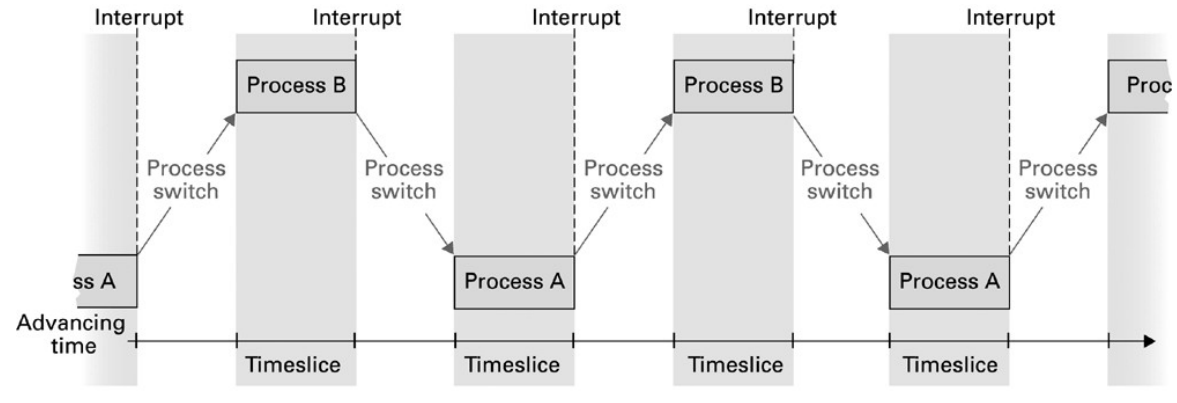
A timer interrupt provides a way for the OS to regain control after an interval. The process need not voluntarily finish its entire program first. A device interrupt has a different cause: a device may report completion of an operation. Both attract attention, but they convey different events. This connects to the Week 2 call-bell analogy: signalling that attention is needed is distinct from deciding what work should receive service next.
Check: why would restoring only the program counter be insufficient?
The resumed instruction may depend on register values computed before the switch. If those registers still contain another process’s values, execution continues at the right address with the wrong data.
8. A complete scheduling trace
Consider two processes, A and B, sharing one core. A requests disk data and becomes blocked. B can then use the core. When the disk completes, A becomes ready, but this example lets B continue until the scheduler chooses A. The trace is a possible sequence, not a rule that every OS must follow.
| Event | A | B |
|---|---|---|
| A executes. | Running | Ready |
| A requests disk data; B is dispatched. | Blocked | Running |
| The disk completes; B continues. | Ready | Running |
| The scheduler selects A and switches. | Running | Ready |
The CPU and the I/O device can be busy with different parts of the overall workload. This is why “process A is waiting” does not imply “the entire computer is idle.” If all processes are blocked, however, there may be no ready application work for the CPU.
Check: does a completion interrupt prove that A immediately starts executing?
No. It reports the event that allows A to become ready. Whether A is dispatched immediately depends on the scheduling decision and system policy.
9. Batch, interactive and real-time work
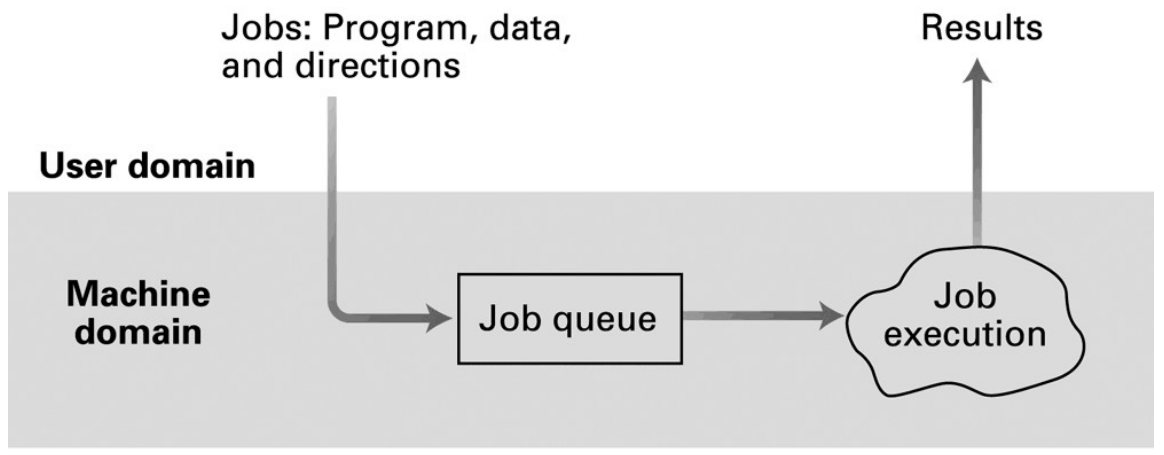
In batch processing, jobs are submitted for execution and results are collected later. The user does not continually converse with each running job. This suits work that can proceed with its supplied instructions and data.
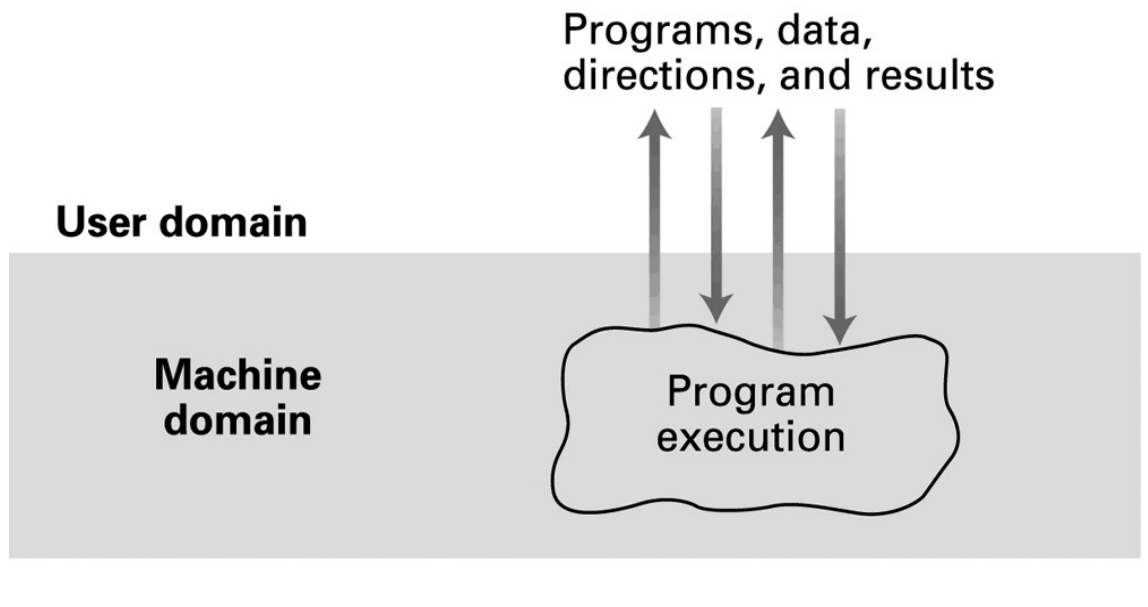
In interactive processing, the user supplies input and receives responses while a program is running. Time-sharing helps several users or applications receive attention without each owning the processor continuously.
Real-time describes timing requirements: a result must be produced within a required time or by a deadline. It is not simply another word for “fast” or “interactive.” An editor should feel responsive, while a control system may have a specified deadline for reacting to a sensor. A system can combine interactive features with real-time requirements, but one does not imply the other.
Check: is an overnight calculation automatically a real-time system if it finishes quickly?
No. Execution speed alone does not establish a real-time requirement. Ask whether correctness includes meeting a defined timing constraint. A batch job can also have a deadline, but that requirement must be stated.
10. Interfaces and operating-system services
Applications depend on services that let them use the machine in an organized way. An editor should be able to request a file operation without implementing every detail of a storage controller. The OS manages the underlying resources and checks which operations a requester is allowed to perform.
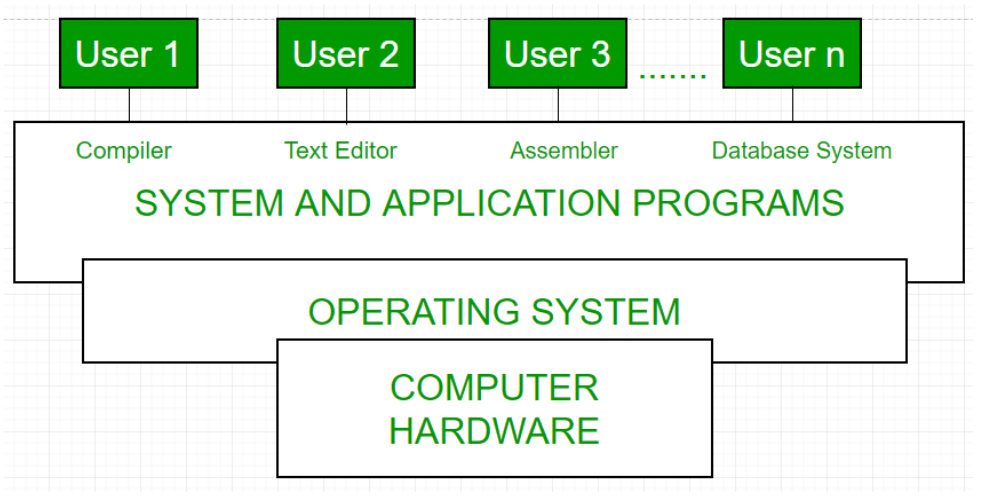
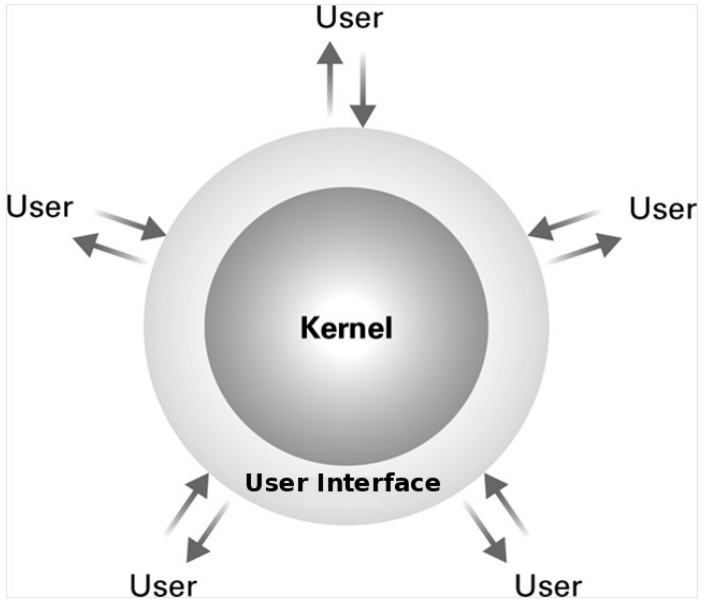
A shell provides a command interface; a graphical interface provides other ways to make requests. The kernel supplies core OS functionality. The interface is not the entire operating system, and opening a different terminal application does not replace the kernel.
Files and directories organize persistent information. Memory management allocates and protects address spaces. Device drivers provide software support for particular hardware. CPU scheduling and these services work together: a process may request a file read, wait for the device, then become ready to use the returned data.
Check: when a process waits for a file read, which ideas from this reading meet?
The file service interprets the request, device support performs the I/O, the process can become blocked, and the scheduler can select other ready work. Completion allows the waiting process to continue later.
11. Startup and protection
The OS must itself be started. Firmware runs when a computer starts, and a boot mechanism loads the kernel into memory. The kernel initializes necessary support and starts services, after which applications can run under OS control. This is an overview: exact firmware and boot arrangements depend on the machine.
Sharing also requires protection. An ordinary application should not freely overwrite another process’s memory or take unrestricted control of devices. Hardware privilege mechanisms and OS checks restrict sensitive operations. Applications request services through controlled interfaces rather than receiving unlimited access to all system resources.
A programming error in one application should be contained as far as the system’s protection mechanisms allow. Protection is not a promise that failures are impossible; it establishes boundaries between work sharing the computer.
Check: why are scheduling and protection separate needs?
Scheduling decides which ready work gets CPU time. Protection determines what that work is permitted to access or change. Fair turns alone would not stop one program from corrupting another’s data.
12. Explaining a shared computer
Consider an editor waiting for a file while a music player has work ready to execute. The editor can become blocked while the device handles its request. The scheduler can choose the player, and the dispatcher restores the state needed to run it. File completion makes the editor ready again; the next scheduling decision determines when it resumes. Memory protection and OS services govern what each process may access throughout this sequence.
You should be able to explain the mechanic/process mapping, distinguish ready from blocked, separate concurrent progress from parallel execution, and describe why a context switch needs saved register values. Use the saved PC and register values from the Week 3 trace to explain what must be preserved when a process pauses. Week 5 will introduce C source, compilation, variables and expressions.
Final check: a process has saved PC = A4 and R1 = 48 after displaying H. What matters when it resumes?
It must resume at A4 with its correct execution context and memory available. In the HI program, A4 contains 2149, so the next instruction loads 49 into R1. M[E0] remains 48 until explicitly overwritten. This is a conceptual pause/resume example; VizMachine itself is not switching between OS processes.
Sources and further reading
The primary source is the revised 32-page Week 4 slide set, based on the instructor’s original Slide Set 3. Mechanic-shop photographs retain their original source appearance; individual creator credits were not recorded in the supplied deck. The batch, interactive, interface and CPU time-sharing figures are retained Brookshear textbook material from the course slides.
For further study, see Arpaci-Dusseau and Arpaci-Dusseau, Operating Systems: Three Easy Pieces, “The Abstraction: The Process”. Historical-photo sources and the Intel processor specification are linked beside the relevant discussion. Microsoft’s Windows trace-analysis example illustrates hundreds of processes; it does not establish a fixed typical process count. The brief pause/resume example refers to the HI program in Week 3.