CSE 513 · WEEK 01 · READING
Processes and threads
What happens when a program runs, waits, shares resources and communicates?
Read continuously or use the contents below. Select any figure to view it at full size.
This chapter explains what happens when a program runs and how an operating system manages its execution. It is written for graduate students revisiting the foundations, and covers both halves of Week 1. The central task is to explain behavior in terms of execution state, resource ownership and dependencies.
By the end, you should be able to trace process creation and termination, distinguish ready from waiting, separate kernel entry from task switching, explain what threads share and reason about a simple pipeline. Read the examples actively: predict a result before reading the explanation, then identify the assumptions that make the answer valid.
1 The useful machine the OS presents
Typing a command seems simple: provide a name, press Enter and wait for a result. Yet the program may compete with a browser, an editor and background services for the same processors, memory and devices. It may need data that has not arrived, or attempt an operation it is not permitted to perform. The operating system makes these activities coexist by providing abstractions, allocating resources and enforcing protection.
A process gives a program an execution context. Virtual memory gives it an address space. Files let it access persistent data without controlling a storage device directly. Sockets support communication without requiring an application to implement every network operation itself. These abstractions are useful because applications can request meaningful operations while the operating system manages the hardware details and competing requests.
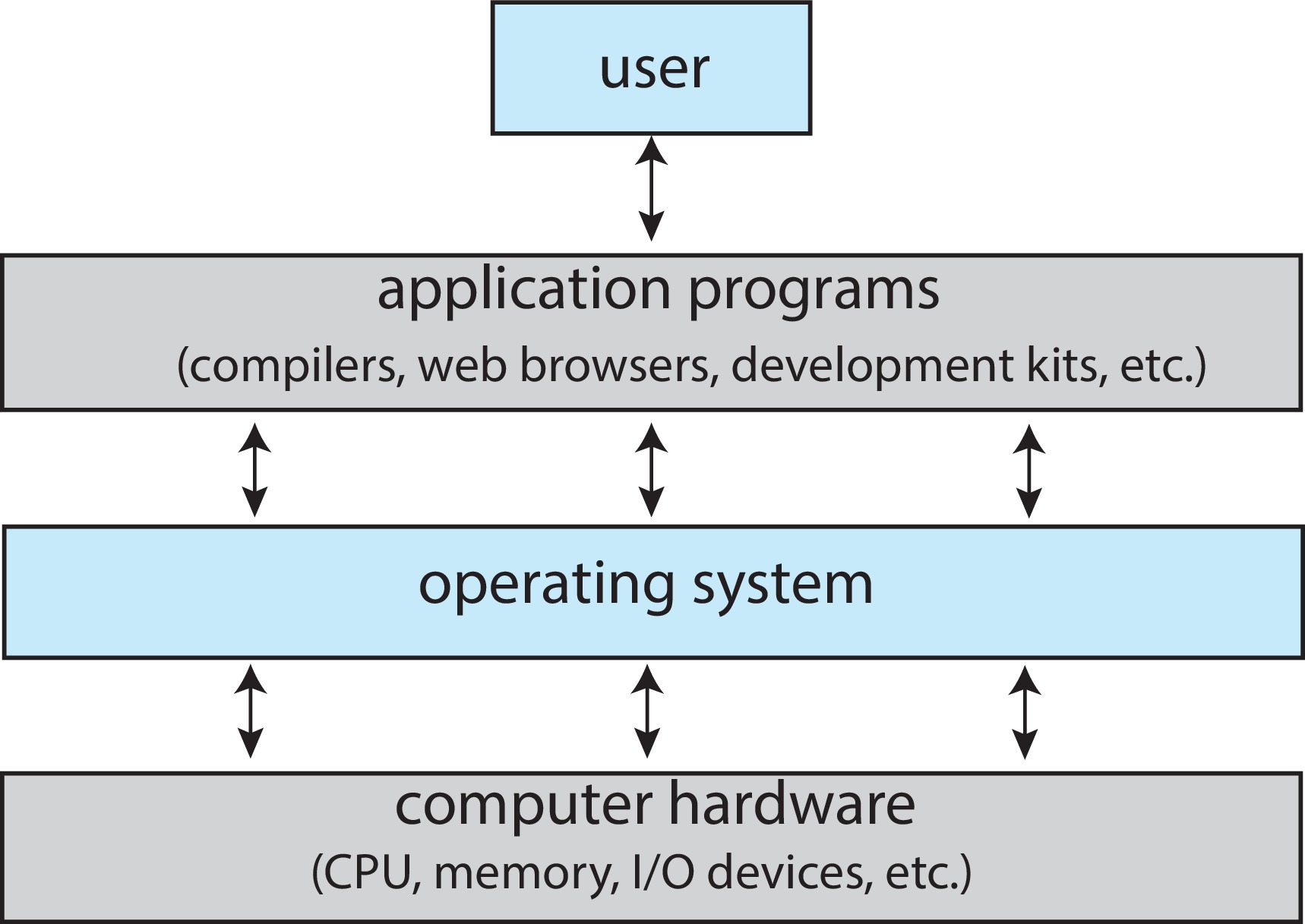
It helps to distinguish the kernel from the larger software environment. A shell interprets command text; it is a user-space program. A library supplies reusable routines; many of those routines do not enter the kernel at all. The kernel is the privileged core that manages resources and implements protected services. Calling every familiar command “the operating system” can hide the boundary we need to understand.
Our first lecture uses this short refresher to establish vocabulary. The main task is to explain execution: who is running, what state must be remembered, and why progress sometimes stops. The same questions will later explain scheduling decisions, synchronization errors and memory-management behavior.
Abstraction does not remove resource limits
When a process acts as if it has a processor available, the machine has not acquired extra physical cores. The operating system has created an execution environment in which interruptions can be hidden from the program’s logical progress. A program can continue correctly after a pause while still taking longer in elapsed time. Correctness of the abstraction and performance of the implementation are different questions.
Consider two independent activities: a file conversion and an interactive terminal. Letting the conversion run until completion may achieve useful throughput while making the terminal feel unresponsive. Switching to the terminal more frequently may improve interaction at some cost. Neither observation alone identifies the best policy. We first need an objective, such as response time, fairness or total completed work. This is why operating systems are studied as a set of design choices rather than a list of services.
Mechanism and policy
A mechanism supplies a capability; a policy decides how to use it. Saving one task’s registers and restoring another’s is a switching mechanism. Choosing which ready task should receive the processor is scheduling policy. The two are related but separable: we can change the selection rule without changing the meaning of saved registers.
OSTEP connection. Chapter 4 introduces CPU sharing through the process abstraction and distinguishes mechanisms from policies. Read it with one question in mind: which parts make a switch possible, and which parts decide whether a switch is desirable? This distinction will organize our scheduling lecture. OSTEP Chapter 4.
Source guide: OSC §§1.1, 1.4.1 and 2.1; OSTEP Chapter 4.
2 Entering the kernel
Ordinary application instructions execute with restricted privileges. A program cannot simply decide to rewrite another process’s memory mappings or operate every device directly. When it needs a protected service, it uses a controlled system-call interface. The kernel checks the request, performs the permitted work and eventually returns a result.
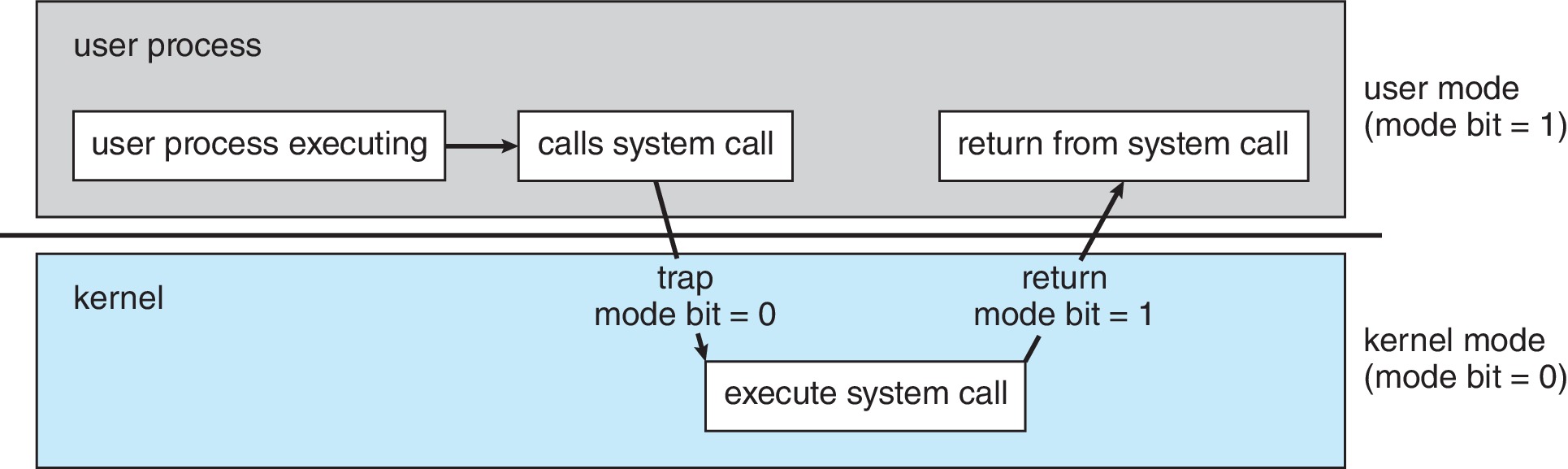
A system call is only one reason for kernel entry. An instruction can cause an exception, such as a page fault. A device can raise an interrupt to report an event independently of the currently executing instruction. These causes lead to different handling, although architecture-specific terminology sometimes overlaps. A page fault need not mean that a program is erroneous: the operating system may be able to supply the missing mapping and continue.
Keep privilege and identity separate. A process running for the root account still executes its ordinary application instructions in user mode. That identity changes permission decisions; it is not the same thing as the processor’s execution mode.
Also keep a library call separate from a system call. Formatting text may happen entirely in user space. A buffered printf can postpone actual output, and several calls can contribute to one later write. This means a source-code listing and a system-call trace describe different levels of activity. The names and counts need not match one for one.
Control must not depend on voluntary cooperation
Suppose a user program repeatedly performs arithmetic and never calls the operating system. If the kernel could regain control only when the program asked for a service, that program could monopolize the processor. Hardware-supported interrupts and protected control transfers address this problem. A timer event can give the kernel an opportunity to account for execution and decide whether another runnable task should be selected.
The word “opportunity” matters. A timer event is not a command to alternate between exactly two processes. There may be no other runnable work, or policy may allow the current task to continue. Likewise, servicing a device event may simply update state and return. We must identify the event, the handler’s work and the scheduling outcome separately.
OSTEP connection. Chapter 6 explains limited direct execution: application instructions run on the processor, while privilege restrictions and controlled entry preserve the operating system’s authority. Its two central concerns are restricting operations and recovering control. Read the mechanism descriptions conceptually; the precise instruction sequence depends on the architecture. OSTEP Chapter 6.
| Event | Immediate issue | Must another task run |
|---|---|---|
| A system call finds the requested data already available | Validate and perform the operation | No; the same task may return |
| A blocking request cannot complete yet | Record the wait and stop running this task | Another ready task may run; otherwise the CPU can be idle |
| A device reports completion | Service the device event and update waiting work | No automatic conclusion about immediate dispatch |
| A timer event occurs | Recover control and make any required scheduling decision | The current task may continue |
A recoverable page fault provides another useful example. The instruction needs a mapping or page that is not immediately usable. The kernel may resolve the condition and retry the instruction. If obtaining the page requires waiting, another task may run meanwhile. An invalid access can instead lead to failure. The phrase “page fault” therefore does not by itself tell us whether an application is incorrect or whether a task switch occurs.
Source guide: OSC §§1.4.2–1.4.3, printed pp. 24–26, and §2.3, pp. 62–73; OSTEP Chapter 6.
3 From a program to a process
A program is a passive description: executable instructions and associated data stored in a file. A process is an active instance with a current execution position, register values, an address space and resources recorded by the kernel. Launching the same executable twice can create two processes that are at different instructions and hold different data.
The familiar address-space picture separates code, static data, dynamically allocated memory and a stack. It is a useful starting point, but not a universal map. Real processes also contain library mappings and other regions; placement and growth directions vary. Address randomization can change locations between runs. Later lectures will explain how virtual addresses relate to physical memory.
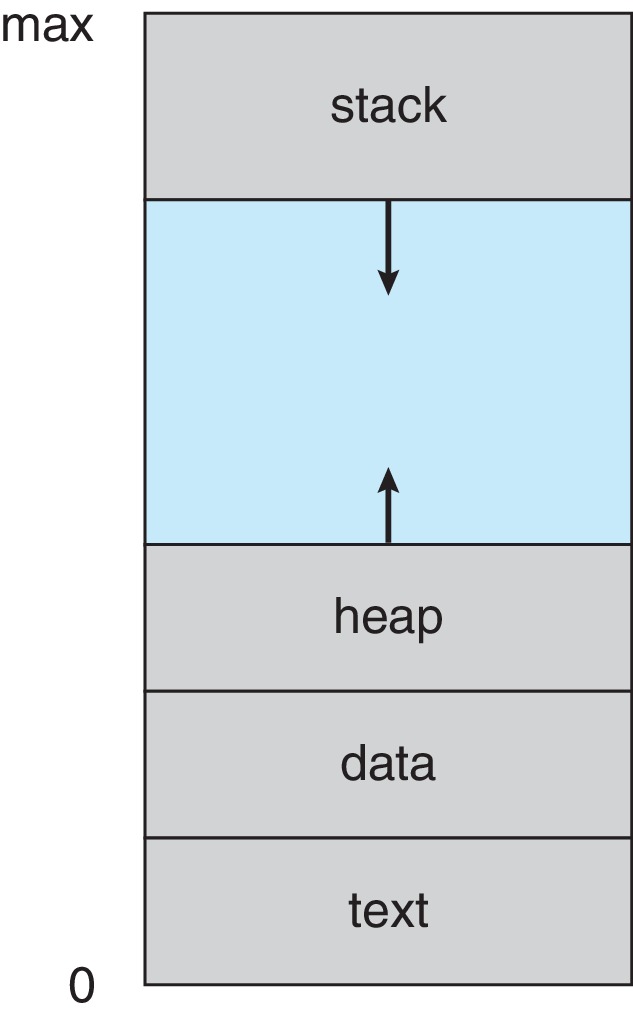
Distinct address spaces do not imply that every underlying physical page is duplicated. Read-only executable pages may be shared. The distinction is about the view and permissions presented to each process: changing an ordinary writable variable in one process does not automatically change the other process’s variable.
The kernel also needs identity, relationships, scheduling state and references to resources such as open files. The textbook gathers these ideas under the process control block, or PCB. An actual implementation can spread them across multiple structures. The concept matters more than memorizing one structure layout: the operating system must retain enough information to manage and resume execution correctly.
Read the memory diagram as a model
Executable code describes operations; static data supplies objects with program-wide lifetime; the stack supports active calls; dynamic allocation supports objects whose lifetime is controlled separately from a particular call. These categories help us ask where a value belongs and how long it remains valid. They do not require every value to have one fixed physical location: compilers can keep values in registers, and the operating system can map virtual memory in different ways.
A local automatic object usually ceases to exist when execution leaves its relevant scope. Returning its address does not extend its lifetime. A dynamically allocated object can outlive the allocating function if the program retains a valid reference and manages the allocation correctly. This is a programming-language distinction, but it becomes an operating-systems issue when one thread gives another a pointer to such an object.
OSTEP connection. Chapter 13 motivates an address space as the process’s view of memory. Use it to distinguish addresses used by a program from positions in physical RAM. Two processes can use the same numerical virtual address while referring to different physical storage. We defer address translation and paging algorithms to the memory lectures. OSTEP Chapter 13.
Same executable does not mean same execution
Imagine two instances of a data-cleaning program, one handling a small file and another a large file. Their instructions may come from the same executable, but their input, progress and memory contents differ. One may have terminated while the other is waiting for input. Even identical command lines need not imply identical observations if external files or services change.
A process identifier names an existing process within the relevant system view; it is not a permanent name for the executable. Repeated invocations generally receive different identifiers, and identifiers can be reused after a process is gone. For our examples, record the identifier returned by the launch operation rather than copying a number from someone else’s terminal.
Keep code identity, process identity and resource identity separate. Two processes can run identical code while writing different files, or run different programs while referring to the same pipe. The communication resource is not determined solely by the executable name.
Source guide: OSC §3.1, printed pp. 106–110; OSTEP Chapters 4 and 13.
4 Why a process stops running
The simplified three-state distinction is central. A running process currently uses a CPU. A ready process can execute but is waiting to be selected. A waiting process cannot continue until an event occurs. If input has not arrived, granting more processor time does not supply the missing input.
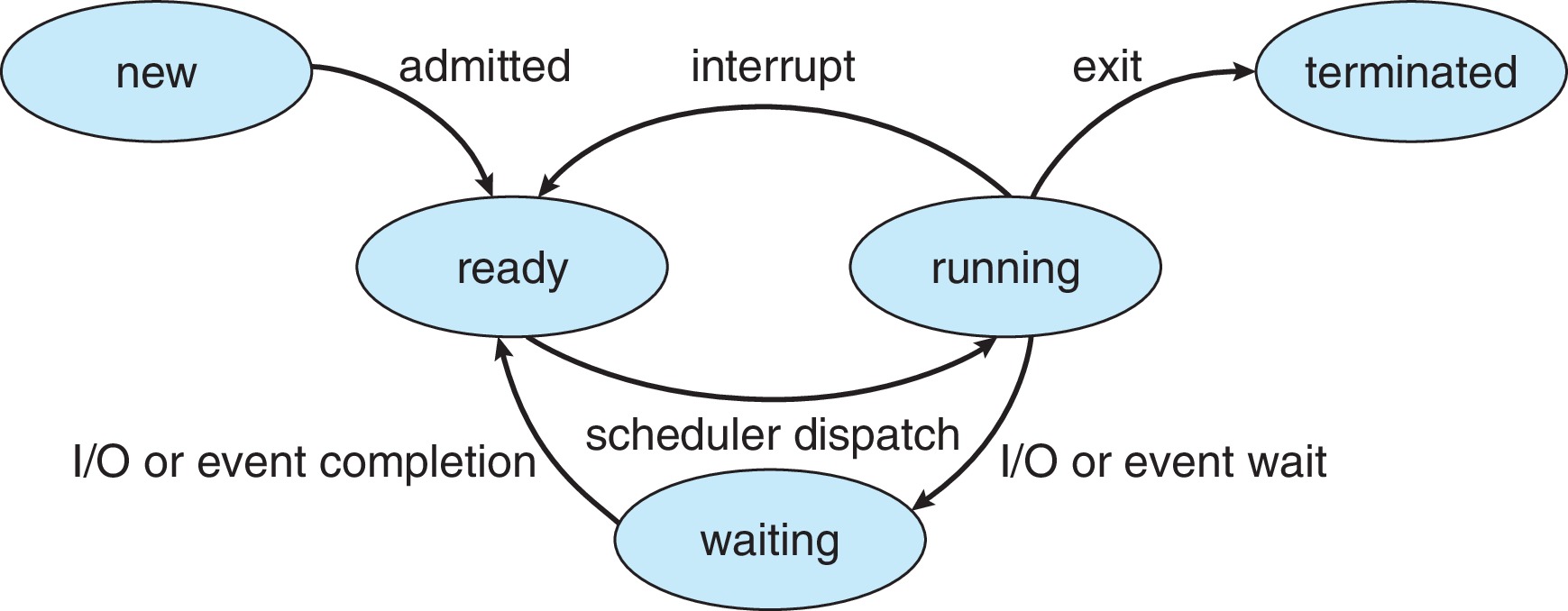
Consider a process P that is calculating. It is running. It requests input that cannot yet be provided, so it waits. When the input arrives, P becomes ready. It is not necessarily running immediately: another task may still own the processor. Only when selected does P run again. If its time slice then expires, P can return to ready even though it has more computation to perform.
This distinction is useful in diagnosis. A slow response may reflect time spent waiting for a processor, a device or a remote service. Those delays have different remedies. Buying more cores will not necessarily shorten a remote server’s response time. Scheduling policy, which we study next, decides among ready tasks; it cannot make an unavailable input appear.
Real systems have more detailed state models, and modern kernels commonly schedule threads or tasks rather than a single indivisible process. The simplified diagram is a reasoning tool, not an exact printout of Linux internals.
A two process trace
The following trace is a constructed example on one CPU. It is intended to test reasoning, not report measured timing. At the start A runs and B is ready. Each row identifies a cause and a resulting state; it makes no claim about a particular Linux scheduling policy.
| Step | Event | A | B |
|---|---|---|---|
| 1 | A calculates while B awaits selection | Running | Ready |
| 2 | A requests unavailable input; B is selected | Waiting | Running |
| 3 | A’s input arrives; B continues for now | Ready | Running |
| 4 | B waits for a reply; A is selected | Running | Waiting |
| 5 | A finishes before B’s reply arrives | Terminated | Waiting |
At step 3, A has become eligible but does not yet own the CPU. At step 5, neither of these two tasks can make further progress on the processor. If no other runnable work exists, idleness is a reasonable outcome. A scheduler cannot solve a missing external dependency simply by choosing more aggressively.
CPU bursts and waiting periods
A workload often alternates between computation and waits. A parser can compute on bytes already in memory, request more bytes, wait for them, and compute again. CPU-bound and I/O-bound are descriptions of the observed balance of work under particular conditions, not immutable properties of an executable.
If the same data is cached, a later run may spend less time waiting for storage. If input arrives over a slow network, communication can dominate. Before suggesting a remedy for slow execution, establish what resource or event is limiting progress. This lecture supplies the vocabulary for that investigation; the next lecture develops scheduling criteria.
Source guide: OSC §§3.1.2 and 3.2.1, printed pp. 107–109 and 112–113.
5 Saving execution context
A task interrupted halfway through its work must later resume with the correct instruction position and register values. A context switch saves the outgoing task’s execution context and restores the selected task’s context. It does not normally copy the entire process address space into a PCB.
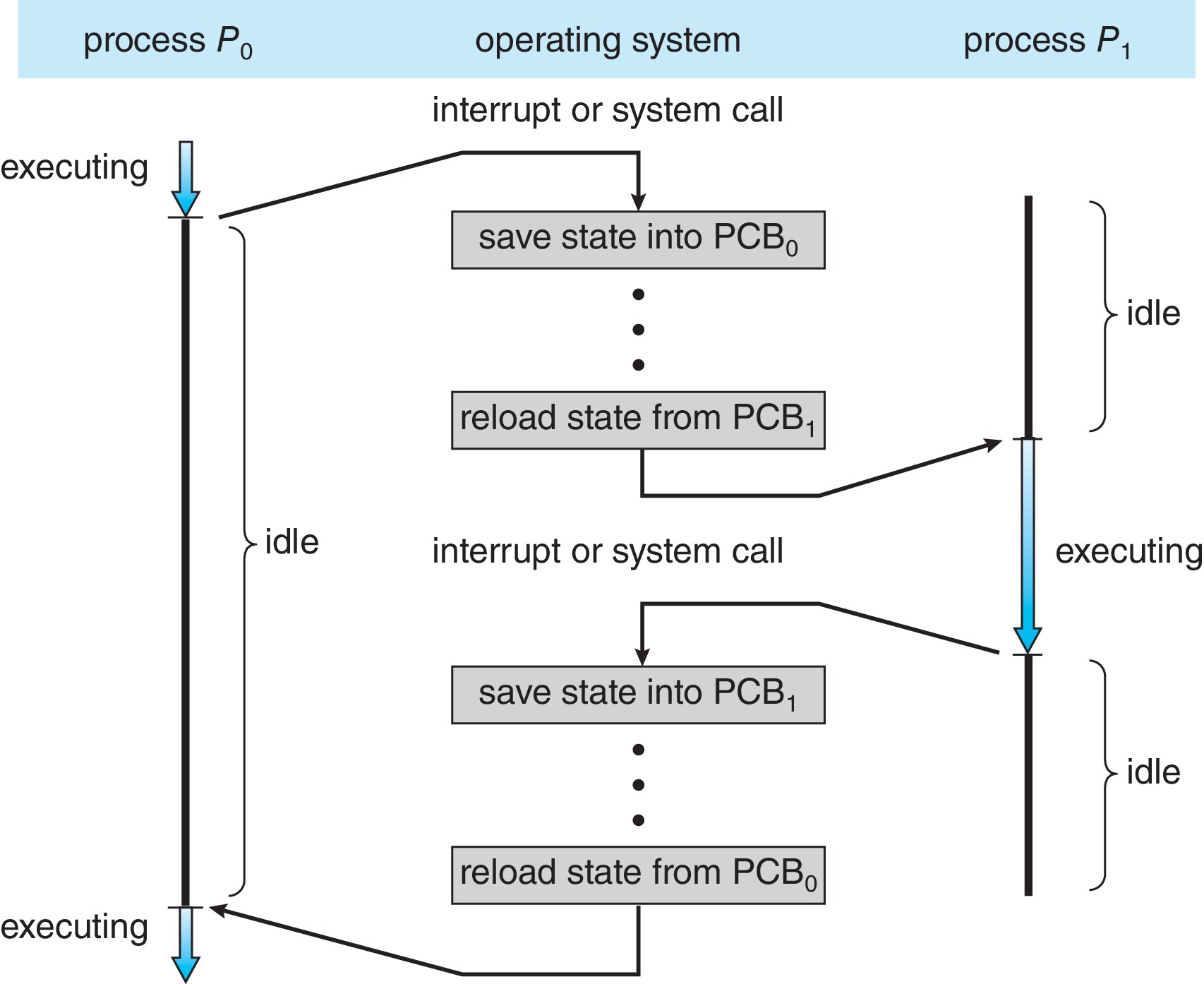
The direct switching operations consume time. Changing the active working set can also affect caches and address translations. There is no single universal context-switch cost: the hardware, workload and kind of switch matter. A switch between two threads of one process still changes execution context even though the address space can remain the same.
Keeping these questions separate avoids a common mistake: treating every kernel entry as proof of a context switch. The kernel can perform work on behalf of the same process throughout a service request.
What is saved and what remains where it is
Suppose P has calculated a partial sum held in a register when execution is interrupted. Restoring only its instruction pointer would be insufficient: the next instruction may use that partial sum. The operating system must preserve the relevant execution context, including the register values needed for correct continuation. A saved context describes a point in execution, not just a program name.
The process’s address space does not need to be copied into a temporary bag of bytes at every switch. Memory mappings and storage already represent its contents. The execution environment must use the correct mappings when that process resumes. Whether particular translation entries or cache contents can be retained is an implementation question, and no universal “flush everything” rule should be assumed.
For threads in one process, the address space is shared but the execution positions and registers differ. Switching between those threads still requires correct context handling. Sharing memory can reduce some work; it does not mean the processor can ignore the outgoing thread’s live state.
Reason about cost without inventing a constant
A switch consumes execution time that is not spent on the application’s immediate calculation. It can also change which code and data are used next, affecting locality. To compare alternatives, define a workload and measure relevant outcomes. A shorter time slice can improve interactive response while increasing switching frequency. No fixed number of microseconds from an unrelated machine establishes the cost in our teaching environment.
Source guide: OSC §3.2.3, printed pp. 114–115; OSTEP Chapter 6.
6 Creating and replacing a process
The traditional Unix launch model separates three responsibilities. fork creates a child. An exec operation replaces the calling process’s program image. A wait operation lets the parent observe and collect a child’s termination status. These operations explain the shell’s work, although real shells and libraries may choose optimized mechanisms such as posix_spawn.
After a successful fork, both parent and child continue after the call. The parent receives the child’s PID; the child receives zero. This difference lets one source program choose separate paths. Their ordinary writable memory is logically independent. Linux commonly uses copy-on-write so physical copying is postponed until necessary. That optimization does not turn ordinary variables into shared writable memory. Inherited file descriptors are different: they can refer to the same open file description and therefore share an offset. See the fork reference.
Exec replaces the current program image without creating another process or changing its PID. Successful exec never returns to the old program; failure does return and must be handled. File descriptors generally survive unless marked close-on-exec. This allows a shell to arrange input and output before running a different program. See execve.
The complete launch.c example creates a child, executes /bin/echo in it, then collects its status. Compile and run:
cc -std=c11 -Wall -Wextra -Werror launch.c -o launch
./launch
Successful output is:
child
parent: child exit status = 0
The parent’s line comes later because it prints only after waiting for the child to terminate. The program checks fork and exec failures and retries an interrupted wait. In the child, a failed exec is followed by _exit, avoiding an extra flush of inherited stdio buffers. This example begins with a single-threaded process; forking a multithreaded program requires additional care.
Waiting serves both synchronization and cleanup. A parent can do other work first; it need not wait immediately. When a child terminates, a small record can remain so its parent can collect the result. A zombie is already terminated, not a program still executing or waiting for input. See waitpid for status interpretation.
Order is a property to establish
Without a wait or another synchronization operation, either parent or child may reach its next statement first. This nondeterminism does not imply that fork is unreliable. It means the interface does not promise the ordering the programmer imagined. If a program’s correctness depends on a particular order, that dependency must appear in the design.
Do not use a fixed sleep as proof that another process has finished. A delay that appears long enough on an idle machine can fail under load. Waiting for a child expresses the actual condition: termination of the selected child. The wait result then describes what happened, and the program can decide how to respond.
OSTEP connection. Chapter 5 develops the Unix process API and shows why separating fork from exec is useful to a shell. Between creation and replacement, the child’s environment can be arranged, including redirection. Read its examples by drawing the two control paths and identifying where an ordering guarantee is introduced. Our accompanying launch.c is a separate course example with explicit error checks. OSTEP Chapter 5.
Copy on write and inherited resources
The parent and child initially see matching contents in ordinary writable memory, but later assignments belong to separate logical address spaces. Copy-on-write can postpone physical copying until separation is needed. It is especially useful when the child soon executes another program, because much of the inherited image may never need a private physical copy. This is a preview of OSC §10.3, not a requirement to understand page-table implementation now.
Resource inheritance has different rules from ordinary variable copying. An inherited file descriptor can refer to the same underlying open file description as its parent’s descriptor. The processes can therefore affect a common file offset even while their variables are separate. “Everything is copied independently” is too broad a description of fork.
| Operation | Process identity | Program image | Main purpose |
|---|---|---|---|
| fork | Creates a child with its own PID | Child begins with a duplicate view | Create an execution participant |
| exec family | Calling process keeps its PID | Replaced on success | Run a different program |
| wait or waitpid | No new process | No replacement | Observe child completion and collect status |
Failure is part of the execution story
In launch.c, fork failure means no child was created. Exec failure means the child exists but could not replace its image. A wait error concerns observing the child, not necessarily the child’s requested work. Keeping these failures separate makes diagnostics meaningful.
To test the second case, use a copy of the program and replace /bin/echo with a nonexistent path. The child reports an error and exits with the example’s chosen status 127. The parent can successfully collect that nonzero status and return failure. A successful wait is not evidence that the child successfully completed its intended program.
The encoded wait status is not itself the exit code. Use the status macros to distinguish normal exit from termination by a signal before interpreting the result. Similarly, retrying an interrupted wait should preserve the identity of the child being awaited, rather than accidentally switching to an unrelated child.
Source guide: OSC §3.3, printed pp. 116–122, and §10.3 for the copy-on-write preview; OSTEP Chapter 5.
7 Observing a process
Use a terminal on Ubuntu to start a short background activity and inspect it:
sleep 20 &
demo_pid=$!
ps -o pid,ppid,stat,comm -p "$demo_pid"
wait "$demo_pid"
The shell variable records the background job’s PID. The requested columns show its identifier, parent identifier, state and command name. They do not show its entire execution history. If the process has already exited, no process row may remain.
Linux’s R state includes running or runnable, so this tool does not directly distinguish the textbook ready and running states. A sleeping state expresses a kind of wait; it does not automatically identify a particular device. Exact identifiers and suffixes differ from run to run. The goal is to explain an observation while recognizing what it cannot establish.
The C examples supplied here have been compiled and run in the local macOS POSIX environment. Their intended teaching target is Ubuntu, but execution on the eventual Ubuntu teaching environment still needs verification. No specific Ubuntu release is assumed.
A small observation record
For a useful record, keep the command, environment, observed output and interpretation together. Note the operating-system release, the command used to build an example and whether you changed the source. For this introductory practice, a short explanation is more valuable than a page of unexplained terminal output.
Separate prediction from observation. Before running sleep, predict that it will spend most of its lifetime waiting. Then inspect the snapshot and explain what supports that prediction. A snapshot cannot prove the entire history or the exact amount of CPU time used. The process might also terminate between two observations.
When using AI assistance, test any suggested interpretation against these boundaries. An explanation that assigns a fixed PID, equates every sleeping state with disk I/O, or promises a particular parent/child order is stronger than the evidence permits. Keep the output you actually obtained and explain any difference from your prediction.
Source guide: OSC §3.3.1, printed pp. 116–118. Linux ps documentation describes tool-specific state codes.
8 Threads and shared resources
A process supplies a resource and protection context. A thread supplies an execution stream inside it. Each thread has its own instruction position, register state and stack, while threads within one process share the address space and many resources, including open files.
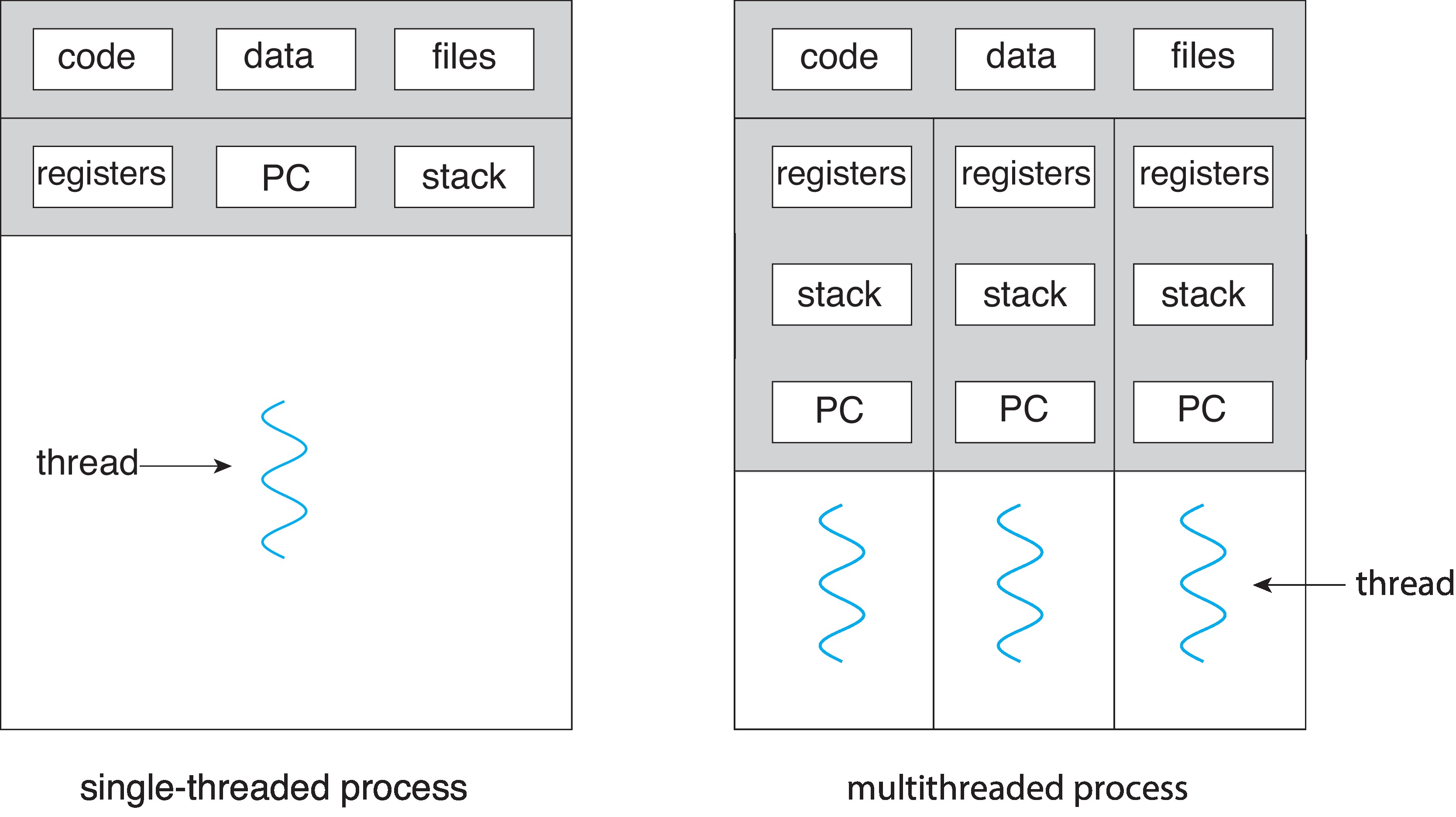
Separate stacks are not security boundaries. They organize each thread’s call frames, but another thread can access a stack object if it has a suitable pointer and the object remains alive. The convenience of shared memory comes with responsibility: one thread can damage data another is using.
Threads can support responsiveness. A server can keep accepting work while another activity waits for a request’s data. Real designs may use bounded worker pools or event loops; spawning an unlimited thread for every request is not automatically a good design. Each execution stream has costs, and shared resources may become bottlenecks.
Concurrency means activities progress over overlapping periods; one core can accomplish this through interleaving. Parallelism means simultaneous execution on multiple cores. Similar completion times do not prove parallel execution. Nor does adding threads guarantee speedup: serial sections, coordination and contention can limit the benefit.
Shared resources change the failure boundary
Separate processes normally communicate through an explicit interface or a deliberately shared mapping. Threads communicate conveniently through objects already in their shared address space. The convenience also gives a defective thread the opportunity to overwrite data used by another thread. A process boundary and a thread boundary therefore offer different kinds of separation.
| Property | Threads within one process | Separate ordinary processes |
|---|---|---|
| Instruction position and registers | Separate for each thread | Separate execution contexts |
| Virtual address space | Shared | Separate unless sharing is explicitly arranged |
| Stacks | Separate call stacks within the shared address space | Within each process’s own address space |
| Communication | Common objects are directly accessible | An explicit mechanism is normally needed |
| Protection from ordinary memory mistakes | No automatic isolation between threads | Address-space isolation limits direct interference |
OSTEP connection. Chapter 26 develops thread execution state, shared address spaces and the possibility of harmful interleavings. Its register-level examples help explain why a source-level operation can contain multiple steps. For our purposes, focus on identifying shared state and possible interference; the synchronization-tool details belong to later lectures. OSTEP Chapter 26.
Concurrency is useful even without speedup
An interactive application can delegate a long operation while another activity remains able to handle input. The objective may be responsiveness, even when total computation time does not improve. On a multicore machine, independent CPU work can also run in parallel, but shared bottlenecks and serial dependencies can limit the benefit.
For a constructed example, suppose a job has an unavoidable serial stage lasting two time units and a perfectly divisible stage requiring eight units of work. Ignoring all overhead, one worker takes ten units; four workers would take two plus eight divided by four, or four units. The resulting speedup is 2.5, not four. This is a model under stated assumptions, not a measurement or a promise about a real program. It shows why worker count alone cannot predict performance.
A bounded worker pool can separate incoming requests from their service. Workers take requests from a queue instead of creating an unlimited new execution stream for every arrival. The pool still needs rules for queue access, full-queue behavior, ownership and shutdown. Merely drawing several worker boxes does not solve those coordination problems.
Source guide: OSC §§4.1–4.2, printed pp. 160–166, and §4.5.1 for thread pools; OSTEP Chapter 26.
9 Why sharing needs coordination
Imagine incrementing a shared counter as three conceptual steps: read its value, add one and write the result. A reads zero. B reads zero. A writes one. B writes one. Two requested increments have produced only one increase. The problem is the allowed interleaving, not an arithmetic error.
| Step | Activity A | Activity B | Stored counter |
|---|---|---|---|
| 1 | Read 0 | — | 0 |
| 2 | — | Read 0 | 0 |
| 3 | Write 1 | — | 1 |
| 4 | — | Write 1 | 1 |
This trace motivates synchronization. It should not be mistaken for a precise prediction about unsynchronized C or C++ code: conflicting concurrent accesses to an ordinary variable can be a data race with undefined behavior. Later we will study mutexes, semaphores and the dining-philosophers problem to reason about coordination systematically.
The complete thread_join.c example demonstrates safe, simple ordering. Main initializes an argument object; a worker computes the square of seven into that object; main joins the worker before reading the result. The object stays alive throughout. Thread creation and joining provide the synchronization needed for this use.
cc -std=c11 -Wall -Wextra -Werror -pthread thread_join.c -o thread_join
./thread_join
# Successful output: result = 49
The example deliberately has no concurrent competing updates. Main waits for worker completion using pthread_join. Removing the join would remove both the completion guarantee and the basis for safely reading the result at that point.
Distinguish completion from mutual exclusion
In the thread example, main creates a worker and then waits for that particular worker to finish. Joining establishes the point after which its result may be consumed. It is suitable because main does not read the result early or modify the input during the worker’s calculation.
Joining is not a general lock around shared memory. If two active workers modify the same object concurrently, a later join does not retroactively repair their conflicting accesses. They need a correct protocol while both are active. Completion ordering and exclusion during an update are different requirements.
OSTEP connection. Chapter 27 explains thread creation, argument passing and completion through joining. Pay particular attention to the argument object’s lifetime: a thread may start after the creating function has progressed. Our example keeps its argument object alive until the worker has completed. OSTEP Chapter 27.
Visibility must follow the language rules
It is tempting to make one thread spin on an ordinary flag until another writes it. That pattern needs more than the assumption that both threads can address the same bytes. Compilers and hardware may transform or reorder operations within the rules they implement, and unsynchronized conflicting accesses can violate the language’s memory model. Use the appropriate synchronization primitives rather than treating observation in one successful run as proof.
For Week 1, the important habit is to name the shared object, identify every participant that can access it, state which accesses can overlap and explain what orders them. We will later use that habit to study critical sections, mutexes, semaphores and deadlocks.
Source guide: OSC §§4.4.1 and 6.1; OSTEP Chapter 27. Detailed synchronization is deferred.
10 Communication and pipes
Separate processes need an explicit communication mechanism. Shared memory makes a region accessible to multiple processes, but they still need a protocol for access and ownership. Message-oriented mechanisms move data through an interface. Both require agreement about meaning and order.
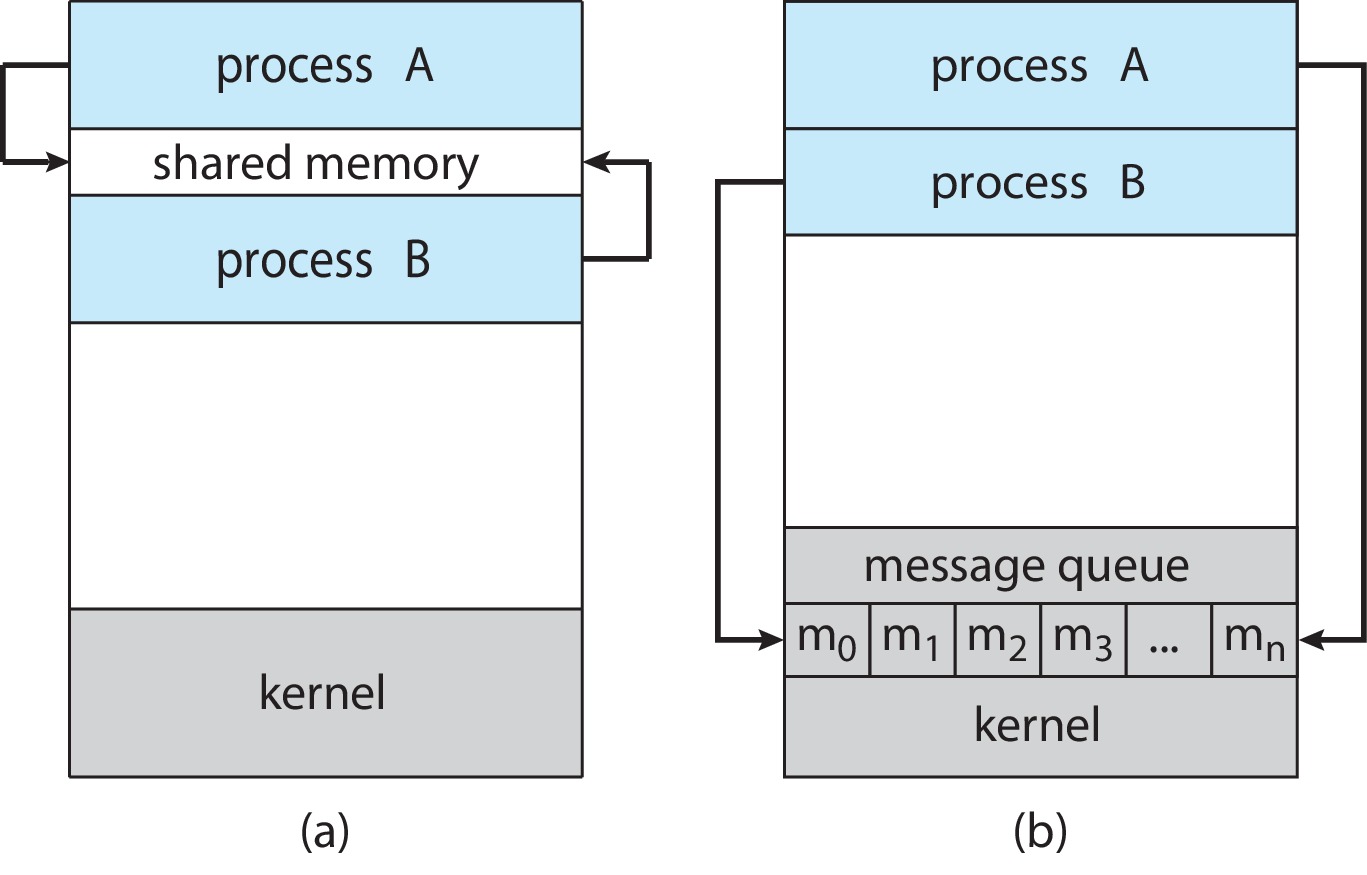
A shell pipeline offers a compact example:
printf 'alpha\nbeta\n' | wc -lThe producer emits two newline characters; the consumer counts them, so the result is 2. The shell connects output to input. Because printf can be a builtin, this syntax does not promise exactly two newly created external processes.
A pipe carries a byte stream without message boundaries. With blocking I/O, an empty pipe may make a reader wait while a writer still exists; a full pipe can make a writer wait. EOF means something stronger than temporary emptiness: buffered data has been consumed and no write-end references remain. An accidentally retained write descriptor can therefore prevent completion. These semantics are described in pipe(7).
Communication requires a protocol
Suppose one process produces records and another consumes them. The records need a format, and both sides must agree on when a record is complete. Shared memory requires rules for placement and ownership. A message or stream interface requires rules for encoding, delivery and error handling. Neither model provides the application’s meaning automatically.
Blocking describes what happens to the caller when immediate progress is impossible. A blocking receive can suspend its caller until data becomes available. A nonblocking operation returns without waiting for that condition, leaving the caller to decide what to do next. Asynchronous completion is another design question; do not use “nonblocking” as a universal synonym for every asynchronous interface.
Buffering also matters. A bounded buffer can absorb a temporary difference in rates but cannot indefinitely accommodate a producer that outruns its consumer. Once it fills, the system needs a defined response such as waiting, rejection or controlled dropping. Which response is correct depends on the application’s contract.
Trace descriptor ownership in a pipe
In the textbook’s ordinary-pipe model, fd[0] refers to the read end and fd[1] to the write end. If a process creates a pipe and then forks, both processes inherit descriptors for both ends. Decide which participant is the producer and which is the consumer, then close the ends each participant does not use.
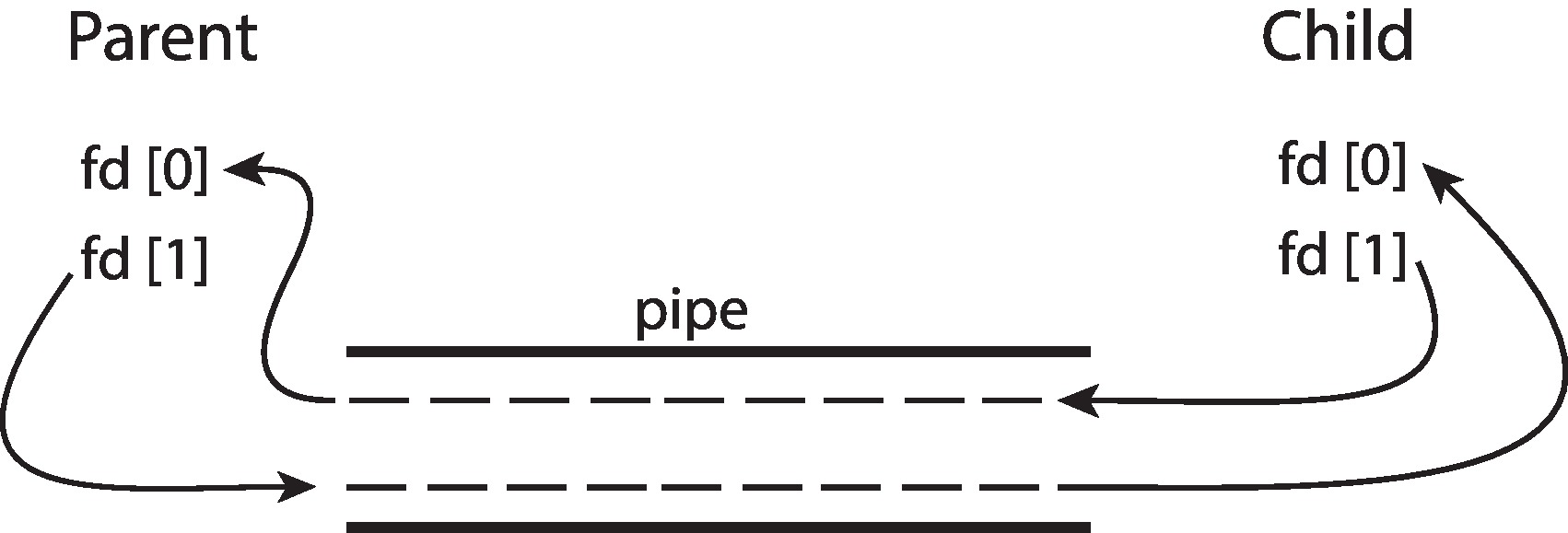
For a parent writing to a child, the parent closes its read end and the child closes its write end. When the parent has finished its output, it closes its write end as well. The child can then consume the remaining bytes and eventually observe EOF. If the child accidentally retains its inherited write descriptor, it can keep the stream logically open even though it never intends to write.
This explains a subtle failure: all expected data can arrive, yet the reader still never reaches completion. The program’s data calculation is correct but its resource lifecycle is not. Draw the remaining references to the write end before changing scheduling delays or adding sleeps.
Source guide: OSC §§3.4–3.6, printed pp. 123–132, and §3.7.4.1, pp. 140–142.
11 Putting the pieces together
Return to the command at the start of this reading. The shell interprets it and prepares execution, including input/output connections. In the conceptual launch model, a child is created and replaces its program image. While the command runs, it computes, asks the kernel for services and sometimes waits. Other ready tasks can use the processor during those waits.
An interrupt may report completed I/O. The waiting task can become runnable without immediately executing. When selected, it resumes with the appropriate saved context. A service can also complete immediately and return to the same task. A program may create additional threads, gaining shared execution streams within its resource context, or communicate with separate processes.
Finally, termination records a result that the parent collects. This narrative connects the abstractions without requiring kernel-source details. Whenever execution appears to stop, ask what is missing: CPU time, an event, data from another activity or permission. That question is the starting point for the later scheduling and synchronization lectures.
Follow the boundaries in order
Consider a shell preparing a producer and a consumer. First identify the shell as an ordinary process. Next identify the communication resource it arranges. Then follow each participant’s creation and program replacement. Finally consider execution, waiting and termination. Keeping these stages separate prevents a vague “the OS runs it” explanation from hiding the mechanism.
During execution, the producer can be ready, running or waiting for output space. The consumer can be ready, running or waiting for input. Their progress can overlap on one core without simultaneous execution. A kernel entry may serve the same task; a blocking event may instead allow a different task to run. At the end, closing resources and collecting status are observable parts of correct behavior.
This method scales to later topics. For synchronization, identify the shared object and ordering rule. For virtual memory, identify the address-space mapping and missing page. For distributed systems, identify the message and uncertain remote state. The details change, but clear descriptions of ownership, state and dependencies remain useful.
Source guide: Synthesis of OSC Chapters 1–4 and the preceding worked examples.
12 Questions with worked answers
1. The child changes x after fork. What does the parent see?
Suppose an ordinary local variable is 10 before fork. The child changes its copy to 20; the parent waits and then prints its own copy. The parent prints 10, assuming no explicit shared mapping. Waiting orders completion; it does not merge address spaces. To transfer the value, use a communication mechanism.
2. A read returns immediately. Was there a context switch?
Not necessarily. The task can enter the kernel, obtain available data and return. Kernel entry establishes a privilege transition, not proof that another task ran.
3. Input arrives for a waiting process. Is it now running?
It becomes eligible to run. The scheduler still has to select it. Event completion removes one dependency; CPU selection removes another.
4. Why does a pipe reader wait after the child finishes?
If another process retained a write-end descriptor, EOF cannot yet be observed. In particular, a parent can accidentally retain its own unused write end. Close unused ends in every participant, not merely in the process regarded as the writer.
5. Does each thread’s stack isolate its local variables?
No. The stacks organize separate call chains but lie within the shared address space. A valid pointer can allow another thread to access a stack object. Access ordering and object lifetime still matter.
6. What evidence would justify a claim of parallelism?
You need evidence of simultaneous execution on different execution resources, not just overlapping lifetimes or similar finish times. A single core can interleave concurrent activities. This lecture’s diagrams are conceptual and are not measurements.
For practice, run the two C examples, explain the ordering in their output and test the exec-error path by changing the executable pathname in a copy. These activities do not establish a graded assignment deadline. The course permits AI assistance; use explanations critically and compare them with source code, observed behavior and documentation.
7. The parent waits successfully but the child reports status 127. Did wait fail?
No. Waiting successfully collected a child result. In launch.c, status 127 indicates the child reached its exec-failure path. Failure to execute the requested program is different from failure to wait for the child.
8. Can a process be ready even though all cores are busy?
Yes. Ready describes eligibility to execute, not ownership of a processor. It may remain ready until the scheduler selects it on an available execution resource.
9. Two workers race, then main joins both. Has joining repaired the race?
No. Joining establishes completion before main continues; it cannot undo conflicting unsynchronized accesses that occurred while the workers were active.
10. Why is a fixed sleep a poor substitute for waiting?
A fixed delay expresses elapsed time, not the condition that another activity has completed. Load and input can change execution time. A synchronization operation should express the event on which correctness depends.
11. Why can a full pipe stop a ready-looking producer?
The producer may have more data to produce but cannot complete a blocking write until the consumer frees space. It waits for a communication condition rather than simply for CPU allocation.
12. Does a virtual address printed by one process identify usable storage in another?
Not by itself. The address is interpreted through the process’s address-space mappings. An explicit sharing mechanism and valid object lifetime are needed before another process can meaningfully use a corresponding location.
13 Reading route and references
Use this chapter as the Week 1 study text, then consult the following selected sections for a second explanation or more detail. The selection is a reading guide, not a requirement to study every exercise or platform-specific subsection.
Operating System Concepts
Abraham Silberschatz, Peter B. Galvin and Greg Gagne. Operating System Concepts, 10th edition, Wiley, 2018. References below use printed book pages. The supplied PDF contains inserted exercise and project pages, so its viewer page number is not obtained through one constant offset.
- Brief refresher: §§1.4.1–1.4.3, printed pp. 23–26; §§2.1 and 2.3 for services and system calls.
- Main process reading: §§3.1–3.3, printed pp. 106–122.
- Communication: §§3.4–3.6, printed pp. 123–132; §3.7.4.1, printed pp. 140–142, for ordinary pipes.
- Threads: §§4.1–4.2, printed pp. 160–166; §4.4.1 for Pthreads. Thread pools in §4.5.1 and copy-on-write in §10.3 are optional previews.
Figures are retained from the authors’ official OSC 10e slide collection. The captions identify their source. These diagrams are simplified teaching models. The explanations, traces and course programs in this document are separately written for CSE513.
Operating Systems Three Easy Pieces
Remzi H. Arpaci-Dusseau and Andrea C. Arpaci-Dusseau. Operating Systems: Three Easy Pieces, version 1.10, Arpaci-Dusseau Books, November 2023. Use the authors’ current online edition; the chapters below are linked directly rather than redistributed.
- Chapter 4 The Abstraction The Process — machine state, process states, mechanism and policy.
- Chapter 5 Interlude Process API — creation, waiting, replacement and shell design.
- Chapter 6 Mechanism Limited Direct Execution — restricted operations and recovering control.
- Chapter 13 The Abstraction Address Spaces — optional memory refresher.
- Chapter 26 Concurrency An Introduction — shared execution state and interleavings.
- Chapter 27 Interlude Thread API — focus on §§27.1–27.2, creation and completion.
Linux interface references
Consult fork(2), execve(2), waitpid(2), pipe(7), pthread_join(3) and ps(1) when investigating exact return values and tool output. Online references were checked during preparation in September 2026; local manual pages describe the installed environment.
14 Complete practice programs
These programs are included in full so the reading can be used independently of the website. Use the commands in Sections 6 and 9. Successful outputs and error-path reasoning are explained there. They are practice material, not a graded assignment brief.
Creating a child and replacing its image
#define _POSIX_C_SOURCE 200809L
#include <errno.h>
#include <stdio.h>
#include <stdlib.h>
#include <sys/types.h>
#include <sys/wait.h>
#include <unistd.h>

int main(void) {
    /* This example begins with a single-threaded process. */
    pid_t child = fork();
    if (child == -1) { perror("fork"); return EXIT_FAILURE; }
    if (child == 0) {
        execl("/bin/echo", "echo", "child", (char *)NULL);
        perror("execl");
        _exit(127);
    }
    int status;
    pid_t result;
    do { result = waitpid(child, &status, 0); }
    while (result == -1 && errno == EINTR);
    if (result == -1) { perror("waitpid"); return EXIT_FAILURE; }
    if (WIFEXITED(status)) {
        printf("parent: child exit status = %d\n", WEXITSTATUS(status));
        return WEXITSTATUS(status) == 0 ? EXIT_SUCCESS : EXIT_FAILURE;
    }
    if (WIFSIGNALED(status))
        fprintf(stderr, "parent: child terminated by signal %d\n", WTERMSIG(status));
    return EXIT_FAILURE;
}
Sharing a result after joining
#define _POSIX_C_SOURCE 200809L
#include <pthread.h>
#include <stdio.h>
#include <stdlib.h>
#include <string.h>

struct work { int input; int result; };
static void *square(void *argument) {
    struct work *job = argument;
    job->result = job->input * job->input;
    return NULL;
}
int main(void) {
    struct work job = { .input = 7, .result = 0 };
    pthread_t worker;
    int error = pthread_create(&worker, NULL, square, &job);
    if (error != 0) {
        fprintf(stderr, "pthread_create: %s\n", strerror(error));
        return EXIT_FAILURE;
    }
    /* Do not read job.result until the worker has completed. */
    error = pthread_join(worker, NULL);
    if (error != 0) {
        fprintf(stderr, "pthread_join: %s\n", strerror(error));
        return EXIT_FAILURE;
    }
    printf("result = %d\n", job.result);
    return job.result == 49 ? EXIT_SUCCESS : EXIT_FAILURE;
}
15 Must watch video
Required viewing for Week 1. Watch the MIT film featuring Fernando J. Corbató that accompanies our first lecture.
1963 Timesharing: A Solution to Computer Bottlenecks
Connect the historical discussion of time sharing with this week’s explanations of processes, waiting, CPU sharing and interactive responsiveness.
If the embedded player is unavailable, watch the video on YouTube.
Questions to consider while watching
- How can several users make progress while sharing one processor?
- Why can an interactive user benefit when another program is waiting?
- How do response time and processor utilization describe different goals?
Video selected by the instructor for the first lecture. Direct link: https://youtu.be/Q07PhW5sCEk.