CSE 101 · WEEK 06 · READING
Physical computing, sensing and control
How a computer observes a physical world, chooses an action and discovers whether that action worked.
Begin with the physical-system concepts, then use the C traces to explain behavior. Try each Check before revealing its answer. Extra code patterns are optional references. Lab 5 uses the onboard LED; the sensor examples here do not add a hardware requirement. Wide tables and code can be scrolled sideways on a narrow screen.
1. Computing inside a physical system
A thermostat, automatic door and washing machine use computation as part of a larger physical task. Their success depends on more than producing the right number. A thermostat must observe a relevant temperature, choose an appropriate action and affect the room soon enough. A correct calculation based on a stale or misleading reading can still produce poor behavior.
A sensor converts a physical quantity into a signal. An input interface makes that signal usable by the computer. An actuator changes the environment, while an output interface or driver connects a command to the load. The program works with a representation of the environment; it does not directly hold light, heat or motion in a variable.
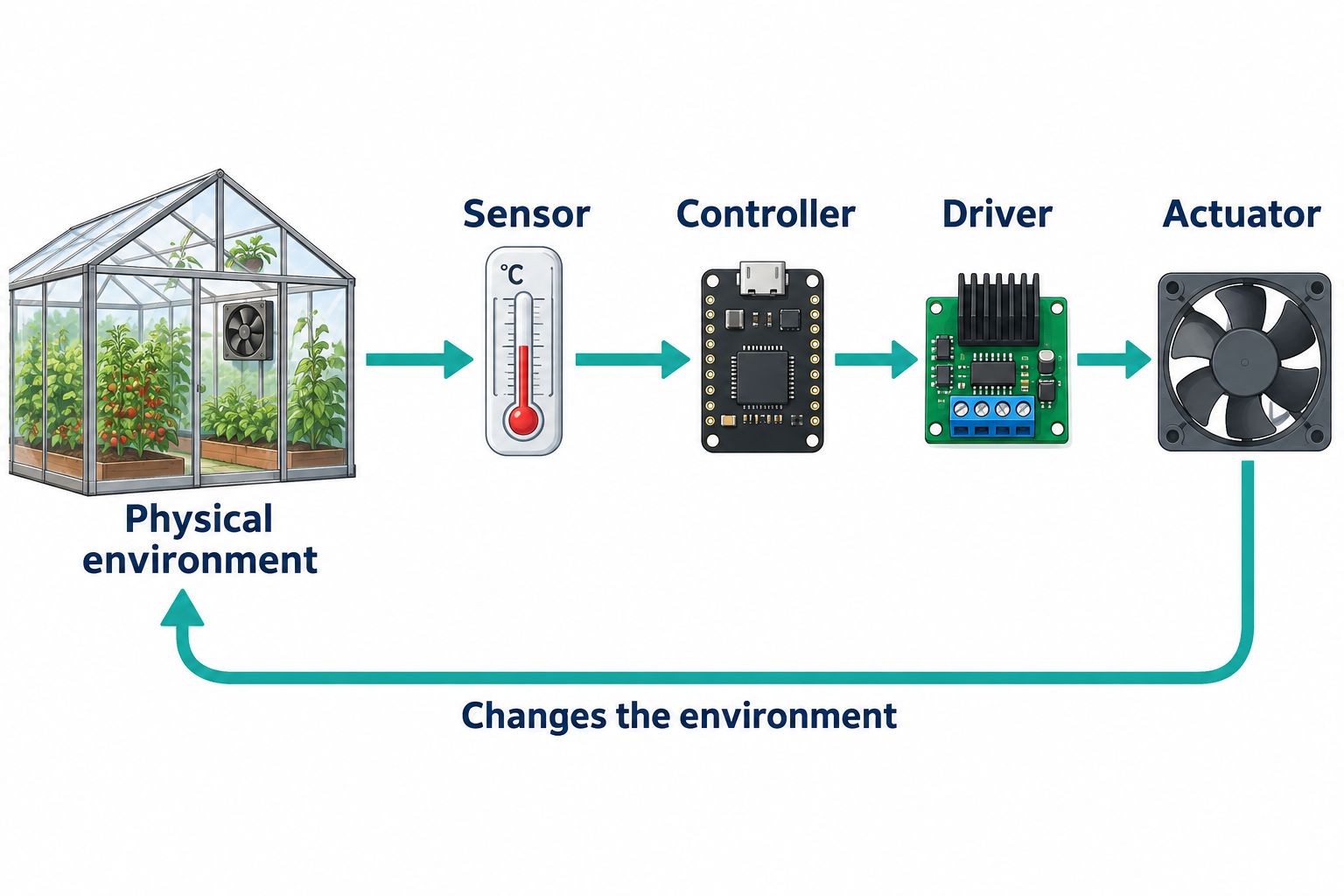
An open-loop system acts without measuring the resulting effect for use in its control decision. Running a fan for ten minutes uses time but does not establish that the room cooled sufficiently. A closed-loop system measures again and uses the result to adjust its later action. Feedback can respond to disturbances, such as sunlight entering the room, but only if the measurement and decision are suitable.
Check: An LED blinks according to a schedule. Is that already feedback control?
No. The program controls an output, but it does not measure the light and use that measurement to alter the action. Repetition alone is not feedback.
2. The board, the microcontroller and the interface
A microcontroller typically combines a CPU, memory, timers and I/O peripherals on one chip. An embedded system places computing inside a device with a particular purpose. A board adds connectors, power circuitry and other support around the chip. The board and the microcontroller are therefore different objects.
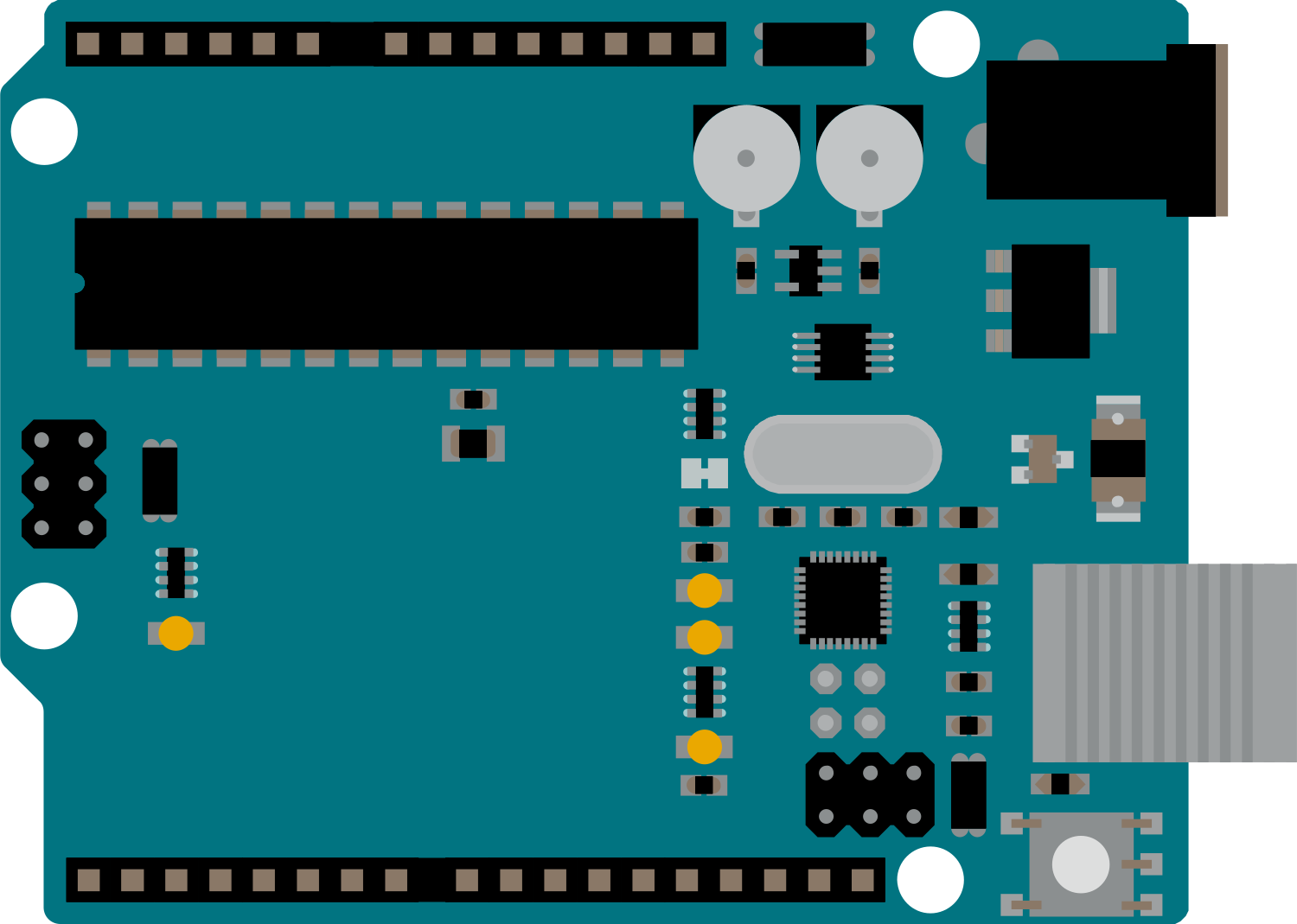
Board illustration: Arduino UNO R3 documentation. UNO R3 is the reference example, not a claim that every Arduino has the same processor, pin capabilities or voltage levels.
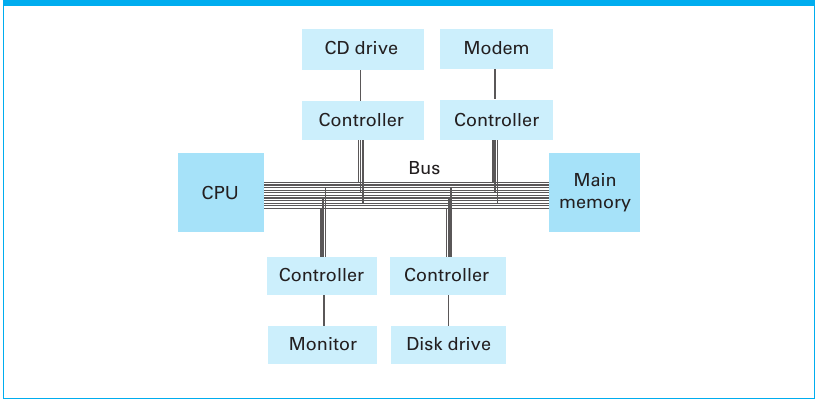
The processor needs interfaces because external devices have their own signal levels, timing and behavior. A microcontroller integrates many peripheral functions, but integration does not remove the need to understand those boundaries. A GPIO output supplies a logic signal with limited current capability; a motor or heater needs an appropriate driver and power source. An external LED needs current limiting, while the onboard LED already has supporting circuitry.
Embedded design also involves trade-offs. A battery-powered device may sleep to save energy, a small memory may store summaries rather than all observations, and a response deadline may limit how long a program can wait. Choosing the fastest processor does not settle any of those questions.
Check: Why is replacing a CPU with a faster one not a complete solution to a slow automatic door?
The delay may occur before the input is sampled, during communication, or in the actuator. The system must detect the event and produce the required physical response within its budget.
3. Sampling chooses when to observe
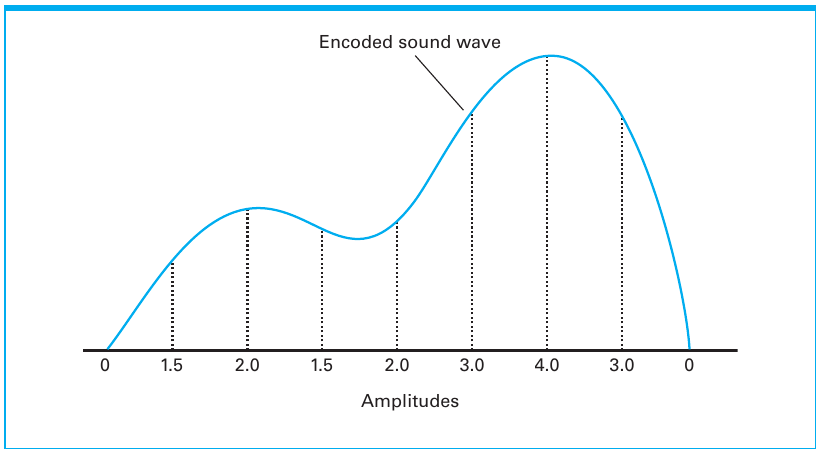
An analog signal varies over a range of physical levels. A digital representation uses a finite set of symbols or codes. Digital circuits still use physical voltages; “digital” does not mean immune to noise. A digital input classifies a level as HIGH or LOW. An analog-to-digital converter, or ADC, assigns a numerical code to an input voltage.
Sampling makes observation time discrete: we record values at selected instants. Quantization makes represented amplitude discrete: ranges of values share a code. These are separate choices. More bits do not reveal what happened when no observation was made, and faster sampling does not automatically correct a sensor offset.
| Time | Actual input | Observation |
|---|---|---|
| 0 ms | LOW | Sample reads LOW |
| 40–70 ms | HIGH | No sample occurs during the pulse |
| 100 ms | LOW | Sample reads LOW |
| 200 ms | LOW | Sample reads LOW |
The observed sequence is entirely LOW even though the input was HIGH for 30 ms. Sampling every 100 ms gives ten observations per second. That rate might be adequate for a slowly changing room temperature, yet unsuitable for detecting a brief event. Choose the observation strategy from what must be detected, including event duration and timing uncertainty.
Check: Would a 12-bit ADC instead of a 10-bit ADC prevent this missed pulse?
No. More amplitude codes cannot recover an event that falls between observations. The failure concerns observation timing, not value resolution.
4. Different realities can produce the same samples
Imagine a wheel with one visible mark. At the first observation the mark is at the top. If the wheel makes exactly one turn before each following observation, the mark is always recorded at the top. The sampled positions are indistinguishable from those of a stationary wheel. This is an intuitive example of aliasing: different underlying motions can give the same sampled observations.
The important lesson is not that one universal sampling rate solves every problem. The needed rate depends on what changes are possible and what must be reconstructed or detected. Real acquisition systems may also filter the signal before conversion. For now, distinguish the evidence actually recorded from the behavior you infer between samples.
Check: A program logs the same value five times. Does that prove that the physical signal was constant between the readings?
No. It establishes the sampled values only. The signal could have changed and returned, or varied in a way synchronized with the observations.
5. Quantization and the meaning of an ADC code
Consider a simplified three-bit ADC covering 0 to less than 8 V with eight equal bins. Inputs from 0 to less than 1 V receive code 0; inputs from 1 to less than 2 V receive code 1; and so on. Both 3.1 V and 3.8 V receive code 3. The code identifies a range rather than preserving every detail of the input. This is a classroom model, not a statement of a particular converter’s exact transition behavior.
The UNO R3 example uses a 10-bit ADC: 2¹⁰ = 1,024 possible codes, numbered 0 through 1,023. With an assumed reference of 5.00 V, the ideal interval is 5.00 / 1,024 ≈ 0.004883 V, or 4.88 mV. The number of intervals is 1,024 even though the highest code is 1,023. A code from analogRead(A0) is not already a temperature.
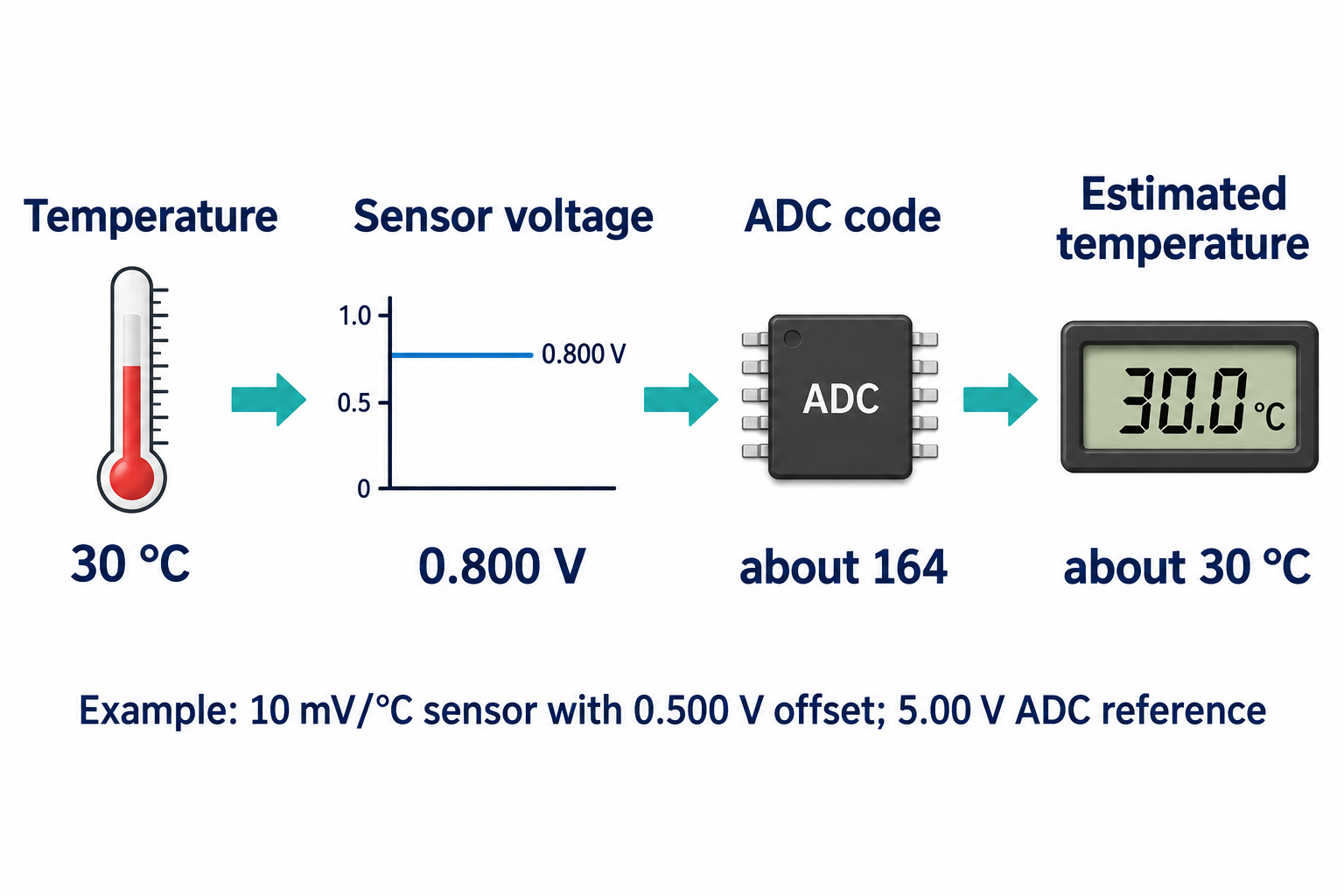
For a nominal TMP235-like sensor, use V = 0.500 + 0.010 × T, with V in volts and T in °C. The offset is 0.500 V and the slope is 10 mV per °C, as described in the TI TMP235 specification. The classroom calculation below combines that nominal model with an assumed 5.00 V ADC reference; it is not a calibration certificate for a real board.
| Step | Calculation | Result |
|---|---|---|
| Ideal ADC step | 5.00 / 1024 V | About 4.88 mV |
| Observed code | 164 | Unitless code |
| Voltage estimate | 164 × 5.00 / 1024 | 0.80078125 V |
| Temperature estimate | (0.80078125 − 0.500) / 0.010 | 30.078125 °C, approximately 30.1 °C |
This example uses a simple code-times-step estimate. A real converter’s transfer function and calibration determine how best to estimate voltage from a bin. One ideal ADC step corresponds to about 0.488 °C for this sensor slope. Printing 30.078125 does not establish that the physical temperature is known to six decimal places.
Check: What information is missing from the statement “the reading is 600”?
We need to know what quantity and representation 600 denotes. If it is an ADC code, conversion also needs the reference scale and sensor model. It does not mean 600 °C.
6. Resolution, accuracy, calibration and smoothing
Resolution concerns the smallest represented increment. Accuracy concerns closeness to the true value. Repeatability concerns consistency under the same conditions. A sensor can repeatedly report a value two degrees too high: consistent output is not necessarily accurate output. Adding ADC bits does not remove a systematic sensor or reference error.
Calibration compares measurements with a reference and supports a correction. Suppose references of 20.0 °C and 30.0 °C produce readings of 22.0 °C and 32.0 °C. A simple model is a +2.0 °C offset. Under that model, a later reading of 27.0 °C gives a corrected estimate of 25.0 °C. Two checks do not prove that the offset stays constant at every temperature or over time.
| Readings in °C | Mean | Interpretation |
|---|---|---|
| 29, 31, 29, 31 | 30 | Some fluctuations cancel |
| 20, 20, 20, 28 | 22 | A real upward change first appears smaller |
| 28, 28, 28, 28 | 28 | The mean eventually catches up |
Averaging can reduce some kinds of noise, but it can also delay the visible effect of a real change. It does not remove a constant offset: averaging four values that are each two degrees high remains two degrees high. We should judge a filter by both stability and responsiveness. This conceptual example does not require implementing arrays this week.
Check: A 12-bit ADC offers 4,096 codes. Does that guarantee a more accurate temperature reading than a 10-bit ADC?
No. It offers finer ideal quantization for the same range, but sensor error, reference error, noise and calibration can dominate accuracy.
Check: Why might smoothing make a warning arrive later?
A new value is combined with older values. The mean can remain below a threshold after the newest observation has crossed it, so the smoothing choice affects the response time.
7. Hysteresis makes history part of the decision
A fan controlled by one threshold can switch repeatedly when measurements fluctuate around it. For example, 29.9, 30.1, 29.8 and 30.2 °C alternate the result of “ON at 30 °C or above.” Even a nearly unchanged room can produce an unstable output because of small measurement variations.
Hysteresis uses separate switching thresholds. Turn the fan ON at 30 °C or above; turn it OFF at 28 °C or below. Between those thresholds, retain the previous state. Now the action depends on both a current measurement and remembered state. Define an initial state, such as OFF, before tracing the behavior.
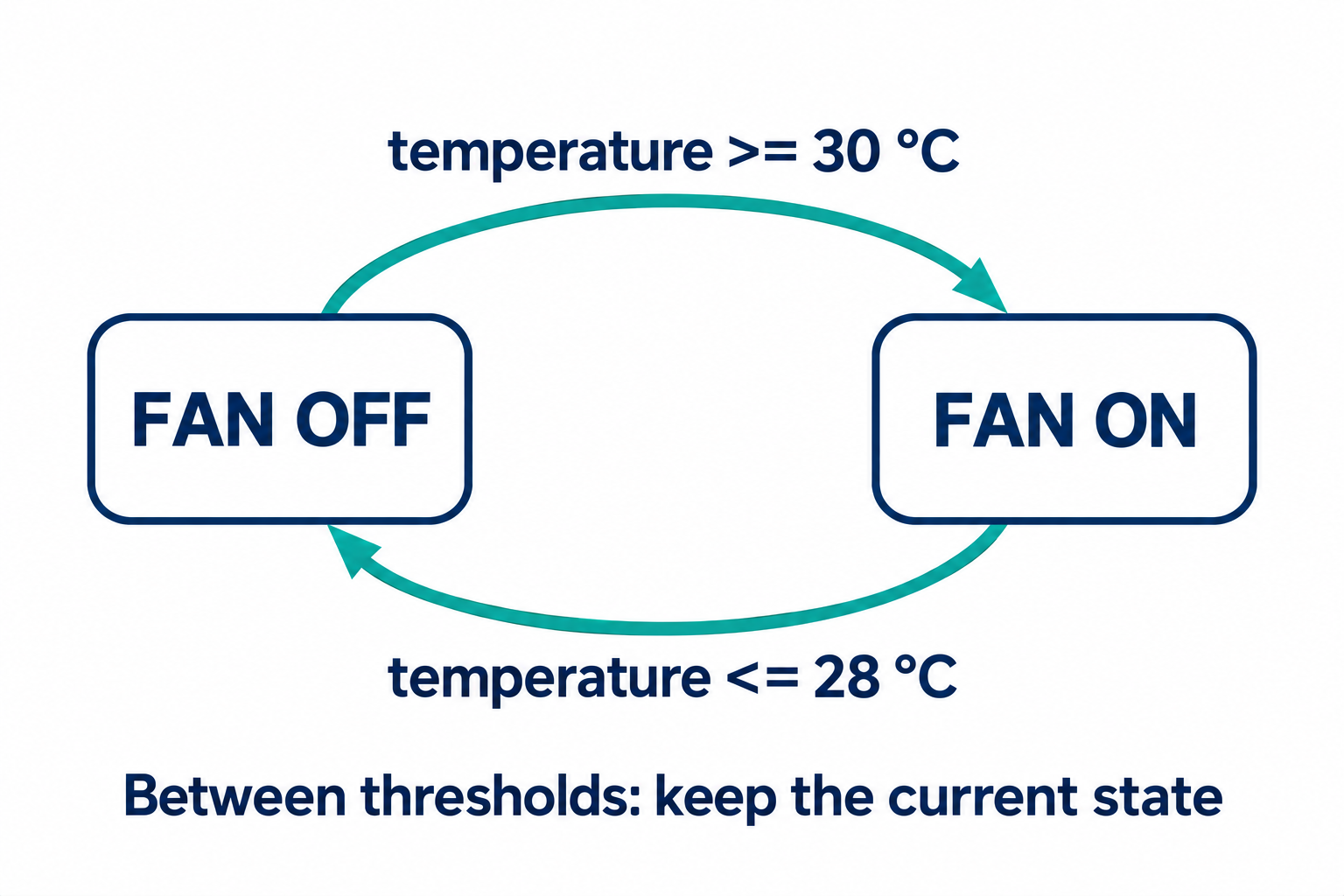
| New temperature | State before | State after |
|---|---|---|
| 29 °C | OFF | OFF |
| 31 °C | OFF | ON |
| 29 °C | ON | ON |
| 27 °C | ON | OFF |
The first and third inputs are identical, yet the outputs differ. A single expression of the current input cannot represent this rule without access to state. Hysteresis changes the switching policy; it does not claim to make the sensor more accurate. The two-degree band is an illustrative design choice, not a universal thermostat setting.
Check: Starting ON, what should happen at 29 °C and then exactly 28 °C?
At 29 °C the state remains ON. At 28 °C the lower threshold is reached and the state becomes OFF. Testing the exact boundary confirms the intended inclusive comparison.
8. Output levels, PWM and physical effects
A command is not the same as a physical outcome. A program can request a digital output level, but the attached circuit determines what happens. This distinction matters when moving from the board’s built-in LED to a motor, lamp or heater. The first lab uses the onboard LED and does not require constructing a power-driver circuit.
Pulse-width modulation (PWM) varies the fraction of a period spent HIGH. The duty cycle is HIGH time divided by period. For a 4 ms period, HIGH times of 1, 2 and 3 ms give duty cycles of 25%, 50% and 75%; the remaining times are 3, 2 and 1 ms. The corresponding frequency remains 250 cycles per second in this illustrative timing example.
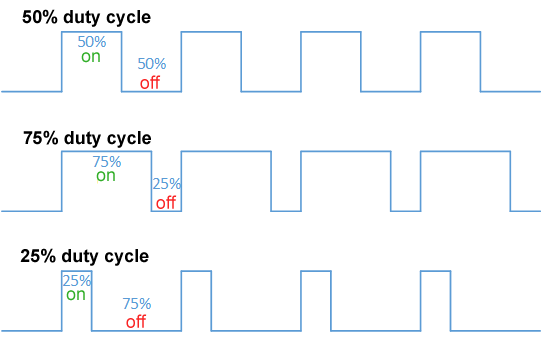
Figure credit: Thewrightstuff2018, lettering edit by Nyq, Duty Cycle Examples, CC BY-SA 4.0. Content retained unchanged from the lecture image and displayed at a different size.

On UNO R3 PWM-capable pins, analogWrite controls pulses rather than creating an arbitrary steady DC voltage. A load, driver or filter determines the resulting physical response. Do not infer an exactly proportional motor speed or perceived brightness from the duty-cycle percentage alone. Other board models can have different output facilities.
Check: At a fixed 4 ms period, does changing duty cycle from 25% to 75% triple the pulse frequency?
No. The frequency stays 1 / 0.004 s = 250 Hz. The HIGH duration changes from 1 ms to 3 ms while the period remains fixed.
9. Response time and energy belong to the system
With regular 100 ms polling, a persistent change can wait almost 100 ms before the next observation. Input conversion, computation, communication and actuator motion add further time. A short pulse might be missed entirely; a persistent input may instead be detected late. These are different failure modes.
| Stage | Time |
|---|---|
| Wait for next observation | 100 ms |
| Read input and decide | 5 ms |
| Send command | 10 ms |
| Actuator begins the required response | 80 ms |
| Total | 195 ms |
This design misses a hypothetical 150 ms requirement. Reducing computation from 5 ms to 1 ms still leaves 191 ms. To improve the result, identify the dominant stage and specify what “response” means: starting motion and finishing motion are different events. The numbers are teaching assumptions, not measurements of the UNO.
Energy introduces another trade-off. With an ideal 2,000 mAh battery and a constant 20 mA draw, division gives 100 hours. If a hypothetical device spends 10% of its time at 20 mA and 90% at 0.1 mA, the weighted average is 2.09 mA and the ideal quotient is about 957 hours. Real battery capacity, regulators, peripherals and wake-up costs change that result. These are not measured Arduino-board battery-life estimates.
Check: Why not simply keep every sensor system asleep for 99% of the time?
The system may miss required events or respond too late. The appropriate sleep and wake-up strategy depends on what can happen while it is asleep and how the system will detect it.
10. Design states and failures before code
A disconnected sensor may produce an invalid or out-of-range reading, but it can also produce a plausible-looking value. No single range test proves that the sensor is working. A stored value may be numerically valid yet stale, and an actuator may fail despite receiving a valid command. Useful evidence includes plausibility, timestamps and agreement between the command and a measured effect.
A fallback must be chosen for the application. “Turn everything OFF” is not a universal safe response. A washing cycle, for example, can be understood as FILL, WASH, DRAIN and SPIN states. Moving from FILL should depend on the required level being reached; advancing because time elapsed alone does not confirm successful filling. Detailed appliance safety design is beyond this introductory model.
Automatic lighting exposes a subtler problem. If the lamp shines directly on its own light sensor, turning on can make the measured environment appear bright enough to turn off. Sensor placement, separate thresholds and testing can matter more than adding lines of code. State the measured quantity, the desired behavior and the relevant failure cases first.
Check: An alarm samples once per second, but the event lasts 0.2 seconds. Would more precise arithmetic alone repair the design?
No. The event can occur between samples. Improve the observation or event-capture strategy before refining the arithmetic. Then check the remaining response delay.
11. A decision as a flowchart and as C
An if condition treats zero as false and a nonzero value as true. Comparisons such as >= produce 0 or 1. The words “at least 30” correspond to temperature >= 30, including the boundary value. Braces group the statements on each path.
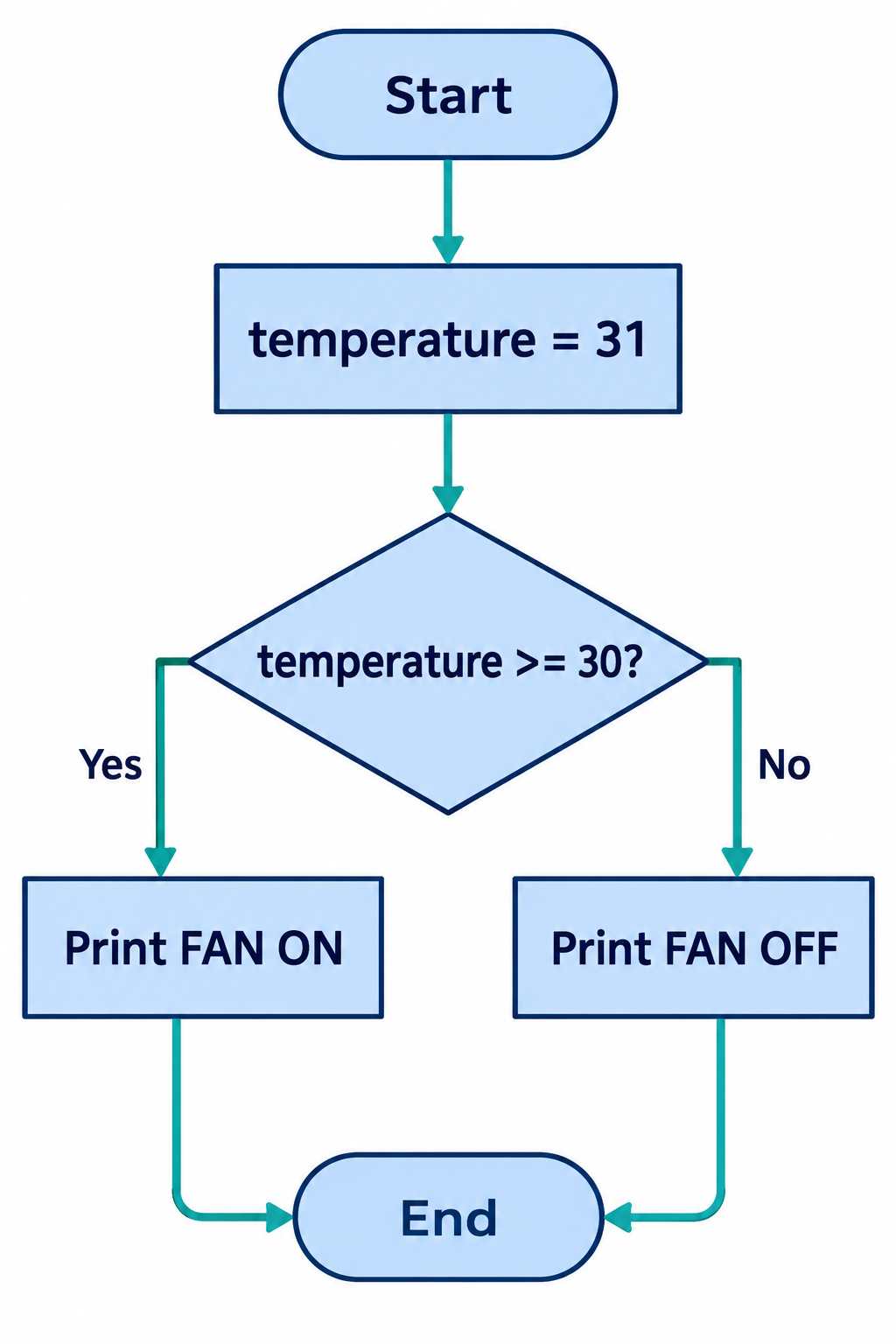
#include <stdio.h>

int main(void) {
    int temperature = 31;
    if (temperature >= 30) {
        printf("FAN ON\n");
    } else {
        printf("FAN OFF\n");
    }
    return 0;
}
The fixed value stands in for a measurement, so the logic can be tested without a sensor. Expected output is FAN ON. Test 29, 30 and 31 to exercise below, exactly at and above the threshold. Changing >= to > changes the answer at 30.
Combine conditions with && for “both,” || for “at least one,” and ! for negation. Write an inclusive interval as x >= 20 && x <= 30. C does not interpret 20 <= x <= 30 as the mathematical chained comparison you intend. Logical AND and OR short-circuit: the right operand is skipped when the left determines the result.
Check: Why does x = 30 inside if differ from x == 30?
The first assigns 30 and then tests that nonzero value, so the condition is true and x changes. The second compares without that assignment. Compiler warnings help expose accidental assignments.
Check: What does an extra semicolon after if (temperature >= 30) do?
It supplies an empty controlled statement. A following braced block then executes unconditionally. Indentation alone does not determine the program structure.
12. A loop needs a path back and a way to stop
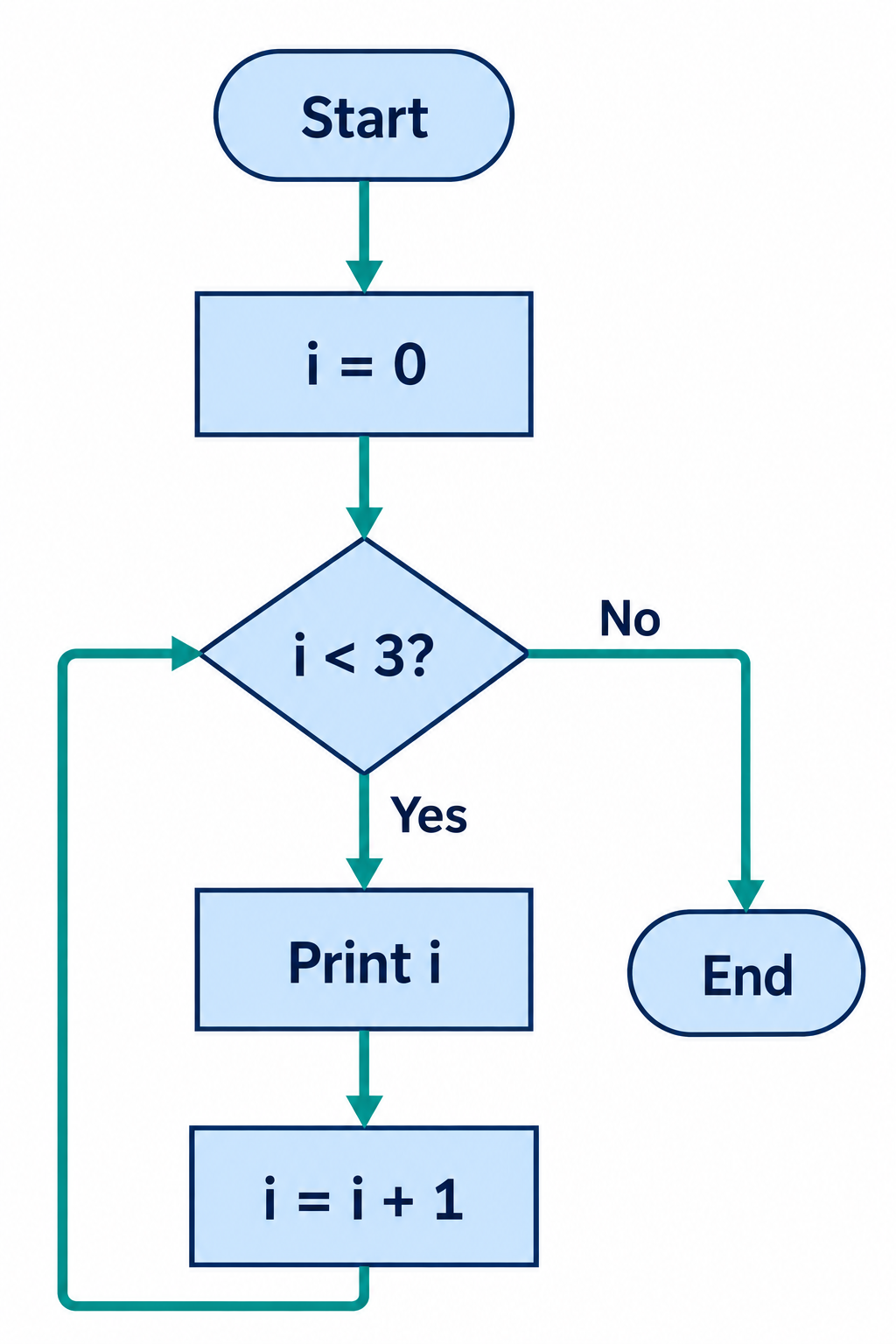
#include <stdio.h>

int main(void) {
    int i = 0;
    while (i < 3) {
        printf("%d\n", i);
        i = i + 1;
    }
    return 0;
}| i before test | i < 3 | Action |
|---|---|---|
| 0 | True | Print 0; update to 1 |
| 1 | True | Print 1; update to 2 |
| 2 | True | Print 2; update to 3 |
| 3 | False | Leave the loop |
Three body executions require four tests. The update makes progress toward the stopping condition. If the initial value were 3, this loop would execute zero times. If the update were removed, the condition would remain true for this example. Always trace initialization, test, body and update separately.
#include <stdio.h>

int main(void) {
    for (int i = 0; i < 3; i++) {
        printf("%d\n", i);
    }
    return 0;
}
This for statement expresses the same printed sequence: 0, 1 and 2. Initialization runs once; the condition precedes each body execution; the update follows it. Here i++ increments i by one. The loop describes program control, not a time interval: printing three numbers does not guarantee three seconds of execution.
Check: Starting at zero, what changes if the condition is i <= 3?
It prints 0, 1, 2 and 3, for four iterations. Write the desired sequence before choosing a comparison to avoid an off-by-one error.
13. Arduino loop() is not a loop statement
The Arduino framework builds a C++ program for the selected board. It calls setup() once after startup/reset, then calls loop() repeatedly. A C/C++ loop statement inside that function is a separate layer of repetition. Returning from one call to loop() does not tell the framework to stop calling it.
void setup() {
    pinMode(LED_BUILTIN, OUTPUT);
}

void loop() {
    digitalWrite(LED_BUILTIN, HIGH);
    delay(500);
    digitalWrite(LED_BUILTIN, LOW);
    delay(500);
}
For the UNO R3 built-in LED, HIGH requests ON and LOW requests OFF. The two requested waits make an approximately one-second cycle: 500 ms ON followed by 500 ms OFF. Instructions and framework work add a little overhead. LED_BUILTIN is supplied by the board definition; do not assume every board uses the same pin or LED polarity.
delay() makes a first example readable, but the normal sketch sequence does not advance to its next input-reading statement during the wait. The board is not entirely inactive: interrupts and some hardware functions can continue. A more responsive design can check elapsed time while continuing other work. Arduino’s Blink Without Delay is an optional next reading, not an added lab requirement.
Check: A finite for loop inside loop() finishes after three flashes. Is the sketch now finished?
No. The for statement has finished, but the framework can call loop() again. Distinguish the bounded repetition within one call from the framework’s ongoing execution.
14. Optional patterns and worked extensions
An ordered if / else if / else chain executes only its first matching branch. For example, test below 20 first, then below 30. The second branch is reached only after the first fails, so its effective range is 20 through values below 30. Separate independent if statements do not impose the same exclusivity.
#include <stdio.h>

int main(void) {
    int temperature = 30;
    if (temperature < 20) {
        printf("COLD\n");
    } else if (temperature < 30) {
        printf("COMFORTABLE\n");
    } else {
        printf("HOT\n");
    }
    return 0;
}
Check: What does the chain print for 19, 20, 29 and 30?
COLD, COMFORTABLE, COMFORTABLE and HOT. Those inputs test the two boundaries and demonstrate why the order of the tests matters.
A burst can combine bounded repetition with the framework: three short flashes inside one loop() call, followed by a longer pause. The next call repeats the burst. The example below requests six waits of 200 ms and one wait of 1,000 ms: approximately 2,200 ms between successive burst starts. The last LOW interval continues through the final pause.
void setup() {
    pinMode(LED_BUILTIN, OUTPUT);
}

void loop() {
    for (int i = 0; i < 3; i++) {
        digitalWrite(LED_BUILTIN, HIGH);
        delay(200);
        digitalWrite(LED_BUILTIN, LOW);
        delay(200);
    }
    delay(1000);
}
The reference slides also show a synthetic reading selecting the blink rate: using 200 ms for both waits gives a nominal 400 ms cycle; using 700 ms gives 1,400 ms. The fixed reading tests the decision without implying that a real sensor has been connected.
For the earlier hysteresis rule, a state variable must already have a defined previous value. This excerpt updates it without resetting it between observations:
if (temperature >= 30) {
    fanOn = 1;
} else if (temperature <= 28) {
    fanOn = 0;
}
// In between, preserve the previous fanOn value.
Other optional reference patterns have distinct purposes. A do ... while executes its body before its first test, so it runs at least once. A switch selects among discrete constant case labels; break exits it rather than continuing into later cases. With a correctly wired button to ground and INPUT_PULLUP, an open switch reads HIGH and a press reads LOW. Mechanical contacts can bounce. These are extensions, not extra required wiring or independent mastery for the first Arduino result.
Check: If fanOn is reset to zero before every measurement, does the hysteresis trace still work?
No. The program loses its history. At 29 °C after a previous ON state it would incorrectly behave as if it had been OFF. Preserve state between decisions.
15. Further study and preparation
For Lab 5, explain an onboard-LED sketch, trace a condition and bounded repetition, and compare predicted with observed behavior after one small change. Additional sensors, button circuits, PWM loads and motor drivers are not required for this first result. The physical examples broaden the lecture beyond a coding exercise.
- Brookshear and Brylow, Computer Science: An Overview, 12th Global Edition: section 1.4 on sampling, section 2.5 on I/O, and the sensor/actuator discussion on printed page 492. Figures 3 and 4 retain Figures 2.13 and 1.12 from the supplied book.
- Analog Devices: analog-to-digital conversion. Connect input range, quantization and resolution; distinguish them from sampling time.
- TI TMP235 product information and datasheet. Identify the nominal slope and offset used in the worked example, then distinguish those from accuracy specifications.
- Arduino UNO R3 and analogRead reference. Relate the board and ADC to the measurement chain.
- Arduino: using PWM output. Check which pins support PWM on the selected board.
- Blink and Blink Without Delay. Compare the normal execution path while waiting.
- GNU C Language Introduction and Reference Manual. Review conditions and loop statements alongside the course’s small C17 examples.
All nine teaching figures in the current Week 6 deck are retained here without slide headers. Figure 2 is Arduino’s board illustration; Figure 7 has its Wikimedia attribution beside it. Figures 1, 5, 6, 8 and 9 are the course’s AI-generated conceptual diagrams, checked against their explanations. They illustrate mechanisms and are not hardware measurements. The worked budgets, thresholds and sampling examples are explicit classroom assumptions.