CSE 101 · WEEK 05 · READING
Programming languages and introduction to C
How a description becomes an executing program—and why the values and operations you choose affect its answer.
Read the language concepts first, then predict the C examples before revealing the Check answers. The final two worked sections are optional extensions. This chapter supports Week 5 and Lab 4; it does not add a new assignment or require Arduino hardware this week.
1. Languages connect people and machines
An algorithm describes a method. A programming language gives us precise rules for expressing that method so tools can implement it. The processor still executes machine instructions, but a person can work with meaningful names, expressions and larger structures rather than manually selecting every register operation. This is abstraction: using a description that exposes what matters for a task while hiding details that another layer handles.
Consider a temperature conversion. We want to express a relationship between Fahrenheit and Celsius, give the quantities clear names and display a labelled result. The processor does not understand “temperature.” The translation tools must connect our chosen operations to instructions, memory and output facilities. The programmer remains responsible for choosing the correct relationship and units.
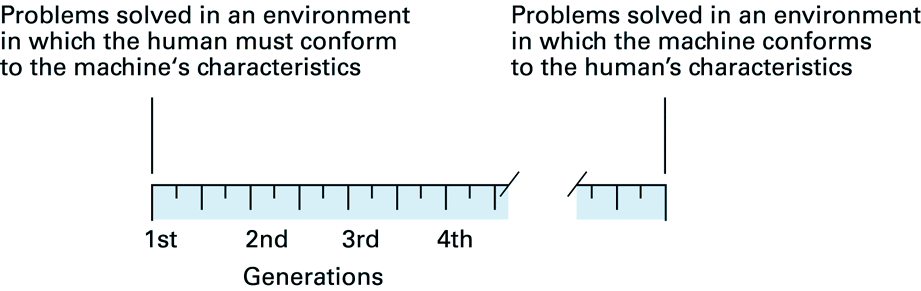
Machine language encodes instructions for a processor architecture. Assembly gives those operations readable names and labels. A high-level language lets us express a calculation without specifying its exact instruction sequence. One source statement can become many instructions; optimization can also combine or remove work. Counting source lines is therefore not the same as counting executed instructions.
Check: Does using a high-level language mean that machine instructions are no longer executed?
No. The compiler, interpreter and runtime connect the description to actual execution. Ultimately the physical processor executes machine instructions, even when the programmer works at a much higher level.
2. Different ways to describe a solution
A paradigm is a style of organizing computation. Imperative programming describes operations that change state. Functional programming emphasizes evaluating and combining functions. Object-oriented programming organizes data and behavior around objects. Declarative programming emphasizes a condition or relationship the result must satisfy. These approaches overlap: one language and even one application can use several.
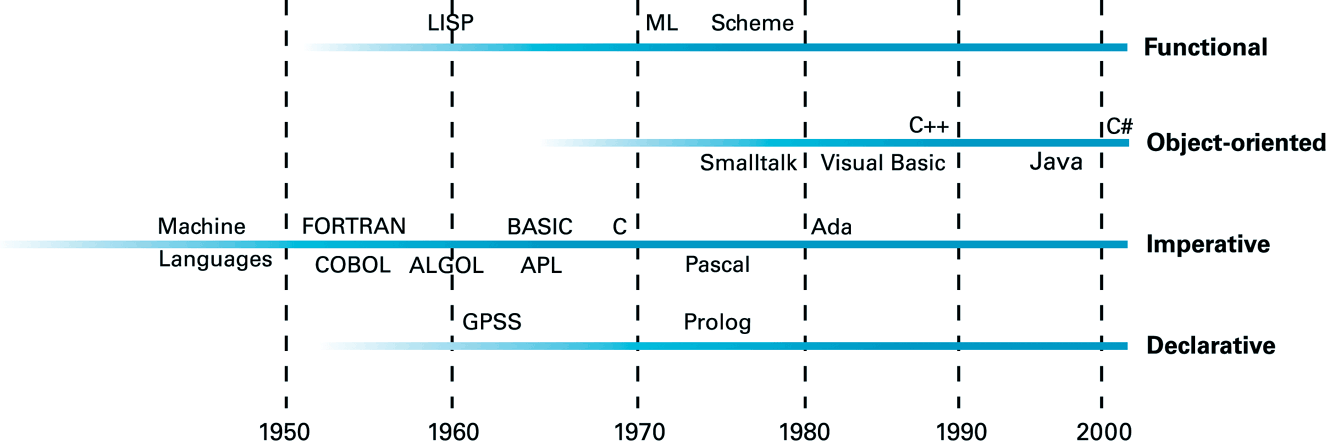
| Approach | How the solution is described |
|---|---|
| Imperative | Visit each reading; if it exceeds the limit, add it to the result. |
| Functional | Apply a filtering function to the collection. |
| Object-oriented | Ask an object representing the readings for the qualifying values. |
| Declarative | Specify the condition that the returned readings must satisfy. |
These are descriptions of approaches, not four syntaxes to memorize. Language choice also depends on the target machine, available libraries, development tools and the people who will maintain the program. A convenient numerical language and a small-device language may emphasize different needs without one being universally better.
Check: Can an object-oriented program contain imperative loops?
Yes. Objects organize responsibilities and data, while a method can use a loop to update state. Paradigms are not mutually exclusive boxes.
3. Syntax, meaning and the intended problem
Three questions should be kept separate. Syntax asks whether a phrase follows the language grammar. Semantics concerns what a valid phrase means, including the role of types. Problem correctness asks whether those operations produce the result we wanted. A translator can reject many invalid programs, but accepting a program does not prove that it solves the intended problem.
total = price + ;       // incomplete expression
total = price + tax;    // add tax
total = price - tax;    // valid form, different rule
The last line can be legal C when the names and types are appropriate. It is wrong for a requirement that says to add tax. Conversely, the first line cannot express a complete addition because an operand is missing. Different mistakes need different evidence: diagnostics for invalid language, and examples or reasoning for an incorrect rule.
A translator first recognizes tokens. In total = price + 12;, the names are identifiers, = and + are operators, 12 is one integer literal and ; ends the statement. A parser then recognizes how tokens fit the grammar. The characters alone are not yet a structured expression.
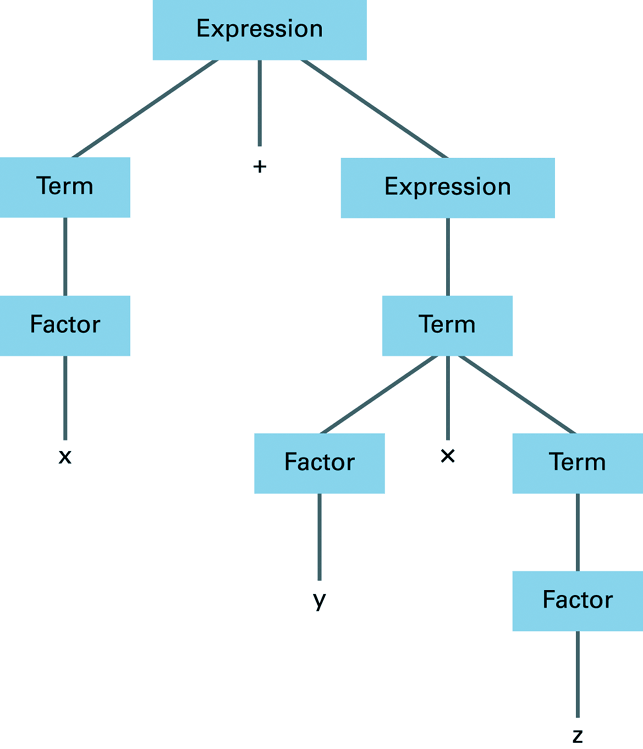
With x = 2, y = 3 and z = 4, that grouping gives 14. Writing (x + y) * z in C requests a different grouping and gives 20. Precedence describes grouping; it should not be confused with a general guarantee about the order in which every part of a C expression is evaluated.
Check: A program builds and prints a plausible temperature. What remains to be checked?
Whether it uses the intended formula, units, input assumptions and arithmetic types. A plausible value can still be wrong. Compare several independently known input/output pairs.
4. Translation, interpretation and execution

A compiler translates a program into another representation. That target may be machine code, bytecode or even another source language. Real compilers can use several intermediate representations and optimization passes; the figure is an introductory model, not a complete engineering diagram.
An interpreter is a running program that carries out operations described by another program representation. It tracks values and control flow and invokes the required actions. Saying that it runs “one source line at a time” is only a rough analogy: parsing and conversion into bytecode can occur before execution.
| Toy operation | Interpreter action | State or output |
|---|---|---|
| SET x 3 | Associate x with 3 | x = 3 |
| ADD x 2 | Read x, add 2 and store the result | x = 5 |
| PRINT x | Read x and request output | 5 |
The table uses an invented notation, not C or a real processor instruction set. It separates the program being described from the program implementing its operations. The interpreter itself runs on the physical machine.
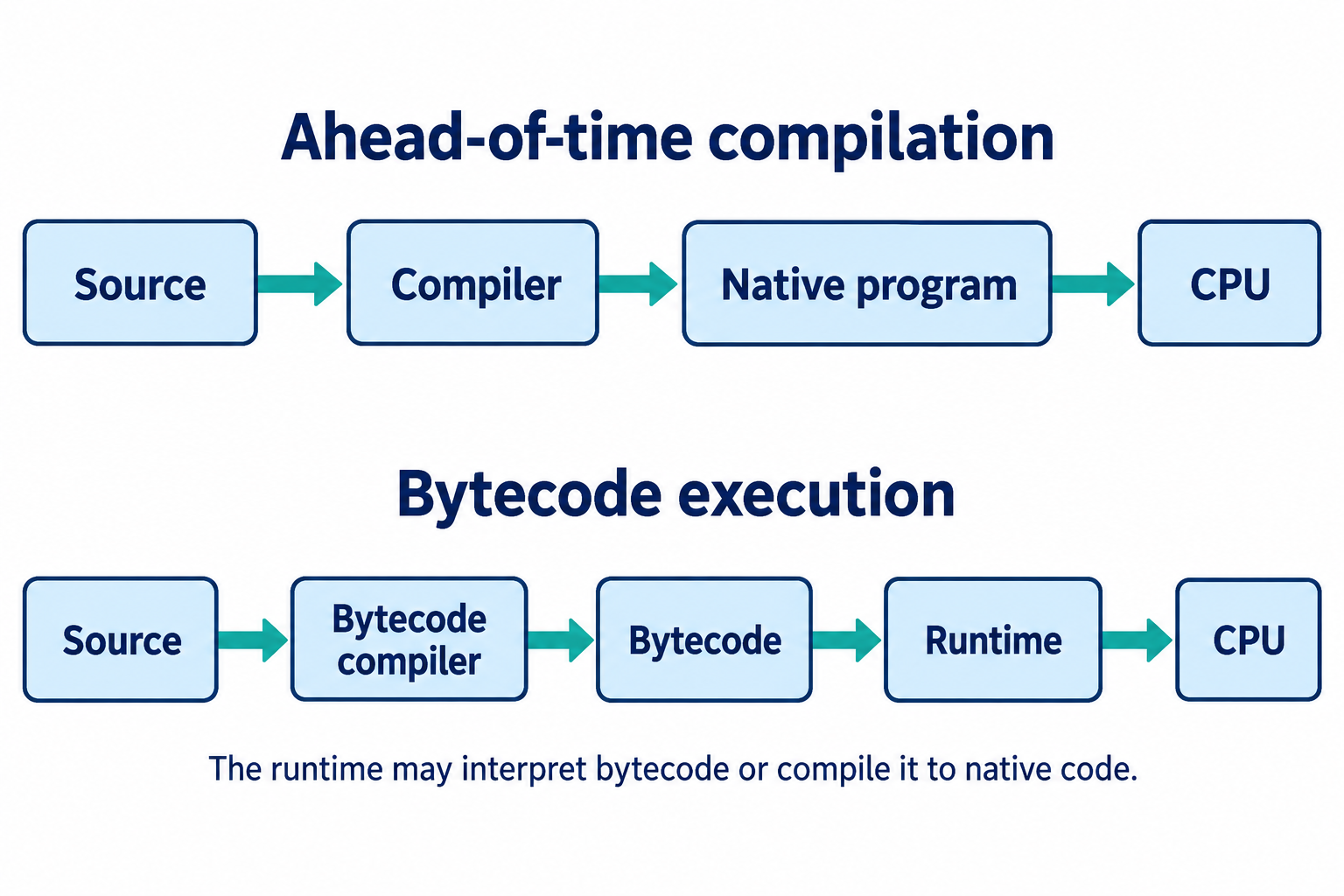
Bytecode targets an abstract execution model rather than a particular physical processor. A compatible runtime implements its operations. Just-in-time compilation (JIT) generates machine code during execution. Interpretation and compilation can therefore appear in the same system, at different stages. A virtual machine for bytecode need not be an emulated whole PC with its own desktop operating system.
Check: If source becomes bytecode, is the program necessarily “not interpreted”?
No. Compilation describes the translation to bytecode; interpretation can describe how that bytecode is executed. They answer questions about different stages.
5. Where is CPython when you run Python?
Python is the language; CPython is its usual reference implementation, principally written in C. If you installed the usual Python distribution, the executable called python or python3 is commonly CPython already. It is not normally a second application you must launch separately.
When you run python3 program.py with CPython, Python source is compiled to Python bytecode and the interpreter executes it. You normally do not perform a separate native-executable build. This is why describing Python as interpreted is compatible with its internal compilation step. Python’s FAQ and bytecode glossary entry describe these two views.
To identify an installation rather than guess from its version number, run this optional command. The result describes the implementation behind that command; it does not install or change Python.
python3 -c "import platform; print(platform.python_implementation())"A normal CPython result is CPython. Other implementations exist. Bytecode and caching details depend on implementation and version, so a .pyc file is not a universal native executable. This chapter uses Python only to explain execution mechanisms; its programming examples remain C.
Check: You use Python 3.11 and have never installed anything labelled CPython. Is that inconsistent?
No. “3.11” identifies a language/runtime release series; the ordinary Python executable can already be the CPython implementation. The implementation query above gives direct evidence for the installation you are using.
6. A language survey: mechanisms can overlap
The tables below summarize the lecture survey for recognition, not memorization. The execution route belongs to a particular implementation. An interactive prompt does not prove that no compilation happens, and a compiled representation does not guarantee that it is native machine code. The application examples suggest common uses, not restrictions.
| Languages | Example use | Illustrative route |
|---|---|---|
| C, C++, Rust, Go | Systems and applications | Compilers commonly produce native executables. |
| Fortran | Scientific numerical work | GNU Fortran is a native compiler. |
| COBOL | Business records | GnuCOBOL can translate to C and then build native code. |
| Pascal, Ada | Teaching and dependable systems | Free Pascal and GNAT provide compiler examples. |
| Languages | Example use | Illustrative route |
|---|---|---|
| Java, C# | Applications and services | JVM bytecode or .NET IL; runtime execution often includes JIT compilation. |
| JavaScript, TypeScript | Web applications | V8 combines interpretation and compilation; TypeScript usually becomes JavaScript first. |
| Python, Lua | Automation and scripting | CPython and standard Lua use bytecode interpreters. |
| R, Julia, MATLAB | Numerical and analytical work | R has bytecode compilation; Julia uses JIT compilation; MATLAB’s execution engine also includes JIT. |
| APL | Array-oriented work | Dyalog supplies an interpreter; other implementations can differ. |
| Language or family | What to notice |
|---|---|
| BASIC | GW-BASIC interprets; FreeBASIC compiles. The family name does not settle the mechanism. |
| Forth | Gforth has interpretation and compilation states; a definition can be compiled and then executed. |
| Lisp | SBCL normally compiles Common Lisp to native code, including interactive evaluation. |
| SQL | A database parses, plans and executes a query; some engines also compile parts of execution. |
| SAS language | DATA steps have compilation and execution phases; PROC steps invoke procedures. |
| SPSS command syntax | Commands request transformations and analyses from the SPSS runtime. |
SAS and SPSS also name software products. Here the comparison concerns their languages or command syntax, not a claim that an entire statistical product is one interpreter. Concrete implementation references are provided in the expandable source list at the end.
Check: A colleague says “BASIC is interpreted, so BASIC programs can never be compiled.” What is missing?
The implementation. GW-BASIC and FreeBASIC illustrate different routes for the same language family. Similar care is needed for Lisp, Forth and other families.
7. Building, linking, loading and portability

In the PC C workflow, preprocessing handles directives such as #include; compilation translates C; assembly produces object code; and linking connects object files and required implementations. A compiler driver such as gcc can coordinate these stages. Loading is a later operating-system activity that prepares an executable for execution. These roles connect directly to Week 4’s discussion of programs and processes. See the GCC overview of stages.
A header provides declarations, such as the information needed to call printf. A library supplies reusable implementations. An IDE combines tools for editing, building and debugging; it is neither the programming language nor necessarily the compiler itself. A missing declaration and a missing implementation can therefore cause failures at different stages.
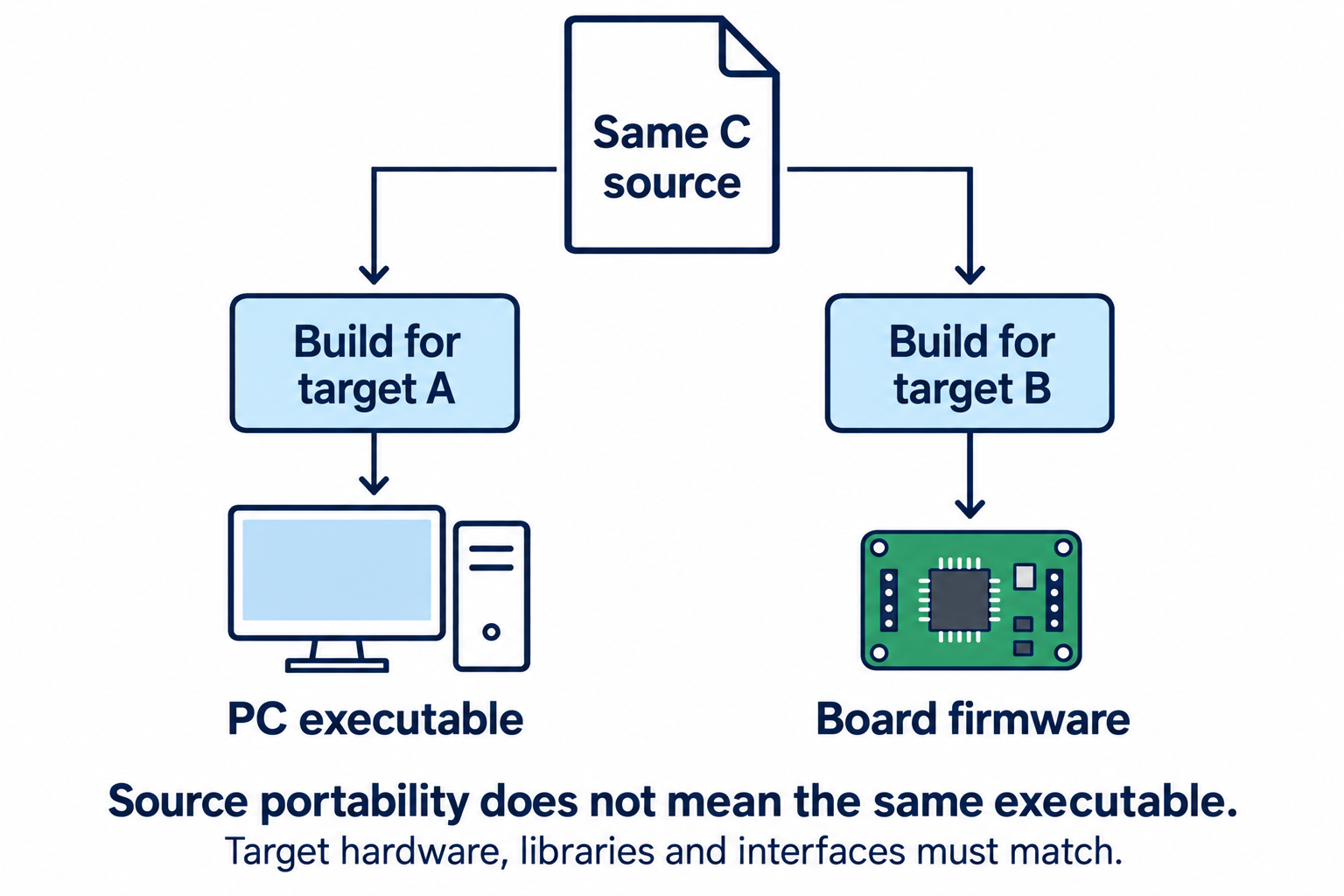
Source portability and executable compatibility are different. An executable has a target instruction set and operating-system conventions. Even recompiling source is not enough if it assumes unavailable libraries or different device interfaces. On Arduino, the PC builds firmware for a selected board and uploads it; the board then executes it. The sketch environment uses C++ and Arduino support libraries. The Arduino build-process documentation explains that preparation and toolchain.
Check: Could you copy a PC executable to an Arduino board and expect it to run because both programs were written with C-style syntax?
No. Syntax similarity does not establish instruction-set, executable-format, library or hardware compatibility. Build for the target and use its interfaces.
8. A first C program and a dependable work cycle
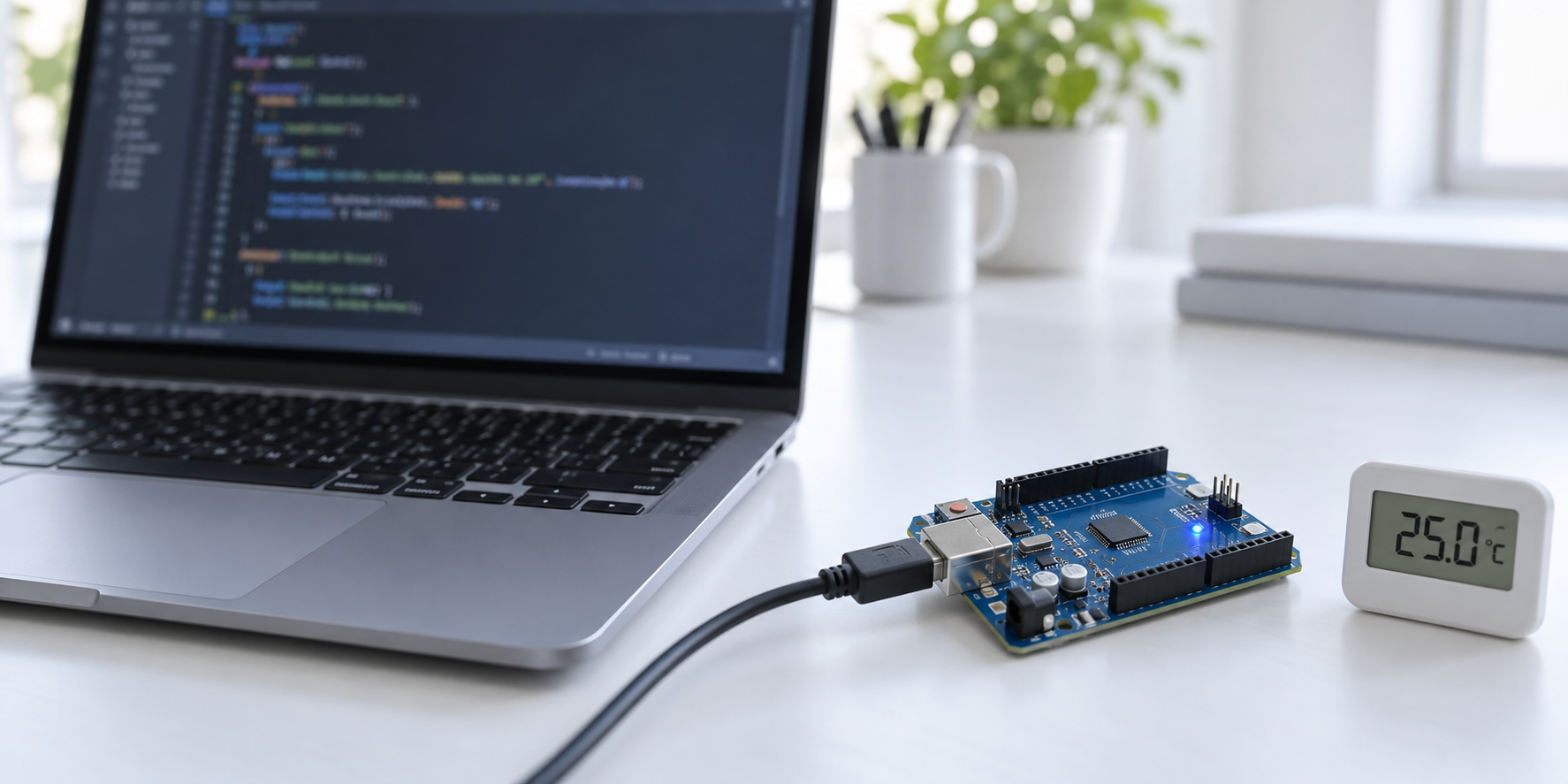
Start with a complete, small PC program. Save the following plain text as hello.c. The include directive makes standard input/output declarations available. main is the entry function for this hosted C program; braces group its statements. The string contains a newline escape, and returning zero reports successful completion to the host.
#include <stdio.h>

int main(void) {
    printf("Hello, C!\n");
    return 0;
}
In the course’s Unix-like terminal environment, build and then run with:
gcc -std=c17 -Wall -Wextra -Wconversion hello.c -o hello
./hello
The first command asks GCC to build an executable named hello, using C17 and useful warnings. The second requests execution from the current directory. Expected output is Hello, C! followed by a newline. Commands can differ in another toolchain or shell; use the course environment for these examples.
The dependable cycle is edit, save, build, inspect diagnostics, run. A failed build may leave yesterday’s executable in place. Running that file can make a correct source edit appear ineffective. Check build success before treating output as evidence about the new source.
Check: You change the greeting but see the old greeting again. Must printf be broken?
No. First check that you saved the intended file, built it successfully and ran the intended executable. An old executable may remain after an unsuccessful build.
9. Variables, assignment and types
int count = 3; declares an object named count, gives it type int and initializes its value. The assignment count = count + 1; reads the old value, computes a new one and stores it back. It is an update, not a mathematical assertion that a number equals itself plus one. Initialize a local variable before using its value.
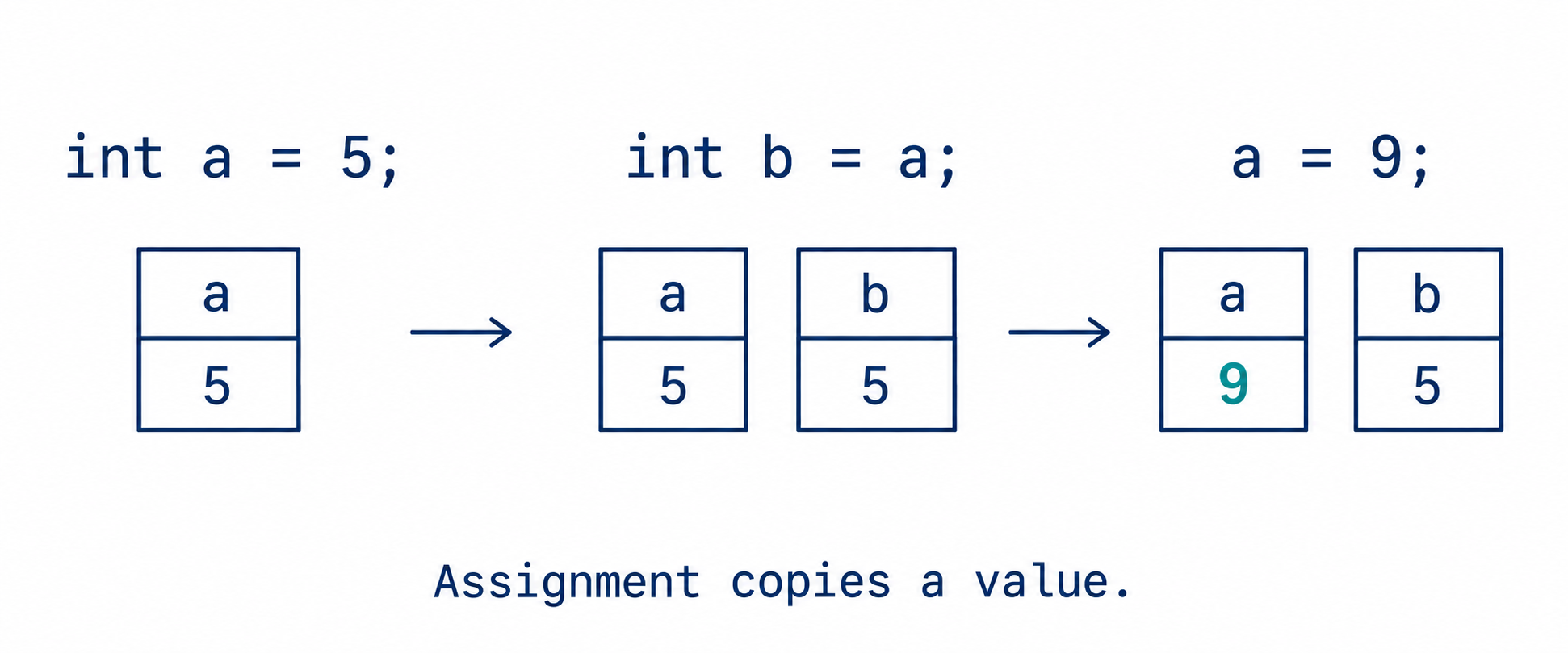
int a = 5;
int b = a;
a = 9;
b = b + 2;
printf("%d %d\n", a, b);
Check: What does the assignment example print, and why does b not follow later changes to a?
It prints 9 7. The initialization copied 5 into b; it did not establish a permanent relationship. The later addition changes b from 5 to 7 independently.
| Type | Example | Reason to use it |
|---|---|---|
| int | int itemCount = 12; | A whole-number count within its supported range. |
| double | double temperatureC = 23.5; | A fractional calculation with finite precision. |
| float | float gain = 0.5f; | Another floating-point type; supported precision and range matter. |
| char | char grade = 'A'; | A small integer type commonly used for character codes. |
A type describes more than how many digits should be printed. Integer types have finite ranges; floating-point types have finite precision and range. C does not require every target to use a four-byte int. The optional measurement example on slide 71 uses sizeof and <limits.h> to inspect the actual implementation.
Do not rely on signed integer overflow wrapping around. Nor will a larger destination repair an expression that already overflowed while being evaluated. A character code is also a representation: on an ASCII-compatible target, 'A' has code 65; the language distinction between a character and its numeric presentation remains important.
Check: Does declaring a result as double guarantee that all arithmetic used to obtain it is floating-point?
No. The operands determine the arithmetic in the expression. Assignment converts the result afterward if necessary. The division examples next make this visible.
10. Expressions: where fractions disappear
C provides +, -, * and / for familiar arithmetic, and % for integer remainder. Parentheses state the intended grouping. For example, 2 + 3 * 4 is 14, while (2 + 3) * 4 is 20. Division and multiplication group from the left at the same precedence: 20 / 5 * 2 gives 8, while 20 / (5 * 2) gives 2.
| Expression | Result | Explanation |
|---|---|---|
7 / 2 | 3 | Both operands are integers. |
7.0 / 2 | 3.5 | A floating-point operand makes this floating-point division. |
-7 / 2 | -3 | Integer division truncates toward zero. |
7 % 2 | 1 | The integer remainder: 7 = 2 × 3 + 1. |
double a = 7 / 2;
double b = 7.0 / 2;
printf("%.1f %.1f\n", a, b);
The output is 3.0 3.5. For a, C first computes integer 3, then converts it to double. The lost half cannot be recovered by assignment. For variables, (double)total / count converts before division, whereas (double)(total / count) converts after it. These examples assume a nonzero divisor. Division by zero is not a valid operation to use as a calculation strategy.
Check: With total = 17 and count = 5, what does double average = total / count store? How would you repair it?
It stores 3.0. Use double average = (double)total / count; to obtain approximately 3.4. Printing it with %.2f gives 3.40. Here count is known to be nonzero.
Check: With a = 9 and b = 4, predict a / b, (double)a / b and a % b.
They produce 2, 2.25 and 1 respectively. The first uses integer division; the second converts before division; the remainder satisfies 9 = 4 × 2 + 1.
11. From a formula to a tested calculation
The intended conversion is C = (F − 32) × 5 / 9. Name the input and output with their units. Before writing C, choose known examples: 32°F should give 0°C and 212°F should give 100°C. A negative example and a fractional example test other aspects of the calculation.
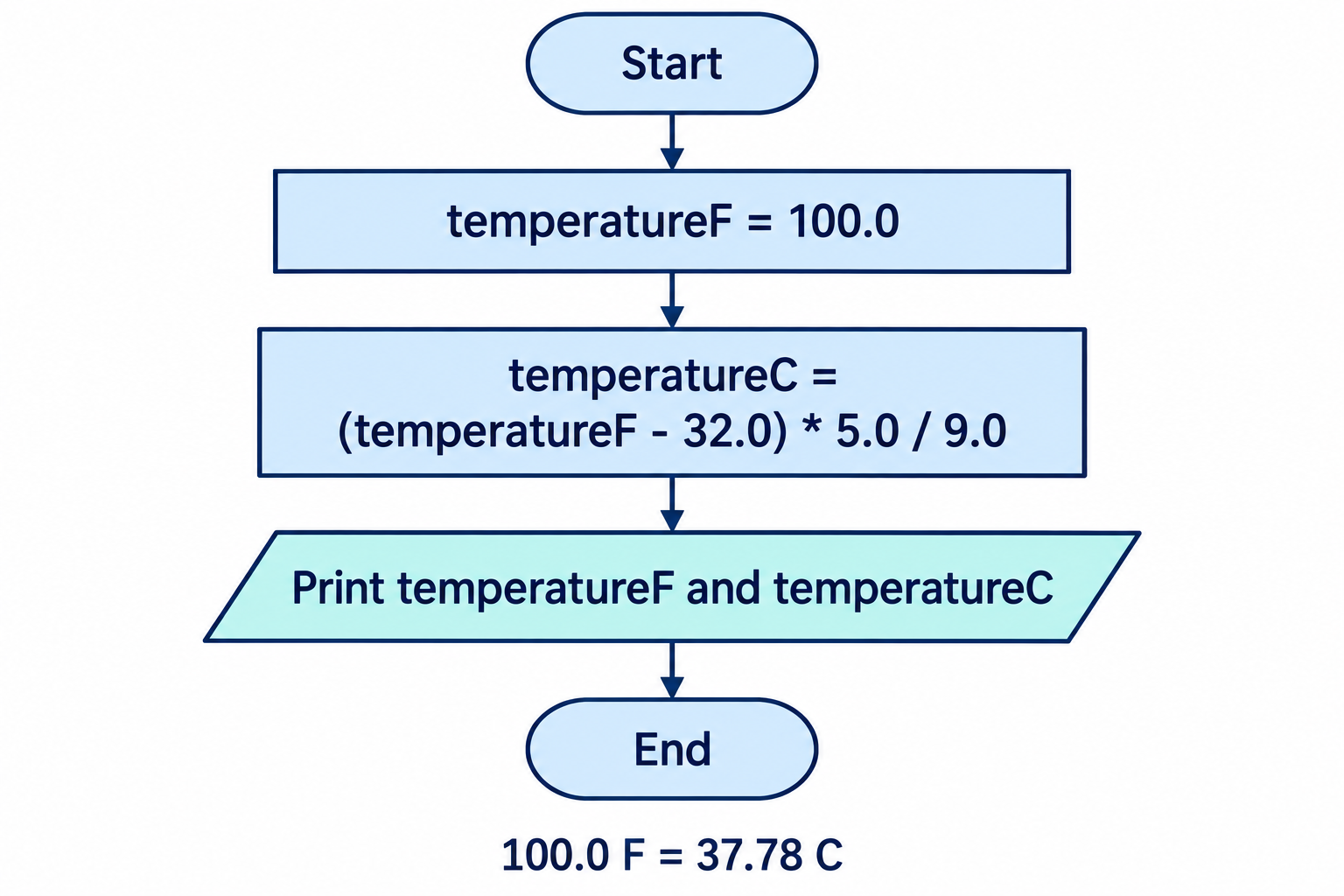
The flowchart separates the calculation from its presentation. Every arrow leads to the next operation; there is no branch or repetition in this version. In the rectangle, the decimal constants deliberately request floating-point arithmetic.
#include <stdio.h>

int main(void) {
    double temperatureF = 100.0;
    double temperatureC =
        (temperatureF - 32.0) * 5.0 / 9.0;
    printf("%.1f F = %.2f C\n",
           temperatureF, temperatureC);
    return 0;
}
Expected output: 100.0 F = 37.78 C. Contrast three expressions when F is an int holding 100:
| Expression | Intermediate reasoning | Result |
|---|---|---|
(5 / 9) * (F - 32) | 5 / 9 is integer 0; multiply by 68 | 0 |
5 * (F - 32) / 9 | 340 / 9 uses integer division | 37 |
(F - 32.0) * 5.0 / 9.0 | Floating-point subtraction, multiplication and division | About 37.7778 |
| Fahrenheit | Celsius | Purpose |
|---|---|---|
| 32 | 0 | Offset |
| 212 | 100 | Scale |
| -40 | -40 | Negative input |
| 100 | About 37.78 | Fractional result |
| 50 | 10 | Another familiar value |
Check: Why is testing only F = 32 particularly weak for detecting the erroneous factor 5 / 9?
At F = 32, the factor multiplies zero. Both the correct expression and an expression with a zero scale factor can give zero. F = 212 or F = 100 exposes the error.
12. Output formatting and approximate numbers
The format string tells printf how to interpret each corresponding argument. %d expects an int; %f is used for a double argument; %.2f requests two fractional digits. A float passed to this variadic function is promoted to double. %c prints a character using an integer character code, and %zu is appropriate for the size_t result of sizeof. A mismatched format is not a request to convert the argument to the desired type.
Many decimal fractions cannot be stored exactly in binary floating-point. Printing more digits does not increase the accuracy of the original measurement. Printing fewer digits changes the displayed text, not the value stored in the variable. For the temperature exercise, compare the expected answers at the requested output precision.
double x = 37.7777777778;
printf("%.2f\n", x);
printf("%.6f\n", x);
These lines display 37.78 and 37.777778. A width such as %8.2f requests at least eight character positions, including the decimal point and fractional digits; it does not truncate a wider result. Spaces are useful for aligning a table.
Check: After printf("%.2f", x), has x been rounded and stored back with two decimal places?
No. The formatting produces a textual representation. It does not assign a new value to x.
13. Reading a supplied loop
A supplied loop lets us repeat the conversion while keeping the focus on arithmetic and output. Trace it using the control-flow ideas from Week 3. Initialization happens once; the condition is checked before each body execution; the update changes the state used by the next check.
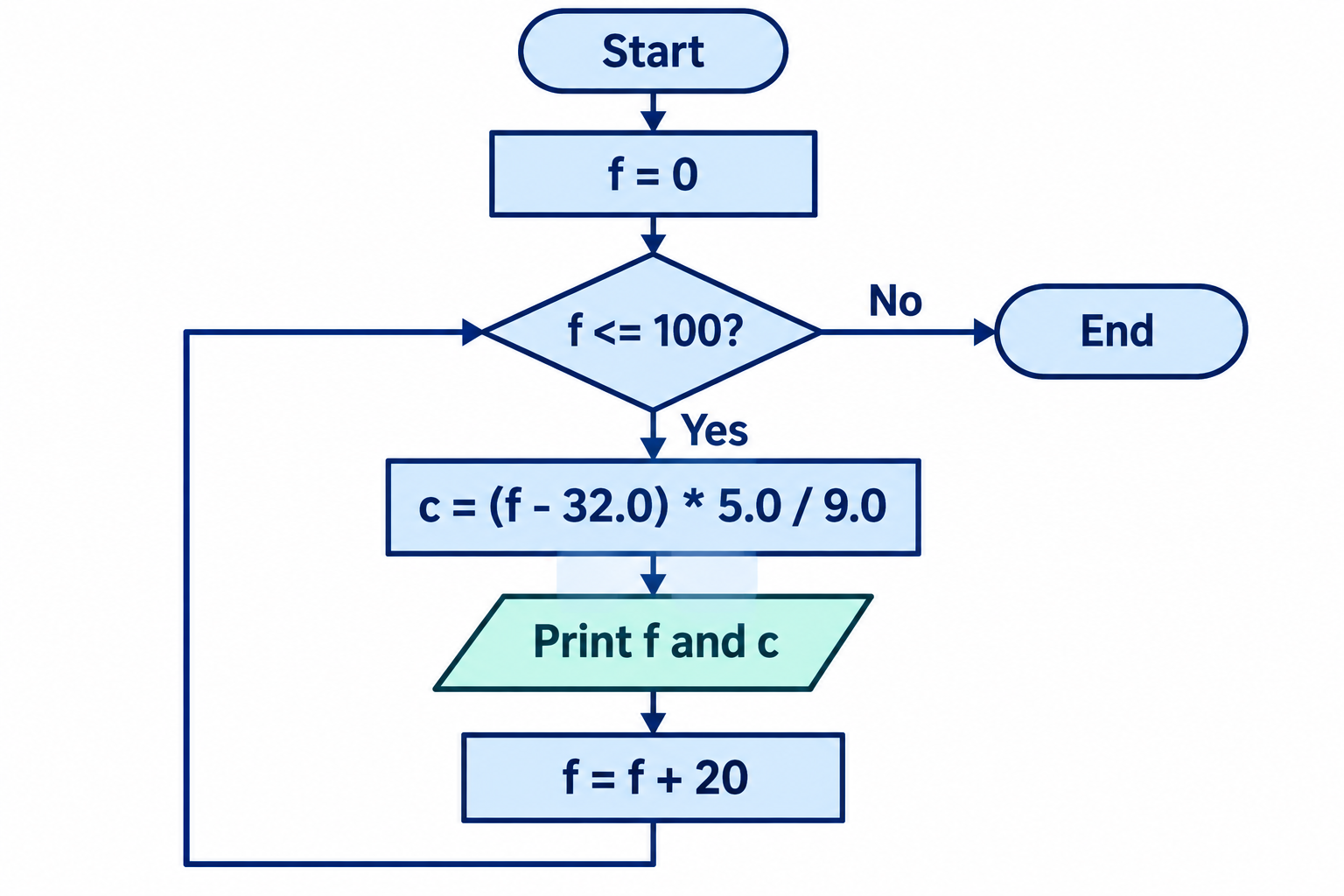
#include <stdio.h>

int main(void) {
    int f = 0;
    while (f <= 100) {
        double c = (f - 32.0) * 5.0 / 9.0;
        printf("%3d %7.2f\n", f, c);
        f = f + 20;
    }
    return 0;
}| f at test | Condition | Printed Celsius | f after update |
|---|---|---|---|
| 0 | True | -17.78 | 20 |
| 20 | True | -6.67 | 40 |
| 40 | True | 4.44 | 60 |
| 60 | True | 15.56 | 80 |
| 80 | True | 26.67 | 100 |
| 100 | True | 37.78 | 120 |
| 120 | False | No row | No update |
There are six rows and seven condition checks. The seventh check is necessary to establish that execution should stop. The update makes progress toward the stopping condition; resetting f to zero inside the body would destroy that progress. Independently designing richer C loops is later work, but explaining this supplied structure is part of the present reading.
Check: If the increment becomes 25, which Fahrenheit values are printed?
0, 25, 50, 75 and 100: five rows. The next value is 125, for which the condition is false.
Check: Would replacing f <= 100 with f < 100 change the original table?
Yes. With a step of 20, the row for 100 disappears. The last printed input becomes 80. A small change at a boundary changes the result.
14. Find evidence before changing code
Different stages expose different mistakes. A missing semicolon can produce a diagnostic at the next token, because that is where the compiler can no longer continue parsing. A link failure can mean that a declared function’s implementation was not supplied. A successful build with a wrong value calls for examining the formula, operand types and intermediate results. An unchanged old message calls for checking which executable actually ran.
| Observed symptom | Evidence to inspect |
|---|---|
| Compile error | The first diagnostic and the preceding source line. |
| Link error | Function spelling and the object/library inputs. |
| Wrong numeric result | Operand types, grouping, units and a hand calculation. |
| Old result after editing | Saved filename, successful build and executable path. |
For Week 5 practice, aim to explain a calculation rather than merely copy a working line. Give quantities meaningful names, predict a result, compile with warnings and compare several test cases. When asking for help, include the exact input, expected output, observed output and relevant diagnostic. That makes the difference between a requirement mistake and an execution mistake visible.
Check: A missing semicolon makes the compiler highlight printf on the next line. Should you delete printf?
Not automatically. Inspect the preceding line and the first diagnostic. The point where a parser notices a problem may be after the actual omission.
15. Optional worked example: minutes and seconds
Suppose a nonnegative whole-number duration is already stored as seconds. We want whole minutes and leftover seconds. The expected answer for 125 seconds is 2 minutes and 5 seconds. This is a case where discarding the fractional quotient is useful rather than a bug: division finds complete groups of 60, and remainder finds what is left.
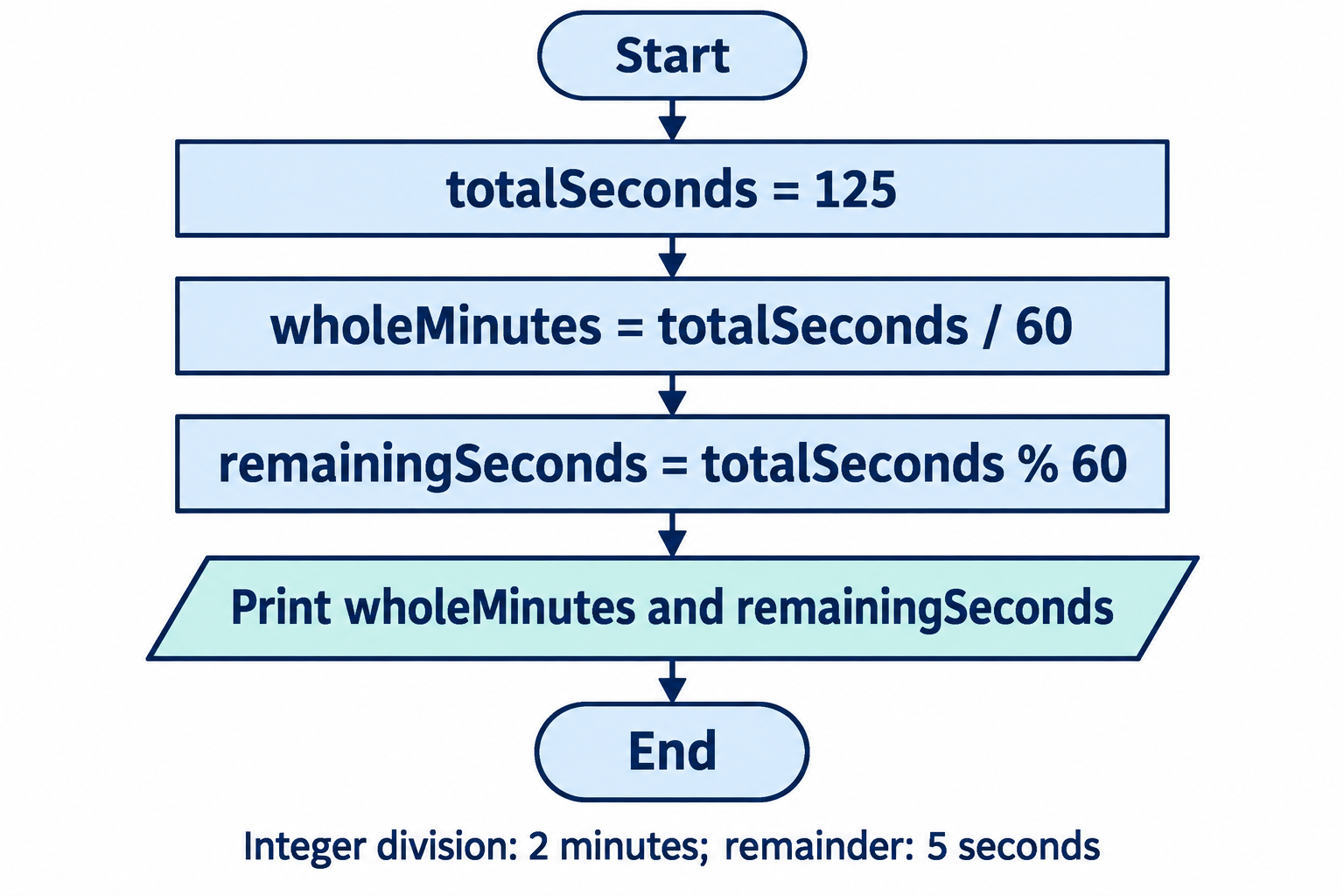
#include <stdio.h>

int main(void) {
    int totalSeconds = 125;
    int wholeMinutes = totalSeconds / 60;
    int remainingSeconds = totalSeconds % 60;
    printf("%d min %d s\n",
           wholeMinutes, remainingSeconds);
    return 0;
}
For the stated input range, totalSeconds = 60 * wholeMinutes + remainingSeconds, with a remainder between 0 and 59. This relationship explains the design and supplies a check. It does not silently extend the intended meaning to negative durations.
Check: Predict the results at 59, 60 and 61 seconds. Why choose those inputs?
They give 0 min 59 s, 1 min 0 s and 1 min 1 s. They surround the boundary where a complete minute first appears, so they test both the quotient change and the remainder reset.
16. Optional preview: a calculation controls time
An Arduino sketch uses C++ with Arduino libraries and a board-specific build. The familiar ideas of variables, assignments and expressions remain useful, but the framework provides entry points different from the PC example. After reset, setup() performs initialization once; the framework repeatedly calls loop(). This is a preview, not a new Week 5 hardware task.
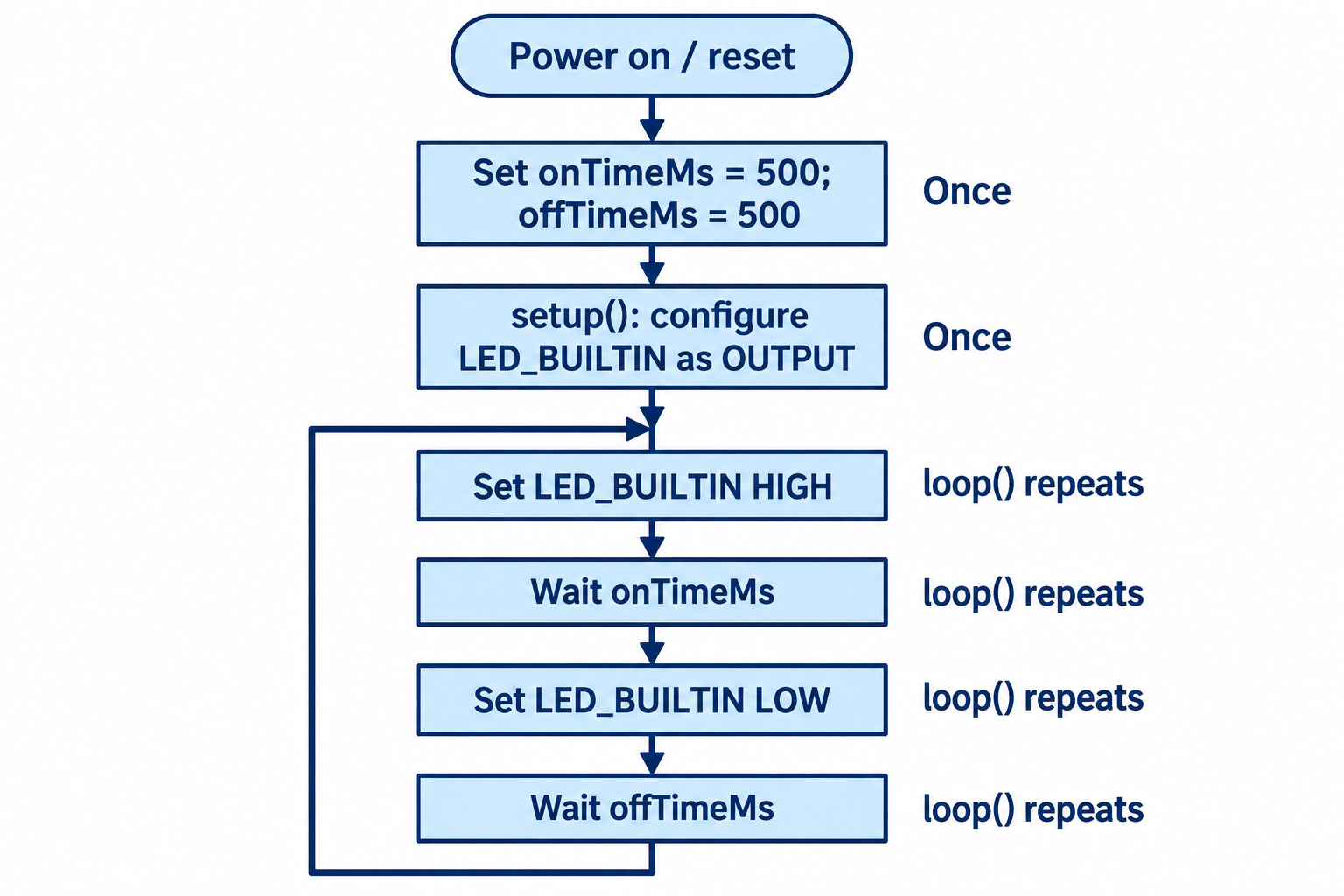
const unsigned long onTimeMs = 500;
const unsigned long offTimeMs = 500;

void setup() {
    pinMode(LED_BUILTIN, OUTPUT);
}

void loop() {
    digitalWrite(LED_BUILTIN, HIGH);
    delay(onTimeMs);
    digitalWrite(LED_BUILTIN, LOW);
    delay(offTimeMs);
}
On a board with an active-high built-in LED, this alternates approximately half a second on and half a second off. LED_BUILTIN is supplied by the selected board definition; LED behavior can be board-dependent. The nominal cycle is 1,000 ms, with small execution overhead. delay pauses normal sketch execution while waiting; richer timing designs come later. See Arduino’s Blink example.
Check: If the on time becomes 100 ms and the off time 900 ms, is the nominal period different?
No. It is still 1,000 ms, but the active-high LED flashes for a smaller fraction of the cycle. Changing both times to 1,000 ms gives a nominal 2,000 ms period.
17. Sources and further study
The 91-page Week 5 slide set supplies the course sequence and worked examples. The reading expands the explanations into a chapter; its numbered figures are extracted images, not screenshots with slide headers. Figures 1–4 and 6 are retained Brookshear illustrations from the supplied seventh-edition chapter slides. The course’s twelfth Global Edition book places programming languages in Chapter 6, particularly sections 6.1 and 6.4; chapter numbering differs across editions. Figures 5 and 7–13 are the authored conceptual illustrations and flowcharts already used in the approved course deck, including AI-generated visuals. They are teaching models, not evidence of a measured experiment.
- GCC: overall options and build stages. Follow what happens before linking and what the -c option leaves unfinished.
- Python: bytecode and interpreted execution, plus identifying the implementation. Resolve why internal compilation and interpreted execution can coexist.
- GNU C Language Introduction and Reference Manual. Use the sections on arithmetic, types, assignments and formatted output as a reference alongside the course’s C17 examples; some GNU extensions go beyond this week.
- Harvard CS50: C, Lecture 1 notes and linked lecture. An alternative explanation of compilation, values and common mistakes. Its helper library and exercises are not extra course requirements.
- Arduino sketch build process and Blink. Connect target selection, compilation and the setup/loop framework.
Choose a resource for a question you still have. For example: explain the difference between an object file and an executable using GCC’s stages; explain where CPython fits when running a script; or predict a changed temperature calculation before running it. Further study should deepen the mechanism rather than turn the language survey into a list of labels to memorize.
Implementation references for the language survey
The survey retains the implementation examples in the reviewed lecture; these links provide the corresponding primary documentation.
- GNU Fortran; GnuCOBOL FAQ; Free Pascal; GNAT for Ada.
- Go compilation; Rust’s first executable.
- JVM specification introduction; .NET managed execution; V8 Ignition; TypeScript; Lua.
- R compiler package; Julia JIT; MathWorks on MATLAB’s execution engine; Dyalog APL.
- FreeBASIC; Gforth manual; SBCL manual.
- PostgreSQL execution overview; SAS DATA-step processing; SPSS command syntax.